
[USAGE] Nexus Jenkins Plugin
828 views
Skip to first unread message

Pietro
Oct 13, 2016, 6:27:30 AM10/13/16
to Nexus Users
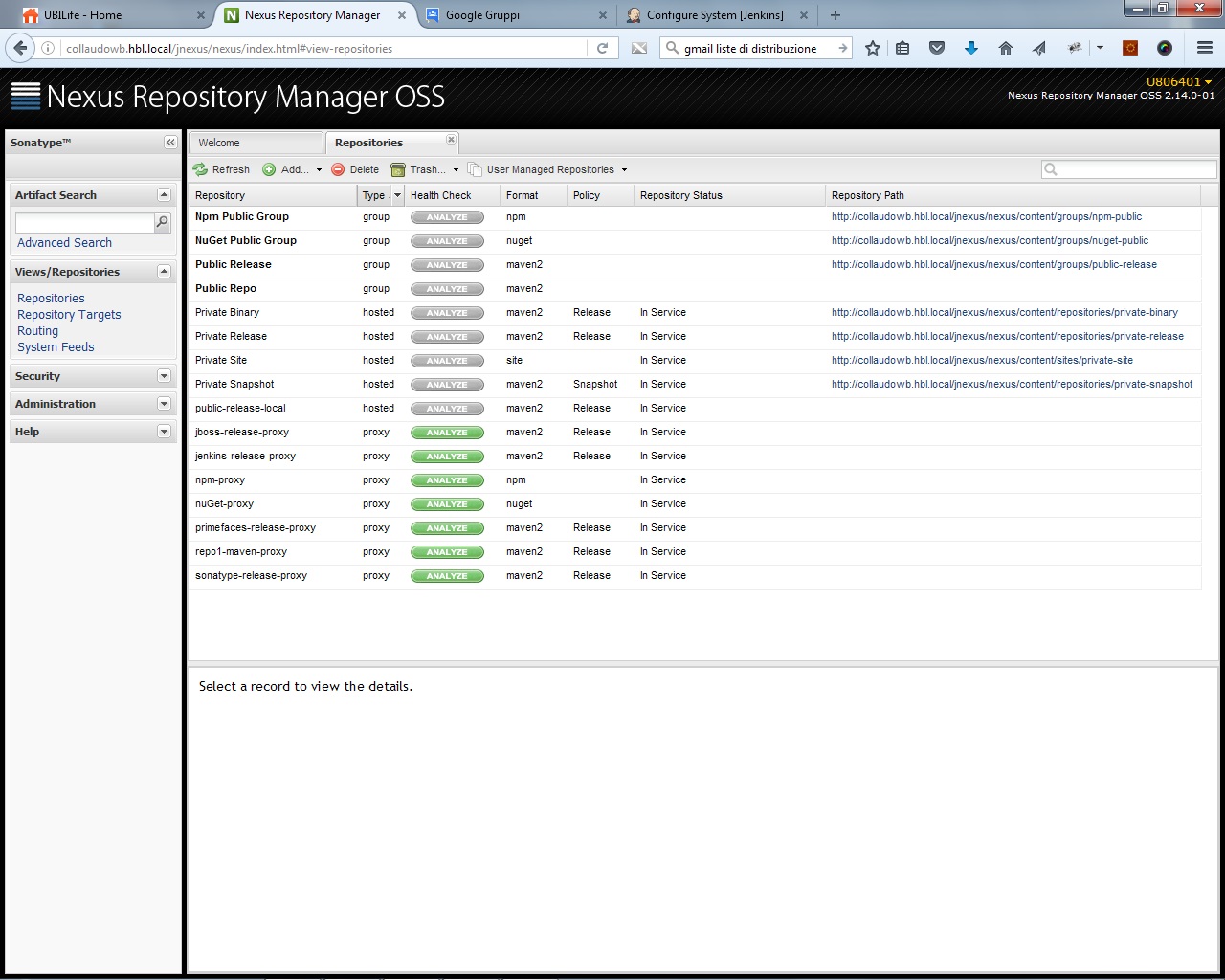


I need your help with Nexus-Jenkins plugin ... I downloaded and installed it as described here :
https://support.sonatype.com/hc/en-us/articles/227256688-How-do-I-configure-the-Nexus-Jenkins-Plugin
but after TestConnection check, no nexus maven2 repositories was displayed.
Someone can help me? Where is configuration error?
Thanks, Pietro
PS: See images for screenshot of my nexus / jenkins configuration
Pietro
Oct 13, 2016, 11:03:18 AM10/13/16
to Nexus Users
Hi all, it's me! ;)
Problem found ... when jenkins first call nexus, no authenticated user was passed ( also if credential was set ) and nexus reply with no repository.
I set apache to require a valid user, now jenkins plugin passes credential to apache and now the list of repository was populated.
Now I've got another problem ... fields such as filename, version, packaging does not accept variable as value, just text fixed ...
Problem found ... when jenkins first call nexus, no authenticated user was passed ( also if credential was set ) and nexus reply with no repository.
I set apache to require a valid user, now jenkins plugin passes credential to apache and now the list of repository was populated.
Now I've got another problem ... fields such as filename, version, packaging does not accept variable as value, just text fixed ...

Christian Biamont
Oct 27, 2016, 10:34:51 AM10/27/16
to Nexus Users
Hello,
I'm also having the same problem.
I think the Nexus Jenkins Plugin should send the auth credentials by default like for example curl does with this command:
curl -u username:password https://mavenrepo.example.com/service/local/repositories
Pietro: How did you configure Apache to require a valid user? Could you please give me an example conf?
Thanks,
Christian
I'm also having the same problem.
I think the Nexus Jenkins Plugin should send the auth credentials by default like for example curl does with this command:
curl -u username:password https://mavenrepo.example.com/service/local/repositories
Pietro: How did you configure Apache to require a valid user? Could you please give me an example conf?
Thanks,
Christian

Justin Young
Oct 27, 2016, 3:27:15 PM10/27/16
to Nexus Users
Hi Pietro,
Variables are currently not supported for the indicated fields, although it is something we will look into for a future release. The Pipeline Build implementation should currently allow variables when calling the nexusPublisher step and could be utilized if desired.
Cheers,
Justin Young
Justin Young
Oct 27, 2016, 3:30:43 PM10/27/16
to Nexus Users
Christian and Pietro,
On Thursday, October 27, 2016 at 7:34:51 AM UTC-7, Christian Biamont wrote:
Hello,
I'm also having the same problem.
The Jenkins plugin should support authentication credentials when using the Test Connection. More information about your particular setup would be useful to understand the problem. Note that only Hosted Release Maven2 repositories will be shown in the list.
Pietro
Oct 28, 2016, 12:59:30 PM10/28/16
to Nexus Users
Thanks Justin for the answer ...I' ll check on Pipeline .
Pietro
Oct 28, 2016, 1:01:42 PM10/28/16
to Nexus Users
Yes it' s true, but I don't know why, first try is done without passing user and so nexus reply as anonymous ( no repository )
@Christina: next week I' ll upload my apache config
@Christina: next week I' ll upload my apache config
Christian Biamont
Nov 1, 2016, 5:11:53 AM11/1/16
to Nexus Users
Hi Justin,
> On Thursday, October 27, 2016 at 9:30:43 PM UTC+2, Justin Young wrote:
>
> Christian and Pietro,
>
>> On Thursday, October 27, 2016 at 7:34:51 AM UTC-7, Christian Biamont wrote:
>>
>> Hello,
>>
>> I'm also having the same problem.
>
>
> The Jenkins plugin should support authentication credentials when using
> the Test Connection. More information about your particular setup would
> be useful to understand the problem. Note that only Hosted Release Maven2
> repositories will be shown in the list.
>
The problem for our organization is that we are protecting our Maven repo with
Shibboleth SSO. If I try to curl
https://mavenrepo.example.com/service/local/repositories, Shibboleth will want
to redirect us to authenticate. We tried to disable Shibboleth on
/service/local/repositories with an Apache LocationMatch, and the curl would
work. The Nexus Plugin in Jenkins did work, in the context that it got a code
200, but since it did not authenticate, the repo was empty. We tried
experimenting with different privileges and roles and were able to make the
plugin auth when we added the Nexus Anonymous Role on our Nexus user that we
use to auth. Unfortunately, we need to have the Shibboleth auth enabled on
/service/local/repositories in the Apache conf, otherwise we are not getting
authenticated in the web gui. So I guess it's a catch 22.
I don't know any way to get around this. We have also tried experimenting with
other ways to deploy artifacts to Nexus. It's possible for us to put files on
"/content/repositories/examplerepository/" without interfering with the web
gui, so I think this is the right way to go for us. Or do you have any
experience or ideas about this? Thank you.
Christian
Shibboleth SSO. If I try to curl
https://mavenrepo.example.com/service/local/repositories, Shibboleth will want
to redirect us to authenticate. We tried to disable Shibboleth on
/service/local/repositories with an Apache LocationMatch, and the curl would
work. The Nexus Plugin in Jenkins did work, in the context that it got a code
200, but since it did not authenticate, the repo was empty. We tried
experimenting with different privileges and roles and were able to make the
plugin auth when we added the Nexus Anonymous Role on our Nexus user that we
use to auth. Unfortunately, we need to have the Shibboleth auth enabled on
/service/local/repositories in the Apache conf, otherwise we are not getting
authenticated in the web gui. So I guess it's a catch 22.
I don't know any way to get around this. We have also tried experimenting with
other ways to deploy artifacts to Nexus. It's possible for us to put files on
"/content/repositories/examplerepository/" without interfering with the web
gui, so I think this is the right way to go for us. Or do you have any
experience or ideas about this? Thank you.
Christian
Justin Young
Nov 1, 2016, 8:10:15 PM11/1/16
to Nexus Users
Traditional methods for deploying artifacts to Nexus include the Maven Deploy Plugin [0] and the Nexus Staging Plugin [1]. I'm not sure if these play nicely with your SSO provider, something you will have to investigate. The purpose of the Jenkins plugin was to decouple artifact uploads from the Maven build process but this may not be a requirement for your use case.
Christian

Laurent Tourreau
Jan 23, 2017, 8:27:16 AM1/23/17
to Nexus Users
Hi
I get a 403 error (FORBIDDEN). If use curl command instead of using the plugin it works (I pass the credentials arguments of course)
I installed the plugin on Jenkins 2.32.1 (LTS).
I added a Nexus Repository Manager Server on Sonatype Nexus section in Jenkins System Configuration with its credentials for deployment. I click on Test button -> It works.
When calling the publish step in my pipeline job:
stage('Publish') { nexusPublisher nexusInstanceId: 'localNexus', nexusRepositoryId: 'releases', packages: [[$class: 'MavenPackage', mavenAssetList: [[classifier: '', extension:'', filePath: 'war/target/jenkins.war']], mavenCoordinate: [artifactId: 'jenkins-war', groupId: 'org.jenkins-ci.main', packaging: 'war', version: '2.23']]] }I get a 403 error (FORBIDDEN). If use curl command instead of using the plugin it works (I pass the credentials arguments of course)
It seems the credentials selected on System Configuration page are not takent into account.
Can you check please if it works? Is there a workaround? (I think using Nexus Artifact Uploader instead or using a curl command)
Regards
Laurent TOURREAU

Rich Seddon
Jan 23, 2017, 10:19:24 AM1/23/17
to Laurent Tourreau, Nexus Users
Make sure your the user doing the upload has the "artifact upload" privilege assigned to them. That is needed to access the REST API endpoint that is used for the upload.
Rich
--
You received this message because you are subscribed to the Google Groups "Nexus Users" group.
To unsubscribe from this group and stop receiving emails from it, send an email to nexus-users+unsubscribe@glists.sonatype.com.
To post to this group, send email to nexus...@glists.sonatype.com.
To view this discussion on the web visit https://groups.google.com/a/glists.sonatype.com/d/msgid/nexus-users/025ddf2f-fcd0-40a2-9e8f-ca7887605387%40glists.sonatype.com.
Laurent Tourreau
Jan 23, 2017, 1:03:49 PM1/23/17
to Nexus Users, l.tou...@gmail.com
Hi
I checked : the user has the "upload" privilege. I try it using curl or Nexus Artifact Uploader plugin -> It works.
When I use Nexus Jenkins plugin, it fails (error 403 : FORBIDDEN).
What's wrong with the Nexus Jenkins plugin?
Regards
Laurent TOURREAU

Peter Lynch
Jan 23, 2017, 1:54:47 PM1/23/17
to Laurent Tourreau, Nexus Users
On Mon, Jan 23, 2017 at 2:03 PM, Laurent Tourreau <l.tou...@gmail.com> wrote:
HiI checked : the user has the "upload" privilege. I try it using curl or Nexus Artifact Uploader plugin -> It works.When I use Nexus Jenkins plugin, it fails (error 403 : FORBIDDEN).
We don't have enough information to help solve this. Keep in mind it does not work with Nexus Repository Manager 3.x, only 2.x.
We would need know exactly what URL is returning 403 and the complete privilege trace of the user doing the upload.
Repeat the failure and file an issue in the NEXUS project at https://issues.sonatype.org. Please include:
- build logs showing the 403 failure
-Peter
What's wrong with the Nexus Jenkins plugin?RegardsLaurent TOURREAU
--
You received this message because you are subscribed to the Google Groups "Nexus Users" group.
To unsubscribe from this group and stop receiving emails from it, send an email to nexus-users+unsubscribe@glists.sonatype.com.
To post to this group, send email to nexus...@glists.sonatype.com.
To view this discussion on the web visit https://groups.google.com/a/glists.sonatype.com/d/msgid/nexus-users/438aeb07-1556-4cbb-b054-c42b2824c70d%40glists.sonatype.com.
Reply all
Reply to author
Forward
0 new messages