
Adding support for USB WiFi TP-LINK TL-WN821N(V4) with Realtek RTL8192CU?
517 views
Skip to first unread message

Wallace Au
Sep 17, 2014, 4:22:56 AM9/17/14
to chromium-...@chromium.org
Hi,
I am new to ChromiumOS/Linux building and trying to get my onhand platform work... It is a ZOTAC ZBOX ID18 with Intel Ivybridge 1007U CPU, the factory config is without WiFi. So I plug the USB WiFi TP-LINK TL-WN821N(V4) with Realtek RTL8192CU chip.
I tried the default ChromiumOS amd64-generic build but with no luck, the WiFi is turned off as the following screen:

Then I went through the following kernel reconfig to include the RTL8192CU driver but still not fixing the problem:
- run cros_sdk
- run ~/trunk/src/third_party/kernel/3.14/chromeos/scripts $ kernelconfig editconfig
- Set"Networking support-->Wireless-->cfg80211 - wirless configuration API=Y"

- Set "Networking support-->Wireless-->Generic IEEE 802.11 Networking Stack=Y"

- Set the "Device Drivers-->Network device support (NETDEVICES [=y])-->Wirless Lan(WLAN [=Y])-->Realtek rtlwifi family of devices" to "Y"
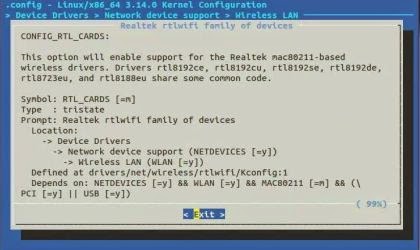
- Guessing it might be required, I tried "kernelconfig oldconfig" here
- run ~/trunk/src/scripts $ ./setup_board --board=amd64-generic
- run ~/trunk/src/scripts $ ./build_packages --board=amd64-generic
- run ~/trunk/src/scripts $ ./build_image --board=amd64-generic --noenable_rootfs_verification dev
- run ~/trunk/src/scripts $ cros flash usb:// amd64-generic/R39-6258.0.2014_09_16_1753
- boot the USB pendrive
Anyone can help me out?
Thanks!

Julius
Feb 27, 2015, 4:39:33 AM2/27/15
to chromium-...@chromium.org
Did You find any solution?
Reply all
Reply to author
Forward
0 new messages