
When will MV3's chrome.storage.inMemory be supported?
993 views
Skip to first unread message

Cuyler Stuwe
Aug 5, 2021, 10:48:35 AM8/5/21
to Chromium Extensions
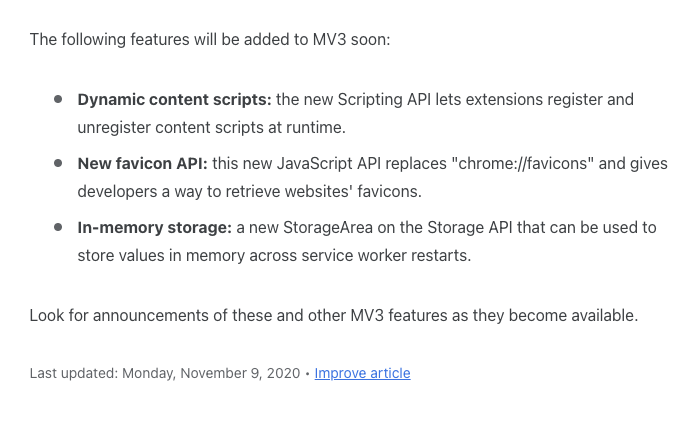
As of November 2020, an in-memory storage API for MV3 extensions was promised "soon"™️:
Several of the companies I work with need to use personal information in the service worker in the extension, and ideally, we want this to last only for the duration of a session.
While I've thought up some (janky and nonperformant) workarounds for this, we really need to be able to hold sensitive information (e.g., passwords) unencrypted on disk ONLY for the duration of a session (e.g., when the user shuts down their computer, regardless of whether Chrome was shut down cleanly or not, that information MUST NOT be persisted).
Right now, the best workaround I've been able to think of is to store that information encrypted, and use the Cookies API to create a session cookie containing an encryption key that lasts for the duration of the session.
While I've thought up some (janky and nonperformant) workarounds for this, we really need to be able to hold sensitive information (e.g., passwords) unencrypted on disk ONLY for the duration of a session (e.g., when the user shuts down their computer, regardless of whether Chrome was shut down cleanly or not, that information MUST NOT be persisted).
Right now, the best workaround I've been able to think of is to store that information encrypted, and use the Cookies API to create a session cookie containing an encryption key that lasts for the duration of the session.
@Simeon Vincent: Any update on the progress on this? Does it currently exist at least in Canary (or will it soon)?
Cuyler Stuwe
Aug 5, 2021, 11:28:56 AM8/5/21
to Chromium Extensions, Cuyler Stuwe
OK, so after a couple of minutes of impatient digging, apparently chrome.storage.session seems to be the API here.
Is this confirmed to be the way moving forward?
https://bugs.chromium.org/p/chromium/issues/detail?id=1185226&q=chrome.storage&can=2
https://bugs.chromium.org/p/chromium/issues/detail?id=1185226&q=chrome.storage&can=2
Cuyler Stuwe
Aug 5, 2021, 12:17:39 PM8/5/21
to Chromium Extensions, Cuyler Stuwe
Given the 1MB limit, we might just have to go with the cookie session key workaround I mentioned.
If the Chrome team really thinks 1MB of memory is enough in 2021 (or that using significantly more leads to actual negative consequences for the vast majority of users), I'm afraid that they are possibly living in a bureaucratic echo chamber.
There is absolutely no way that 1MB of RAM is sufficient, in a world where even my tiny smartphone comes with 6GB.
If the Chrome team really thinks 1MB of memory is enough in 2021 (or that using significantly more leads to actual negative consequences for the vast majority of users), I'm afraid that they are possibly living in a bureaucratic echo chamber.
There is absolutely no way that 1MB of RAM is sufficient, in a world where even my tiny smartphone comes with 6GB.
The tiny minority of people who whine about memory consumption happen to just be very loud, and I'm afraid that the Chromium team is bending over backwards here to try to solve a problem that doesn't actually exist.

Simeon Vincent
Aug 5, 2021, 3:46:09 PM8/5/21
to Chromium Extensions, salem...@gmail.com
Ahh, the optimism of 9 months ago. I would have framed that intro a bit different had I realized that none of those APIs would be in Stable by now.
Anyway, it took a bit longer than originally anticipated, but the storage.session API is in Canary as of a couple days ago. This is so fresh we our Storage API docs (which are partially generated off of Chromium's main branch) don't even have a reference to this feature yet.In the meantime crbug.com/1185226 and the design doc you linked are probably the best references for folks looking to start poking around.
Anyway, it took a bit longer than originally anticipated, but the storage.session API is in Canary as of a couple days ago. This is so fresh we our Storage API docs (which are partially generated off of Chromium's main branch) don't even have a reference to this feature yet.In the meantime crbug.com/1185226 and the design doc you linked are probably the best references for folks looking to start poking around.
I confess that I don't understand why cookies would be preferable here. A single cookie can only store 4096 bytes and Chrome currently allows up to 180 cookies per domain (tested with this site). Assuming you're storing these values on the extension's origin, that comes out to 737,280 bytes or ~0.73 MB of data.
As mentioned in issue 1185226, we do not view this as a general purpose storage mechanism. You asserted that "there is absolutely no way that 1MB of RAM is sufficient", but sufficient for what? The primary use case we were targeting with this API was storing encryption keys across SW restarts. In any case, IMO the current 1MB limit is a starting point much like the original Declarative Net Request limit of 30k rules. If 1MB is insufficient for your use case, I'd strongly encourage you to share more details about what trying to accomplish in order to help us better understand and respond to developer needs.
Simeon - @dotproto
Chrome Extensions DevRel

hrg...@gmail.com
Aug 5, 2021, 6:09:56 PM8/5/21
to Chromium Extensions, Simeon Vincent, salem...@gmail.com
On Thursday, August 5, 2021 at 3:46:09 PM UTC-4 Simeon Vincent wrote:
I confess that I don't understand why cookies would be preferable here.
If you need to keep more than 1MB of volatile data, the only option is to store it in permanent storage, but encrypted, so that the data is useless without the encryption key.
Then the encryption key is stored in a volatile storage, like a cookie or may be window.sessionStorage.
That way, when a power outage occurs, the encryption key is gone, and so the "volatile" data that remains on the disk is useless..
You could avoid this cumbersome trick, if there was a decent volatile storage mechanism with more than 1MB capacity.
The primary use case we were targeting with this API was storing encryption keys across SW restarts.
This seems rather shortsighted.
If you are going through the hassle of designing, implementing and maintaining a new API for the world to make good use of, it would be wise to design this new API with a general-purpose perspective, so that developers can find ways of making good use of it by themselves, instead of being told that the API is only meant for one specific use case. This sounds like a waste of design effort.
In software engineering, there something called "Principle of generality".
Cuyler Stuwe
Aug 5, 2021, 6:48:56 PM8/5/21
to Chromium Extensions, hrg...@gmail.com, Simeon Vincent, Cuyler Stuwe
Yep, HRG nailed it; He understood EXACTLY what I was saying.
The only reason that 1MB of data might seem sufficient from a Chromium dev's perspective is that they're only really imagining toy apps, rather than "big boy apps" that are used by real customers to do "big boy things". If you design these constrained API with a very specific limited use-case in mind, then you really hamper the ability of devs to be imaginative and make anything other than what whatever toy example you thought up.
What makes this even worse is that we as professional extension developers are usually responsible for integrating into an existing product; We rarely have the opportunity to create a self-contained greenfield app that operates entirely within Google Chrome (extensions in-and-of themselves tend to be extremely difficult to monetize). This means that we can't build our product entirely around Google's arbitrary paranoid constraints like this, and it makes our lives extremely painful. But hey, at least the fact that developing extensions totally sucks is a form of job security, right...? 🤔
The only reason that 1MB of data might seem sufficient from a Chromium dev's perspective is that they're only really imagining toy apps, rather than "big boy apps" that are used by real customers to do "big boy things". If you design these constrained API with a very specific limited use-case in mind, then you really hamper the ability of devs to be imaginative and make anything other than what whatever toy example you thought up.
What makes this even worse is that we as professional extension developers are usually responsible for integrating into an existing product; We rarely have the opportunity to create a self-contained greenfield app that operates entirely within Google Chrome (extensions in-and-of themselves tend to be extremely difficult to monetize). This means that we can't build our product entirely around Google's arbitrary paranoid constraints like this, and it makes our lives extremely painful. But hey, at least the fact that developing extensions totally sucks is a form of job security, right...? 🤔
As I see it: If this in-memory API isn't going to be a general-use API, then don't give it a general name.
If you absolutely meant for it only to be useful for storing encryption keys, then call it something like chrome.storage.encryptionKeys rather than something misleadingly general like chrome.storage.session. Of course, if this name feels ridiculous, then that feeling should help highlight just how absurd it is to defend its minuscule size on the basis that it "was only meant for encryption keys".
As it stands with a shrunken schema using chrome.storage.session, I would have to tell users that our solution can't reliably store more than ~3000 logins, and that if they want more than that, they'll have to take it up with Google. 🤷♂️
If you absolutely meant for it only to be useful for storing encryption keys, then call it something like chrome.storage.encryptionKeys rather than something misleadingly general like chrome.storage.session. Of course, if this name feels ridiculous, then that feeling should help highlight just how absurd it is to defend its minuscule size on the basis that it "was only meant for encryption keys".
As it stands with a shrunken schema using chrome.storage.session, I would have to tell users that our solution can't reliably store more than ~3000 logins, and that if they want more than that, they'll have to take it up with Google. 🤷♂️
That arbitrary limit seems unacceptable to me. I've thought of a handful of workarounds, but each of them is convoluted, nonperformant, and/or insecure.
Finally: If you don't see from telemetry that people are regularly approaching 1MB, don't assume that it's because there are few use-cases that need >1MB. Instead, it's just more likely that we as developers simply cannot rely upon something so tiny to store user data. There's a survivor bias sampling there, as only the people who need a handful of KB of fixed quantities of data (or those hobbyists unaware of the limit) would feel comfortable using that at all. EVERY professional developer I've told about MV3's constraints expects that Google would provide some form of unbounded memory storage that persists across service worker restarts; Without exception, they're always surprised when I reveal all of the janky workarounds I have to apply in order to try to compensate, and they're happy they're not the ones who have to do my job.
Cuyler Stuwe
Aug 5, 2021, 7:43:32 PM8/5/21
to Chromium Extensions, hrg...@gmail.com, Simeon Vincent
To expand on this further by comparison, just to really illustrate the insanity:
1.
Here's the memory usage report from Google's own "new tab page", ostensibly as cut-down as it gets:


1.
Here's the memory usage report from Google's own "new tab page", ostensibly as cut-down as it gets:
2.
Chrome Extensions should essentially be "webpages with superpowers" more or less, right? E.g., in principle, you should generally expect to be able to do anything a webpage can, and then some.
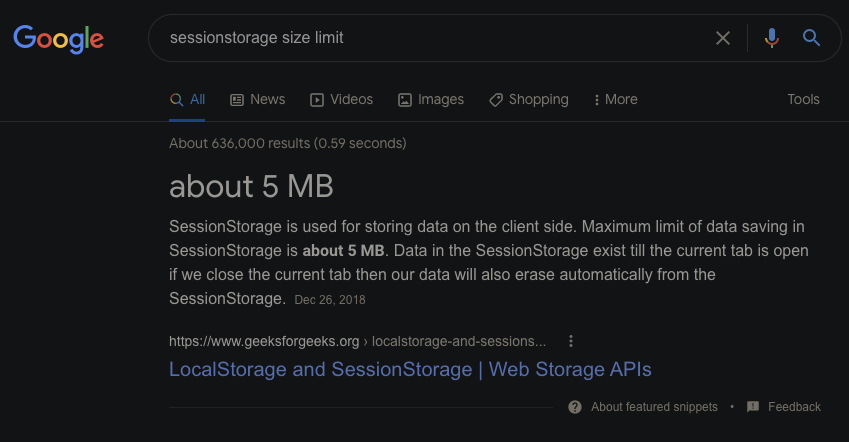
Well, let's see how easy it is to persist an arbitrary amount of data in a "normal webpage" for the duration the user is using it:
Well, let's see how easy it is to persist an arbitrary amount of data in a "normal webpage" for the duration the user is using it:
Wow, allocated 260MB onto the heap in the blink of an eye.
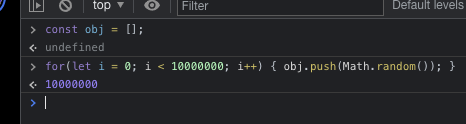
OK, let's see how much session storage we can expect a "normal webpage" to have access to; Let's try the recommended result from our favorite search engine:
Huh, interesting. That's 5x as much as a Chrome Extension can access. And a user doesn't even need to accept an installation permissions dialog! 5MB of storage scoped strictly to that session.
As these illustrations demonstrate, there's a very strange and unclear dichotomy between extensions and "normal webpages". Counterintuitively, MV3 extensions are significantly crippled compared to mere webpages, yet despite this, still have some superpowers deemed dangerous. They've been hamstrung by so many restrictions that it's very difficult to use their features for anything useful.

Simeon Vincent
Aug 6, 2021, 12:59:52 AM8/6/21
to Chromium Extensions, salem...@gmail.com, hrg...@gmail.com, Simeon Vincent
Normally I'd reply to a thread like this with my own wall of text trying to provide my perspective, challenge some of the assumptions presented, and discuss what I know of the constraints that we're working with in the hopes that we could all understand each other a bit better. To be honest, though, it's been a long day and this thread is draining what little energy I have left. So instead, I'm just going to focus on the most actionable point from the last posts in this thread.
As it stands with a shrunken schema using chrome.storage.session, I would have to tell users that our solution can't reliably store more than ~3000 logins, and that if they want more than that, they'll have to take it up with Google.🤷♂️
This is the tip of the iceberg for the kind of information I'm looking for in order to advocate on your behalf; what constraints does the platform impose on developers? What is possible?
It sounds like you're working on a password manager and attempting to use storage.session to persist unencrypted passwords across service worker restarts. Let's dig into how the current 1MB limit is affecting your use case.
How many passwords do users have? Percentile breakdown may be helpful, as would insight into growth rate for future projections. What is your schema for session.storage? if not field names, type and size would help better understand your storage requirements. Do you have to store the entire collection or would it be possible to cache favorites, most frequently used, and most recently used? What is the impact of not being able to cache credentials?
Simeon - @dotproto
Chrome Extensions DevRel
Cuyler Stuwe
Aug 6, 2021, 9:35:36 AM8/6/21
to Simeon Vincent, Chromium Extensions, Simeon Vincent, hrg...@gmail.com
Extension devs are likely to do some really wonky things to try to work around these new arbitrary limitations.
These might range from forcibly keeping the service worker awake, to asking the user to keep an extension tab open (since that's the only area where we can allocate arbitrary amounts of memory, as the "webby" model has always allowed us to do).
We might end up with a very janky experience like Tile has on iOS, where you have to keep something very specific open for the app to work at all, and where we have to nudge the user to reopen it if they ever close it:

Imagine this as "Extension tab is not running. Open the extension tab to enable this extension."
Either that, or we could just forcibly re-open our special "extension tab" whenever we want.
Or maybe instead of writing only an extension, we'll have to release our product alongside an entirely distinct browser forked from Chromium, with these limits turned up to something reasonable. 🤦♂️
You see, the problem is that your company is trying way too hard to micromanage what can and can't be done. It's not really Google's place to tell us what to create here; You should be building a platform that empowers users, rather than trying to shape the landscape as you deem fit. I think that's a perspective that Google might have forgotten over the period that it had become the new web browser monopoly (the new IE). Now, you don't even listen to users or developers. It's just "This is the way Google wants to do things, and you'll learn to deal with it, because what real alternative do you actually have?". A lot like early-2000s Microsoft; The new "Evil Empire".
As to your specific questions about customers and schema; I'm not in a position where I want to take a risk of divulging more information publicly than I should. Besides that, I don't really think it's relevant. It should only take a very tiny amount of playing Devil's Advocate with yourself to imagine a myriad of situations where the MV3 limitations are insufficient. Many of the companies I've written MV2 extensions for are in an absolute panic trying to figure out how to convert to an MV3 extension that maintains a good user experience.
Just as an example of one company's shopping extension I had built in the past: It needed to scrape logged-in information on-demand, as the user, in the background from three different sites concurrently. In order to do this, we embedded three different iframes in background.js, stripped the X-Frame-Options header, and drove those sites as-needed to fulfill the user's requests. The user definitely didn't want to be bothered by watching the steps the scraper takes to grab the information he requested. Doing this in the background means that the user isn't bombarded by active windows he doesn't care about, which could otherwise accidentally capture his input and clutter his desktop. How do you propose we write such an extension in MV3 with an equally-good user experience?
And this is just one example. One tiny example. I've made my living specializing in writing literally hundreds of browser extensions, and the majority of my former customers who are still in business have no clear upgrade path. You really gotta throw us a bone here, and start thinking about devs and users, rather than some KPI or whatever that you're sacrificing them for.
Just as an example of one company's shopping extension I had built in the past: It needed to scrape logged-in information on-demand, as the user, in the background from three different sites concurrently. In order to do this, we embedded three different iframes in background.js, stripped the X-Frame-Options header, and drove those sites as-needed to fulfill the user's requests. The user definitely didn't want to be bothered by watching the steps the scraper takes to grab the information he requested. Doing this in the background means that the user isn't bombarded by active windows he doesn't care about, which could otherwise accidentally capture his input and clutter his desktop. How do you propose we write such an extension in MV3 with an equally-good user experience?
And this is just one example. One tiny example. I've made my living specializing in writing literally hundreds of browser extensions, and the majority of my former customers who are still in business have no clear upgrade path. You really gotta throw us a bone here, and start thinking about devs and users, rather than some KPI or whatever that you're sacrificing them for.
Cuyler Stuwe
Aug 6, 2021, 12:00:43 PM8/6/21
to Chromium Extensions, Cuyler Stuwe, Chromium Extensions, Simeon Vincent, hrg...@gmail.com, Simeon Vincent
And basically, we'll all generally try to find a way to cope, since it's our job to do the best we can with what we're given.
But it will cause needless suffering for us and/or our users.
But it will cause needless suffering for us and/or our users.
Basically, developing an MV3 Chrome Extension feels a lot like trying to make one of these "pure CSS" video games (e.g., https://codepen.io/hailedev/pen/MWJLGOq); The deck is stacked against you.

Alexander Shoykhet
Oct 20, 2021, 6:22:29 PM10/20/21
to Cuyler Stuwe, Chromium Extensions, Simeon Vincent, hrg...@gmail.com, Simeon Vincent
Hi, I'm noticing that the chrome.storage.session api is no longer available in Chrome Canary 97. It looked like it appeared in Chrome Canary 96. Has this api been descoped or has it been renamed?
--
You received this message because you are subscribed to the Google Groups "Chromium Extensions" group.
To unsubscribe from this group and stop receiving emails from it, send an email to chromium-extens...@chromium.org.
To view this discussion on the web visit https://groups.google.com/a/chromium.org/d/msgid/chromium-extensions/1be21261-fd0e-4d99-aefd-a0d022add8e5n%40chromium.org.
Alexander Shoykhet
Oct 20, 2021, 6:30:49 PM10/20/21
to Cuyler Stuwe, Chromium Extensions, Simeon Vincent, hrg...@gmail.com, Simeon Vincent
Oops, wish I could unsend :D.
Api is still there (I had been testing with a v2 extension).
Api is still there (I had been testing with a v2 extension).
Reply all
Reply to author
Forward
0 new messages