
My Chromium don't support xp
223 views
Skip to first unread message

杜士雄
Feb 23, 2016, 7:05:35 AM2/23/16
to Chromium-discuss
My compile setting:
set GYP_GENERATORS=ninja,msvs-ninja
set GYP_DEFINES=component=shared_library
set GYP_MSVS_VERSION=2013
Chromium Debug
Version:
MAJOR=48
MINOR=0
BUILD=2564
PATCH=103
And i copy the package to xp ,and it failed to run,why?

PhistucK
Feb 23, 2016, 8:16:54 AM2/23/16
to dusx...@gmail.com, Chromium-discuss
Note that "failed" is not enough information. What do you see? Do you have a stack trace? A log? An error message? Anything?
☆PhistucK
--
--
Chromium Discussion mailing list: chromium...@chromium.org
View archives, change email options, or unsubscribe:
http://groups.google.com/a/chromium.org/group/chromium-discuss
---
You received this message because you are subscribed to the Google Groups "Chromium-discuss" group.
To unsubscribe from this group and stop receiving emails from it, send an email to chromium-discu...@chromium.org.

Ramesh Srigiriraju
Feb 28, 2016, 8:43:58 PM2/28/16
to PhistucK Productions, dusx...@gmail.com, Chromium-discuss
Dusx,
Visual Studio 2013 has some compatibility issues with Windows XP. Specifically, the remote debugging and profiling tools are not available:https://www.visualstudio.com/en-us/products/visual-studio-2013-compatibility-vs.aspx
杜士雄
Mar 3, 2016, 9:38:11 PM3/3/16
to Chromium-discuss, phis...@gmail.com, dusx...@gmail.com
how should i set this in chromium
在 2016年2月29日星期一 UTC+8上午9:43:58,TTCUSM写道:
在 2016年2月29日星期一 UTC+8上午9:43:58,TTCUSM写道:
杜士雄
Mar 3, 2016, 9:39:35 PM3/3/16
to Chromium-discuss, phis...@gmail.com, dusx...@gmail.com
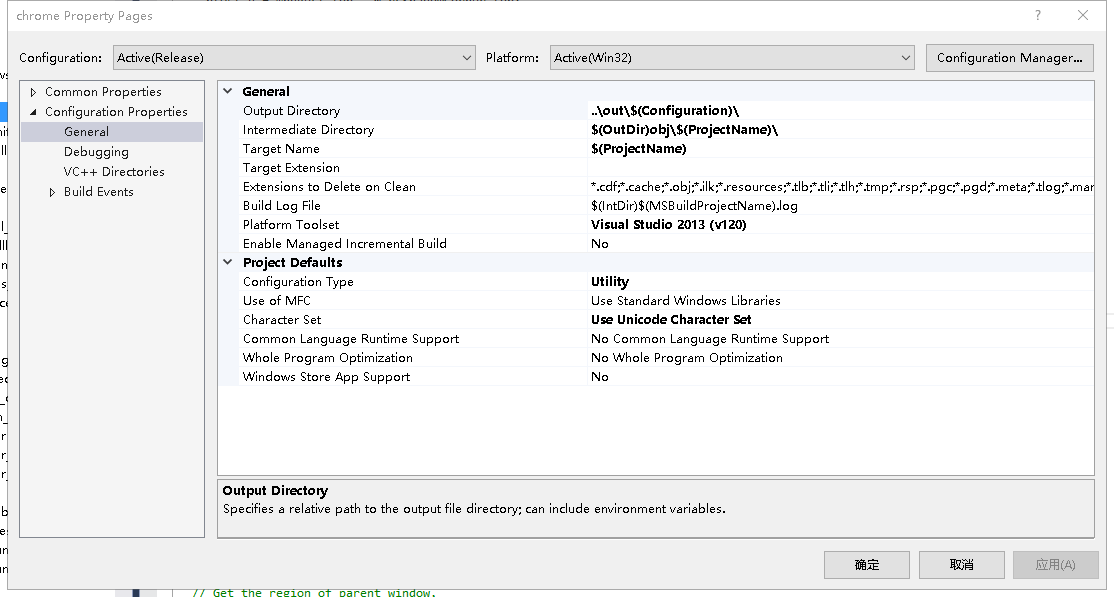
how should i set this in chromium
在 2016年3月4日星期五 UTC+8上午10:38:11,杜士雄写道:
杜士雄
Mar 3, 2016, 9:41:41 PM3/3/16
to Chromium-discuss, phis...@gmail.com, dusx...@gmail.com
Ramesh Srigiriraju
Mar 4, 2016, 9:52:52 AM3/4/16
to 杜士雄, Chromium-discuss, PhistucK Productions
Dusx,
Are there any other versions of Visual Studio on your Windows XP machine?
Maybe you can change your Platform Toolset to something that is compatible.
杜士雄
Mar 5, 2016, 3:26:36 AM3/5/16
to Chromium-discuss, dusx...@gmail.com, phis...@gmail.com
where should i set the tool set, vs or gyp?
在 2016年3月4日星期五 UTC+8下午10:52:52,TTCUSM写道:
在 2016年3月4日星期五 UTC+8下午10:52:52,TTCUSM写道:
杜士雄
Mar 5, 2016, 3:58:46 AM3/5/16
to Chromium-discuss, dusx...@gmail.com, phis...@gmail.com
I made a test, change it in vs to xp_120,and run gclient runhooks, the toolset was reset,then how shuold i do
在 2016年3月5日星期六 UTC+8下午4:26:36,杜士雄写道:
在 2016年3月5日星期六 UTC+8下午4:26:36,杜士雄写道:
Ramesh Srigiriraju
Mar 5, 2016, 4:57:45 AM3/5/16
to 杜士雄, Chromium-discuss, PhistucK Productions
Try setting it in gyp.
杜士雄
Mar 5, 2016, 7:03:40 AM3/5/16
to Chromium-discuss, dusx...@gmail.com, phis...@gmail.com
I searched the "toolset" & "v120_xp" in the src path , but did not found the content about it, could you please tell in which gyp file, and how
在 2016年3月5日星期六 UTC+8下午5:57:45,TTCUSM写道:
在 2016年3月5日星期六 UTC+8下午5:57:45,TTCUSM写道:
杜士雄
Mar 5, 2016, 9:27:08 AM3/5/16
to Chromium-discuss, dusx...@gmail.com, phis...@gmail.com
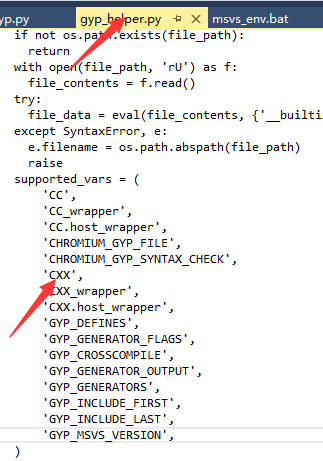
在 2016年3月5日星期六 UTC+8下午8:03:40,杜士雄写道:

Bruce Dawson
Mar 5, 2016, 1:25:51 PM3/5/16
to dusx...@gmail.com, Chromium-discuss, phis...@gmail.com
Trying to change the toolset used to build Chromium on Windows is a huge undertaking and will ultimately fail because the Chromium team is moving in another direction (towards VS 2015). And, the toolset may be the wrong thing to change anyway.
Until recently Chromium was designed to run on XP. I'm not sure whether any XP incompatible changes have been committed yet, but I wouldn't be surprised. The safest thing would be to sync to a point about six weeks ago when XP was still supported.
But, that is for the question of targeting XP. If you are trying to build on XP then you may hit other issues. For instance, most XP installs are 32-bit, and Chromium cannot build on a 32-bit OS.
These concerns:
> Visual Studio 2013 has some compatibility issues with Windows XP. Specifically, the remote debugging and profiling tools are not available
are also not related to building or running Chromium on XP. Debugging and profiling are only necessary after you have successfully created a built that will run.
Once Chromium changes the default toolset to VS 2015 then building on XP will not be possible. VS 2015 requires Windows 7 or higher in order to compile code.
So... if you want to build on XP then make sure you have 64-bit XP, and understand that you will not be able to keep syncing because VS 2015 will soon be required.
If you want to run on XP then make sure you sync to a point prior to when the first XP-incompatible change got committed, which is probably sometime in the last six weeks.
杜士雄
Mar 6, 2016, 12:42:08 AM3/6/16
to Chromium-discuss, dusx...@gmail.com, phis...@gmail.com
I downloaded mini_installer with version 48 and 50,tested it on xp,the 48 succeded, but 50 failed
My woring version is 48.xxx.xxx.103, my 48 test version is 48.xxx.xxx.116, and can i deduction that my woring version is still supported for xp?
在 2016年3月6日星期日 UTC+8上午2:25:51,Bruce Dawson写道:
在 2016年3月6日星期日 UTC+8上午2:25:51,Bruce Dawson写道:
Bruce Dawson
Mar 7, 2016, 1:57:11 PM3/7/16
to 杜士雄, Chromium-discuss, PhistucK Productions
http://chrome.blogspot.com/2015/11/updates-to-chrome-platform-support.html
Version 49 should also work on XP, I believe.
杜士雄
Mar 9, 2016, 2:33:05 AM3/9/16
to Chromium-discuss, dusx...@gmail.com, phis...@gmail.com
OK,Tks
在 2016年3月8日星期二 UTC+8上午2:57:11,Bruce Dawson写道:
在 2016年3月8日星期二 UTC+8上午2:57:11,Bruce Dawson写道:

lion
Feb 9, 2017, 6:43:36 PM2/9/17
to Chromium-discuss
Hi, have you ever solved the problem?
Now I encounted the same problem to you
在 2016年2月23日星期二 UTC+8下午8:05:35,杜士雄写道:
在 2016年2月23日星期二 UTC+8下午8:05:35,杜士雄写道:
Reply all
Reply to author
Forward
0 new messages