
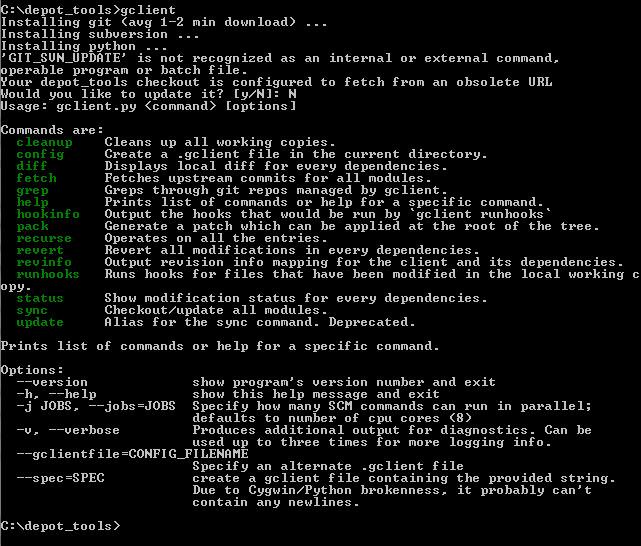
"Your depot_tools checkout is configured to fetch from an obsolete URL Would you like to update it? [y/N]:"
1,065 views
Skip to first unread message

David Michael
Jan 8, 2013, 5:48:53 PM1/8/13
to Chromium-dev, sza...@chromium.org
I ran gclient on Windows today and saw this message:
Your depot_tools checkout is configured to fetch from an obsolete URL Would you like to update it? [y/N]:
I dutifully answered "Y"es, and it broke depot_tools for me... running "gclient sync" gave me:
'GIT_SVN_UPDATE' is not recognized as an internal or external command, operable program or batch file.
'GIT_SVN_UPDATE' is not recognized as an internal or external command, operable program or batch file.
I fixed it by cd-ing to my depot_tools directory and running:
It looks like this change might have happened in:
https://codereview.chromium.org/11778024
https://codereview.chromium.org/11778024
Is anyone else seeing this?

Nick Carter
Jan 8, 2013, 6:46:55 PM1/8/13
to dmic...@google.com, Chromium-dev, sza...@chromium.org
I'm seeing this too, starting today. I do not use cygwin.
--
Chromium Developers mailing list: chromi...@chromium.org
View archives, change email options, or unsubscribe:
http://groups.google.com/a/chromium.org/group/chromium-dev

Wez
Jan 8, 2013, 7:06:09 PM1/8/13
to ni...@chromium.org, David Michael, Chromium-dev, sza...@chromium.org
I saw the message, said "yes" and checked remote.origin.url in my depot_tools, which seems to be set to the value you've listed.

Stefan Zager
Jan 8, 2013, 7:22:13 PM1/8/13
to Nick Carter, David Michael, Chromium-dev, sza...@chromium.org
I haven't been able to reproduce this. If anyone else is having the same problem, I'd welcome an opportunity to chromote into your machine and poke it with a stick.
Thanks,
Stefan

Sigurður Ásgeirsson
Jan 9, 2013, 9:36:54 AM1/9/13
to David Michael, Chromium-dev, sza...@chromium.org
I got this yesterday as well.
--
Sigurður Ásgeirsson
Jan 9, 2013, 9:37:03 AM1/9/13
to David Michael, Chromium-dev, sza...@chromium.org
On Windows, msys git.

Sungguk Lim
Jan 11, 2013, 10:43:28 AM1/11/13
to chromi...@chromium.org, sza...@chromium.org
Same here
This can be regenerated by extracting tarball, run 'gclient sync --force'
Any information about this?
2013년 1월 9일 수요일 오전 7시 48분 53초 UTC+9, David Michael 님의 말:
2013년 1월 9일 수요일 오전 7시 48분 53초 UTC+9, David Michael 님의 말:
David Michael
Jan 11, 2013, 12:16:26 PM1/11/13
to lim...@gmail.com, Chromium-dev, sza...@chromium.org
To clarify, it's fine and expected to get this message:
Your depot_tools checkout is configured to fetch from an obsolete URL Would you like to update it? [y/N]:
If you say "yes", and everything works after that, then you're fine.
But if gclient starts failing with:
But if gclient starts failing with:
'GIT_SVN_UPDATE' is not recognized as an internal or external command, operable program or batch file.
Then you should contact Stefan Zager. If you're in a hurry, you can use the work-around I listed above.
(In case it helps: I use Windows, and I don't use Cygwin).
(In case it helps: I use Windows, and I don't use Cygwin).
--


Emmanuel Saint-loubert
Jan 14, 2013, 4:32:14 PM1/14/13
to kkob...@kobashicomputing.com, chromi...@chromium.org, sza...@chromium.org
Same thing happened to me...
Stefan Zager
Jan 14, 2013, 4:41:20 PM1/14/13
to Emmanuel Saint-loubert, kkob...@kobashicomputing.com, Chromium-dev, sza...@chromium.org
I've root-caused this, and I'll upload a new depot_tools.zip ASAP.
Thanks,
Stefan

William Byrne
Mar 23, 2013, 4:20:49 PM3/23/13
to chromi...@chromium.org, Emmanuel Saint-loubert, kkob...@kobashicomputing.com, sza...@chromium.org
>> I've root-caused this, and I'll upload a new depot_tools.zip ASAP.
Any news on this? William Byrne
Mar 23, 2013, 11:08:39 PM3/23/13
to chromi...@chromium.org, Emmanuel Saint-loubert, kkob...@kobashicomputing.com, sza...@chromium.org
Got off a build on Win7 64 bit with the following steps:
Steps 13-20 from build-instructions-windows # Automatic simplified toolchain setup section
It was a bit of struggle to get this done, but it worked. The important tweak involved setting up SVN 1.6.20 and setting the symlink.
* Final output of step #13 - python src\tools\win\toolchain\toolchain.py
- Installed CollabNet SVN 1.6.20 (Win 32-bit) (in addition to my other SVN installs)
- Opened a regular cmd shell (no vcvars, no elevation)
- cd \path\to\chromium\.. (parent folder of empty chromium directory, or directory to be)
- svn co http://src.chromium.org/svn/trunk/tools/depot_tools
(this step gave me the depot_tools directory next to my empty chromium directory) - Opened cmd shell as Administrator to make the symlink in the next step
- mklink'd .\depot_tools\svn_bin to SVN installed in step #1 (hid/renamed the default svn_bin folder)
(03/23/2013 06:19 PM <SYMLINKD> svn_bin [C:\Program Files (x86)\CollabNet\Subversion Client]) - Returned to my regular cmd shell
- path=\path\to\depot_tools;%path% (give priority visibility to the depot tools)
- cd \path\to\chromium
gclient config http://src.chromium.org/chrome/trunk/srcgclient sync --revision src@###### --jobs 8 --force (I used src@187216 - the --revision option can be omitted)gclient sync --revision src@###### (ran a second time to verify download - had a few download errors.)- python src\tools\win\toolchain\toolchain.py (See final output below. Installed tools already on system, but this step
successfully placed the require tools/libs local to the workspace. Ran this step twice to see what would happen. 2nd run did nothing.) - Opened a new regular cmd shell. May not be necessary but wanted to verify for future builds.
- cd \path\to\chromium
- path=\path\to\depot_tools;%path% (give priority visibility to the depot tools)
- win_toolchain\env.bat
- gclient runhooks
- cd src
- ninja -C out\Debug chrome (ran to completion without errors with minimal display activity to console. Produced chrome.exe)
Steps 13-20 from build-instructions-windows # Automatic simplified toolchain setup section
It was a bit of struggle to get this done, but it worked. The important tweak involved setting up SVN 1.6.20 and setting the symlink.
* Final output of step #13 - python src\tools\win\toolchain\toolchain.py
Pulling together required pieces...
Stubbing ammintrin.h...
Patching asyncinfo.h...
Cleaning up temporaries...
In a (clean) cmd shell, you can now run
\path\to\google\chromium\win_toolchain\env.bat
then
gclient runhooks (or gclient sync if you haven't pulled deps yet)
ninja -C out\Debug chrome
Note that this script intentionally does not modify any global
settings like the registry, or system environment variables, so you
will need to run the above env.bat whenever you start a new
shell.
Reply all
Reply to author
Forward
0 new messages