
Is there anyway to help us improve visual studio debug chromium
214 views
Skip to first unread message

18f
Jul 9, 2023, 10:27:36 PM7/9/23
to Chromium-dev
Hey, this is not a bug, I just curious about something.

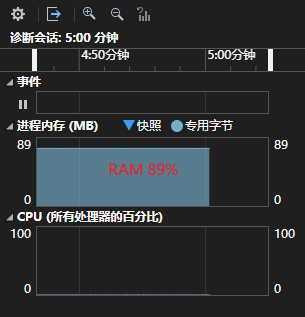

Chromium is too big... Too many file at here. I know for code search , chromium offer a plugin named VSChromium to help us do code search.
But , When I want to debug chromium, I often feels unhappy, Because chromium is too big. So Visual need too much time to deal with it. My Machine CPU is intel 12 with 22 cores, and my RAM is 64RAM. So When I run a debug process.
u could see my CPU and RAM(%61) should be enough.but When I I observer the project, it say our RAM is almost full:
I click the chromium project, it say it is so busy...
So, My question is :
> Is any tools like VSChromium to help us to debug chromium more easy, Because vs say it is busy, I wait it 20 minutes, It still busy...
Thx!

ziggy
Jul 10, 2023, 1:53:27 AM7/10/23
to Chromium-dev, 18f
I am not an expert but I did as below to make debugging working under VS 2019
########################
Next, to reduce file system overhead I excluded build directories from antivirus Windows Defender software and run
gn gen out/Default
autoninja -C out\Default chrome
to build a browser. It took 6 hours to complete the build on my:
HP Zbook 15 G5, 4 physical cores/8 logical cores, 16GB RAM, 2.3Ghz, all SSD drives.
+++++++++++++++++++++++++++++++++++++++++++++++
Editing and Debugging under Visual Studio 19 IDE
+++++++++++++++++++++++++++++++++++++++++++++++++
I was going to use VS 19 to prototype and debug enhancements to the print-to-pdf, so I generated VS project files as follow:
gn gen --ide=vs out\Default
That resulted in over 9,000 project files. VS could not handle such a large number of projects reliably on 16GB RAM. I upgraded my machine to 48GB and reduced the number of generated projects to around 4,000 by running:
gn gen --ide=vs --filters=//chrome;//headless out\Default
Having more RAM and less projects really helped to make VS fairly stable (but not completely).
gn gen out/Default
autoninja -C out\Default chrome
to build a browser. It took 6 hours to complete the build on my:
HP Zbook 15 G5, 4 physical cores/8 logical cores, 16GB RAM, 2.3Ghz, all SSD drives.
+++++++++++++++++++++++++++++++++++++++++++++++
Editing and Debugging under Visual Studio 19 IDE
+++++++++++++++++++++++++++++++++++++++++++++++++
I was going to use VS 19 to prototype and debug enhancements to the print-to-pdf, so I generated VS project files as follow:
gn gen --ide=vs out\Default
That resulted in over 9,000 project files. VS could not handle such a large number of projects reliably on 16GB RAM. I upgraded my machine to 48GB and reduced the number of generated projects to around 4,000 by running:
gn gen --ide=vs --filters=//chrome;//headless out\Default
Having more RAM and less projects really helped to make VS fairly stable (but not completely).

Bruce Dawson
Jul 10, 2023, 11:47:40 PM7/10/23
to Chromium-dev, ziggy, 18f
VsChromium is indeed very helpful for code search. It consumes several GB of RAM (it loads all of Chrome's source into RAM) so that it can do quick searches, but on a 64 GB machine this should not be a problem.
VS should be able to debug Chrome fairly efficiently. I just tested now and from when I pressed F11 (step in) to when the debugger was stopped in WinMain took about five seconds. This is with VS 2019. I then pressed F5 (run) and Chrome was running about five seconds later. If this was my first time debugging then it would take longer because symbols would need to be downloaded, but during this time there would be minimal CPU usage.
This was with a release build. A debug build would be a bit slower because there is more code generated and more debug information, but should still be manageable.
So, code search and debugging of Chromium can/should be fast enough, especially with VS 2022. I suspect that the slowdowns that you are seeing are related to Intellisense and project loading. If you generate project files (the --ide=vs option to gn gen) then loading these project files and parsing all of their dependencies can be very expensive, in RAM and CPU.
Personally I don't use these generated project files. I use VsChromium and code search to navigate the code and I use a debug-only project (see "Using Visual Studio without Intellisense" here). If you do use generated project files it is important to filter down the list because 9,000 project files is unwieldy.
I hope that this information helps set expectations. Chromium development with Visual Studio can be fast, but it is definitely possible to overwhelm your system.
P.S. You said that your RAM is 89% full, but it's not clear what that means. The OS tries to use all available memory for disk cache so it is quite common to have only ~1% of memory "free" while having 60% or more of memory "available". The Windows Task Manager's performance tab has a memory section which has multiple memory usage numbers and these standardized numbers are easier for others to interpret than whatever tool you are using. Memory is complicated.
ziggy
Jul 11, 2023, 2:23:55 AM7/11/23
to Chromium-dev, Bruce Dawson, ziggy, 18f
In my setup
I didn't disable Intellisense, maybe I should but I didn't investigate. I also installed VsChromium and relied for code search.
Loading of ~4,000 projects takes 5 minutes most of the time but it can take up 10 minutes. Once loaded I was able to modify source code, compile and build executable without any issues.
Startup of executable is fairly quick, it needs to load lots of DLLs. VS Shutdown takes close to 1 minute.
I have fairly fast SSD drive: Samsung SSD 970 Evo Plus 1TB
ziggy
Jul 25, 2023, 6:53:12 PM7/25/23
to Chromium-dev, ziggy, Bruce Dawson, 18f
Appreciate if you can share with the community which approach, if any, as documented in the link here provided by
Bruce Dawson, worked for you.
Reply all
Reply to author
Forward
0 new messages