
private key security
1,083 views
Skip to first unread message

Jon Oberheide
Jan 11, 2015, 2:29:08 PM1/11/15
to chromiu...@chromium.org
Are the threats outlined for the End-To-End extension, particularly the extension debug APIs, also relevant to Secure Shell's private key storage?
--
Jon Oberheide <j...@oberheide.org>
GnuPG Key: 4096R/52961381
Fingerprint: 964B 79EF 47D4 D7D0 CF73 D456 97FF B9D2 5296 1381

Mike Frysinger
Jan 13, 2015, 12:23:07 AM1/13/15
to Jon Oberheide, chromiu...@chromium.org
when the private key is imported into localstorage, yes
-mike
--
You received this message because you are subscribed to the Google Groups "chromium-hterm" group.
To view this discussion on the web visit https://groups.google.com/a/chromium.org/d/msgid/chromium-hterm/CAFHQe1eEOYa7Ktz1QKjtJNobHdWS0rN7oZF%2BYkKc5g-cV6Nodg%40mail.gmail.com.
Jon Oberheide
Jan 13, 2015, 12:25:27 AM1/13/15
to Mike Frysinger, chromiu...@chromium.org
Are there options for private key storage other than Local Storage?
I heard a rumor of some ssh-agent support coming soon... :-)
To view this discussion on the web visit https://groups.google.com/a/chromium.org/d/msgid/chromium-hterm/CAAbOScki%3DYrzmV5QvKEL%3DHwetpJmPdXcT9yo1Hf3bVE1wRN%3Dtw%40mail.gmail.com.
To unsubscribe from this group and stop receiving emails from it, send an email to chromium-hter...@chromium.org.
Mike Frysinger
Jan 13, 2015, 12:30:50 AM1/13/15
to Jon Oberheide, chromiu...@chromium.org
yubikey can hold a private key:
which can be paired with SecureShell:
https://chrome.google.com/webstore/detail/pnhechapfaindjhompbnflcldabbghjo
https://chrome.google.com/webstore/detail/pnhechapfaindjhompbnflcldabbghjo
via gnubbyd:
even if there were an ssh-agent like extension, or additional nacl app added to SecureShell, the chrome debugger, by design, would have access to all the same avenues as the extension itself. the lesson of this story is: don't install debuggers you don't trust.
-mike

Harald Wagener
Jan 13, 2015, 3:34:30 AM1/13/15
to chromiu...@chromium.org, j...@oberheide.org
AFAIR, the simple U2F yubikey has no additional functionality to store private key; you'd need a Yubikey NEO to test this.
Jon Oberheide
Jan 13, 2015, 10:40:59 AM1/13/15
to Mike Frysinger, chromiu...@chromium.org
Black magic, I say!
We have quite a few Neos, actually. Do they need a custom applet loaded on them? Any docs on getting them to work with the gnubby extension?
Mike Frysinger
Jan 13, 2015, 3:19:56 PM1/13/15
to Jon Oberheide, chromiu...@chromium.org
the gnubbyd app is pretty simple ... just click the buttons until you get something ;)
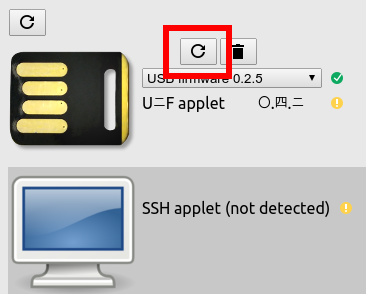

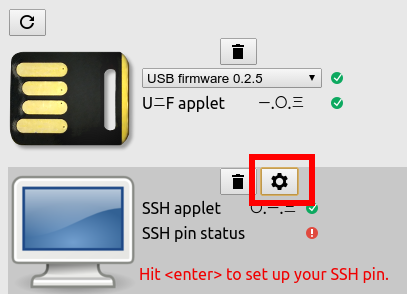

here's what it looked like for a new key for me:
after confirming, it moved to this page:
register the key with your Google account if you want, but i don't think it's required for ssh key storage
next page looks like:
it'll have you select a pin. that'll be used whenever you try to auth using the priv key on the device.
finally we see:
on your remote system, use that public key in your ~/.ssh/authorized_keys like normal. then try logging in with the SecureShell extension.
-mike

Adam Goode
Jan 13, 2015, 3:54:28 PM1/13/15
to Mike Frysinger, Jon Oberheide, chromiu...@chromium.org
I don't think this works with yubikey devices shipped since July 1 2014:
There is a chance this extension can work with "developer edition" yubikey devices but I think you need to special-order these now.
Adam
To view this discussion on the web visit https://groups.google.com/a/chromium.org/d/msgid/chromium-hterm/CAAbOSc%3DMzRgMjRF%3D-Cty08SwbzTN08DDk5hQph2z-H-vP92FYQ%40mail.gmail.com.
Jon Oberheide
Jan 13, 2015, 4:40:56 PM1/13/15
to Mike Frysinger, chromiu...@chromium.org
Ah, cool, thanks Mike. I'm assuming you're a Google employee and on corp/moma when you click the add button?

I have a developer edition NEO-n, but get the following when clicking "install SSH applet" as a non-Googler:
On Tue, Jan 13, 2015 at 3:19 PM, Mike Frysinger <vap...@chromium.org> wrote:
Marius Schilder
Jan 13, 2015, 4:44:48 PM1/13/15
to Jon Oberheide, Mike Frysinger, chromiu...@chromium.org
None of this works outside Google and also does not work with Yubico NEOs.
Perhaps Mike did not realize this a public list?
To view this discussion on the web visit https://groups.google.com/a/chromium.org/d/msgid/chromium-hterm/CAFHQe1cajHpp8Yr_YOjD6PXNvH_8o-FqVPh_ojT4G%2Bq3StP98g%40mail.gmail.com.

worth...@gmail.com
Mar 29, 2016, 1:58:50 PM3/29/16
to chromium-hterm

dragon788
Apr 7, 2016, 5:13:12 PM4/7/16
to chromium-hterm, j...@oberheide.org, vap...@chromium.org
Marius, are you using the Beta version of Secure Shell or the default publicly available one? A lot of the nicer features (IMO) of Secure Shell are only available in the Beta version.
Reply all
Reply to author
Forward
0 new messages