
Using Chrome extension to access the accessibility tree of an element
414 views
Skip to first unread message

Zhaoyi Li
Aug 25, 2023, 1:58:27 AM8/25/23
to Chromium Extensions
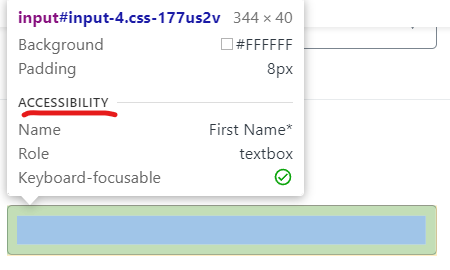
Can a Chrome extension access the accessibility tree of an element on the current tab? For example, getting the accessibility list below

wOxxOm
Aug 25, 2023, 2:14:40 AM8/25/23
to Chromium Extensions, Zhaoyi Li
The attributes shown in your screenshot can be obtained from the DOM element using a content script.
wOxxOm
Aug 25, 2023, 2:21:50 AM8/25/23
to Chromium Extensions, wOxxOm, Zhaoyi Li
There's also chrome.automation API but to use it you'll need to run chrome --allowlisted-extension-id=your-extension-id. I don't see it documented publicly, so you'll have to read the internal definition in the source code.

Ben Bracha
Aug 25, 2023, 2:36:42 AM8/25/23
to wOxxOm, Chromium Extensions, Zhaoyi Li
woxxom how can this obtained from a content script ? what’s the api ?
--
You received this message because you are subscribed to the Google Groups "Chromium Extensions" group.
To unsubscribe from this group and stop receiving emails from it, send an email to chromium-extens...@chromium.org.
To view this discussion on the web visit https://groups.google.com/a/chromium.org/d/msgid/chromium-extensions/36ff554c-6770-4b37-a627-99a8e18c54a7n%40chromium.org.
wOxxOm
Aug 25, 2023, 2:41:03 AM8/25/23
to Chromium Extensions, Ben Bracha, Chromium Extensions, Zhaoyi Li, wOxxOm
Depends on what you mean by "this". The attributes shown in your screenshot can be ontained using the standard DOM methods like document.querySelector and getAttribute for attributes like "name", "role", aria-*, and properties like elem.tabIndex.
Ben Bracha
Aug 25, 2023, 2:59:14 AM8/25/23
to wOxxOm, Chromium Extensions, Zhaoyi Li
accessibility name is calculated and can be referenced from other nodes because of aria labeled by. Therefore i wonder if there is a single api to get the name. I’m not aware of such, only by fetching the full a11y tree
wOxxOm
Aug 25, 2023, 4:00:44 AM8/25/23
to Chromium Extensions, Ben Bracha, Chromium Extensions, Zhaoyi Li, wOxxOm
Judging by the source code this name is exposed in two cases:
1) in DOM, which you can see as elem.computedName in your content script when chrome://flags/#enable-experimental-web-platform-features is enabled
2) in devtools backend used by devtools UI as a tooltip, console as getAccessibleName($0), and which can be also used directly in a chrome extension via chrome.debugger API Accessibility methods.
Ben Bracha
Aug 25, 2023, 4:16:40 AM8/25/23
to wOxxOm, Chromium Extensions, Zhaoyi Li
Very interesting. Seems to work well.
Where can I see the list of features enabled by:
chrome://flags/#enable-experimental-web-platform-features
?
Zhaoyi Li
Aug 25, 2023, 4:18:49 AM8/25/23
to Chromium Extensions, Ben Bracha, Chromium Extensions, Zhaoyi Li, wOxxOm
Thanks, I will try it out now. If I am building this into a Chrome extension, do I need to ask the user to enable the Chrome flag you mentioned or could I do it in the extension automatically?
wOxxOm
Aug 25, 2023, 4:25:41 AM8/25/23
to Chromium Extensions, Ben Bracha, Chromium Extensions, Zhaoyi Li, wOxxOm
To see how each feature is actually exposed you'll have to click it and investigate each usage.
> do I need to ask the user to enable the Chrome flag you mentioned or could I do it in the extension automatically?
It's your choice. Note that using chrome.debugger will show a warning on top of all browser windows.
Reply all
Reply to author
Forward
0 new messages