
Skip to first unread message

Rob and Bill
Jul 4, 2020, 11:39:12 AM7/4/20
to Camect User Forum
I switched some of our Amcrest Cameras from H.264H (default) to H.265 (saves storage space and bandwidth) - just to see how that format affects performance on my OSX and iOS devices. In short, it doesn't seem to affect their performance when playing back video via Camect.
- When saving a full clip, using H.265, Camect creates an .MKV file instead of the normal .MP4 files. The MKV is a wrapper and has the MP4 file in it. I can only play it using VLC Player. Why does Camect create an .MKV file?
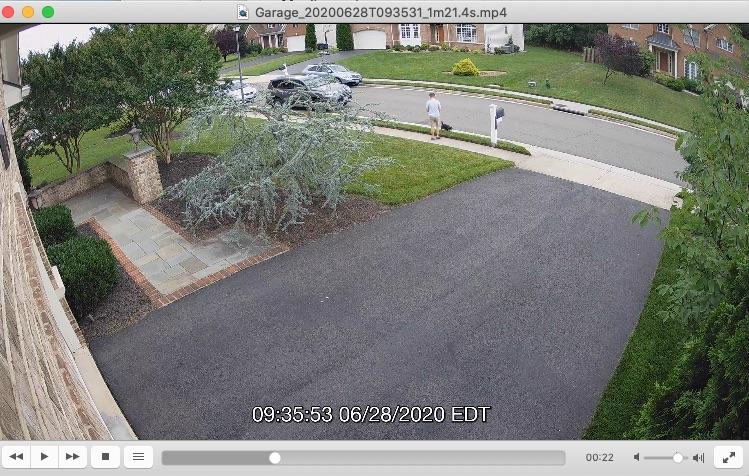
- I found it surprising there is sub-title track that shows up when playing with VLC Player - the time and date at the bottom. This applies to H.265 (in MKV wrapper) and H.264H on .MP4. See attached snapshot. How can 'turn on' that track when playing in MP4 - QuickTime does not have that option.
- More importantly on H.265 - does that affect the CPU workload on the Camect processor?
Jack 7
Jul 6, 2020, 4:03:35 PM7/6/20
to Camect User Forum
Ask Apple to update their Quicktime video viewer and support MKV, subtitles disabling, and probably h.265 which wasn't supported awhile back. VLC can disable subtitles on PC, maybe on apple. Or find a good quality apple video file converter for MKV and h.265. A number of video viewers don't support h.265 so you will need to convert to h.264 if you want to distribute a h.265 video widely. Handbrake free program on PC can convert MKV h.265 file to mp4 h.264 file.

Graham Bird
Jul 6, 2020, 4:19:32 PM7/6/20
to Camect User Forum
Quicktime is long dead.........

CamectArup
Jul 6, 2020, 4:44:03 PM7/6/20
to Camect User Forum
Re: H.265 vs H264H .... If you're not seeing any performance issues, then why worry about it? I would expect that live viewing at full resolution will be worse, but for most people that's not the main way that they use Camect.
Using H.265 should not save much in terms of storage, but it will save bandwidth usage between the camera and Camect. It also should not take up a lot more resources to process, but H265 implementations tend to not get used as much, and thus to have more variability in their quality. We have seen some cameras from well-known brands that don't work at all if you use H.265. So, do be aware that there's probably an increased chance of bumping into camera bugs this way -- but if it's working for you, no specific reason not to use it.
We use MKV simply because it's capable of handling more formats than mp4 can, so it's the format of choice unless we're sure that we have a situation where we are sure that mp4 is okay.
VLC is the player we recommend because it's a fully-featured player and available for all platforms. Given that VLC is available, we prefer not to make an operation like export far more expensive (by encoding the timestamps directly in the video stream) simply because some players don't support subtitles. We haven't played a lot with quicktime ourselves, but some users have reported other issues worse than this, e.g. use of a lot more cpu such that video would not play smoothly on a less powerful machine, vs playing fine in VLC on the same machine.
Rob and Bill
Jul 7, 2020, 11:58:41 AM7/7/20
to Camect User Forum
You're right - it only pops up when I play a saved clip - Apple still distributes V10 (I think) with the latest OS X releases. I don't need it for anything else.
Rob and Bill
Jul 7, 2020, 12:09:31 PM7/7/20
to Camect User Forum
I was just trying to see the differences between the two formats - doesn't seem to be any visual differences at all - full screen or other sizes - quality is excellent. I'll just return the H.265 settings to the original format to make them all the same.
Bandwidth is not an issue - the cameras are POE on my internal network. And since it doesn't impact storage significantly that's not an issue either.
Camect runs very well on our iPad Pro's and the cameras displayed are clear and sharp. On the iMac - performance is fine too - despite it being a late 2014 iMac - hoping to change that in the next six months or so.
I really appreciate you taking the time to explain what Camect is doing - I've learned a lot!
Graham Bird
Jul 7, 2020, 1:55:10 PM7/7/20
to Rob and Bill, Camect User Forum
VLC is your friend!!!! Just set the default app for .mov files.
Cheers
--
You received this message because you are subscribed to the Google Groups "Camect User Forum" group.
To unsubscribe from this group and stop receiving emails from it, send an email to forum+un...@camect.com.
To view this discussion on the web visit https://groups.google.com/a/camect.com/d/msgid/forum/27b9efc0-fe53-45fe-9623-1c77ff266292o%40camect.com.
Rob and Bill
Jul 7, 2020, 5:32:49 PM7/7/20
to Camect User Forum, robnbi...@gmail.com
My clips come out as MP4 files - I think identical to MOV files. I can change the association as you suggest. Thanks
On Tuesday, July 7, 2020 at 1:55:10 PM UTC-4, Graham Bird wrote:
VLC is your friend!!!! Just set the default app for .mov files.Cheers
On Jul 7, 2020, at 11:58 AM, Rob and Bill <robnb...@gmail.com> wrote:
You're right - it only pops up when I play a saved clip - Apple still distributes V10 (I think) with the latest OS X releases. I don't need it for anything else.
On Monday, July 6, 2020 at 4:19:32 PM UTC-4, Graham Bird wrote:Quicktime is long dead.........
On Monday, July 6, 2020 at 4:03:35 PM UTC-4, Jack 7 wrote:Ask Apple to update their Quicktime video viewer and support MKV, subtitles disabling, and probably h.265 which wasn't supported awhile back. VLC can disable subtitles on PC, maybe on apple. Or find a good quality apple video file converter for MKV and h.265. A number of video viewers don't support h.265 so you will need to convert to h.264 if you want to distribute a h.265 video widely. Handbrake free program on PC can convert MKV h.265 file to mp4 h.264 file.--
You received this message because you are subscribed to the Google Groups "Camect User Forum" group.
To unsubscribe from this group and stop receiving emails from it, send an email to fo...@camect.com.

Eric Meeson
Jul 11, 2020, 10:07:45 AM7/11/20
to Camect User Forum
I definitely recommend VLC as others have said.
I also wanted to throw in that I had a camera drop down to 3 fps when I put it on H.264H, while H.265 works perfectly. This was on a "non upgrade firmware" Dahua variant, haven't seen that issue on my Lorex cameras though I think those have all been set to H.265 anyway. Retention time on 265 is amazing.
Rob and Bill
Jul 11, 2020, 1:44:13 PM7/11/20
to Camect User Forum
"Retention time on 265 is amazing" -- Assuming this is due to reduced file sizes???
Our Amcrest (Dahua) POE cameras offer 264 and 265. I like the video quality in either format.
Agree - VLC.
Jack 7
Jul 13, 2020, 12:53:37 PM7/13/20
to Camect User Forum
Earlier in this thread, CamectArup wrote:
"...Using H.265 should not save much in terms of storage, but it will save bandwidth usage between the camera and Camect…"
Checking ~30 sec. downloaded Camect H.265 and H.264 file sizes, H.265 file is about about 40-50% smaller. Both contained about the same motion. One reason why H.265 files can be smaller is because much lower bitrate can be used and produce similar quality as H.264.
I used an Amcrest 4MP camera where H.265 used its default 2048 Kb/s bitrate and H.264 used its default 4096 Kb/s bitrate. That's all of my little test. I realize changing camera settings around would change results.
"...Using H.265 should not save much in terms of storage, but it will save bandwidth usage between the camera and Camect…"
Checking ~30 sec. downloaded Camect H.265 and H.264 file sizes, H.265 file is about about 40-50% smaller. Both contained about the same motion. One reason why H.265 files can be smaller is because much lower bitrate can be used and produce similar quality as H.264.
I used an Amcrest 4MP camera where H.265 used its default 2048 Kb/s bitrate and H.264 used its default 4096 Kb/s bitrate. That's all of my little test. I realize changing camera settings around would change results.

J B
Apr 8, 2021, 2:28:34 PM4/8/21
to Camect User Forum, robn...@mac.com
Is there anyway to play these and/or send them on an iOS device without having to use VLC (to view) or another app to convert to .mov?

Brian Wilson
Apr 9, 2021, 9:55:13 AM4/9/21
to Camect User Forum, kot...@gmail.com, robn...@mac.com
Having the same issue. Can’t just send a clip from iOS and have to go to a machine. Seems like an unnecessary step. Any chance for an option to lower requirements on export?
Reply all
Reply to author
Forward
0 new messages