
how to access admin or management page?

Tim Tyler
I am running CAS 5.2 and have configured ldap for authentication. But I still have not figured out how to access the admin or management page. What do I need to configure to login to the management page?
Do I need to define an admin account? Do I need to define the Admin Status Endpoints per https://apereo.github.io/cas/5.0.x/installation/Configuration-Properties.html ?
Do I need to create an adminusers.properties file? Can I define an existing ldap user as an admin to access the management page(s)?
Tim Tyler
Network Engineer
Beloit College

David Curry
cas.adminPagesSecurity.actuatorEndpointsEnabled: truecas.monitor.endpoints.enabled: trueendpoints.enabled: true
cas.adminPagesSecurity.ip: ^192\\.168\\.(50\\.[0-9]{1,3}|1\\.[12]0)$
cas.monitor.endpoints.sensitive: falseendpoints.sensitive: false
cas.adminPagesSecurity.loginUrl: ${cas.server.prefix}/logincas.adminPagesSecurity.service: ${cas.server.prefix}/status/dashboardcas.adminPagesSecurity.users: file:/etc/cas/config/admusers.propertiescas.adminPagesSecurity.adminRoles[0]: ROLE_ADMIN
# This file lists the users who are allowed access to the CAS /status/*# endpoints ("adminpages").## The syntax for each line is:## username=password,grantedAuthority[,grantedAuthority][,enabled|disabled]#gnarls=passwordnotused,ROLE_ADMIN
{"@class" : "org.apereo.cas.services.RegexRegisteredService","serviceId" : "^https://casserver.your.dom.ain/cas/status/dashboard(\\z|/.*)","name" : "CAS Admin Dashboard","id" : 123456789,"description" : "CAS dashboard and administrative endpoints","evaluationOrder" : 5000}
--
DAVID A. CURRY, CISSP
DIRECTOR OF INFORMATION SECURITY
INFORMATION TECHNOLOGY
71 FIFTH AVE., 9TH FL., NEW YORK, NY 10003
+1 212 229-5300 x4728 • david...@newschool.edu

--
- Website: https://apereo.github.io/cas
- Gitter Chatroom: https://gitter.im/apereo/cas
- List Guidelines: https://goo.gl/1VRrw7
- Contributions: https://goo.gl/mh7qDG
---
You received this message because you are subscribed to the Google Groups "CAS Community" group.
To unsubscribe from this group and stop receiving emails from it, send an email to cas-user+unsubscribe@apereo.org.
To view this discussion on the web visit https://groups.google.com/a/apereo.org/d/msgid/cas-user/357545e0243806517d1dac6eed8c06ee%40mail.gmail.com.
Tim Tyler
Dave, others,
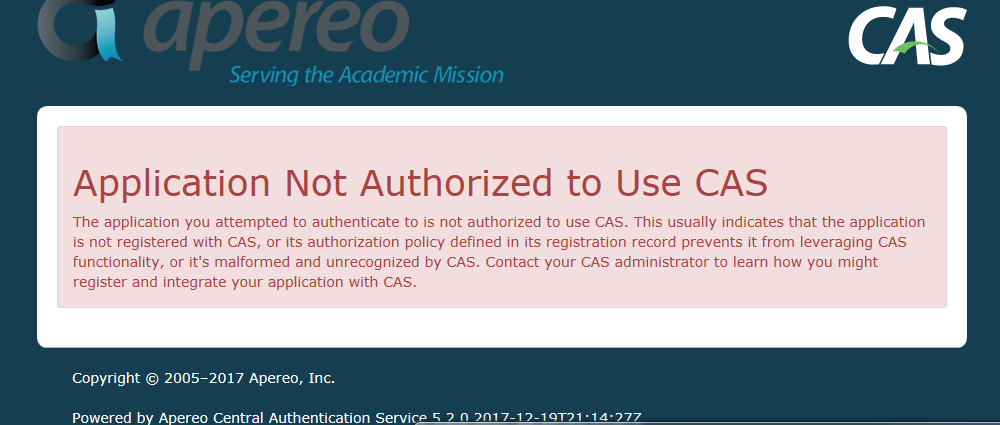
Ok, I think I am getting closer but I am getting the error shown below. I should note that there was no etc/cas/services directory so I had to create the service directory manually before creating the etc/cas/services/CASAdminDashboard-123456789.json file. I included the port :8443 with the hostname. I assume I need it. I should also point out that I am using the equal sign format for variables in cas.properties. I am not sure how the colon format works or if it is even appropriate for cas.properties.
I got this warning when starting up:
<No registered service is found to match [org.apereo.cas.authentication.principal.SimpleWebApplicationServiceImpl@514d45fe[id=https://cas.beloit.edu:8443/cas/status/dashboard,originalUrl=https://cas.beloit.edu:8443/cas/status/dashboard,artifactId=<null>,principal=<null>,loggedOutAlready=false,format=XML]] or service access is disallowed. Using default theme [cas-theme-default]>
This is how the json entry for service looks:
{
"@class" : "org.apereo.cas.services.RegexRegisteredService",
"serviceId" : "^https://cas.beloit.edu:8443/cas/status/dashboard(\\z|/.*)",
"name" : "CAS Admin Dashboard",
"id" : 123456789,
"description" : "CAS dashboard and administrative endpoints",
"evaluationOrder" : 5000
}
Tim
--
To unsubscribe from this group and stop receiving emails from it, send an email to cas-user+u...@apereo.org.
To view this discussion on the web visit https://groups.google.com/a/apereo.org/d/msgid/cas-user/357545e0243806517d1dac6eed8c06ee%40mail.gmail.com.
--
- Website: https://apereo.github.io/cas
- Gitter Chatroom: https://gitter.im/apereo/cas
- List Guidelines: https://goo.gl/1VRrw7
- Contributions: https://goo.gl/mh7qDG
---
You received this message because you are subscribed to the Google Groups "CAS Community" group.
To unsubscribe from this group and stop receiving emails from it, send an email to cas-user+u...@apereo.org.
To view this discussion on the web visit https://groups.google.com/a/apereo.org/d/msgid/cas-user/CA%2Bd9XAON5qRK1A8U-3vgufMYby%2BOMQi_VsknpScpF2zbSHsqEQ%40mail.gmail.com.

Ray Bon
--
Ray Bon
Programmer analyst
Development Services, University Systems
2507218831 | CLE 019 | rb...@uvic.ca
David Curry
--
DAVID A. CURRY, CISSP
DIRECTOR OF INFORMATION SECURITY
INFORMATION TECHNOLOGY
71 FIFTH AVE., 9TH FL., NEW YORK, NY 10003
+1 212 229-5300 x4728 • david...@newschool.edu
--
To unsubscribe from this group and stop receiving emails from it, send an email to cas-user+unsubscribe@apereo.org.
To view this discussion on the web visit https://groups.google.com/a/apereo.org/d/msgid/cas-user/357545e0243806517d1dac6eed8c06ee%40mail.gmail.com.
--
- Website: https://apereo.github.io/cas
- Gitter Chatroom: https://gitter.im/apereo/cas
- List Guidelines: https://goo.gl/1VRrw7
- Contributions: https://goo.gl/mh7qDG
---
You received this message because you are subscribed to the Google Groups "CAS Community" group.
To unsubscribe from this group and stop receiving emails from it, send an email to cas-user+unsubscribe@apereo.org.
To view this discussion on the web visit https://groups.google.com/a/apereo.org/d/msgid/cas-user/CA%2Bd9XAON5qRK1A8U-3vgufMYby%2BOMQi_VsknpScpF2zbSHsqEQ%40mail.gmail.com.
--
- Website: https://apereo.github.io/cas
- Gitter Chatroom: https://gitter.im/apereo/cas
- List Guidelines: https://goo.gl/1VRrw7
- Contributions: https://goo.gl/mh7qDG
---
You received this message because you are subscribed to the Google Groups "CAS Community" group.
To unsubscribe from this group and stop receiving emails from it, send an email to cas-user+unsubscribe@apereo.org.
To view this discussion on the web visit https://groups.google.com/a/apereo.org/d/msgid/cas-user/6614892d02e51ed93812d43a1a6a5057%40mail.gmail.com.
Tim Tyler
Dave,
Thanks a ton! I think that advice worked.
Tim

--
To unsubscribe from this group and stop receiving emails from it, send an email to cas-user+u...@apereo.org.
To view this discussion on the web visit https://groups.google.com/a/apereo.org/d/msgid/cas-user/357545e0243806517d1dac6eed8c06ee%40mail.gmail.com.
--
- Website: https://apereo.github.io/cas
- Gitter Chatroom: https://gitter.im/apereo/cas
- List Guidelines: https://goo.gl/1VRrw7
- Contributions: https://goo.gl/mh7qDG
---
You received this message because you are subscribed to the Google Groups "CAS Community" group.
To unsubscribe from this group and stop receiving emails from it, send an email to cas-user+u...@apereo.org.
To view this discussion on the web visit https://groups.google.com/a/apereo.org/d/msgid/cas-user/CA%2Bd9XAON5qRK1A8U-3vgufMYby%2BOMQi_VsknpScpF2zbSHsqEQ%40mail.gmail.com.
--
- Website: https://apereo.github.io/cas
- Gitter Chatroom: https://gitter.im/apereo/cas
- List Guidelines: https://goo.gl/1VRrw7
- Contributions: https://goo.gl/mh7qDG
---
You received this message because you are subscribed to the Google Groups "CAS Community" group.
To unsubscribe from this group and stop receiving emails from it, send an email to cas-user+u...@apereo.org.
To view this discussion on the web visit https://groups.google.com/a/apereo.org/d/msgid/cas-user/6614892d02e51ed93812d43a1a6a5057%40mail.gmail.com.
--
- Website: https://apereo.github.io/cas
- Gitter Chatroom: https://gitter.im/apereo/cas
- List Guidelines: https://goo.gl/1VRrw7
- Contributions: https://goo.gl/mh7qDG
---
You received this message because you are subscribed to the Google Groups "CAS Community" group.
To unsubscribe from this group and stop receiving emails from it, send an email to cas-user+u...@apereo.org.
To view this discussion on the web visit https://groups.google.com/a/apereo.org/d/msgid/cas-user/CA%2Bd9XAO-enLWkNgj-PBAsSng0i%3D6d7rt0BF2i2qxucDNutQZcA%40mail.gmail.com.