
Blending displacement using raylength
205 views
Skip to first unread message

Chris Marshall
Aug 7, 2012, 10:49:45 AM8/7/12
to soft...@listproc.autodesk.com
Hi All,
I have a camera very close to a surface which has some displacement detail in the very foreground. I'm using the BA raylength shader to try and blend this so the displacement reduces the further away from the camera the object is. But it doesn't appear to be working. I've tried to clamp the scalar range, but even though the BA Raylenth is showing a grad from black to white on the object, the displacement never reduces.
Any thoughts on how this might be achieved?
Thanks
Chris

Bradley Gabe
Aug 7, 2012, 10:54:00 AM8/7/12
to soft...@listproc.autodesk.com
Isn't this a cycle dependency situation? Raylength is affected by displacement.

Guillaume Laforge
Aug 7, 2012, 11:12:32 AM8/7/12
to soft...@listproc.autodesk.com
Hi Chris,
I didn't play with the RenderTree since a very loonngg time but I think that you could use the "Intersection Point" from the Vector State node.
Then you need to get the world position of your camera and get the distance to those intersection points. I think that they are evaluated before the displacement (assuming you are using MentalRay).
Cheers,
Guillaume Laforge
From: softimag...@listproc.autodesk.com [mailto:softimag...@listproc.autodesk.com] On Behalf Of Bradley Gabe
Sent: Tuesday, August 07, 2012 10:54 AM
To: soft...@listproc.autodesk.com
Subject: Re: Blending displacement using raylength
Isn't this a cycle dependency situation? Raylength is affected by displacement.
I didn't play with the RenderTree since a very loonngg time but I think that you could use the "Intersection Point" from the Vector State node.
Then you need to get the world position of your camera and get the distance to those intersection points. I think that they are evaluated before the displacement (assuming you are using MentalRay).
Cheers,
Guillaume Laforge
From: softimag...@listproc.autodesk.com [mailto:softimag...@listproc.autodesk.com] On Behalf Of Bradley Gabe
Sent: Tuesday, August 07, 2012 10:54 AM
To: soft...@listproc.autodesk.com
Subject: Re: Blending displacement using raylength
Isn't this a cycle dependency situation? Raylength is affected by displacement.

David Thibodeau
Aug 7, 2012, 11:23:11 AM8/7/12
to soft...@listproc.autodesk.com
Hi Chris,
I've been using in the Render tree the node Scalar
State in Ray Lenght mode and its working well with the displacement in MR Soft
2012 SP1.
Hope it helps!
Dav♪d Th♪bodeau || Artiste 3D ||
Tél: (514) 848-0579 (2525)

From: Guillaume Laforge [mailto:guillaum...@autodesk.com]
Sent: August-07-12 11:13 AM
To: soft...@listproc.autodesk.com
Subject: RE: Blending displacement using raylength
Hi Chris,
I didn’t play with the RenderTree since a very loonngg time but I think that you could use the “Intersection Point” from the Vector State node.
Then you need to get the world position of your camera and get the distance to those intersection points. I think that they are evaluated before the displacement (assuming you are using MentalRay).
Cheers,
Guillaume Laforge
From:
softimag...@listproc.autodesk.com
[mailto:softimag...@listproc.autodesk.com] On Behalf Of Bradley
Gabe
Sent: Tuesday, August 07, 2012 10:54 AM
To:
soft...@listproc.autodesk.com
Subject: Re: Blending displacement
using raylength
Isn't this a cycle dependency situation? Raylength is affected by displacement.
David Thibodeau
Aug 7, 2012, 11:34:20 AM8/7/12
to soft...@listproc.autodesk.com
Worse case scenario would be to set up two nulls with
the right distance in your scene, set their global position with
an expression (Distance to cam) in the Scalar Change Range node (Old Range:
Start, Old Range: End) and then multiply your displacement with this output
value if that makes any sense..
Hope it helps

Chris Marshall
Aug 7, 2012, 12:57:35 PM8/7/12
to soft...@listproc.autodesk.com
OK Thanks all. Been out of the office but will take a look at some of the suggestions now.
Cheers
Chris Marshall
Aug 8, 2012, 6:07:18 AM8/8/12
to soft...@listproc.autodesk.com
My brain's fried! How do I get the positions of objects into the
render tree? It's all gone foggy and I have a client in shortly!
On 07/08/2012, David Thibodeau <david.t...@visionglobale.com> wrote:
> Worse case scenario would be to set up two nulls with the right distance in
> your scene, set their global position with an expression (Distance to cam)
> in the Scalar Change Range node (Old Range: Start, Old Range: End) and then
> multiply your displacement with this output value if that makes any sense..
>
>
> Hope it helps
>
>
> Dav♪d Th♪bodeau || Artiste 3D ||
>
> Tél: (514) 848-0579 (2525)
>
>
>
>
>
>
>
--
render tree? It's all gone foggy and I have a client in shortly!
On 07/08/2012, David Thibodeau <david.t...@visionglobale.com> wrote:
> Worse case scenario would be to set up two nulls with the right distance in
> your scene, set their global position with an expression (Distance to cam)
> in the Scalar Change Range node (Old Range: Start, Old Range: End) and then
> multiply your displacement with this output value if that makes any sense..
>
>
> Hope it helps
>
>
> Dav♪d Th♪bodeau || Artiste 3D ||
>
> Tél: (514) 848-0579 (2525)
>
>
>
>
>
>
>
> ________________________________
>
> From: David Thibodeau [mailto:david.t...@visionglobale.com]
> Sent: August-07-12 11:23 AM
> To: soft...@listproc.autodesk.com
> Subject: RE: Blending displacement using raylength
>
>
> Hi Chris,
>
> I've been using in the Render tree the node Scalar State in Ray Lenght mode
> and its working well with the displacement in MR Soft 2012 SP1.
>
> Hope it helps!
>
>
>
> Dav♪d Th♪bodeau || Artiste 3D ||
>
> Tél: (514) 848-0579 (2525)
>
>
>
>
>
>
>
>
> From: David Thibodeau [mailto:david.t...@visionglobale.com]
> Sent: August-07-12 11:23 AM
> To: soft...@listproc.autodesk.com
> Subject: RE: Blending displacement using raylength
>
>
> Hi Chris,
>
> I've been using in the Render tree the node Scalar State in Ray Lenght mode
> and its working well with the displacement in MR Soft 2012 SP1.
>
> Hope it helps!
>
>
>
> Dav♪d Th♪bodeau || Artiste 3D ||
>
> Tél: (514) 848-0579 (2525)
>
>
>
>
>
>
>


Christian Keller
Aug 8, 2012, 6:17:43 AM8/8/12
to soft...@listproc.autodesk.com
vector node and put expressions on it ?
--
christian keller
visual effects|direction

+49 179 69 36 248
chri...@me.com
Chris Marshall
Aug 8, 2012, 6:23:48 AM8/8/12
to soft...@listproc.autodesk.com
Ideally I don't want to generate a texture projection, just get the
position of the camera and / or other objects in space. Brain's died.
Where can I write an expression in the render tree? I'm clearly
missing something obvious here.
position of the camera and / or other objects in space. Brain's died.
Where can I write an expression in the render tree? I'm clearly
missing something obvious here.
Chris Marshall
Aug 8, 2012, 6:44:59 AM8/8/12
to soft...@listproc.autodesk.com
He's just walked in! Diverting him to coffee machine, sofa and Olympics on tv!
Of course the expression is added through the animation divot! I'm an
idiot! Was looking in the wrong place all along. Cheers
Of course the expression is added through the animation divot! I'm an
idiot! Was looking in the wrong place all along. Cheers
Chris Marshall
Aug 8, 2012, 7:10:10 AM8/8/12
to soft...@listproc.autodesk.com
OK after all that I'm still getting displacement across the whole
surface, even though I can run the scalar value through a gradient and
it gives the correct result. I've double checked and I'm using the
Vector_State - Intersection Point, so it's obviously not calculating
this before calculating the displacement.
Any other ideas?
Thanks
Chris
surface, even though I can run the scalar value through a gradient and
it gives the correct result. I've double checked and I'm using the
Vector_State - Intersection Point, so it's obviously not calculating
this before calculating the displacement.
Any other ideas?
Thanks
Chris
Rob Chapman
Aug 8, 2012, 7:38:46 AM8/8/12
to soft...@listproc.autodesk.com
ah I see, think in the past for fading off displacements into the distance I was using textures & gradients in the rendertree - with texture projection rather than distance to camera. not much help other than that Im afraid
Chris Marshall
Aug 8, 2012, 7:43:01 AM8/8/12
to soft...@listproc.autodesk.com
Yes I was hoping to avoid rendering both and then blending afterwards.
Just feels like something that could be doable.
Thanks anyway.
Just feels like something that could be doable.
Thanks anyway.

Guillaume Laforge
Aug 8, 2012, 7:59:02 AM8/8/12
to soft...@listproc.autodesk.com
Yes it is doable i one render pass for sure! I made such RenderTree in the past.
I'm rather confident that the thing I explained to you (using point intersections) is working. I will try to put my hands on Softi today... if nobody else can find the solution :).
Chris Marshall
Aug 8, 2012, 8:19:30 AM8/8/12
to soft...@listproc.autodesk.com
If you could, that would be superb and beer will be exchanged!!
Guillaume Laforge
Aug 8, 2012, 10:40:48 AM8/8/12
to soft...@listproc.autodesk.com
Here is a sample scene: http://dl.dropbox.com/u/5533643/Softimage/BlendingDisplacementUsingRayLength_00.scn
And here is the result:
http://dl.dropbox.com/u/5533643/Softimage/BlendDisplacementFromRayLength.png
For the beer, one of those http://www.ratebeer.com/Story.asp?StoryID=275 sounds good!
Cheers,
Guillaume
David Thibodeau
Aug 8, 2012, 10:55:48 AM8/8/12
to soft...@listproc.autodesk.com
Hey Chris!
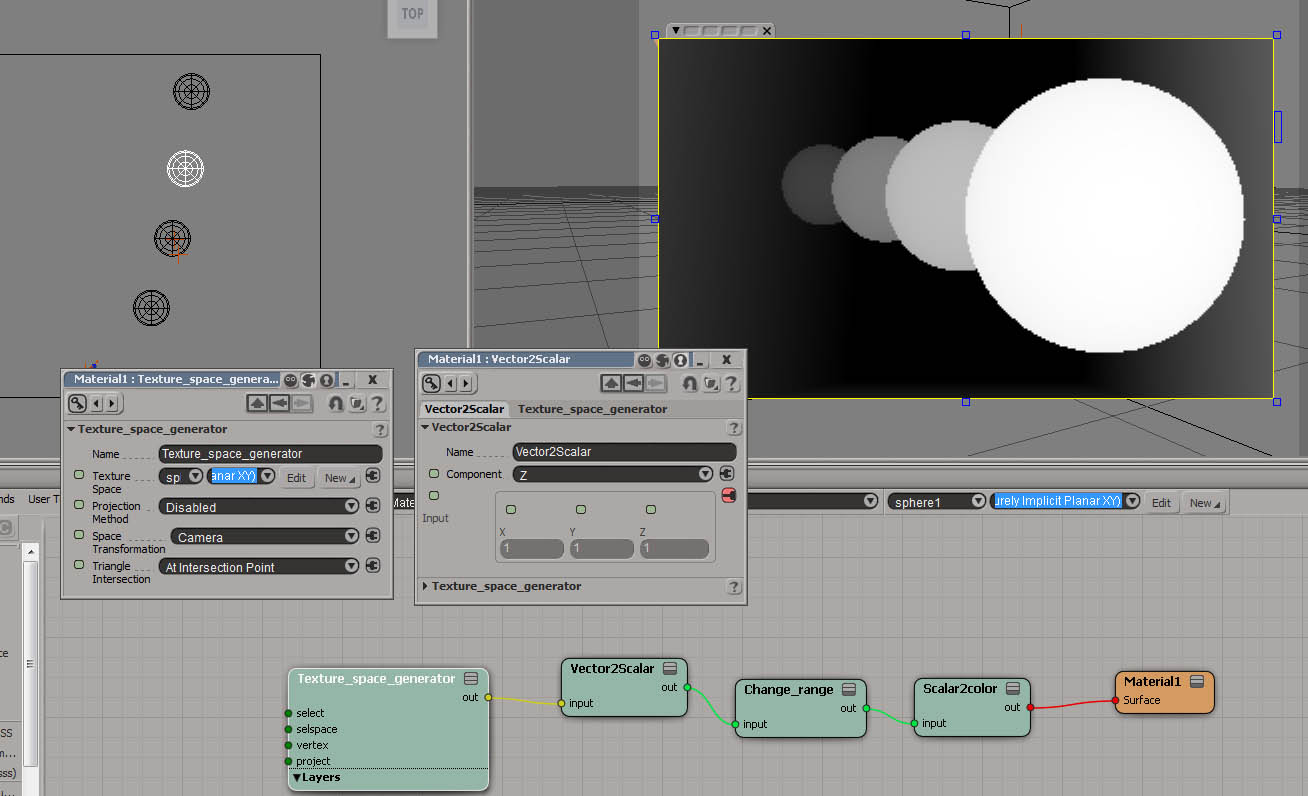
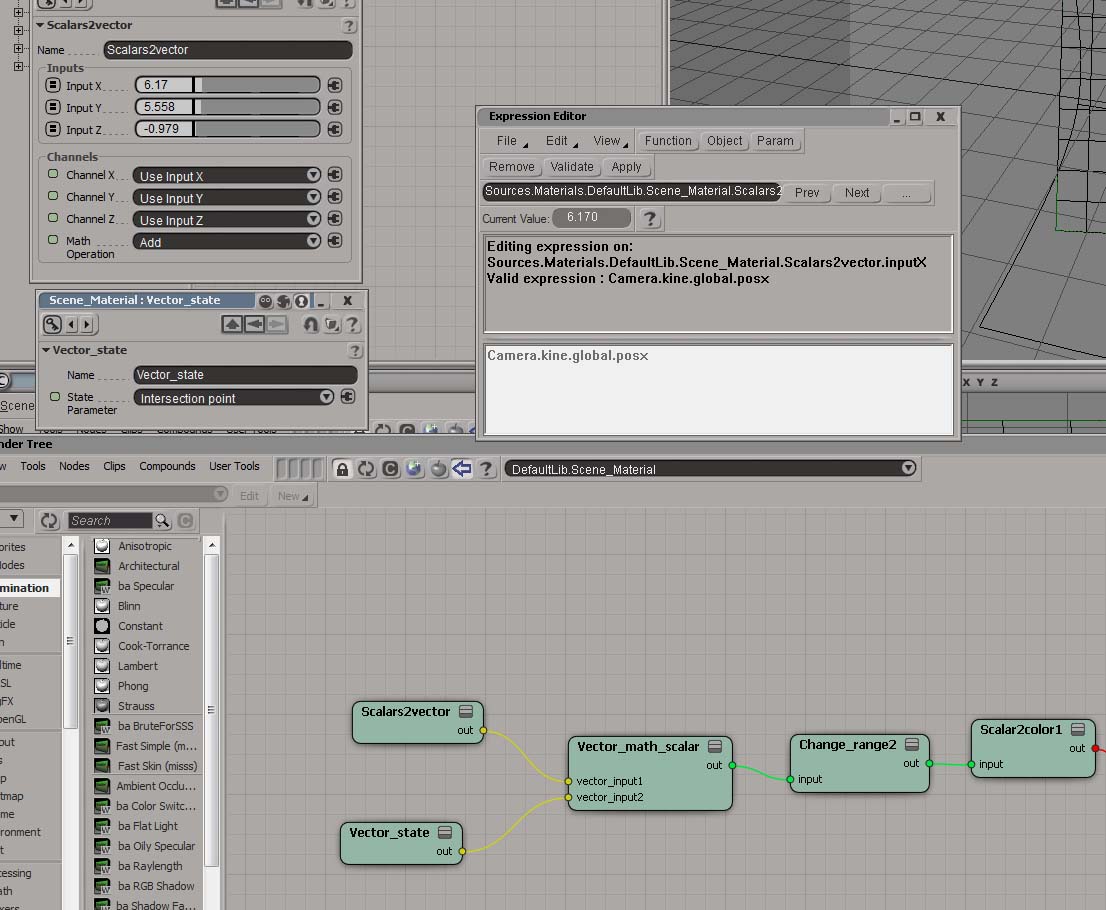
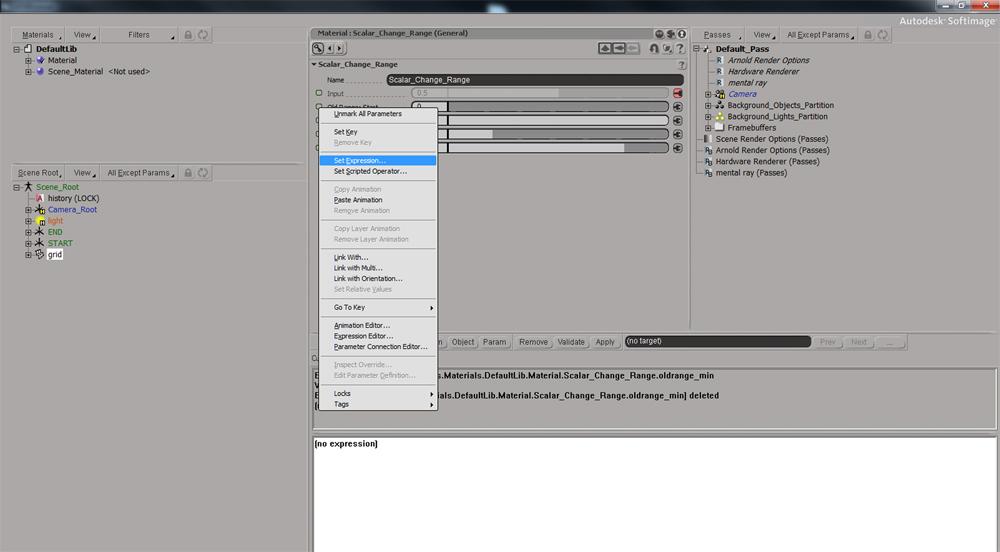
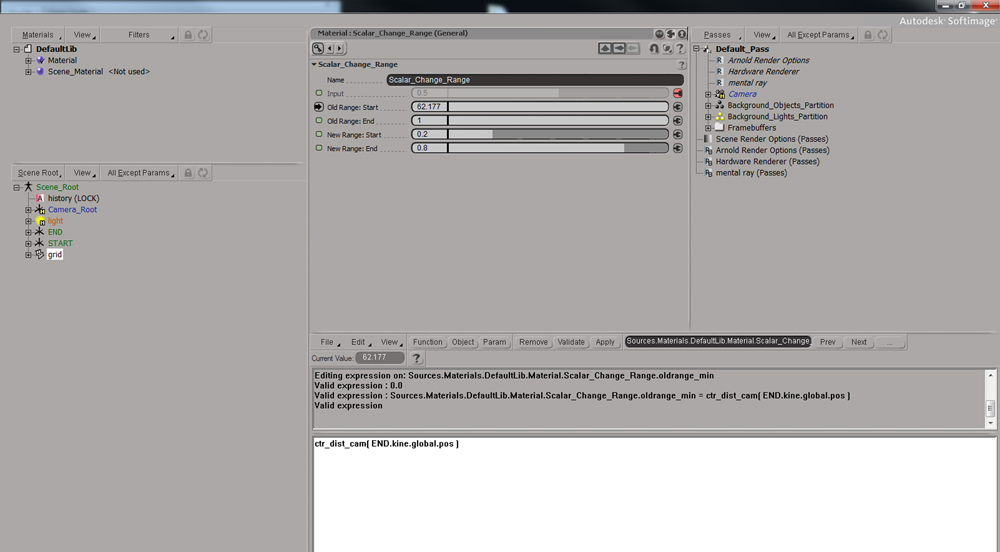
Sorry for the confusion! I've put some images to show how to set expressions in the render tree.
In this case I used the function Distance to Camera, then specified wich object that will be evaluated, followed by his position( END.kine.global.pos)
My apologize!
Dav♪d Th♪bodeau || Artiste 3D ||
Tél: (514) 848-0579 (2525)
-----Original Message-----
From: Chris Marshall [mailto:chrisma...@gmail.com]
Sent: August-08-12 8:20 AM
To: soft...@listproc.autodesk.com
Subject: Re: Blending displacement using raylength
Chris Marshall
Aug 8, 2012, 11:00:38 AM8/8/12
to soft...@listproc.autodesk.com
Thanks David, but Guillaume has just blown me out of the water, well
and truly! Though I currently can't see what the difference is between
what I've done and what he's done. Just trying to figure it out now.
Thanks
Chris
and truly! Though I currently can't see what the difference is between
what I've done and what he's done. Just trying to figure it out now.
Thanks
Chris
Chris Marshall
Aug 8, 2012, 11:02:34 AM8/8/12
to soft...@listproc.autodesk.com
That's really great Guillaume!! Thanks a lot for sending that through.
I genuinely can't see where the difference is with what I've done, but
yours works and mine doesn't. Did you want all thirty of those beers?
I genuinely can't see where the difference is with what I've done, but
yours works and mine doesn't. Did you want all thirty of those beers?
Rob Chapman
Aug 8, 2012, 11:11:47 AM8/8/12
to soft...@listproc.autodesk.com
he did say 'one' of those and also, havn't loaded the scene (2012 still here) but doesn't seem any different from the 2nd example pic I sent. slight problem between the chair and keyboard I say ! :)
Chris Marshall
Aug 8, 2012, 11:23:42 AM8/8/12
to soft...@listproc.autodesk.com
Guillaume Laforge
Aug 8, 2012, 11:24:50 AM8/8/12
to soft...@listproc.autodesk.com
Hey Rob,
>
but doesn't seem any different from the 2nd example pic
I didn't received your email with the pic in my gmail. But checking in my AD mail, I see it now... weird xsilist problem again?
So yes, you are using the exact same thing :). The only thing to add is a node to clamp the value that are out of range (to avoid displacement again after the end of the interpolation).
In the sample scene, I'm using an fcurve node as it looks like it clamps the values nicely (and add more control in the blending).
G.
Rob Chapman
Aug 8, 2012, 11:45:52 AM8/8/12
to soft...@listproc.autodesk.com
I didn't received your email with the pic in my gmail. But checking in my AD mail, I see it now... weird xsilist problem again?
oh no I hope not! well my posts appear in the google groups archive so fingers crossed we don't have that problem happening again
best regards
Rob
Chris Marshall
Aug 8, 2012, 11:57:13 AM8/8/12
to soft...@listproc.autodesk.com
OK I have a couple of reasons here why mine wasn't working. Firstly
the object I'm applying the material to is simply giving different
results to what you get with the same material applied on a grid. So
that's basically what's thrown me. I'll need to figure out what the
issue is there.
But also, including the Scalar-curve is a very clever way of clamping
and controlling the end values, which I didn't have.
Thanks all!!
the object I'm applying the material to is simply giving different
results to what you get with the same material applied on a grid. So
that's basically what's thrown me. I'll need to figure out what the
issue is there.
But also, including the Scalar-curve is a very clever way of clamping
and controlling the end values, which I didn't have.
Thanks all!!
Chris Marshall
Aug 8, 2012, 12:11:10 PM8/8/12
to soft...@listproc.autodesk.com
OK apologies on this. If you rotate your object, the displacement
height goes with the object. So if you rotate it 180, the bumpy area
is now away from the camera! That's not what I was expecting.
height goes with the object. So if you rotate it 180, the bumpy area
is now away from the camera! That's not what I was expecting.
Guillaume Laforge
Aug 8, 2012, 1:09:03 PM8/8/12
to soft...@listproc.autodesk.com
Please be aware that Service Beer Pack 1 is now available to all drinkers: http://dl.dropbox.com/u/5533643/BlendingDisplacementUsingRayLength_Advantage_Beer_Pack_SP1.scn
Fixed Bug:
Beer Issue 001: If you rotate your object, the displacement height goes with the object.
Guillaume
Chris Marshall
Aug 9, 2012, 4:28:19 AM8/9/12
to soft...@listproc.autodesk.com
Excellent!! Will take a look first thing tomorrow and amend the beer
order accordingly!
Thanks for you help on this, though I think the first time around I
was slightly scuppered by a dodgy model. Well that's my excuse
order accordingly!
Thanks for you help on this, though I think the first time around I
was slightly scuppered by a dodgy model. Well that's my excuse
Chris Marshall
Aug 9, 2012, 4:38:26 AM8/9/12
to soft...@listproc.autodesk.com
Cool, so the only difference in the Advantage_Beer_Pack_SP1 is the
addition of the Vector Coordinate Converter which forces the Vector to
World Coordinates. I assume. Never used that before, but appears to
work great.
Thanks a lot!!
addition of the Vector Coordinate Converter which forces the Vector to
World Coordinates. I assume. Never used that before, but appears to
work great.
Thanks a lot!!




Tim Leydecker
Aug 9, 2012, 5:44:47 AM8/9/12
to soft...@listproc.autodesk.com
Hi Guillaume,
could you I ask you to add a Service beer pack 2 with
controls to mask only the area visble in camera?
E.g. everything else outside the camera�s view isn�t displaced.
I�m not sure how much of an optimization this is as it depends
solely on how displacement is implemented in general in the renderer.
Would setting adaptive displacement allow for reduced geometry tesselation?
If the object is tesselated even in areas that have 0 height displacement
the mesh�s displacement geometry would still be huge and only the displacemengt
height would be affected by the your network?
It would be nice to know if it�s possible/worth to mix between two shaders,
one with displacement, one without...
Intended uses:
*large terrain
*large ocean
*close detail
Cheers,
tim
On 08.08.2012 19:09, Guillaume Laforge wrote:
> Please be aware that Service Beer Pack 1 is now available to all drinkers: http://dl.dropbox.com/u/5533643/BlendingDisplacementUsingRayLength_Advantage_Beer_Pack_SP1.scn
>
> Fixed Bug:
> Beer Issue 001: If you rotate your object, the displacement height goes with the object.
>
> Guillaume
>
could you I ask you to add a Service beer pack 2 with
controls to mask only the area visble in camera?
E.g. everything else outside the camera�s view isn�t displaced.
I�m not sure how much of an optimization this is as it depends
solely on how displacement is implemented in general in the renderer.
Would setting adaptive displacement allow for reduced geometry tesselation?
If the object is tesselated even in areas that have 0 height displacement
the mesh�s displacement geometry would still be huge and only the displacemengt
height would be affected by the your network?
It would be nice to know if it�s possible/worth to mix between two shaders,
one with displacement, one without...
Intended uses:
*large terrain
*large ocean
*close detail
Cheers,
tim
On 08.08.2012 19:09, Guillaume Laforge wrote:
> Please be aware that Service Beer Pack 1 is now available to all drinkers: http://dl.dropbox.com/u/5533643/BlendingDisplacementUsingRayLength_Advantage_Beer_Pack_SP1.scn
>
> Fixed Bug:
> Beer Issue 001: If you rotate your object, the displacement height goes with the object.
>
> Guillaume
>
Guillaume Laforge
Aug 9, 2012, 8:11:06 AM8/9/12
to soft...@listproc.autodesk.com
Hi Tim,
Service Beer Packs are only for bugs fixing. So I won't be able to add any feature.
On Thu, Aug 9, 2012 at 5:44 AM, Tim Leydecker <baue...@gmx.de> wrote:
Hi Guillaume,
could you I ask you to add a Service beer pack 2 with
controls to mask only the area visble in camera?
E.g. everything else outside the camera愀 view isn愒 displaced.
I惴 not sure how much of an optimization this is as it depends
solely on how displacement is implemented in general in the renderer.
Would setting adaptive displacement allow for reduced geometry tesselation?
If the object is tesselated even in areas that have 0 height displacement
the mesh愀 displacement geometry would still be huge and only the displacemengt
height would be affected by the your network?
It would be nice to know if it愀 possible/worth to mix between two shaders,
one with displacement, one without...
Intended uses:
*large terrain
*large ocean
*close detail
Cheers,
tim
On 08.08.2012 19:09, Guillaume Laforge wrote:
Please be aware that Service Beer Pack 1 is now available to all drinkers: http://dl.dropbox.com/u/5533643/BlendingDisplacementUsingRayLength_Advantage_Beer_Pack_SP1.scn
Fixed Bug:
Beer Issue 001: If you rotate your object, the displacement height goes with the object.
Guillaume
Chris Marshall
Aug 9, 2012, 9:02:50 AM8/9/12
to soft...@listproc.autodesk.com
I just knew Tim's feature request would come at a high price!
On 09/08/2012, Guillaume Laforge <guillaume....@gmail.com> wrote:
> Hi Tim,
>
> Service Beer Packs are only for bugs fixing. So I won't be able to add any
> feature.
> However, if you can send me a pack of this
> product<http://www.mentalfloss.com/blogs/archives/130875>, maybe
>>> drinkers: http://dl.dropbox.com/u/**5533643/**
>>> BlendingDisplacementUsingRayLe**ngth_Advantage_Beer_Pack_SP1.**scn<http://dl.dropbox.com/u/5533643/BlendingDisplacementUsingRayLength_Advantage_Beer_Pack_SP1.scn>
On 09/08/2012, Guillaume Laforge <guillaume....@gmail.com> wrote:
> Hi Tim,
>
> Service Beer Packs are only for bugs fixing. So I won't be able to add any
> feature.
> However, if you can send me a pack of this
>>> BlendingDisplacementUsingRayLe**ngth_Advantage_Beer_Pack_SP1.**scn<http://dl.dropbox.com/u/5533643/BlendingDisplacementUsingRayLength_Advantage_Beer_Pack_SP1.scn>
>>>
>>> Fixed Bug:
>>> Beer Issue 001: If you rotate your object, the displacement height goes
>>> with the object.
>>>
>>> Guillaume
>>>
>>> On Wed, Aug 8, 2012 at 12:11 PM, Chris Marshall <
>>> chrisma...@gmail.com
>>> <mailto:chrismarshall3d@gmail.**com<chrisma...@gmail.com>>>
>>> Fixed Bug:
>>> Beer Issue 001: If you rotate your object, the displacement height goes
>>> with the object.
>>>
>>> Guillaume
>>>
>>> On Wed, Aug 8, 2012 at 12:11 PM, Chris Marshall <
>>> chrisma...@gmail.com
Tim Leydecker
Aug 9, 2012, 9:37:03 AM8/9/12
to soft...@listproc.autodesk.com
You learned your business 101 quickly, Guillaume...
Supply and demand.
I´ll put a few stamp on the bottles and give the postal service folks a try:-)
Don´t hold your breath, thought. That´s a fragile chance.
I may have to make an upgrade to Canada myself first before I can pay you back
with a sixpack or two. Vancouver maybe.
There, see. Selfless. I´d even immigrate to pay you back :-)
Cheers,
tim
On 09.08.2012 14:11, Guillaume Laforge wrote:
> Hi Tim,
>
> Service Beer Packs are only for bugs fixing. So I won't be able to add any feature.
> However, if you can send me a pack of this product <http://www.mentalfloss.com/blogs/archives/130875>, maybe I will do an exception ;).
Supply and demand.
I´ll put a few stamp on the bottles and give the postal service folks a try:-)
Don´t hold your breath, thought. That´s a fragile chance.
I may have to make an upgrade to Canada myself first before I can pay you back
with a sixpack or two. Vancouver maybe.
There, see. Selfless. I´d even immigrate to pay you back :-)
Cheers,
tim
On 09.08.2012 14:11, Guillaume Laforge wrote:
> Hi Tim,
>
> Service Beer Packs are only for bugs fixing. So I won't be able to add any feature.
>
> On Thu, Aug 9, 2012 at 5:44 AM, Tim Leydecker <baue...@gmx.de <mailto:baue...@gmx.de>> wrote:
>
> Hi Guillaume,
>
>
> could you I ask you to add a Service beer pack 2 with
> controls to mask only the area visble in camera?
>
> E.g. everything else outside the camera愀 view isn愒 displaced.
>
> I惴 not sure how much of an optimization this is as it depends
> solely on how displacement is implemented in general in the renderer.
>
> Would setting adaptive displacement allow for reduced geometry tesselation?
>
> If the object is tesselated even in areas that have 0 height displacement
> the mesh愀 displacement geometry would still be huge and only the displacemengt
> height would be affected by the your network?
>
> It would be nice to know if it愀 possible/worth to mix between two shaders,
> one with displacement, one without...
>
> Intended uses:
>
> *large terrain
> *large ocean
> *close detail
>
>
> Cheers,
>
>
> tim
>
>
>
>
>
> On 08.08.2012 19:09, Guillaume Laforge wrote:
>
> Please be aware that Service Beer Pack 1 is now available to all drinkers:
> http://dl.dropbox.com/u/__5533643/__BlendingDisplacementUsingRayLe__ngth_Advantage_Beer_Pack_SP1.__scn
> On Thu, Aug 9, 2012 at 5:44 AM, Tim Leydecker <baue...@gmx.de <mailto:baue...@gmx.de>> wrote:
>
> Hi Guillaume,
>
>
> could you I ask you to add a Service beer pack 2 with
> controls to mask only the area visble in camera?
>
> E.g. everything else outside the camera愀 view isn愒 displaced.
>
> I惴 not sure how much of an optimization this is as it depends
> solely on how displacement is implemented in general in the renderer.
>
> Would setting adaptive displacement allow for reduced geometry tesselation?
>
> If the object is tesselated even in areas that have 0 height displacement
> the mesh愀 displacement geometry would still be huge and only the displacemengt
> height would be affected by the your network?
>
> It would be nice to know if it愀 possible/worth to mix between two shaders,
> one with displacement, one without...
>
> Intended uses:
>
> *large terrain
> *large ocean
> *close detail
>
>
> Cheers,
>
>
> tim
>
>
>
>
>
> On 08.08.2012 19:09, Guillaume Laforge wrote:
>
> Please be aware that Service Beer Pack 1 is now available to all drinkers:
> <http://dl.dropbox.com/u/5533643/BlendingDisplacementUsingRayLength_Advantage_Beer_Pack_SP1.scn>
>
> Fixed Bug:
> Beer Issue 001: If you rotate your object, the displacement height goes with the object.
>
> Guillaume
>
>
> Fixed Bug:
> Beer Issue 001: If you rotate your object, the displacement height goes with the object.
>
> Guillaume
>
olivier jeannel
Aug 9, 2012, 11:01:19 AM8/9/12
to soft...@listproc.autodesk.com
Maya turned you into an alchoolic...
Guillaume Laforge
Aug 9, 2012, 11:31:42 AM8/9/12
to soft...@listproc.autodesk.com
Fortunately I didn't wait for Maya to be an alcoholic!
But having working in production before definitely turned me as one :D.
olivier jeannel
Aug 9, 2012, 11:47:44 AM8/9/12
to soft...@listproc.autodesk.com
Yes, but before you were hidding...
;)
;)
Chris Marshall
Aug 10, 2012, 4:51:51 PM8/10/12
to soft...@listproc.autodesk.com
Excellent!! Will take a look first thing tomorrow and amend the beer order accordingly!
Thanks for you help on this, though I think the first time around I was slightly scuppered by a dodgy model. Well that's my excuse!!
On Wednesday, 8 August 2012, Guillaume Laforge wrote:
--

Reply all
Reply to author
Forward
0 new messages