
Google search සිංහල virtual keyboard
797 views
Skip to first unread message

K3
Apr 30, 2010, 12:50:02 AM4/30/10
to Sinhala...@googlegroups.com
සිංහල භාෂාවට වෝට් කරන්න. http://spreadsheets.google.com/viewform?formkey=dHBoYWc3TFdCNm1mLTVVZzVfUWF2cWc6MQ
Our user research has shown that many people are more comfortable formulating search queries in their own language but have difficulty typing these queries into Google. (Try typing नमस्ते on a keyboard with English letters.) To overcome the difficulty they face in typing in their local language scripts, some people have resorted to copying and pasting from other sites and from online translation tools. But there’s an easier way — a virtual, or “on-screen” keyboard, lets you type directly in your local language script in an easy and consistent manner, no matter where you are or what computer you’re using.
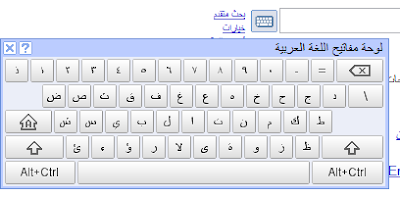
Last year, to make text input easy for people across the globe, we introduced a virtual keyboard API through code.google.com. This allowed developers to enable virtual keyboards on any text field or text area in their webpages. Today, we are taking this effort one step further by integrating virtual keyboards into Google search in 35 languages.

If you use Google search in one of the languages listed below, you’ll see a small keyboard icon show up next to the search field, on both the Google homepage and search results page. Clicking on that keyboard icon brings up a virtual keyboard in your language. You can input text by either clicking on the on-screen keyboard or pressing the corresponding key.
You can find out more information on how to use the virtual keyboard in our help article. If you use Google in a language not listed below and feel that your language will benefit from a virtual keyboard, let us know by voting for your language. We hope virtual keyboards help you find information more easily — especially those of you who speak/type/read in non-Latin scripts.
Languages with integrated virtual keyboards
Albanian
Arabic
Armenian
Basque
Belarusian
Bosnian
Bulgarian
Catalan
Croatian
Czech
Finnish
Galician
Georgian
Greek
Hebrew
Hindi
Hungarian
Icelandic
Kazakh
Kirghiz
Macedonian
Malayalam
Mongolian
Persian
Polish
Russian
Serbian
Slovak
Slovenian
Swedish
Tatar
Thai
Turkish
Ukrainian
Uzbek
Posted by Manish Bhargava, Product Manager Google Îñţérñåţîöñåļîžåţîờñ


--
සිංහල යුනිකෝඩ් සමූහය - Sinhala Unicode Group.
මෙම සමූහයට විද්යුත් තැපැල් පණිවුඩයක් එවීමට: Sinhala...@googlegroups.com
දායකත්වයෙන් ඉවත්වීමට මෙම ලිපිනයට ලියන්න: Sinhala-Unico...@googlegroups.com
වෙනත් විකල්ප සඳහා සමූහය වෙත එන්න: http://groups.google.com/group/Sinhala-Unicode?hl=si
If you have trouble reading Sinhala Fonts, please visit http://si.wikipedia.org/wiki/Wikipedia:Sinhala_font for instructions.
Sent to you by K3 via Google Reader:
via The Official Google Blog by A Googler on 4/29/10
You’ve spilled coffee on your keyboard. The a, e, i, o, u, and r keys have stopped working. Now try to search Google for the nearest computer repair shop. The pain of typing on this broken keyboard is similar to what many people searching in non-English languages feel when trying to type today. Typing searches on keyboards not designed for your languages can be frustrating, even impossible.Our user research has shown that many people are more comfortable formulating search queries in their own language but have difficulty typing these queries into Google. (Try typing नमस्ते on a keyboard with English letters.) To overcome the difficulty they face in typing in their local language scripts, some people have resorted to copying and pasting from other sites and from online translation tools. But there’s an easier way — a virtual, or “on-screen” keyboard, lets you type directly in your local language script in an easy and consistent manner, no matter where you are or what computer you’re using.
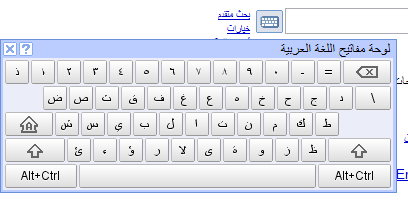
Virtual keyboards let people type directly in their local language script and don't require any additional software.
Last year, to make text input easy for people across the globe, we introduced a virtual keyboard API through code.google.com. This allowed developers to enable virtual keyboards on any text field or text area in their webpages. Today, we are taking this effort one step further by integrating virtual keyboards into Google search in 35 languages.
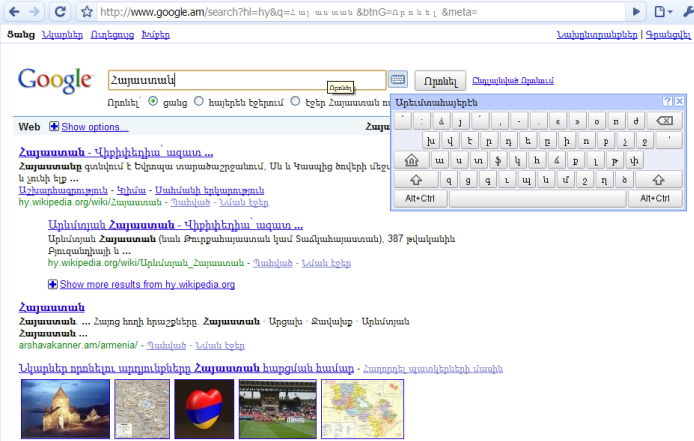
A virtual keyboard on www.google.am to input Armenian text (the query term is [armenia])
If you use Google search in one of the languages listed below, you’ll see a small keyboard icon
 show up next to the search field, on both the Google homepage and search results page. Clicking on that keyboard icon brings up a virtual keyboard in your language. You can input text by either clicking on the on-screen keyboard or pressing the corresponding key.
You can find out more information on how to use the virtual keyboard in our help article. If you use Google in a language not listed below and feel that your language will benefit from a virtual keyboard, let us know by voting for your language. We hope virtual keyboards help you find information more easily — especially those of you who speak/type/read in non-Latin scripts.
Languages with integrated virtual keyboards
Albanian
Arabic
Armenian
Basque
Belarusian
Bosnian
Bulgarian
Catalan
Croatian
Czech
Finnish
Galician
Georgian
Greek
Hebrew
Hindi
Hungarian
Icelandic
Kazakh
Kirghiz
Macedonian
Malayalam
Mongolian
Persian
Polish
Russian
Serbian
Slovak
Slovenian
Swedish
Tatar
Thai
Turkish
Ukrainian
Uzbek
Posted by Manish Bhargava, Product Manager Google Îñţérñåţîöñåļîžåţîờñ
Things you can do from here:
- Subscribe to The Official Google Blog using Google Reader
- Get started using Google Reader to easily keep up with all your favorite sites
සිංහල යුනිකෝඩ් සමූහය - Sinhala Unicode Group.
මෙම සමූහයට විද්යුත් තැපැල් පණිවුඩයක් එවීමට: Sinhala...@googlegroups.com
දායකත්වයෙන් ඉවත්වීමට මෙම ලිපිනයට ලියන්න: Sinhala-Unico...@googlegroups.com
වෙනත් විකල්ප සඳහා සමූහය වෙත එන්න: http://groups.google.com/group/Sinhala-Unicode?hl=si
If you have trouble reading Sinhala Fonts, please visit http://si.wikipedia.org/wiki/Wikipedia:Sinhala_font for instructions.
කෙසර
May 28, 2010, 3:47:46 AM5/28/10
to සිංහල යුනිකෝඩ් සමූහය - Sinhala Unicode Group
දැන් Google Language APIහි < http://code.google.com/apis/ajaxlanguage/documentation/referenceKeyboard.html
> සිංහල Virtual Keyboard අන්තර්ගත කොට ඇත.
මෙය Google Code Playgroundහි < http://code.google.com/apis/ajax/playground
> පහත දැක්වෙන JavaScript run කිරීමෙන් test කලහැක.
CODE:
/*
* How to setup up sinhala keyboards for textareas.
*/
google.load("elements", "1", {packages: "keyboard"});
function onLoad() {
var content = document.getElementById('content');
// Create the HTML for out text area
content.innerHTML = '<div><i>(Scroll down)</i> ' +
'Type Sinhala in textarea and type Arabic in
the other.</div>' +
'<textarea id="t1" style="width: 300px; ' +
'height: 100px;"></textarea> ';
var kbd1 = new google.elements.keyboard.Keyboard(
[google.elements.keyboard.LayoutCode.SINHALA],
['t1']);
}
google.setOnLoadCallback(onLoad);
/* End of Code */
ජය ශ්රී!
කෙසර
On Apr 30, 9:50 am, K3 <kesara.rathnay...@gmail.com> wrote:
> සිංහල භාෂාවට වෝට් කරන්න.http://spreadsheets.google.com/viewform?formkey=dHBoYWc3TFdCNm1mLTVVZ...
> - Get started using Google Reader to easily keep up with all your
> සිංහල Virtual Keyboard අන්තර්ගත කොට ඇත.
මෙය Google Code Playgroundහි < http://code.google.com/apis/ajax/playground
> පහත දැක්වෙන JavaScript run කිරීමෙන් test කලහැක.
CODE:
/*
* How to setup up sinhala keyboards for textareas.
*/
google.load("elements", "1", {packages: "keyboard"});
function onLoad() {
var content = document.getElementById('content');
// Create the HTML for out text area
content.innerHTML = '<div><i>(Scroll down)</i> ' +
'Type Sinhala in textarea and type Arabic in
the other.</div>' +
'<textarea id="t1" style="width: 300px; ' +
'height: 100px;"></textarea> ';
var kbd1 = new google.elements.keyboard.Keyboard(
[google.elements.keyboard.LayoutCode.SINHALA],
['t1']);
}
google.setOnLoadCallback(onLoad);
/* End of Code */
ජය ශ්රී!
කෙසර
On Apr 30, 9:50 am, K3 <kesara.rathnay...@gmail.com> wrote:
> සිංහල භාෂාවට වෝට් කරන්න.http://spreadsheets.google.com/viewform?formkey=dHBoYWc3TFdCNm1mLTVVZ...
>
> Sent to you by K3 via Google Reader: Integrating virtual keyboards in
> Google search via The Official Google Blog by A Googler on 4/29/10
> You’ve spilled coffee on your keyboard. The a, e, i, o, u, and r keys
> have stopped working. Now try to search Google for the nearest computer
> repair shop. The pain of typing on this broken keyboard is similar to
> what many people searching in non-English languages feel when trying to
> type today. Typing searches on keyboards not designed for your
> languages can be frustrating, even impossible.
>
> Our user research has shown that many people are more comfortable
> formulating search queries in their own language but have difficulty
> typing these queries into Google. (Try typing नमस्ते on a keyboard with
> English letters.) To overcome the difficulty they face in typing in
> their local language scripts, some people have resorted to copying and
> pasting from other sites and from online translation tools. But there’s
> an easier way — a virtual, or “on-screen” keyboard, lets you type
> directly in your local language script in an easy and consistent
> manner, no matter where you are or what computer you’re using.
>
> Sent to you by K3 via Google Reader: Integrating virtual keyboards in
> Google search via The Official Google Blog by A Googler on 4/29/10
> You’ve spilled coffee on your keyboard. The a, e, i, o, u, and r keys
> have stopped working. Now try to search Google for the nearest computer
> repair shop. The pain of typing on this broken keyboard is similar to
> what many people searching in non-English languages feel when trying to
> type today. Typing searches on keyboards not designed for your
> languages can be frustrating, even impossible.
>
> Our user research has shown that many people are more comfortable
> formulating search queries in their own language but have difficulty
> typing these queries into Google. (Try typing नमस्ते on a keyboard with
> English letters.) To overcome the difficulty they face in typing in
> their local language scripts, some people have resorted to copying and
> pasting from other sites and from online translation tools. But there’s
> an easier way — a virtual, or “on-screen” keyboard, lets you type
> directly in your local language script in an easy and consistent
> manner, no matter where you are or what computer you’re using.
>
> Virtual keyboards let people type directly in their local language
> script and don't require any additional software.
> Last year, to make text input easy for people across the globe, we
> introduced a virtual keyboard API through code.google.com. This allowed
> developers to enable virtual keyboards on any text field or text area
> in their webpages. Today, we are taking this effort one step further by
> integrating virtual keyboards into Google search in 35 languages.
>
> A virtual keyboard onwww.google.amto input Armenian text (the query
> script and don't require any additional software.
> Last year, to make text input easy for people across the globe, we
> introduced a virtual keyboard API through code.google.com. This allowed
> developers to enable virtual keyboards on any text field or text area
> in their webpages. Today, we are taking this effort one step further by
> integrating virtual keyboards into Google search in 35 languages.
>
> term is [armenia])
> If you use Google search in one of the languages listed below, you’ll
> see a small keyboard icon show up next to the search field, on both the
> If you use Google search in one of the languages listed below, you’ll
> Things you can do from here:
> - Subscribe to The Official Google Blog using Google Reader
> - Get started using Google Reader to easily keep up with all your
Reply all
Reply to author
Forward
0 new messages