Gmail Calendar Documents Reader Web more »
Recently Visited Groups | Help | Sign in
Google Groups Home
No Audio
There are currently too many topics in this group that display first. To make this topic appear first, remove this option from another topic.
There was an error processing your request. Please try again.
flag
  8 messages - Collapse all  -  Translate all to Translated (View all originals)
The group you are posting to is a Usenet group. Messages posted to this group will make your email address visible to anyone on the Internet.
Your reply message has not been sent.
Your post was successful
 
From:
To:
Cc:
Followup To:
Add Cc | Add Followup-to | Edit Subject
Subject:
Validation:
For verification purposes please type the characters you see in the picture below or the numbers you hear by clicking the accessibility icon. Listen and type the numbers you hear
 
Ray  
View profile  
 More options Apr 18, 11:59 pm
From: Ray <k7...@comcast.net>
Date: Sat, 18 Apr 2009 20:59:04 -0700 (PDT)
Local: Sat, Apr 18 2009 11:59 pm
Subject: No Audio
On the W4MQ Internet Remote Base I hear no audio.

    Reply to author    Forward  
You must Sign in before you can post messages.
To post a message you must first join this group.
Please update your nickname on the subscription settings page before posting.
You do not have the permission required to post.
Cedrick Johnson  
View profile  
 More options Apr 19, 1:02 am
From: Cedrick Johnson <cedri...@gmail.com>
Date: Sun, 19 Apr 2009 00:02:27 -0500
Local: Sun, Apr 19 2009 1:02 am
Subject: Re: [IRB] No Audio
Seems to work here, using latest version with IRB audio..

wt2p


    Reply to author    Forward  
You must Sign in before you can post messages.
To post a message you must first join this group.
Please update your nickname on the subscription settings page before posting.
You do not have the permission required to post.
Randy  
View profile  
 More options Apr 19, 9:40 am
From: "Randy" <k7...@comcast.net>
Date: Sun, 19 Apr 2009 06:40:52 -0700
Local: Sun, Apr 19 2009 9:40 am
Subject: Re: [IRB] Re: No Audio

Thank you for the report and glad it is giving you audio.  I have been
trying to get my audio to come on for quite some time with no luck yet.

                                              Ray K7RBR

--------------------------------------------------------------------------- -----

No virus found in this incoming message.
Checked by AVG - www.avg.com
Version: 8.0.238 / Virus Database: 270.12.0/2066 - Release Date: 04/18/09
09:55:00

[ multipart_alternative_part < 1K ]

No virus found in this outgoing message.
Checked by AVG - www.avg.com
Version: 8.0.238 / Virus Database: 270.12.0/2066 - Release Date: 04/18/09 09:55:00


    Reply to author    Forward  
You must Sign in before you can post messages.
To post a message you must first join this group.
Please update your nickname on the subscription settings page before posting.
You do not have the permission required to post.
Cedrick Johnson  
View profile  
 More options Apr 19, 1:56 pm
From: Cedrick Johnson <cedri...@gmail.com>
Date: Sun, 19 Apr 2009 12:56:06 -0500
Local: Sun, Apr 19 2009 1:56 pm
Subject: Re: [IRB] Re: No Audio
Which version are you running?

I assume you're able to connect, and the irb audio window pops up?

Try this, see if maybe it works
1) connect to the station, when the irb audio window pops up, try
closing it.
2) Press the Start Audio button on the txcvr and wait for the irb audio
window to pop up again

I hope this helps... I would say look at firewall config, but I have a
fairly battened down fw here, with no ports opened back to this computer
(port forwarding etc..)

GL, 73
wt2p


    Reply to author    Forward  
You must Sign in before you can post messages.
To post a message you must first join this group.
Please update your nickname on the subscription settings page before posting.
You do not have the permission required to post.
Randy  
View profile  
 More options Apr 19, 4:32 pm
From: "Randy" <k7...@comcast.net>
Date: Sun, 19 Apr 2009 13:32:00 -0700
Subject: Re: [IRB] Re: No Audio

I am running version 6.000 and I can connect to the webXCVR but I do not
understand your next question about the IRB audio window popping up?  Can
you please explain?

                                                                           Ray
K7RBR

--------------------------------------------------------------------------- -----

No virus found in this incoming message.
Checked by AVG - www.avg.com
Version: 8.0.238 / Virus Database: 270.12.0/2066 - Release Date: 04/18/09
09:55:00

[ multipart_alternative_part < 1K ]

No virus found in this outgoing message.
Checked by AVG - www.avg.com
Version: 8.0.238 / Virus Database: 270.12.0/2066 - Release Date: 04/18/09 09:55:00


    Reply to author    Forward  
You must Sign in before you can post messages.
To post a message you must first join this group.
Please update your nickname on the subscription settings page before posting.
You do not have the permission required to post.
Cedrick Johnson  
View profile  
 More options Apr 19, 4:45 pm
From: Cedrick Johnson <cedri...@gmail.com>
Date: Sun, 19 Apr 2009 15:45:12 -0500
Local: Sun, Apr 19 2009 4:45 pm
Subject: Re: [IRB] Re: No Audio

I'd try upgrading to 6.002.6 (that's the version I'm on) from w4mq's site...

Check to see which audio format you're using:

Setup >  Select Sound Type

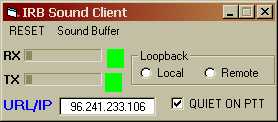
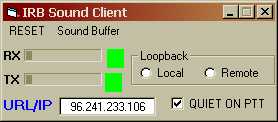
For W4MQ, I'm using IRB Sound. When you connect, a little window like this appears:


Randy wrote:

I am running version 6.000 and I can connect to the webXCVR but I do not understand your next question about the IRB audio window popping up?  Can you please explain?

                                                                          Ray K7RBR
----- Original Message ----- From: "Cedrick Johnson" <cedrickj@gmail.com>
To: <remotebase@googlegroups.com>
Sent: Sunday, April 19, 2009 10:56 AM
Subject: [IRB] Re: No Audio


Which version are you running?

I assume you're able to connect, and the irb audio window pops up?

Try this, see if maybe it works
1) connect to the station, when the irb audio window pops up, try
closing it.
2) Press the Start Audio button on the txcvr and wait for the irb audio
window to pop up again

I hope this helps... I would say look at firewall config, but I have a
fairly battened down fw here, with no ports opened back to this computer
(port forwarding etc..)

GL, 73
wt2p

Randy wrote:
Thank you for the report and glad it is giving you audio.  I have been
trying to get my audio to come on for quite some time with no luck yet.

                                             Ray K7RBR
----- Original Message ----- From: "Cedrick Johnson" <cedrickj@gmail.com>
To: <remotebase@googlegroups.com>
Sent: Saturday, April 18, 2009 10:02 PM
Subject: [IRB] Re: No Audio


Seems to work here, using latest version with IRB audio..

wt2p

Ray wrote:
On the W4MQ Internet Remote Base I hear no audio.
>


>>


--------------------------------------------------------------------------------


No virus found in this incoming message.
Checked by AVG - www.avg.com
Version: 8.0.238 / Virus Database: 270.12.0/2066 - Release Date:
04/18/09 09:55:00
------------------------------------------------------------------------


No virus found in this outgoing message.
Checked by AVG - www.avg.com
Version: 8.0.238 / Virus Database: 270.12.0/2066 - Release Date: 04/18/09 09:55:00


--------------------------------------------------------------------------------


No virus found in this incoming message.
Checked by AVG - www.avg.com
Version: 8.0.238 / Virus Database: 270.12.0/2066 - Release Date: 04/18/09 09:55:00

No virus found in this outgoing message. Checked by AVG - www.avg.com Version: 8.0.238 / Virus Database: 270.12.0/2066 - Release Date: 04/18/09 09:55:00

  moz-screenshot.jpg
10K Download

    Reply to author    Forward  
You must Sign in before you can post messages.
To post a message you must first join this group.
Please update your nickname on the subscription settings page before posting.
You do not have the permission required to post.
Randy  
View profile  
 More options Apr 19, 5:55 pm
From: "Randy" <k7...@comcast.net>
Date: Sun, 19 Apr 2009 14:55:53 -0700
Local: Sun, Apr 19 2009 5:55 pm
Subject: Re: [IRB] Re: No Audio

I upgraded to 6.002.6 and on the IRB Sound Client window where it says Loopback do I need to put a check mark in either Local or Remote?  I am also using IRB Sound.

  moz-screenshot.jpg
10K Download

[ multipart_alternative_part < 1K ]

No virus found in this outgoing message.
Checked by AVG - www.avg.com
Version: 8.0.238 / Virus Database: 270.12.0/2066 - Release Date: 04/18/09 09:55:00


    Reply to author    Forward  
You must Sign in before you can post messages.
To post a message you must first join this group.
Please update your nickname on the subscription settings page before posting.
You do not have the permission required to post.
Randy  
View profile  
 More options Apr 20, 1:30 pm
From: "Randy" <k7...@comcast.net>
Date: Mon, 20 Apr 2009 10:30:45 -0700
Local: Mon, Apr 20 2009 1:30 pm
Subject: Re: [IRB] Re: No Audio

I have upgraded to 6.002.6 but still no audio.  On my IRB SOUND window it shows the RX window about 1\2 full and the TX window empty.  I am using the IRB Sound.  Can you please tell me can you listen to all of the bands on the WebXCVR and is the audio pretty good?  Thank You.

                                               Ray K7RBR

  moz-screenshot.jpg
10K Download

[ multipart_alternative_part < 1K ]

No virus found in this outgoing message.
Checked by AVG - www.avg.com
Version: 8.0.238 / Virus Database: 270.12.1/2069 - Release Date: 04/20/09 10:36:00


    Reply to author    Forward  
You must Sign in before you can post messages.
To post a message you must first join this group.
Please update your nickname on the subscription settings page before posting.
You do not have the permission required to post.
End of messages
« Back to Discussions « Newer topic     Older topic »

Create a group - Google Groups - Google Home - Terms of Service - Privacy Policy
©2009 Google