
Nanode 5: Issues w/ Reading MAC Address

Luis Fraguada
Nanode MAC reader
Reading MAC address... failure
MAC address is AF:00:00:04:A8:01
NanodeUNIO test
Read status register...
(failure)
3
Read the device...
(failure)
00: 00000000000000000000000000000000 ................
10: 00000000000000000000000000000000 ................
20: 00000000000000000000000000000000 ................
30: 00000000000000000000000000000000 ................
40: 00000000000000000000000000000000 ................
50: 00000000000000000000000000000000 ................
60: 00000000000000000000000000000000 ................
70: 00000000000000000000000000000000 ................
80: 00000000000000000000000000000000 ................
90: 00000000000000000000000000000000 ................
A0: 00000000000000000000000000000000 ................
B0: 00000000000000000000000000000000 ................
C0: 00000000000000000000000000000000 ................
D0: 00000000000000000000000000000000 ................
E0: 00000000000000000000000000000000 ................
F0: 00000000000000000000000000000000 ................
Write to the device...
(failure)
Read again...
(failure)
00: 00000000000000000000000000000000 ................
10: 00000000000000000000000000000000 ................
20: 00000000000000000000000000000000 ................
30: 00000000000000000000000000000000 ................
40: 00000000000000000000000000000000 ................
50: 00000000000000000000000000000000 ................
60: 00000000000000000000000000000000 ................
70: 00000000000000000000000000000000 ................
80: 00000000000000000000000000000000 ................
90: 00000000000000000000000000000000 ................
A0: 00000000000000000000000000000000 ................
B0: 00000000000000000000000000000000 ................
C0: 00000000000000000000000000000000 ................
D0: 00000000000000000000000000000000 ................
E0: 00000000000000000000000000000000 ................
F0: 00000000000000000000000000000000 ................
Try writing in the write-protected area...
(failure)
Read again...
(failure)
00: 00000000000000000000000000000000 ................
10: 00000000000000000000000000000000 ................
20: 00000000000000000000000000000000 ................
30: 00000000000000000000000000000000 ................
40: 00000000000000000000000000000000 ................
50: 00000000000000000000000000000000 ................
60: 00000000000000000000000000000000 ................
70: 00000000000000000000000000000000 ................
80: 00000000000000000000000000000000 ................
90: 00000000000000000000000000000000 ................
A0: 00000000000000000000000000000000 ................
B0: 00000000000000000000000000000000 ................
C0: 00000000000000000000000000000000 ................
D0: 00000000000000000000000000000000 ................
E0: 00000000000000000000000000000000 ................
F0: 00000000000000000000000000000000 ................
Nanode MAC reader
Reading MAC address... failure
MAC address is 02:79:08:F1:01:A1

Ian Chilton
If the DHCP Test is working then your hardware must be ok.
I use the https://github.com/thiseldo/NanodeMAC with no problem but
i'm still on Arduino 0022 / 0023 so if you are on 1.0, it may be worth
downloading and trying that.
Ian

Stephen Early
On Wednesday, 4 January 2012 12:03:19 UTC, Ian Chilton wrote:
Hi,If the DHCP Test is working then your hardware must be ok.
I use the https://github.com/thiseldo/NanodeMAC with no problem but
i'm still on Arduino 0022 / 0023 so if you are on 1.0, it may be worth
downloading and trying that.
Steve
Ian Chilton
Odd.
If you use this sketch with 0023, what exact output do you get? -
Ian
On Wed, Jan 4, 2012 at 12:58 PM, Luis Fraguada <frag...@gmail.com> wrote:
> Hello Ian,
> Yes, I have also used that code in Arduino 0023 to no avail.
>
> What would be a way to check if I can even communicate properly to the chip?
>
> best,
> Luis
Luis Fraguada
DHCP Client test
0:0:0:0:0:0
Init ENC28J60
Init done
ENC28J60 version 7
Requesting IP Addresse
My IP: 192.168.1.45
Netmask: 255.255.255.0
DNS IP: ##.##.##.##
GW IP: 192.168.1.1
Luis Fraguada
best,
Luis
Stephen Early
Steve
Luis Fraguada
I will report back with the results tomorrow.
Thanks
Luis
Ian Chilton
This looks like you have a hardware problem as it's not getting the
mac address there either (0:0:0:0:0:0).
I'd check that you have no shorts (around it and the ATMega
particularly) and that it's connected to the ATMega (D7), Vcc and GND
correctly.
Ian
Luis Fraguada
Vcc and GND are correctly connected. AREF / 21 and PD0 / 2 are both connected to the last pin on the chip.
Any way to remedy this?
Luis

Nigel Worsley
> Vcc and GND are correctly connected. AREF / 21 and PD0 / 2 are both connected to the last pin on the chip.
I think you are counting the pin numbers incorrectly. They run anticlockwise, with pin 1 being the bottom right if
you orient the nanode as shown in the build guide. This means that the pin on the MAC chip is conected to
PD7 / 13 (which it should be) and also to either AREF / 21 or GND / 22 depending on how your numbering goes,
which are both very close to the SMT pad. GND is about a millimetre away, it is very easy to have a tiny bit of
older bridging the gap that can only be seen if you look really closely (or use a magnifying glass if your eyesight is
geting as bad as mine, I often use a 10x jeweller's style eyepiece)
Nigle
Luis Fraguada
oops, I was checking the wrong chip!
Pins 8/GND, 13/PD7, and 22/GND are connected to that pin on the MAC chip. Here are some photos:
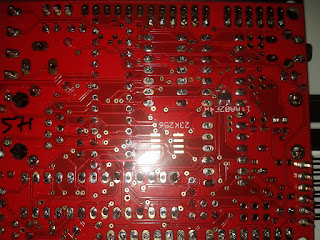

Thanks for the attention!
Luis
Luis Fraguada
Thanks!
Luis
Stephen Early
What was the result of the continuity test? You said "8/GND, 13/PD7, and 22/GND are connected to that pin on the MAC chip" - does that mean that there's a connection between all three of those pins on the processor? If so, there's a short somewhere between DIG7 and ground which you'll need to find and fix.
Luis Fraguada
13/PD7, 8/GND, and 22/GND are all connected to Pins 1/SCIO and 3/Vss of the 11AA02E48
Also all of those pins (13/PD7, 8/GND, and 22/GND) connect to each other.
Unfortunately, I am not just sarting with this so finding shorts is not something I've really mastered. From what I can see, there are no giant globs of solder connceting any two contacts. Other than that, I am not so sure how to find this short. I suppose then that I could use the board, just with a fake MAC id and no access to the memory space on the 11AA02E48.

olab
There is obviously a short.
You have 2 circuits here :
8 + 22 + 3 (MAC chip) are correctly grounded.
13 + 1 (MAC chip) are correctly connected together but wrongly also to
ground.
I have designed a .jpeg which could help. Look here : http://i44.tinypic.com/kbubua.jpg
It's part of my gerber view of nanode 5 PCB. In order to highlight the
path that needs a careful checking for short, I have grayed the rest.
The green tracks are bottom side, red top side.
You should check specifically around the places pointed by the yellow
arrows, both sides. Judging by the photos, there must be no problem
elsewhere.
At a last resort, if you find nothing, you may want to cut the track
above the yellow cross just at the via (hole) to part the path in two
and find out on which side is the short. It is not totally impossible
that the MAC chip could have fried and shorted internally 1-3.
Hope this helps ;)
Luis Fraguada
I sincerely appreciate the graphic and the explanation. I did not have a chance to check everything over the weekend, but I was able to identify the zones you mention. Will report back when I have something more conclusive. Again, thanks!
Luis