
Magic Lantern 0.2.0 RC1 for 550D firmware 1.0.9

Alex
for 550D firmware 1.0.9 is stable enough to release it to the general
public.
You can find it on the main 550D wiki page:
http://magiclantern.wikia.com/wiki/550D
Features:
* GUI menus: press the ERASE button to display them
* Bit rate control (QScale parameter) for the H.264 encoder
* Zebra stripes for overexposed / underexposed areas
* Spotmeter, histogram
* Cropmarks (16:9, Cinemascope, Fisheye)
* Simple intervalometer
* Trap Focus: camera takes a picture when something comes in focus
* Wireless trigger with the LCD face sensor & your own hand
* AE bracketing (like on 5D2 ML)
* Rack focus
* Stack focus (Live View only)
* Lens data computation
* Onscreen audio meters
* Manual audio gain, selectable input source, disable AGC and
digital filters
* Display time remaining during video recording
* Debug functions (display CMOS temperature, screenshot, logging)
We also have a new Windows tool for making the cards bootable
(EOSCard), and new install & user guides.
Even with all the testing this version has received, nobody can
guarantee it is bug-free. There is still a small risk in using this
software, and we want to fix all the bugs and improve it. Please read
the installation instructions carefully!
New developments will continue. Maybe coming soon: customizable ISO,
auto QScale, fluent zebras, better UI, scripting... suggestions
welcome.
Many thanks to all the Magic Lantern developers, contributors and
users who made possible this release!
Enjoy!
Alex

arm.indy
Indy

Pedro Barbosa

Morgan Look

Arm
Anyway i found some bug.
During the play back mode, you cant hear any sounds that been recored.
Great job!!

de...@42u.de
> This Version works very well.
> Anyway i found some bug.
> During the play back mode, you cant hear any sounds that been recored.
Deti
Alex
steps between ISO 100 and ISO 8000). Unzip autoexec.bin over the 0.2.0
files on the card.
> --
> http://magiclantern.wikia.com/
>
> To post to this group, send email to ml-d...@googlegroups.com
> To unsubscribe from this group, send email to
> ml-devel+u...@googlegroups.com
> For more options, visit this group at
> http://groups.google.com/group/ml-devel?hl=en

h4nz
fine work!!
h4nz
On 19 Dez., 22:02, Alex <broscutama...@gmail.com> wrote:
> Test build for in-camera audio playback & custom ISO (ISO 25600 and 50
> steps between ISO 100 and ISO 8000). Unzip autoexec.bin over the 0.2.0
> files on the card.
>
> > On 12/19/2010 08:58 PM, Arm wrote:
>
> >> This Version works very well.
> >> Anyway i found some bug.
> >> During the play back mode, you cant hear any sounds that been recored.
>
> > I fixed it already, update your sources and recompile.
>
> > Deti
>
> > --
> >http://magiclantern.wikia.com/
>
> > To post to this group, send email to ml-d...@googlegroups.com
> > To unsubscribe from this group, send email to
> > ml-devel+u...@googlegroups.com
> > For more options, visit this group at
> >http://groups.google.com/group/ml-devel?hl=en
>
>
>
> 59KAnzeigenHerunterladen

Piers
M-L-Userrr
ISO's .
And about this white balance thing, eosmovrec is capable of changing
white balance values in kelvins with my 550D,so maybe its sourcecode
would help with this a bit ?
http://sourceforge.net/projects/eos-movrec/
> 59KZobaczPobierz
M-L-Userrr
ISO's above ISO6400 look the same so how about erasing them ? :) The
same is in photo mode without MLantern ,ISO H(12800)looks the same as
6400.
Alex
and AV modes at least) they do work well. I've tested ISO 12800 vs
25600 with a picture at f5.6 and f8 and they came out with the same
brightness. Of course, the ISO 25600 was noisier... but still good for
instant messenger avatar :)
Deti
camera is in playback mode. This sends audio straight to the speaker or
audio output. I think it should work now as expected.
Deti
Piers
Deti
Deti
Alex
ISO fixes:
- all the advertised 50 steps should be now present (I've messed the
source with previous build)
- in video mode, you can select only up to 6400 (more generally, it
will skip all values refused by the camera.. like ISO 100 in HTP mode)
Menu improvement:
- you can toggle the values backwards using Disp button (thanks Tobias
for the patch!).
This would be nice to be implemented using the wheel... but I don't
know how to decode it yet.

Fotohobis
more about video futures,
but what do you think, is it posible in future to enable lens AF
microadjustment function for 550d owner?
On 20 Gruo, 17:56, Alex <broscutama...@gmail.com> wrote:
> New test build.
>
> magiclantern-2010Dec20.550d.fw109.iso+menu.alex.zip
> 60KŽiūrėtiSiųstis
>
> - Rodyti cituojamą tekstą -
Alex
focus as a workaround.
2010/12/20 Fotohobis <foto...@gmail.com>:

robert
However, during LiveView or Video mode, the Delete key was used to
reset the position of the focus rectangle to the center of the screen.
Now it's used by ML. I think we would still need the rectangle
position reset feature as in the original firmware - is there any
reason why Delete button was chosen? The central SET button has no
function by default (it's disabled in Custom Functions) - we could use
that. Or perhaps a setting in magic.cfg would make anyone happy,
allowin everyone to specfy a button of their choice.
On Dec 20, 4:56 pm, Alex <broscutama...@gmail.com> wrote:
> New test build.
>
> ISO fixes:
> - all the advertised 50 steps should be now present (I've messed the
> source with previous build)
> - in video mode, you can select only up to 6400 (more generally, it
> will skip all values refused by the camera.. like ISO 100 in HTP mode)
>
> Menu improvement:
> - you can toggle the values backwards using Disp button (thanks Tobias
> for the patch!).
>
> This would be nice to be implemented using the wheel... but I don't
> know how to decode it yet.
>
> > On 12/20/10 12:23 PM, Piers wrote:
>
> >> I agree it's best for now to turn it off, but I'd still like to see it
> >> switchable in a future version.. or, wait, is A/V out still active when
> >> in record?
>
> > Yes sure.
>
> > Deti
>
> > --
> >http://magiclantern.wikia.com/
>
> > To post to this group, send email to ml-d...@googlegroups.com
> > To unsubscribe from this group, send email to
> > ml-devel+u...@googlegroups.com
> > For more options, visit this group at
> >http://groups.google.com/group/ml-devel?hl=en
>
>
>
> 60KViewDownload
Justyna Nadriczna
Alex
used to set lots of settings (with the Q button).
Reason for chosing Delete: when I clicked it outside Play mode,
nothing seem to happen. But maybe the rectangle was already centered
:D
Alex
Will add a config file option.
robert
I've set button.menu.on = 4 and button.menu.off = 5 at the end of my
config file, replaced autoexec.bin with the new one. Pressing SET
shows a black rectangle when in P mode. It displays the menu fine in
Movie mode. Unfortunately it interferes with ML itself, as after
showing the menu, SET affects the menuitems (correctly), and it cannot
be hidden except by showing some original canon menu (press Menu key
for example).
Can you give me the codes for the DOF preview button (the one below
the lens release button)? I think I could best use that for ML menu on/
off.
On Dec 20, 9:53 pm, Alex <broscutama...@gmail.com> wrote:
> Robert: set button.menu.on = 4 in config file.
> For more details, see the last page in the user guide from the archive.
>
> > ... whoops... seems it does nothing with those settings.
>
> > Will add a config file option.
>
> >> Outside LV, I use SET for flash exposure compensation. In LV, it's
> >> used to set lots of settings (with the Q button).
>
> >> Reason for chosing Delete: when I clicked it outside Play mode,
> >> nothing seem to happen. But maybe the rectangle was already centered
> >> :D
>
> >> On Mon, Dec 20, 2010 at 10:25 PM, Justyna Nadriczna
> >> <justynadric...@gmail.com> wrote:
> >>> SET button to turn on menu and delete button to turn off menu ?
>
> 887KViewDownload
robert
good.
robert
shooting session of 30-50 images (usually P mode, but also Av),
pressing Play button locks the camera. Display is black, backlight can
be seen. Battery re-insertion helps.
Not only this version, all of the latest days produce this.
> For more details, see the last page in the user guide from the archive.
>
> > ... whoops... seems it does nothing with those settings.
>
> > Will add a config file option.
>
> >> Outside LV, I use SET for flash exposure compensation. In LV, it's
> >> used to set lots of settings (with the Q button).
>
> >> Reason for chosing Delete: when I clicked it outside Play mode,
> >> nothing seem to happen. But maybe the rectangle was already centered
> >> :D
>
> >> On Mon, Dec 20, 2010 at 10:25 PM, Justyna Nadriczna
> >> <justynadric...@gmail.com> wrote:
> >>> SET button to turn on menu and delete button to turn off menu ?
>
> 887KViewDownload
Alex
robert
Alex
that) which freezes the camera?

bbss
*Bracketing.
-Can the speed between shots be increased, as in the aeb mode?
-Some form of timer? It seems the only way to trigger the bracketing
is by pushing set on test bracket. This can move the camera on first
shot.
Lcd as trigger to work on both intervallometer and bracket maybe? To
be able to use the infrared remote would be great.
Previous releases it was advices to remove the battery after use. Is
this still necessary?
**awesome work, jealous of you guys skills!**

Tobias Rho
Alex added a config file property for the delay between the shots:
brack.delay=1000
The default delay of 1000ms is necessary, because without it the camera
freezes from time to time using bracketing in live view (LV) mode.
I had no issues setting the delay to 0 when shooting without LV in M, Av
& Tv mode.
Please give it a try, too.
See also our discussion here:
https://bitbucket.org/hudson/magic-lantern/issue/189/support-for-larger-ae-bracketing-steps
Tobias
> Thanks for the release. Really great. A few questions.
>
> *Bracketing.
> -Can the speed between shots be increased, as in the aeb mode?
> -Some form of timer? It seems the only way to trigger the bracketing
> is by pushing set on test bracket. This can move the camera on first
> shot.
>
> Lcd as trigger to work on both intervallometer and bracket maybe? To
> be able to use the infrared remote would be great.
>
> Previous releases it was advices to remove the battery after use. Is
> this still necessary?
>
> **awesome work, jealous of you guys skills!**
>
>
> On Dec 19, 7:36 pm, Alex<broscutama...@gmail.com> wrote:
>> After lots of testing and bug fixing, we believe the new Magic Lantern
>> for 550D firmware 1.0.9 is stable enough to release it to the general
>> public.
>>
>> You can find it on the main 550D wiki page:http://magiclantern.wikia.com/wiki/550D
>>
>> Features:
>> * GUI menus: press the ERASE button to display them
>> * Bit rate control (QScale parameter) for the H.264 encoder
>> * Zebra stripes for overexposed / underexposed areas
>> * Spotmeter, histogram
>> * Cropmarks (16:9, Cinemascope, Fisheye)
>> * Simple intervalometer
>> * Trap Focus: camera takes a picture when something comes in focus
>> * Wireless trigger with the LCD face sensor& your own hand
>> * AE bracketing (like on 5D2 ML)
>> * Rack focus
>> * Stack focus (Live View only)
>> * Lens data computation
>> * Onscreen audio meters
>> * Manual audio gain, selectable input source, disable AGC and
>> digital filters
>> * Display time remaining during video recording
>> * Debug functions (display CMOS temperature, screenshot, logging)
>>
>> We also have a new Windows tool for making the cards bootable
>> (EOSCard), and new install& user guides.
bbss
Thanks that worked perfectly. Had some difficulty to get the property
accepted. So I saved the config in the camera, then changed the value
in notepad.
In live view it worked the best, no issue in av-mode. Just as quick as
aeb, great. It was slower when not in live view.
So now just the remote or timer trigger. Can I do the same here? add a
delay for the trigger? It's not ideal for hand help. But I could have
two cards. I only found one way to trigger. Have camera in continuous,
and press 'SET' on 'Test bracket'. Induces shake.
bbss
On Dec 21, 9:45 pm, Tobias Rho <tobias....@googlemail.com> wrote:
> Hello bbss,
>
> Alex added a config file property for the delay between the shots:
>
> brack.delay=1000
>
> The default delay of 1000ms is necessary, because without it the camera
> freezes from time to time using bracketing in live view (LV) mode.
>
> I had no issues setting the delay to 0 when shooting without LV in M, Av
> & Tv mode.
> Please give it a try, too.
>

Chris71
that I am really impressed by all the new features! :-)
So I would like to thank Alex and you other guys to make this
possible!
There is one feature request that I have:
I would like to have an option in the input selection of Audio menu
that the camera itself decides whether to use the internal mic or the
external stereo input.
What I am asking for is the normal behaviour of the original firmware
(if a mic-plug is put into the socket for the external stereo, the
camera recognizes this and automatically and switches to external
stereo), so hopefully this is not difficult to implement.
The reason I am asking for this feature is that I quite often use just
the internal mic but every now and than use my OKM II as an external
mic. So it would be quite handy if I do not have to manually switch to
the external mic.
Chris

konarix
Thx for ML. This is very great stuff.
I wonder is there a posibility, that ML would display Shutter Speed,
Aperture, Exposure compensation ammount, ISO Speed and Battery check,
just like the oryginal display on 550D?
If it's possible, we can clear oryginal display by pressing Display
button, and maybe then ML would display correct values for ISO like
110,115,125,140,160...
Thx for Reply.
Best Regards.
Alex
Small bugfixes and a new feature: HDR images and timelapses. It's in
the "Shoot" menu and is used together with intervalometer or LCD
Remote. Also works in M mode.
Intervalometer & Brack have now a delay before starting => no shake.
With the LCD remote, you don't touch the camera => no shake.
I'm thinking to remove the Brack menu and leave only the HDR one. This
will make some space for new menus. Thoughts?
Alex
Microphone: if the camera sends an event which I can get, it's
possible. I'll try.
Alex
(in EV).
> 1018KViewDownload
Piers
Piers
Alex
HDR effect, when lighting is very tricky).
On Wed, Dec 22, 2010 at 11:58 PM, Piers <pie...@gmail.com> wrote:
> Dude! I knew I could rely on you.
>

Trammell Hudson
> Microphone: if the camera sends an event which I can get, it's
> possible. I'll try.
Look in hotplug_task (in Canon's firmware) for details on how to detect
USB, HDMI, and MIC events. If you search for ISR you can find it
easily. I thought we had the mic insert property named in property.h,
but don't see it off hand.
--
Trammell
Piers
Alex
cool is that I can speak at them and the camera hears :)
8003002b: 1 when headphones are plugged in, 0 when not. I don't know
if it detects the mic type (i.e. other values when plugging with real
mic).
I did this test with Debug->Draw_prop.
Probably the best way is to add another setting to "Inp" (Auto) which
should enable the auto-switch.

Matt Dennie
Chris71
I agree that an "Auto" setting for "Inp" would be a nice way to
implement this feature into the Menu.
On the technical side, maybe it would also be possible simply not to
change (override) the way that the camera itself chooses the mic
source when "Auto" is selected.
Piers
- Auto
- Int L, Ext R
- Int L, Ext Balanced
- (and maybe it would be useful to have forced int/ext? I can't see why but I mention it)
Piers
bbss
shots as I could with the previous release when I changed brack.delay
= 0. Didn't seem to work. Tried the previous config file as well.
I personally would like to have the brack menu, as you included the
timer, so this can be customized. But I see the point. That small
feature takes up a whole lot of space, but with the brack.startdelay
handle it became very useful.
I would also like to trigger this with the infrared remote. If I am in
front of the camera. That is the only thing I can think of that may be
missing.
ML 550d bracketing now beat the 1D series excellent bracket function
imo. Kewl :)
----
I need to learn the basics of this. At least so I can copy and paste
code and customize meny and such things myself. That would be great.
But don't know how difficult it will be to acquire the skills.
bbss
> 1018KViewDownload

BramKrist
A/V out, the LCD automatically turns off...
It's possible to monitoring video recording and sound recording at the
same time? Thanks..
robert
- Ext L, Ext R
setting also, for audio input!
There are tines when you need stereo input from external sources.
On Dec 23, 12:33 am, Piers <pie...@gmail.com> wrote:
> "Auto" would, in fact, take care of both int dual mono and ext stereo, so if
> memory serves we'd want:
>
> - Int L, Ext R
> - Int L, Ext Balanced
> - (and maybe it would be useful to have forced int/ext? I can't see why
> but I mention it)
robert
> 1018KViewDownload
robert
the screen!
There a 3 labels still left there - could you please remove these also
when Global Draw is OFF?
Also clear Preview doesn't remove all texts. There are
some leftovers on the bottom and top right. I guess these aren't there
on purpose while clear Preview is on...
On Dec 19, 7:36 pm, Alex <broscutama...@gmail.com> wrote:
> After lots of testing and bug fixing, we believe the new Magic Lantern
> for 550D firmware 1.0.9 is stable enough to release it to the general
> public.
>
> You can find it on the main 550D wiki page:http://magiclantern.wikia.com/wiki/550D
>
> Features:
> * GUI menus: press the ERASE button to display them
> * Bit rate control (QScale parameter) for the H.264 encoder
> * Zebra stripes for overexposed / underexposed areas
> * Spotmeter, histogram
> * Cropmarks (16:9, Cinemascope, Fisheye)
> * Simple intervalometer
> * Trap Focus: camera takes a picture when something comes in focus
> * Rack focus
> * Stack focus (Live View only)
> * Lens data computation
> * Onscreen audio meters
> * Manual audio gain, selectable input source, disable AGC and
> digital filters
> * Display time remaining during video recording
> * Debug functions (display CMOS temperature, screenshot, logging)
>
> We also have a new Windows tool for making the cards bootable
Alex
Canon code redraws it continuously. Battery icon and Canon histogram
have the same problem.
If it's not this, post a screenshot.
Arman
initial video recording with these builds? The first video recording
after turning on the camera always has a short but extremely loud
audio burst around 1 or 2 seconds in. This happens with the both the
int/ext mics ...

Audionut
Useful for those who record using an external device.
And it would allow more bitrate for the video.
And most importantly, thanks a bunch for this excellent firmware.
Alex
I'll be offline for a while (maybe until next year), and therefore I
wish Merry Christmas and (maybe) Happy New Year to all the Magic
Lantern users and developers.
Here's a new build which should fix many unstable behaviors. I'll do
some more tests in the next few hours, until I'll leave, but so far it
worked very well for me. I've tested all the new cropmarks, did a
short timelapse (60 images) and wrote some garbage to config file. No
crashes or unstable behaviors yet.
Enjoy Magic Lantern and don't brick your cameras!
Alex
sawomedia
See you around next year ;)
Greetings
sawo
On 24 Dez., 09:32, Alex <broscutama...@gmail.com> wrote:
> Hello,
>
> I'll be offline for a while (maybe until next year), and therefore I
> wish Merry Christmas and (maybe) Happy New Year to all the Magic
> Lantern users and developers.
>
> Here's a new build which should fix many unstable behaviors. I'll do
> some more tests in the next few hours, until I'll leave, but so far it
> worked very well for me. I've tested all the new cropmarks, did a
> short timelapse (60 images) and wrote some garbage to config file. No
> crashes or unstable behaviors yet.
>
> Enjoy Magic Lantern and don't brick your cameras!
>
> > Is it also possible to disable audio recording.
> > Useful for those who record using an external device.
> > And it would allow more bitrate for the video.
>
> > And most importantly, thanks a bunch for this excellent firmware.
>
> > --
> >http://magiclantern.wikia.com/
>
> > To post to this group, send email to ml-d...@googlegroups.com
> > To unsubscribe from this group, send email to ml-devel+u...@googlegroups.com
> > For more options, visit this group athttp://groups.google.com/group/ml-devel?hl=en
>
>
>
> 1019KAnzeigenHerunterladen

shd
You ! :)
On 24 Gru, 10:17, Alex <broscutama...@gmail.com> wrote:
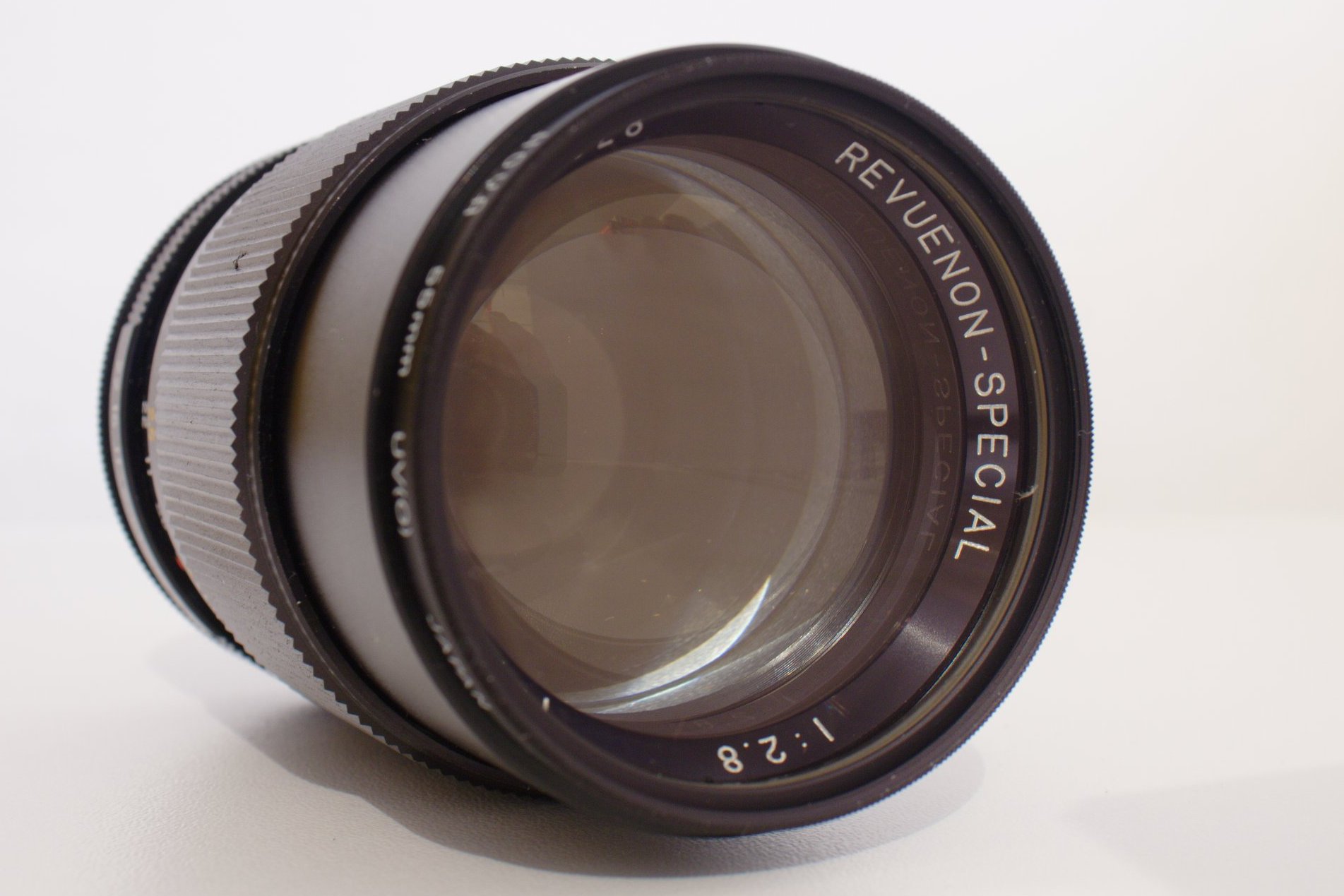
> P.S. Here's what I've got from the donations (an M42 Revuenon Special
> 135/2.8). Works pretty nice with trap focus :)
>
> Thanks to all the Magic Lantern users who supported the project!
>
> > Hello,
>
> > I'll be offline for a while (maybe until next year), and therefore I
> > wish Merry Christmas and (maybe) Happy New Year to all the Magic
> > Lantern users and developers.
>
> > Here's a new build which should fix many unstable behaviors. I'll do
> > some more tests in the next few hours, until I'll leave, but so far it
> > worked very well for me. I've tested all the new cropmarks, did a
> > short timelapse (60 images) and wrote some garbage to config file. No
> > crashes or unstable behaviors yet.
>
> > Enjoy Magic Lantern and don't brick your cameras!
>
> > Alex
>
> >> Is it also possible to disable audio recording.
> >> Useful for those who record using an external device.
> >> And it would allow more bitrate for the video.
>
> >> And most importantly, thanks a bunch for this excellent firmware.
>
> >> --
> >>http://magiclantern.wikia.com/
>
> >> To post to this group, send email to ml-d...@googlegroups.com
> >> To unsubscribe from this group, send email to ml-devel+u...@googlegroups.com
> >> For more options, visit this group athttp://groups.google.com/group/ml-devel?hl=en
>
>
>
> 292KZobaczPobierz

totriz
> 1019KViewDownload
Stokis
video i take after turning the camera on. It is very bad, because
eveytime I turn the camera on and take the first video, i need to
delete it because of audio bug at the beginning of the video. The
audio burst effect starts after 2 seconds in video, and lasts for 1
seccond. It seems that camera turns the gain on for one seccond. and
than turns it off.
Alex, can you fix it? This bug is in every last 3 firmware versions i
have tested.

Gilbert M
Thanks Alex! You have a good Christmas!

René Lolli Muniz
Cheers,
René Lolli Muniz

thepiecesfit
24. If you power down your camera they do not appear. You have to
go into video menu and it says for e.g. CineScop.bmp! and you have
to pick a different one for it to re-appear.
Happy holidays Alex!
> 1019KViewDownload
robert
http://www.megaupload.com/?d=I9SY8SIH
The three fields at the bottom stay on even though Global Draw is OFF.
Is this on purpose?
Also the text "Screenshot in 10 seconds" stays on even after the
screenshot was taken. I'd change this behaviour to the folowing:
remove the "Screenshot in 10 seconds" text just before taking the
screenshot. That would guarantee that it won't appear in the
screenshot and it won't be left there after
On Dec 23, 9:39 pm, Alex <broscutama...@gmail.com> wrote:
> EV indicator cannot be cleared by ClrScr in HalfPress mode, because
> Canon code redraws it continuously. Battery icon and Canon histogram
> have the same problem.
>
> If it's not this, post a screenshot.
>
M-L-Userrr
autoexec along with cfg file onto your cards ! This would solve issues
with disappearing cropmarks.
James Donnelly

pel
You can donate him to send money to his paypal account here:
http://magiclantern.wikia.com/wiki/550D/UserGuide (click on Donate)
Make sure you donate broscu...@gmail.com.
Merry Christmas!
Piers

Moira O'Brien LIPF
Moira
Moira O'Brien LIPF
The idea would be that when on auto, you're either on int mono or ext stereo. No loss of functionailty, just no need to explicitly choose it anymorePG
--
Alex
As you've guessed from Indy's message, I'm back. I've received exactly
64 e-mails about ML... still reading them. I'm very happy to see the
ML progress, especially the focus assist demos, high-speed zebras,
on-going work on the 60D, but also user feedback from all around the
'net.
Time for a new release... developed offline. It should be pretty
stable; the last significant code change was 4 days ago.
What's new:
- Kelvin WB works for photos, too
- extra info displayed on main shooting screen and on MENU->DISP
(including shutter counter)
- removed Brack menu and added a new one: Expo. This contains ISO,
shutter, kelvin, contrast, and quick access to HTP/ALO.
- on-demand auto ISO/shutter/kelvin WB in manual modes. This is
experimental and works best in LiveView. Press Q key in Expo menu on
the relevant menu item, and read the docs for more info.
- much smaller CO2 footprint (FONT_HUGE was removed)
And there's a new feature I'm working on. I'll let you guess what it
will be (hints are already online if you know where to look).
Alex
and trap focus modes.
A small proof of stability:
http://www.flickr.com/photos/alexdu/5316997484/
> 1028KViewDownload

Torrey Meeks
I also made a modified Cinescop.bmp with just black matte above and below the red matte lines and clean display between red matte marks. If anyone is interested:
Pedro Barbosa
welcome back
i've tested this new release and its working really great...
the auto adjustment ISO,K and Shutter is a great feature...
i've tested all the function again and they worked ok for me...
tanks
M-L-Userrr
"problems" ,now Kelvin values are remembered and HDR works nice,good
idea with contrast in menu .Thank you very much ! I see even in
videomode there is 16:9 cropmark visible which wasnt there i
think :).
Torrey Meeks
thepiecesfit
the power off and on the camera. it will say CineScop.bmp! in the
menu and you can only re-enable by going through a few of the bmps.
> 1028KViewDownload
cristian paradiso
you can fix the fact that on external monitors zebras and more stuff
are all messed up? especially on hdmi connection, I'm getting a dp6
5.6 hdmi monitor from smallhd company and I'd love to be able to use
it with the magic lantern as well. thanks
Alex
debugging info. I'll compile some debug builds for you to run.
cropmarks disappearing: I did not experience this issue (and I
start/stop the camera very often). Can you tell me the exact sequence
(press this/press that) which triggers this bug?
CineScop.bmp is used when there's no cropmark in the config file, or
when there's no config file used. Does the startup fineprint say
anything about cropmarks?
Pedro Barbosa
have to make sure that i config the cfg file everytime i change the
marks inside the sd card...the names have to be excately the same
Stokis
hate the most. Every first video after turning camera on, there is a
audio volume burst (audio jumps louder for 1 sec) 2 seconds after
video starts. this happens when audio gain is set off. I am using ext
microphone. Other users have mentioned this bug too at this forum.
On 24 dec. 2010, 15:38, Stokis <sto...@inbox.lv> wrote:
> Yes, I have the audio burst effect too at the beginning of the first
> video i take after turning the camera on. It is very bad, because
> eveytime I turn the camera on and take the first video, i need to
> delete it because of audio bug at the beginning of the video. The
> audio burst effect starts after 2 seconds in video, and lasts for 1
> seccond. It seems that camera turns the gain on for one seccond. and
> than turns it off.
>
> Alex, can you fix it? This bug is in every last 3 firmware versions i
> have tested.
>
> On 23 dec., 23:21, Arman <ar...@armanbohn.com> wrote:
>
>
>
>
>
>
>
> > Has anyone else noticed the short audio burst at the beginning of the
> > initial video recording with these builds? The first video recording
> > after turning on the camera always has a short but extremely loud
> > audio burst around 1 or 2 seconds in. This happens with the both the
> > int/ext mics ...
>
Pedro Barbosa
tried to find it in the ML wiki but i wasn't successful
Pedro Barbosa
my happiness would be to have 720x576 instead of 640x480 or 1080p crop
sensor
this would be the begining of a new year...again :D
konarix
Alex
Pedro Barbosa
constant output :D
Alex
Fixes:
- ISO/shutter/aperture displays in LiveView mode
- Uncacheable memory fix from 5D2 branch when loading cropmark (it may
fix the cropmark issue... or not)
Also, lens_info now contains updated ISO/shutter info, wb and picture
style data.
On Mon, Jan 3, 2011 at 7:19 PM, Pedro Barbosa <barbos...@hotmail.com> wrote:
> constant bitrate with adjustable q-scale would be nice too...and 1080p
> constant output :D
>
Torrey Meeks
Alex
hitting Download.
Torrey Meeks
Torrey Meeks
konarix
Displaying info about Shutter Speed, Aperture, etc works perfectly.
Can You add just one more thing to display : Exposure compensation
ammount ?
THX.
Best Regards.

inosak
secounds interval.
Maybe times array can be stored in config?
For uploading you can use my upload site, it's stable, public, free.
And most important - private. http://ssij.inosak.org/
Pedro Barbosa
is...good feature...again :D
i didn't have much time to teste this release but right now everything
is works without major issues
thanks again
robert
Global Draw: OFF doesn't remove all the labels from the screen.
when Global Draw is OFF?
The three fields at the bottom stay on even though Global Draw is OFF.
Is this on purpose?
(Another suggestion, not crucial: the text "Screenshot in 10 seconds"
stays on even after the
screenshot was taken. I'd change this behaviour to the folowing:
remove the "Screenshot in 10 seconds" text just before taking the
screenshot. That would guarantee that it won't appear in the
screenshot and it won't be left there after)
On Jan 3, 7:47 pm, Alex <broscutama...@gmail.com> wrote:
> New bugfix release.
>
> Fixes:
> - ISO/shutter/aperture displays in LiveView mode
> - Uncacheable memory fix from 5D2 branch when loading cropmark (it may
> fix the cropmark issue... or not)
>
> Also, lens_info now contains updated ISO/shutter info, wb and picture
> style data.
>
> > constant bitrate with adjustable q-scale would be nice too...and 1080p
> > constant output :D
>
> > --
> >http://magiclantern.wikia.com/
>
> > To post to this group, send email to ml-d...@googlegroups.com
> > To unsubscribe from this group, send email to ml-devel+u...@googlegroups.com
> > For more options, visit this group athttp://groups.google.com/group/ml-devel?hl=en
>
>
>
> 1027KViewDownload
Audionut
menu, the camera freezes.
I can take a picture and it unfreezes. But refuses to adjust shutter
for me.
bbss
release from 20.des this worked by changing the parameters in the
config file by reducing the delay to 0. I have not found out how to do
this with the new hdr function?
>
> Fixes:
> - ISO/shutter/aperture displays in LiveView mode
> - Uncacheable memory fix from 5D2 branch when loading cropmark (it may
> fix the cropmark issue... or not)
>
> Also, lens_info now contains updated ISO/shutter info, wb and picture
> style data.
>
> > constant bitrate with adjustable q-scale would be nice too...and 1080p
> > constant output :D
>
> > --
> >http://magiclantern.wikia.com/
>
> > To post to this group, send email to ml-d...@googlegroups.com
> > To unsubscribe from this group, send email to ml-devel+u...@googlegroups.com
> > For more options, visit this group athttp://groups.google.com/group/ml-devel?hl=en
>
>
>
> 1027KViewDownload
Alex
You have tried to adjust the shutter in Av or some auto mode, where
camera sets the shutter automatically => starts fighting with ML code.
Audionut
> You have tried to adjust the shutter in Av or some auto mode, where
> camera sets the shutter automatically => starts fighting with ML code.
when I'm tired.
Thanks.