
Unified Magic Lantern - new release

Alex
Most important changes since July 8, 2011:
* 60D:
- Upgraded ML to 60D firmware 1.1.0.
- To upgrade from 1.0.9 ML, the safest method is to format your cards,
run the Canon firmware upgrade, then copy new ML files and make your
cards bootable.
- Photo mode tweak: turn off main shooting screen with a long
half-shutter press.
- Battery indicator in percentage, on the top bar
- Movie mode remap on C position
- Slit-scan pictures are working now
* 550D:
- Easier to access intermediate ISO steps in movie mode (it's just
like you would change ISO with standard firmware)
- Flash button in Movie mode toggles display profiles (you can
customize it to toggle false color or any other LiveView tool);
* 600D:
- A new series of bugfixes
- Seamless shortcut for enabling/disabling 3x zoom mode (DISP + Zoom In/Out).
- Audio module on 600D is still disabled; the audio chip seems
different than in 5D2/550D/60D/500D (at least the registers have
different addresses). I wasn't able to figure it out yet; having
access to a camera for tests could help.
* All cameras:
- Fixed a few stability issues and bugs regarding intervalometer,
config autosave, bracketing, free space, bottom bar, magic zoom...
- Simplified install method for new users: the install procedure is
now basically "download, unzip, upgrade firmware and reboot". Check
the install guide for details:
http://magiclantern.wikia.com/wiki/Unified/Install (translations
available in German, Czech, Spanish, French, Italian, Chinese
Simplified and Japanese)
Existing ML users can still use the old method (with EOSCard and MacBoot).
- New screen layout, with larger fonts and color-coded shooting
settings, inspired from AJ, and white-on-black theme for in-camera
help (press DISP or INFO in LiveView if you don't see it);
- Simplified bitrate control; QScale is only available as a hidden
setting, CBR is much more reliable;
- Ported AF patterns from 400plus (for photo mode only);
- You can use a custom picture style for recording (toggled
automagically); for example, you can record with Cinestyle and preview
with Neutral;
- Live defishing preview in the camera (it turns your fisheye into a
rectilinear ultra-wide lens)
- Ability to display either real or 35mm equivalent lens focal length
(patch from msi);
- Auto exposure algorithm for timelapse (it automates ISO and shutter);
- Some new cropmarks, including a few ones for photo mode.
- Found the true shutter counter, including LiveView actuations and
quick focus attempts. Right now I have 26767 shutter actuations on 60D
and 102003 on 550D.
- Safety stuff: this autoexec.bin will refuse to start on a different
camera camera (or on an incorrect firmware version)
- User guide in wiki format, with pictures:
http://magiclantern.wikia.com/wiki/Unified/UserGuide (you can improve
and/or translate it in your language)
- Complete list of changes here:
https://bitbucket.org/hudson/magic-lantern/changesets
- And, of course, a nice surprise under "Don't click me" :)
Other news: 50D and 1100D ports started, but they are still in very
early stages. Most probably, on 50D will run a stripped-down version
of Magic Lantern only with photo functionality. Testers and developers
are welcome.
Also, the HDMI monitor from SmallHD is on its way to me, hopefully
will arrive these days.
The same ML card is compatible with all these cameras (so there's a
single download link now):
- 550D 1.0.9
- 60D 1.1.0
- 600D 1.0.1
You need to unzip all the files on the card (not just autoexec.bin).
http://bitbucket.org/hudson/magic-lantern/downloads/magiclantern-2011Aug22.550D.109.60D.110.600D.101.alex.zip
Enjoy!
P.S. If you like Magic Lantern, you can buy me a pizza here :)
http://goo.gl/79JgB

arm.indy
Indy
> - Complete list of changes here:https://bitbucket.org/hudson/magic-lantern/changesets
> - And, of course, a nice surprise under "Don't click me" :)
>
> Other news: 50D and 1100D ports started, but they are still in very
> early stages. Most probably, on 50D will run a stripped-down version
> of Magic Lantern only with photo functionality. Testers and developers
> are welcome.
>
> Also, the HDMI monitor from SmallHD is on its way to me, hopefully
> will arrive these days.
>
> The same ML card is compatible with all these cameras (so there's a
> single download link now):
> - 550D 1.0.9
> - 60D 1.1.0
> - 600D 1.0.1
>
Alex
Actually I'm building upon Trammell's, AJ's and your low-level work
(this is called "Standing on the shoulders of giants").
> --
> http://magiclantern.wikia.com/
>
> To post to this group, send email to ml-d...@googlegroups.com
> To unsubscribe from this group, send email to ml-devel+u...@googlegroups.com
> For more options, visit this group at http://groups.google.com/group/ml-devel?hl=en

unity2k
will be a sad day when Canon implements all of these changes or nabs
you guys to work directly for them, denying us the opportunity to
benefit so frequently from what you guys are gifting us with. My
appreciation for you have given me is off the chart.
JW
> > - Complete list of changes here:https://bitbucket.org/hudson/magic-lantern/changesets
> > - And, of course, a nice surprise under "Don't click me" :)
>
> > Other news: 50D and 1100D ports started, but they are still in very
> > early stages. Most probably, on 50D will run a stripped-down version
> > of Magic Lantern only with photo functionality. Testers and developers
> > are welcome.
>
> > Also, the HDMI monitor from SmallHD is on its way to me, hopefully
> > will arrive these days.
>
> > The same ML card is compatible with all these cameras (so there's a
> > single download link now):
> > - 550D 1.0.9
> > - 60D 1.1.0
> > - 600D 1.0.1
>
> > You need to unzip all the files on the card (not just autoexec.bin).http://bitbucket.org/hudson/magic-lantern/downloads/magiclantern-2011...
>
> > Enjoy!
>
>
> - Show quoted text -

Morgan Look
I read a review the other day that said the Sony NEX3 gained focus peaking through an official firmware upgrade.
Looks like at least one of the manufacturers is starting to take notice.
Good work.
Morgan.
Alex
Interesting news about focus peaking, seems much more polished than my
implementation.

"Sztupák Sz. Zsolt"
apart from the slight lagging.
SztupY
2011.08.22. 22:19 keltez�ssel, Alex �rta:

Ivo Silva
So, is it safe to click where it says not to click? What happens exactly?
Morgan Look
These are the two most important audio features I feel, It's a pain to go into the menu just to even see if your levels are too high.
I haven't installed ML on the 600D yet (it belongs to the gf), but it looks like this might be the release to try.
Morgan.
Alex
all the audio settings untouched.
It's possible that analog gain (i.e. in-camera preamps) are at the
maximum level; in this case, being able to turn them off from ML would
result in better audio (with less noise).
http://www.dvinfo.net/forum/all-things-audio/498727-agc-disable-magic-lantern-vs-juicedlink-2.html
But the problem is that audio chip may be different (addresses used in
audio_ic_read/write are not the same as in 5D2, 550D, 60D, 600D and
500D).
Also, the audio stuff is very difficult to debug via Skype, since I
can't just probe various registers myself and listen to the changes.
Scrax and me tried hard to fix this (he sent me test videos), but I'm
afraid I can't do more in this direction without having a 600D in my
hands.
Morgan Look
Someone who's pulled their cam apart might be able to tell us what the part number on the audio chip is, assuming they can identify it.
Confirming it's the same, or getting a data sheet if it's different would obviously be a big help.
Morgan.
Morgan Look
http://www.lifepixel.com/tutorials/infrared-diy-tutorials/canon-t3i
They've clearly taken one apart, so hopefully they'll be able to give us a part number or some higher res photos of the PCB.
Morgan.
On 23/08/2011, at 8:41 AM, Alex wrote:

cristian paradiso
Da: Alex <broscu...@gmail.com>
A: Magic Lantern firmware development <ml-d...@googlegroups.com>
Inviato: Lun 22 agosto 2011, 19:17:26
Oggetto: [ML] Unified Magic Lantern - new release
cristian paradiso
Da: Alex <broscu...@gmail.com>
A: ml-d...@googlegroups.com
Inviato: Lun 22 agosto 2011, 20:41:39
Oggetto: Re: [ML] Unified Magic Lantern - new release
>> For more options, visit this group at http://groups.google.com/group/ml-devel?hl=en
>
> --
> http://magiclantern.wikia.com/
>
> To post to this group, send email to ml-d...@googlegroups.com
> For more options, visit this group at http://groups.google.com/group/ml-devel?hl=en
--
http://magiclantern.wikia.com/
To post to this group, send email to ml-d...@googlegroups.com
K.
To unsubscribe from this group, send email to ml-devel+u...@googlegroups.com

Paul Nolan
Nice work! Would it be possible to change the behavior of the DISP+Zoom
In/Out buttons on the 600D to how it was before though where you could
go from 1x to 3-10x? It seemed more intuitive. MagicZoom in 3x mode
works now which is cool, although if you go back to 1x mode afterwards
it is scrambled.
Thanks,
--
Paul Nolan, CEO Idruna Software Inc.

Mandi
smart!!! ......Walks to camera..... tries it.... WOW!
I would love to see audio levels in preview!!! Is it possible?!? By
pressing 'Av' :)
And to have more level options for analog gain would be sweet, like
6db.
Awesome
Build!!!!!!!!!!!!!!!!!!!!!!!!!!!!!!!!!!!!!!!!!!!!!!!!!!!!!!!!!!!!!!!!!!!

John Veto
> early stages. Most probably, on 50D will run a stripped-down version
> of Magic Lantern only with photo functionality. Testers and developers
> are welcome.
50D!
> - Complete list of changes here:https://bitbucket.org/hudson/magic-lantern/changesets
> - And, of course, a nice surprise under "Don't click me" :)
>
> Other news: 50D and 1100D ports started, but they are still in very
> early stages. Most probably, on 50D will run a stripped-down version
> of Magic Lantern only with photo functionality. Testers and developers
> are welcome.
>
> Also, the HDMI monitor from SmallHD is on its way to me, hopefully
> will arrive these days.
>
> The same ML card is compatible with all these cameras (so there's a
> single download link now):
> - 550D 1.0.9
> - 60D 1.1.0
> - 600D 1.0.1
>
Morgan Look
I guess if you had a -6dB attenuator on your input that would effectively give you more options at the bottom end. 4, 11, 14, 17, 20, 23, 26.
It would mean you had more noise (from the extra analogue amp gain), and your maximum analogue gain would be lower.
If you split your mono-Lav signal and have one channel attenuated -6dB you'd have the best of both worlds.
Good luck.
Morgan.
Alex
Zoom higher than 3x is done with loss of quality, so I don't see any
reason for ML to support it. 3x has the best possible image quality
from 600D, judging after recording buffer size :)
Morgan Look
I believe simply browsing to the cropmks folder is enough to generate these files, so it's pretty easy to get them by accident.
Any chance ML could automatically ignore any file starting with a period just to stop this in future?
Morgan.
Alex
ML ignores files starting with a dot (I've applied a patch from Mac
users a while ago), so I thought this was fixed. I tried adding a dot
to some BMP files now, but they show up as CINESC~1.BMP.
Alex
for example (camera only sees short 8.3 filenames, i.e. CINESC~1.BMP).
Now ML also checks for a tilde in the file name.
Probably the previous fix only worked on ExFAT cards, where the camera
sees case-sensitive file names (not sure if 8.3 or not).
So... ancient DOS/Windows limitation affecting Mac users?!
Morgan Look
ML shows the file as called _16X9_~1.BMP (note it starts with _ not ._ ) even though in OSX they clearly show as starting with ._ (dot underscore).
mogsbook:cropmks mogs$ ls -la
total 896
drwxrwxrwx@ 1 mogs staff 32768 23 Aug 20:26 .
drwxrwxrwx 1 mogs staff 32768 23 Aug 20:30 ..
-rwxrwxrwx 1 mogs staff 4096 23 Aug 20:30 ._16x9_blk.bmp
-rwxrwxrwx 1 mogs staff 4096 23 Aug 20:30 ._CineSco2.bmp
-rwxrwxrwx 1 mogs staff 4096 23 Aug 20:30 ._CrssMtr1.bmp
-rwxrwxrwx 1 mogs staff 4096 23 Aug 20:30 ._Passport.bmp
-rwxrwxrwx 1 mogs staff 4096 23 Aug 20:30 ._PhiPhoto.bmp
-rwxrwxrwx 1 mogs staff 4096 23 Aug 20:30 ._PhiVideo.bmp
-rwxrwxrwx@ 1 mogs staff 4920 22 Aug 22:00 16x9_blk.bmp
-rwxrwxrwx@ 1 mogs staff 7420 22 Aug 22:00 CineSco2.bmp
-rwxrwxrwx@ 1 mogs staff 11712 22 Aug 22:00 CrssMtr1.bmp
-rwxrwxrwx@ 1 mogs staff 19748 22 Aug 22:00 Passport.bmp
-rwxrwxrwx@ 1 mogs staff 12036 22 Aug 22:00 PhiPhoto.bmp
-rwxrwxrwx@ 1 mogs staff 12894 22 Aug 22:00 PhiVideo.bmp
After some messing around it seems the "dot underscore" files are created at the time the files are copied to the card.
I think in technical terms what is happening is that the thumbnails are stored in the resource fork, when they get copied to a Fat32 volume the thumbnails are copied into a dot underscore file.
No amount of browsing/previewing the files once they are on the card seems to create these files, only copying them creates it (so the problem only occurs once if you delete the problem files after install).
> For more options, visit this group at http://groups.google.com/group/ml-devel?hl=en<autoexec.bin>
Morgan Look
This build correctly ignores the extra files.
Hmm... but thinking about this... checking for a tilde is not a guarantee that it will ignore the hidden file.
Imagine someone created a crop file with a very short name... eg CROP.BMP this would end up with a hidden file called ._CROP.BMP no need to have a tilde since it didn't push the file name past the 8.3 limit (it may be bad for ML to attempt to load the dot file at all).
See my previous post for more technical info on what's going on with the file names.
Thanks.
Morgan.
On 23/08/2011, at 7:52 PM, Alex wrote:
> For more options, visit this group at http://groups.google.com/group/ml-devel?hl=en<autoexec.bin>
Morgan Look
One more thing (I think someone else already reported this) we installed the release on the 600D and everything we tested worked nicely, except the magic zoom is just a box of corrupt noise.
Morgan.
On 23/08/2011, at 7:52 PM, Alex wrote:
> For more options, visit this group at http://groups.google.com/group/ml-devel?hl=en<autoexec.bin>
Alex
In which mode? On early 60D ports, going to Play mode, or taking a
picture, or pressing record usually fixed this problem (and now
probably it's the same thing).
Morgan Look

Malcolm Debono
Alex
Maybe it can be turned into something useful, any ideas?
On Tue, Aug 23, 2011 at 12:14 PM, Malcolm Debono <mdeb...@gmail.com> wrote:
> Does the 'don't click me' item actually do anything apart from the beep?
>
Morgan Look
From memory it would've simply been a matter of enabling the option, and pressing record then zoom. But since I can't make it happen again... who knows!
I guess I had been in the process of showing my partner each menu option and observing the result.
I'll let you know if I can make it happen again.
Morgan.
Malcolm Debono
Morgan Look
If you hold down the flash key, and roll the wheel then release the flash button. The iso +/- and kel +/- display stays on the screen and behaves as if the flash key was still held down.
I was secretly hoping this would be a shortcut for getting intermediate ISO values since the ISO+wheel trick doesn't work, unfortunately it still just changes the shutter speed.
Morgan.
On 23/08/2011, at 9:04 PM, Alex wrote:
Alex
Beep for every image in timelapse sounds nice. Here's a quick
implementation (only tested on 550D); it should enable beep for all
pictures taken from ML (intervalometer, motion detection, whatever).

scrax
scrax

Ash McKenzie
On boot in 1080 magic zoom fine
Enter 3x magic zoom fine
Exit 3x magic zoom broken (only fixed by removing battery, simple
power off does not fix magic zoom)
Alex
scrax
Alex
scrax
scrax
scrax
Alex
Anyway... after the movie recording "incident" it might not be 100%
safe to call the beep in the middle of taking a picture, so probably
it's best to enable it only for silent pictures and AF patterns, like
in this autoexec. I've also enabled it for screenshots.
On Tue, Aug 23, 2011 at 5:22 PM, scrax <scr...@gmail.com> wrote:
> But there is no beep when changing patterns, is this correct?
> ...oh yes this one is the previous changeset...
>
scrax
scrax
Alex
since this FIR was around since August 9 if I remember well.
I'm trying to simplify the Wiki page, hopefully new users will find
the downloads easier. I find it really odd that users are posting
"where is the latest release?" right after announcing it. Do you have
any suggestions?
http://magiclantern.wikia.com/wiki/Unified
I've stolen a few ideas from Scrax :)
Morgan Look
I've tried the new .fir with the scrollwheel confirmations instead of the 3 sec counter, and on 600D I can't reset the bootflag, I see the BUSY dialog flickering with the green on black screen that confirm ML installation, finished that I'm again at the green on black screen instead of the white on black one.
Morgan Look
it can go to the same place, but people will know (or think) they have the latest stable
I think also some people are under the impression that releases on the wiki are somehow out of date, so they must ask in here for a new version.
(and in some ways they are right, for example we've fixed the cropmarks bug since your release).
Morgan.
Alex
source for all cameras (only constants and stubs differ, there's no
camera-specific code). And I wonder why nobody reported this glitch.
Can you try with this FIR? (I've only compiled it again).

Tim
unified release?
The unified version is so beautiful but I dearly miss the continuous
auto focus. Yes, I know, it got confused sometimes and used up memory
but it really is quite useful.
Thanks for a great job.
On Aug 22, 3:17 pm, Alex <broscutama...@gmail.com> wrote:
> Time for a new stable release :)
>
>

Jeppe Toustrup
battery or storage while filming/time lapsing, if that's possible?
--
Venlig hilsen / Kind regards
Jeppe Toustrup
Morgan Look
I wonder what the chances are of subsequent attempts having differing results.
i.e. even if I were to run the original .fir again it may just decide to work that time anyway.
Morgan.
> For more options, visit this group at http://groups.google.com/group/ml-devel?hl=en<ml-600d-101.fir>

Shawn Wytch
--
http://magiclantern.wikia.com/
To post to this group, send email to ml-d...@googlegroups.com
To unsubscribe from this group, send email to ml-devel+u...@googlegroups.com
For more options, visit this group at http://groups.google.com/group/ml-devel?hl=en
Email me at too...@gmail.com
Or call me at 316.312.5584 ask for Shawn
Shawn Wytch
arm.indy
and 0xff485f88 in 550d 108.
the function that plays it is
FF064294 StartPlayWaveData
well maybe we can turn the camera into a digital music player ?
Indy
Shawn Wytch
Morgan Look
Alex
:) and port Rockbox?
I think it's possible, and I remember CHDK developers discussing this.
Shawn: it's a good idea to format the card in order to remove
filesystem fragmentation. But it's optional. I think it's good to
format before any important shooting session, just to be sure.
Shawn Wytch
Shawn Wytch
scrax
Shawn Wytch
check here: http://magiclantern.wikia.com/wiki/Unified/Install#Updating_Magic_Lantern
scrax
scrax
Shawn Wytch
I have the same behavior as before, not able to uninstall ML from camera, but it works to install it
--
http://magiclantern.wikia.com/
To post to this group, send email to ml-d...@googlegroups.com
To unsubscribe from this group, send email to ml-devel+u...@googlegroups.com
For more options, visit this group at http://groups.google.com/group/ml-devel?hl=en
--
Shawn Wytch

Matt Dennie
Morgan Look
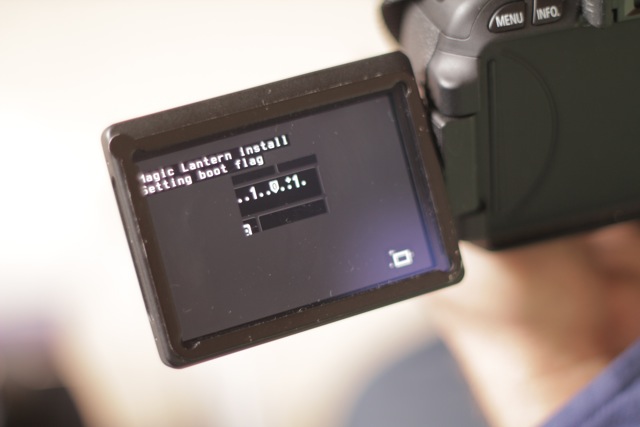
I have tested this new FIR (on a different 660D), and it did the same thing. Never got past the "Setting boot flag" screen, but the install was successful. Drop the battery out and back in and we can boot to ML.
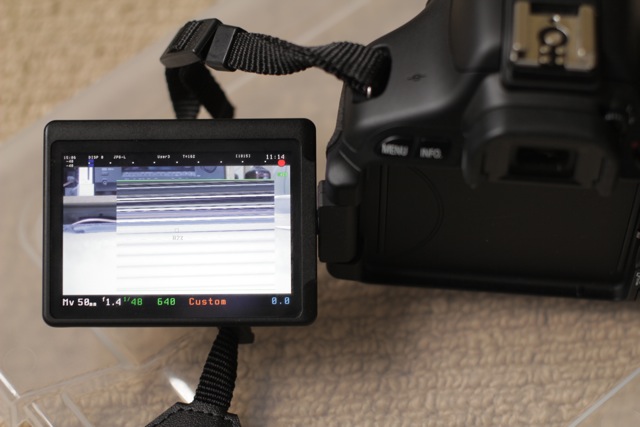
See also attached a shot of corruption on the MagicZoom...
This seems to be random, when it occurs I have not been able to get it to come right without restarting the camera.
Conversely when it was working correctly, I wasn't able to induce it to happen. If I can find a pattern I will let you know.
Also, when it is working, it doesn't seem that I am able to move the AF Frame while recording (to zoom over different areas of the screen), it works on the 550D... have I missed something or is this issue specific to the 600D?
Finally sometimes the palette gets messed up for the Canon menu.
This can be induced by turning false colour on then off, and fixed by going debug->draw palette.
Alex
updates too). You can't turn the camera off normally? (without taking
the battery out)
For the wiki, I see Scrax updated all the camera wiki pages and
removed the redirects to Unified page. Maybe it's a good idea to see
the state of each camera, but this is going to be difficult to
maintain and update (right now, a lot of info from the wiki is
outdated).
> On 24/08/2011, at 7:38 AM, Alex wrote:
>
>> For more options, visit this group at http://groups.google.com/group/ml-devel?hl=en<ml-600d-101.fir>
Morgan Look
Maybe a table in the wiki showing what features work on each camera, and at which stage of development things are at.
Perhaps like the openwrt hardware table http://wiki.openwrt.org/toh/start or the winehq app ratings.
That would at least put all the info in one place.
Morgan.
Alex
Here's a new FIR without UILock functions (i.e. it doesn't block
unused buttons). If this works, maybe they have changed the lock bits
in 600D.
Morgan Look
In the mean time, some food for thought.
I've found a way to repeatably cause corruption on the MagicZoom on 600D.
Note: when recording it is possible to use the DISP+Zoom(in/out) to adjust the digital zoom beyond 3x (but it's not possible when not recording).
If I have the camera in a state where MagicZoom is fully working correctly (which is approx 80% chance each time I boot), then I turn on Digital Zoom (3x).
Digital zoom beyond 3x while recording causes the Magic Zoom gets corrupt, but works normally when I return to 3x.
However if I now stop recording and exit Digital Zoom, from this point on Magic Zoom is corrupt in the (non DZ) view. It works again if I go back to 3x DZ.
I don't think this state is 100% the same as my other corrupt zoom states, since I think in that earlier examples it would also be corrupt at 3x. If I can make it do it again I will test this. It may help track down the cause however.
Morgan.
scrax
scrax
scrax
scrax
Morgan Look
Could it be something to do with it being run for the first time?
Remember the aug22 fir failed first time on a (call it the first) 600D, and the one you sent me later failed on a second 600D (two different cameras).
Todays one and the one that had failed on the second 600D both worked correctly on the first 600D.
Morgan.
On 24/08/2011, at 7:55 PM, Alex wrote:
Morgan Look
Morgan Look
scrax
Alex
I wish it was like that. Look at the history of these pages.
Anyway, I vote for a single page because 90% of Magic Lantern is
identical on these 3 cameras (550D, 600D and 60D). And on 50D it's the
same thing, but with less items in the menu.
Alex
At some point I did a little test with the 60D page. After announcing the
60D alpha 12 on May 25, I've left the download link on the wiki
untouched (i.e. link for alpha 11). It was only updated after about
one month (June 22) by an anonymous user.
And users are asking "where is the latest release" even in this
thread... what's going on here?!
Alex
... you need to rotate the mode dial, not the scrollwheel.
Do you see the green confirmation screen?
Alex
How is the display of the 600D when you start the camera? Is it
normally on or normally off?
If I set the 550D to have the display off at startup, the FIR still
works, but since the display is off, you won't see anything...
scrax
scrax
Alex
Another question: after you clear your camera settings, is the display
on by default? Just to be sure new users won't experience this.
On 60D, the display doesn't turn back on to on after clearing the
settings (if it was turned off before), so I need to find a way around
this.
On Wed, Aug 24, 2011 at 2:00 PM, scrax <scr...@gmail.com> wrote:
> Oh, yes, it's ok, on and off in a switch. that's why i didn't worked before,
> sorry for the false alarm :/
>
scrax

Roh
Roh
misaligned blue dots.
But corrected the cropmarks _file thing.
I went back to the 22 August release.
:)
scrax
Morgan Look
Is it supposed to be up in the top bar near the center right?
Morgan.
> For more options, visit this group at http://groups.google.com/group/ml-devel?hl=en<autoexec.bin>
Alex
Reading the battery level on 550D (PD_GetBatteryLevel) crashes the camera.
On 550D, that space is used for LCD remote icon.
Roh
corrected! along the _file error. But i have to test better this
autoexec.bin.
Everything looks good!
Thanks Alex!
> 594KViewDownload


NedB
Jeppe Toustrup
"...get the camera to beep if it's about to run out of battery or
storage while filming/time lapsing..."
--
Venlig hilsen / Kind regards
Jeppe Toustrup
On Tue, Aug 23, 2011 at 21:40, Jeppe Toustrup <je...@tenzer.dk> wrote:
> Just a thought, get the camera to beep if it's about to run out of
> battery or storage while filming/time lapsing, if that's possible?
>
> --
> Venlig hilsen / Kind regards
> Jeppe Toustrup
>
>
>
> On Tue, Aug 23, 2011 at 11:15, Alex <broscu...@gmail.com> wrote:
>> No, it only does the beep.
>>
>> Maybe it can be turned into something useful, any ideas?
>>
>> On Tue, Aug 23, 2011 at 12:14 PM, Malcolm Debono <mdeb...@gmail.com> wrote:
>>> Does the 'don't click me' item actually do anything apart from the beep?