This update comes with many internals refactored using DIGIC pokes, thus removing a lot of hacks - thanks to g3gg0 for the big push in this direction and to Eddie Svard and others for documenting a lot of them on the wiki!
The surprise comes from a little ISO test, which shows that ML can improve dynamic range and highlight rolloff in movie mode (see attached files). How much? Let's find the answer together by running a little experiment.
Background -----------------
There are two methods for obtaining in-between ISOs: 1) by asking the camera to set the ISO at 160 (for example); 2) by setting a full-stop ISO (let's say 200) and applying some digital gain (let's say -0.3 EV) by changing DIGIC registers.
In these two cases, the resulting images will have: - the same overall brightness in midtones and shadows; - the same amount of noise; - different highlight characteristics [!]
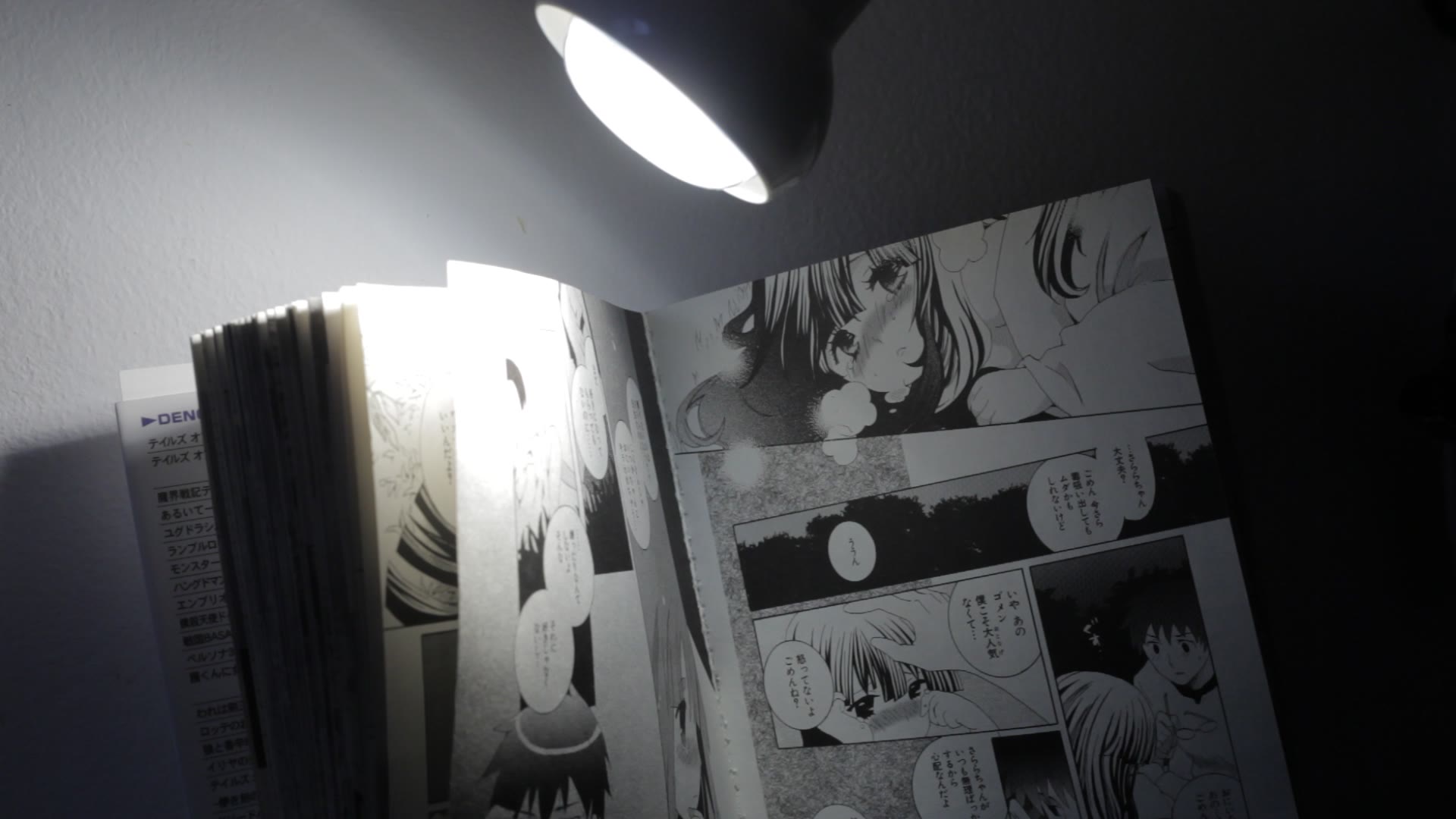
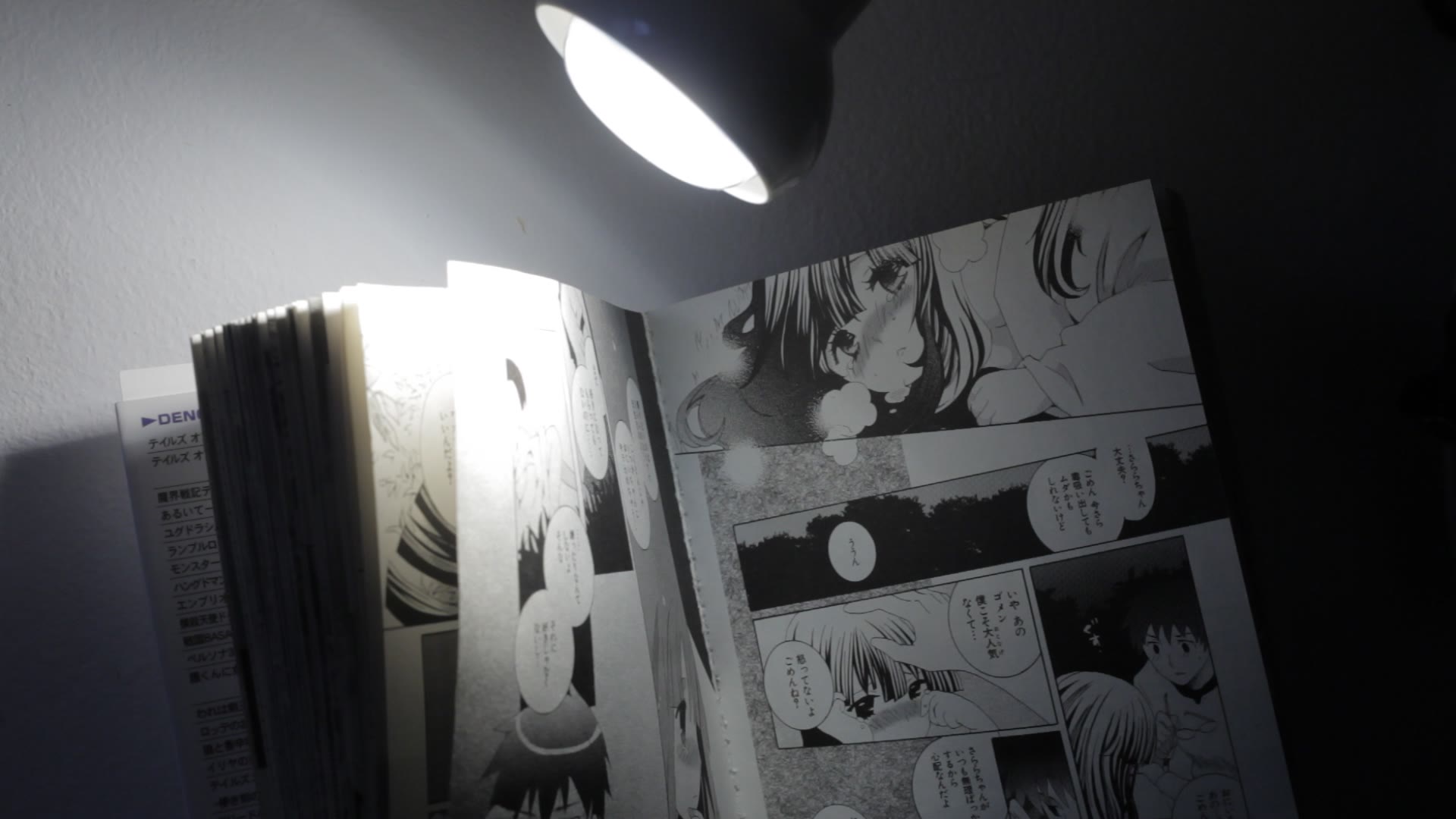
In the attached files, you can see that ML's ISO 640 (5D2, Neutral 0,-4,-4,0) retains more highlight detail and has a smoother transition to white, compared to Canon's ISO 640.
So, this experiment will let us discover the best ISO settings for difficult scenes (in particular, high-contrast ones, where you would normally consider HDR video).
Test overview --------------------
Under Debug menu you will find "ISO Tests", which can be divided in two:
* Real-world tests, where you record a scene with various settings, at similar overall brightness; you will get a few test frames and tell me which one(s) you like best and why.
* Synthetic tests, where ML computes the response curve at some fixed ISOs; you will send me the results (log files) for analysis.
The result of these tests will depend on picture style and parameters (especially contrast). Please test with any picture style you like. I've ran a few tests with Neutral 0,-4,-4,0 and Flaat12p, but the data is not sufficient to draw a conclusion yet.
How to run the real-world test --------------------------------------------
This test will alter the settings while recording, to see what's best for some particular scene. It takes roughly one minute.
- Find a contrasty test scene (one for which you would normally use HDR video; that is, with bright highlights and dark shadows); - Choose your favorite picture style; - Enable movie logging; - Expose the scene so you get both clipped highlights and clipped shadows; use a full-stop ISO (100, 200..) and try not to choose extreme shutter speeds; - Reduce the bitrate (CBR 0.8 should be fine) - it's needed because ML will save a few uncompressed still frames, and recording may stop; - Choose "Debug -> ISO Tests -> Movie test" from ML menu.
After one minute, you will get two movies (one with HTP off and another with HTP on); ML will alter ISO and shutter speed every two seconds, and save a still frame (silent picture - YUV422) for each setting combination. You will get 20 still frames (*.422 files).
After hearing your thoughts, I'll tell you what settings I've used for each frame (this should make the results as unbiased as possible).
How to run the synthetic test --------------------------------------------
This test will compute the response curve at different ISOs. It takes roughly one hour (maybe a bit more).
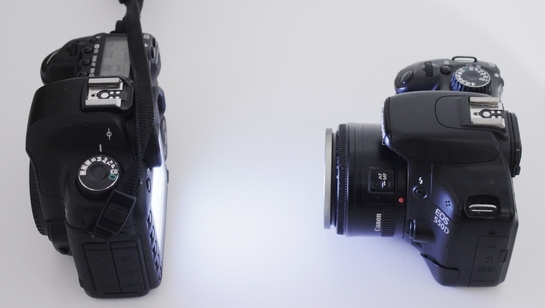
You will need: - A Canon lens (kit lens and 50/1.8 are both fine); - A controlled light setup with a white wall or screen. I've used a second camera body to provide a white test screen, with the Flashlight function (see attached picture). You can use a computer monitor too. It's a good idea to avoid natural lighting (you can cover the setup with a cardboard box, for example, or place it in a dark room). - Strong batteries.
Before running the test, set the correct white balance for your test screen.
Under Debug -> ISO tests, you will run these 3 tests: - For ISO 100 multiples (ful-stop ISOs), 160x (Canon method) and 80x (ML method, with DIGIC ISO gain set to -0.3 EV); - For ISO 70/65/50 multiples (ML method); - For HTP, with ISO 200x (full-stops), 140x (ML method) and 100x (ML method);
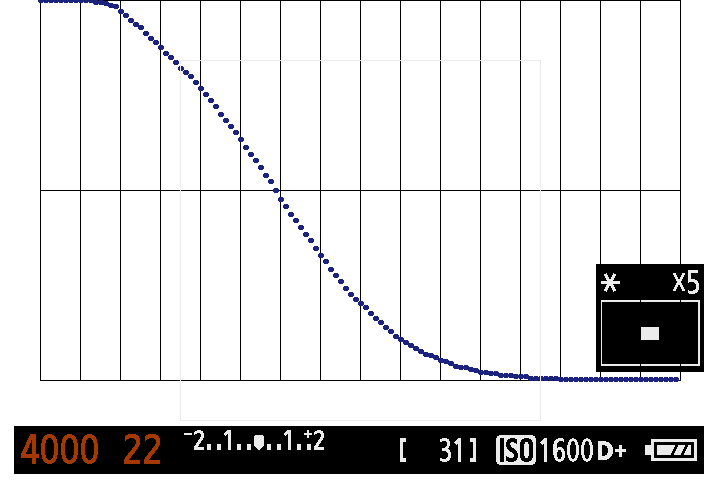
To compute a response curve, ML will start from 1/30 seconds wide open and will underexpose by changing shutter and aperture, in 1/8-stop increments, over a total range of 16 stops. It takes roughly 1 minute to compute one curve. If done correctly, you should get something like in the attachment, starting with a flat section at the top and ending with a flat section at the bottom.
Each test takes roughly 20 minutes. The result is a series of TXT files which contain the data points. Zip all these files and send them to me, mentioning what camera and picture style you have used.
Be careful if you use a second camera body to provide a white screen. The camera will turn off after 30 minutes, even if you disable power saving, so you need to re-activate the flashlight after each test.
----------------------------------------------
Back to so-called release notes. In this update you'll find these important changes:
DIGIC-based refactoring: - Silent pictures no longer use powersave tricks to pause LiveView; - Display gain (night vision) and highlight recovery feature (previously known as Highlight++) are now available under a single control in the ISO submenu, called DIGIC ISO gain: positive values are for night vision, negative values are for highlight recovery and low ISOs. - More ISOs with low noise: 60, 65, 70, 80, 85, 90 and their multiples. Set a negative DIGIC ISO gain to enable them.
And a few handy shortcuts: - Configurable arrow keys: besides ISO/Kelvin, you can also toggle audio gain, shutter, aperture and others - check the Tweaks menu, the shortcut key is camera-specific; - Rack / follow focus: while recording, press MENU to save current focus point and PLAY to return to it. No need to configure it from the menu (just enable follow focus and start recording).
I don't think movie logging ever worked on 50D... did it?
In movie mode, ISO 6400 is still useful. Even more: if, at 1/fps wide-
open, the image is still dark, boost digital gain as much as you can,
as long as you don't clip the highlights. This is due to the internals
of Canon's image processor.
Indeed, it wasn't working but there was an option to enable it. Should the 50D users run the real world test as well? Let us know how we can make it without the log file. I see the point for 6400 iso, i recorded inside a music club and altough it was really dark i could produce a nice video file anyway.
<giovannidice...@gmail.com> wrote: > Indeed, it wasn't working but there was an option to enable it. > Should the 50D users run the real world test as well? Let us know how we can > make it without the log file. > I see the point for 6400 iso, i recorded inside a music club and altough it > was really dark i could produce a nice video file anyway.
> To post to this group, send email to ml-devel@googlegroups.com > To unsubscribe from this group, send email to > ml-devel+unsubscribe@googlegroups.com > For more options, visit this group at > http://groups.google.com/group/ml-devel?hl=en
it's obvious highlights are better, but look at left bottom, - shadows more flat, text there less readable. you can alter such in post, but it will probably stretch mids to banging. i mean, in your examples (with manga) ML image have less overal contrast. it's preserv some highlights with cost of more flat shadows. in terms of curves ML have more S-like one. will your want to have such or not should depend on scene, i guess.
I'll be testing the shop display/church scene from the hdr teaser. with neutral, cinestyle and flaat12. I like the highlight recovery and it is far too early to draw conclusions. Let's all do the test and discover what works and what not.
> Apologies for not yet doing a test using your advised method, but I wanted to do a quick test to see if I could see much difference. I can see a huge difference when using Digic Poke ISO160. Here is the comparison. > -- > http://magiclantern.wikia.com/
> To post to this group, send email to ml-devel@googlegroups.com > To unsubscribe from this group, send email to ml-devel+unsubscribe@googlegroups.com > For more options, visit this group at http://groups.google.com/group/ml-devel?hl=en
1: the test is about improving the highlights, not shadows
2: its a real world test in that its a picturestyle i would use in my work. I have found that picturestyles that allow blacks to dip below a certain value contain lots of compression artefacts. Not everyone wants crushed blacks.
3: in the proper test, i could see a big difference in the shadow noise whilst using this pocture style, so even with the bottom end lifted, it still makes a difference.
4: As alex said, you are free to test with any picture style
5: the two images were shot with the same picture style so the comparison is completely fair.
Please post your own test results to show how me using this setting has in some way made the test unfair.
Perhaps your monitor is automatically adjusting or something, because I cannot see any difference in the shadows on the manga image. The text looks just as legible (even in the lower left) and the lower levels look exactly the same. When I drop the two images into a waveform monitor, they register the same in the shadow areas, not flatter or anything.
The contrast looks exactly the same except that the highlights drop off slightly later on the ML one, which is exactly what we need - better highlights without making the image flatter.
On Thu, Apr 12, 2012 at 6:44 PM, TOM_M <duopho...@gmail.com> wrote: > Perhaps your monitor is automatically adjusting or something, because I > cannot see any difference in the shadows on the manga image. The text looks > just as legible (even in the lower left) and the lower levels look exactly > the same. When I drop the two images into a waveform monitor, they register > the same in the shadow areas, not flatter or anything.
> The contrast looks exactly the same except that the highlights drop off > slightly later on the ML one, which is exactly what we need - better > highlights without making the image flatter.
> To post to this group, send email to ml-devel@googlegroups.com > To unsubscribe from this group, send email to > ml-devel+unsubscribe@googlegroups.com > For more options, visit this group at > http://groups.google.com/group/ml-devel?hl=en
I'm having a problem getting the shutter speed to change...anyone else
having this problem, or is there some new setting here I haven't kept
up on? It's locked in an extremely low shutter speed (1/2), and when I
try to change it just changes back immediately...
Thanks,
Arne
On Apr 9, 1:04 pm, Alex <broscutama...@gmail.com> wrote:
> This update comes with many internals refactored using DIGIC pokes,
> thus removing a lot of hacks - thanks to g3gg0 for the big push in
> this direction and to Eddie Svard and others for documenting a lot of
> them on the wiki!
> The surprise comes from a little ISO test, which shows that ML can
> improve dynamic range and highlight rolloff in movie mode (see
> attached files). How much? Let's find the answer together by running a
> little experiment.
> Background
> -----------------
> There are two methods for obtaining in-between ISOs:
> 1) by asking the camera to set the ISO at 160 (for example);
> 2) by setting a full-stop ISO (let's say 200) and applying some
> digital gain (let's say -0.3 EV) by changing DIGIC registers.
> In these two cases, the resulting images will have:
> - the same overall brightness in midtones and shadows;
> - the same amount of noise;
> - different highlight characteristics [!]
> In the attached files, you can see that ML's ISO 640 (5D2, Neutral
> 0,-4,-4,0) retains more highlight detail and has a smoother transition
> to white, compared to Canon's ISO 640.
> So, this experiment will let us discover the best ISO settings for
> difficult scenes (in particular, high-contrast ones, where you would
> normally consider HDR video).
> Test overview
> --------------------
> Under Debug menu you will find "ISO Tests", which can be divided in two:
> * Real-world tests, where you record a scene with various settings, at
> similar overall brightness; you will get a few test frames and tell me
> which one(s) you like best and why.
> * Synthetic tests, where ML computes the response curve at some fixed
> ISOs; you will send me the results (log files) for analysis.
> The result of these tests will depend on picture style and parameters
> (especially contrast). Please test with any picture style you like.
> I've ran a few tests with Neutral 0,-4,-4,0 and Flaat12p, but the data
> is not sufficient to draw a conclusion yet.
> How to run the real-world test
> --------------------------------------------
> This test will alter the settings while recording, to see what's best
> for some particular scene. It takes roughly one minute.
> - Find a contrasty test scene (one for which you would normally use
> HDR video; that is, with bright highlights and dark shadows);
> - Choose your favorite picture style;
> - Enable movie logging;
> - Expose the scene so you get both clipped highlights and clipped
> shadows; use a full-stop ISO (100, 200..) and try not to choose
> extreme shutter speeds;
> - Reduce the bitrate (CBR 0.8 should be fine) - it's needed because ML
> will save a few uncompressed still frames, and recording may stop;
> - Choose "Debug -> ISO Tests -> Movie test" from ML menu.
> After one minute, you will get two movies (one with HTP off and
> another with HTP on); ML will alter ISO and shutter speed every two
> seconds, and save a still frame (silent picture - YUV422) for each
> setting combination. You will get 20 still frames (*.422 files).
> After hearing your thoughts, I'll tell you what settings I've used for
> each frame (this should make the results as unbiased as possible).
> How to run the synthetic test
> --------------------------------------------
> This test will compute the response curve at different ISOs. It takes
> roughly one hour (maybe a bit more).
> You will need:
> - A Canon lens (kit lens and 50/1.8 are both fine);
> - A controlled light setup with a white wall or screen. I've used a
> second camera body to provide a white test screen, with the Flashlight
> function (see attached picture). You can use a computer monitor too.
> It's a good idea to avoid natural lighting (you can cover the setup
> with a cardboard box, for example, or place it in a dark room).
> - Strong batteries.
> Before running the test, set the correct white balance for your test screen.
> Under Debug -> ISO tests, you will run these 3 tests:
> - For ISO 100 multiples (ful-stop ISOs), 160x (Canon method) and 80x
> (ML method, with DIGIC ISO gain set to -0.3 EV);
> - For ISO 70/65/50 multiples (ML method);
> - For HTP, with ISO 200x (full-stops), 140x (ML method) and 100x (ML method);
> To compute a response curve, ML will start from 1/30 seconds wide open
> and will underexpose by changing shutter and aperture, in 1/8-stop
> increments, over a total range of 16 stops. It takes roughly 1 minute
> to compute one curve. If done correctly, you should get something like
> in the attachment, starting with a flat section at the top and ending
> with a flat section at the bottom.
> Each test takes roughly 20 minutes. The result is a series of TXT
> files which contain the data points. Zip all these files and send them
> to me, mentioning what camera and picture style you have used.
> Be careful if you use a second camera body to provide a white screen.
> The camera will turn off after 30 minutes, even if you disable power
> saving, so you need to re-activate the flashlight after each test.
> ----------------------------------------------
> Back to so-called release notes. In this update you'll find these
> important changes:
> DIGIC-based refactoring:
> - Silent pictures no longer use powersave tricks to pause LiveView;
> - Display gain (night vision) and highlight recovery feature
> (previously known as Highlight++) are now available under a single
> control in the ISO submenu, called DIGIC ISO gain: positive values are
> for night vision, negative values are for highlight recovery and low
> ISOs.
> - More ISOs with low noise: 60, 65, 70, 80, 85, 90 and their
> multiples. Set a negative DIGIC ISO gain to enable them.
> And a few handy shortcuts:
> - Configurable arrow keys: besides ISO/Kelvin, you can also toggle
> audio gain, shutter, aperture and others - check the Tweaks menu, the
> shortcut key is camera-specific;
> - Rack / follow focus: while recording, press MENU to save current
> focus point and PLAY to return to it. No need to configure it from the
> menu (just enable follow focus and start recording).
> And also the hope that I didn't break anything :)
> Happy Easter!
> ISO 640 (Canon).jpg
> 147KViewDownload
> ISO 640 (ML).jpg
> 145KViewDownload
> Test setup for ISO analysis.jpg
> 86KViewDownload
Do you have FPS override enabled? There is an option to optimize for low FPS which locks shutter speed to framerate. So if it's locked at 1/2s then perhaps you have FPS override set to 2fps. You can always delete the config file through the CF menu to reset to default ML settings and then pay attention to which settings you change and the result it has.
On Thursday, April 12, 2012 1:46:33 PM UTC-4, Arne Johnson wrote:
> I'm having a problem getting the shutter speed to change...anyone else > having this problem, or is there some new setting here I haven't kept > up on? It's locked in an extremely low shutter speed (1/2), and when I > try to change it just changes back immediately...
> Thanks,
> Arne
> On Apr 9, 1:04 pm, Alex <broscutama...@gmail.com> wrote: > > This update comes with many internals refactored using DIGIC pokes, > > thus removing a lot of hacks - thanks to g3gg0 for the big push in > > this direction and to Eddie Svard and others for documenting a lot of > > them on the wiki!
> > The surprise comes from a little ISO test, which shows that ML can > > improve dynamic range and highlight rolloff in movie mode (see > > attached files). How much? Let's find the answer together by running a > > little experiment.
> > Background > > -----------------
> > There are two methods for obtaining in-between ISOs: > > 1) by asking the camera to set the ISO at 160 (for example); > > 2) by setting a full-stop ISO (let's say 200) and applying some > > digital gain (let's say -0.3 EV) by changing DIGIC registers.
> > In these two cases, the resulting images will have: > > - the same overall brightness in midtones and shadows; > > - the same amount of noise; > > - different highlight characteristics [!]
> > In the attached files, you can see that ML's ISO 640 (5D2, Neutral > > 0,-4,-4,0) retains more highlight detail and has a smoother transition > > to white, compared to Canon's ISO 640.
> > So, this experiment will let us discover the best ISO settings for > > difficult scenes (in particular, high-contrast ones, where you would > > normally consider HDR video).
> > Test overview > > --------------------
> > Under Debug menu you will find "ISO Tests", which can be divided in two:
> > * Real-world tests, where you record a scene with various settings, at > > similar overall brightness; you will get a few test frames and tell me > > which one(s) you like best and why.
> > * Synthetic tests, where ML computes the response curve at some fixed > > ISOs; you will send me the results (log files) for analysis.
> > The result of these tests will depend on picture style and parameters > > (especially contrast). Please test with any picture style you like. > > I've ran a few tests with Neutral 0,-4,-4,0 and Flaat12p, but the data > > is not sufficient to draw a conclusion yet.
> > How to run the real-world test > > --------------------------------------------
> > This test will alter the settings while recording, to see what's best > > for some particular scene. It takes roughly one minute.
> > - Find a contrasty test scene (one for which you would normally use > > HDR video; that is, with bright highlights and dark shadows); > > - Choose your favorite picture style; > > - Enable movie logging; > > - Expose the scene so you get both clipped highlights and clipped > > shadows; use a full-stop ISO (100, 200..) and try not to choose > > extreme shutter speeds; > > - Reduce the bitrate (CBR 0.8 should be fine) - it's needed because ML > > will save a few uncompressed still frames, and recording may stop; > > - Choose "Debug -> ISO Tests -> Movie test" from ML menu.
> > After one minute, you will get two movies (one with HTP off and > > another with HTP on); ML will alter ISO and shutter speed every two > > seconds, and save a still frame (silent picture - YUV422) for each > > setting combination. You will get 20 still frames (*.422 files).
> > Convert these pictures to JPG (seehttp:// > magiclantern.wikia.com/wiki/Unified/UserGuide#silent-pictures > > for a howto), post them here, together with the log file (or send > > directly to me) and say which one(s) you like best, and why.
> > After hearing your thoughts, I'll tell you what settings I've used for > > each frame (this should make the results as unbiased as possible).
> > How to run the synthetic test > > --------------------------------------------
> > This test will compute the response curve at different ISOs. It takes > > roughly one hour (maybe a bit more).
> > You will need: > > - A Canon lens (kit lens and 50/1.8 are both fine); > > - A controlled light setup with a white wall or screen. I've used a > > second camera body to provide a white test screen, with the Flashlight > > function (see attached picture). You can use a computer monitor too. > > It's a good idea to avoid natural lighting (you can cover the setup > > with a cardboard box, for example, or place it in a dark room). > > - Strong batteries.
> > Before running the test, set the correct white balance for your test > screen.
> > Under Debug -> ISO tests, you will run these 3 tests: > > - For ISO 100 multiples (ful-stop ISOs), 160x (Canon method) and 80x > > (ML method, with DIGIC ISO gain set to -0.3 EV); > > - For ISO 70/65/50 multiples (ML method); > > - For HTP, with ISO 200x (full-stops), 140x (ML method) and 100x (ML > method);
> > To compute a response curve, ML will start from 1/30 seconds wide open > > and will underexpose by changing shutter and aperture, in 1/8-stop > > increments, over a total range of 16 stops. It takes roughly 1 minute > > to compute one curve. If done correctly, you should get something like > > in the attachment, starting with a flat section at the top and ending > > with a flat section at the bottom.
> > Each test takes roughly 20 minutes. The result is a series of TXT > > files which contain the data points. Zip all these files and send them > > to me, mentioning what camera and picture style you have used.
> > Be careful if you use a second camera body to provide a white screen. > > The camera will turn off after 30 minutes, even if you disable power > > saving, so you need to re-activate the flashlight after each test.
> > Back to so-called release notes. In this update you'll find these > > important changes:
> > DIGIC-based refactoring: > > - Silent pictures no longer use powersave tricks to pause LiveView; > > - Display gain (night vision) and highlight recovery feature > > (previously known as Highlight++) are now available under a single > > control in the ISO submenu, called DIGIC ISO gain: positive values are > > for night vision, negative values are for highlight recovery and low > > ISOs. > > - More ISOs with low noise: 60, 65, 70, 80, 85, 90 and their > > multiples. Set a negative DIGIC ISO gain to enable them.
> > And a few handy shortcuts: > > - Configurable arrow keys: besides ISO/Kelvin, you can also toggle > > audio gain, shutter, aperture and others - check the Tweaks menu, the > > shortcut key is camera-specific; > > - Rack / follow focus: while recording, press MENU to save current > > focus point and PLAY to return to it. No need to configure it from the > > menu (just enable follow focus and start recording).
> > And also the hope that I didn't break anything :)
> > Happy Easter!
> > ISO 640 (Canon).jpg > > 147KViewDownload
> > ISO 640 (ML).jpg > > 145KViewDownload
> > Test setup for ISO analysis.jpg > > 86KViewDownload
Hi, I had the same problem. Got it fixed by selecting LV ViewType: Movie (in the Expo menu). Hope that helps. By the way, thanks to all ML developers. It's a great tool. Paul
> I'm having a problem getting the shutter speed to change...anyone else > having this problem, or is there some new setting here I haven't kept > up on? It's locked in an extremely low shutter speed (1/2), and when I > try to change it just changes back immediately...
> Thanks,
> Arne
> On Apr 9, 1:04 pm, Alex <broscutama...@gmail.com> wrote: >> This update comes with many internals refactored using DIGIC pokes, >> thus removing a lot of hacks - thanks to g3gg0 for the big push in >> this direction and to Eddie Svard and others for documenting a lot of >> them on the wiki!
>> The surprise comes from a little ISO test, which shows that ML can >> improve dynamic range and highlight rolloff in movie mode (see >> attached files). How much? Let's find the answer together by running a >> little experiment.
>> Background >> -----------------
>> There are two methods for obtaining in-between ISOs: >> 1) by asking the camera to set the ISO at 160 (for example); >> 2) by setting a full-stop ISO (let's say 200) and applying some >> digital gain (let's say -0.3 EV) by changing DIGIC registers.
>> In these two cases, the resulting images will have: >> - the same overall brightness in midtones and shadows; >> - the same amount of noise; >> - different highlight characteristics [!]
>> In the attached files, you can see that ML's ISO 640 (5D2, Neutral >> 0,-4,-4,0) retains more highlight detail and has a smoother transition >> to white, compared to Canon's ISO 640.
>> So, this experiment will let us discover the best ISO settings for >> difficult scenes (in particular, high-contrast ones, where you would >> normally consider HDR video).
>> Test overview >> --------------------
>> Under Debug menu you will find "ISO Tests", which can be divided in two:
>> * Real-world tests, where you record a scene with various settings, at >> similar overall brightness; you will get a few test frames and tell me >> which one(s) you like best and why.
>> * Synthetic tests, where ML computes the response curve at some fixed >> ISOs; you will send me the results (log files) for analysis.
>> The result of these tests will depend on picture style and parameters >> (especially contrast). Please test with any picture style you like. >> I've ran a few tests with Neutral 0,-4,-4,0 and Flaat12p, but the data >> is not sufficient to draw a conclusion yet.
>> How to run the real-world test >> --------------------------------------------
>> This test will alter the settings while recording, to see what's best >> for some particular scene. It takes roughly one minute.
>> - Find a contrasty test scene (one for which you would normally use >> HDR video; that is, with bright highlights and dark shadows); >> - Choose your favorite picture style; >> - Enable movie logging; >> - Expose the scene so you get both clipped highlights and clipped >> shadows; use a full-stop ISO (100, 200..) and try not to choose >> extreme shutter speeds; >> - Reduce the bitrate (CBR 0.8 should be fine) - it's needed because ML >> will save a few uncompressed still frames, and recording may stop; >> - Choose "Debug -> ISO Tests -> Movie test" from ML menu.
>> After one minute, you will get two movies (one with HTP off and >> another with HTP on); ML will alter ISO and shutter speed every two >> seconds, and save a still frame (silent picture - YUV422) for each >> setting combination. You will get 20 still frames (*.422 files).
>> After hearing your thoughts, I'll tell you what settings I've used for >> each frame (this should make the results as unbiased as possible).
>> How to run the synthetic test >> --------------------------------------------
>> This test will compute the response curve at different ISOs. It takes >> roughly one hour (maybe a bit more).
>> You will need: >> - A Canon lens (kit lens and 50/1.8 are both fine); >> - A controlled light setup with a white wall or screen. I've used a >> second camera body to provide a white test screen, with the Flashlight >> function (see attached picture). You can use a computer monitor too. >> It's a good idea to avoid natural lighting (you can cover the setup >> with a cardboard box, for example, or place it in a dark room). >> - Strong batteries.
>> Before running the test, set the correct white balance for your test screen.
>> Under Debug -> ISO tests, you will run these 3 tests: >> - For ISO 100 multiples (ful-stop ISOs), 160x (Canon method) and 80x >> (ML method, with DIGIC ISO gain set to -0.3 EV); >> - For ISO 70/65/50 multiples (ML method); >> - For HTP, with ISO 200x (full-stops), 140x (ML method) and 100x (ML method);
>> To compute a response curve, ML will start from 1/30 seconds wide open >> and will underexpose by changing shutter and aperture, in 1/8-stop >> increments, over a total range of 16 stops. It takes roughly 1 minute >> to compute one curve. If done correctly, you should get something like >> in the attachment, starting with a flat section at the top and ending >> with a flat section at the bottom.
>> Each test takes roughly 20 minutes. The result is a series of TXT >> files which contain the data points. Zip all these files and send them >> to me, mentioning what camera and picture style you have used.
>> Be careful if you use a second camera body to provide a white screen. >> The camera will turn off after 30 minutes, even if you disable power >> saving, so you need to re-activate the flashlight after each test.
>> ----------------------------------------------
>> Back to so-called release notes. In this update you'll find these >> important changes:
>> DIGIC-based refactoring: >> - Silent pictures no longer use powersave tricks to pause LiveView; >> - Display gain (night vision) and highlight recovery feature >> (previously known as Highlight++) are now available under a single >> control in the ISO submenu, called DIGIC ISO gain: positive values are >> for night vision, negative values are for highlight recovery and low >> ISOs. >> - More ISOs with low noise: 60, 65, 70, 80, 85, 90 and their >> multiples. Set a negative DIGIC ISO gain to enable them.
>> And a few handy shortcuts: >> - Configurable arrow keys: besides ISO/Kelvin, you can also toggle >> audio gain, shutter, aperture and others - check the Tweaks menu, the >> shortcut key is camera-specific; >> - Rack / follow focus: while recording, press MENU to save current >> focus point and PLAY to return to it. No need to configure it from the >> menu (just enable follow focus and start recording).
>> And also the hope that I didn't break anything :)
>> Happy Easter!
>> ISO 640 (Canon).jpg >> 147KViewDownload
>> ISO 640 (ML).jpg >> 145KViewDownload
>> Test setup for ISO analysis.jpg >> 86KViewDownload
> To post to this group, send email to ml-devel@googlegroups.com > To unsubscribe from this group, send email to ml-devel+unsubscribe@googlegroups.com > For more options, visit this group at http://groups.google.com/group/ml-devel?hl=en
On Monday, April 9, 2012 10:04:20 PM UTC+2, Alex wrote:
> This update comes with many internals refactored using DIGIC pokes, > thus removing a lot of hacks - thanks to g3gg0 for the big push in > this direction and to Eddie Svard and others for documenting a lot of > them on the wiki!
> The surprise comes from a little ISO test, which shows that ML can > improve dynamic range and highlight rolloff in movie mode (see > attached files). How much? Let's find the answer together by running a > little experiment.
> Background > -----------------
> There are two methods for obtaining in-between ISOs: > 1) by asking the camera to set the ISO at 160 (for example); > 2) by setting a full-stop ISO (let's say 200) and applying some > digital gain (let's say -0.3 EV) by changing DIGIC registers.
> In these two cases, the resulting images will have: > - the same overall brightness in midtones and shadows; > - the same amount of noise; > - different highlight characteristics [!]
> In the attached files, you can see that ML's ISO 640 (5D2, Neutral > 0,-4,-4,0) retains more highlight detail and has a smoother transition > to white, compared to Canon's ISO 640.
> So, this experiment will let us discover the best ISO settings for > difficult scenes (in particular, high-contrast ones, where you would > normally consider HDR video).
> Test overview > --------------------
> Under Debug menu you will find "ISO Tests", which can be divided in two:
> * Real-world tests, where you record a scene with various settings, at > similar overall brightness; you will get a few test frames and tell me > which one(s) you like best and why.
> * Synthetic tests, where ML computes the response curve at some fixed > ISOs; you will send me the results (log files) for analysis.
> The result of these tests will depend on picture style and parameters > (especially contrast). Please test with any picture style you like. > I've ran a few tests with Neutral 0,-4,-4,0 and Flaat12p, but the data > is not sufficient to draw a conclusion yet.
> How to run the real-world test > --------------------------------------------
> This test will alter the settings while recording, to see what's best > for some particular scene. It takes roughly one minute.
> - Find a contrasty test scene (one for which you would normally use > HDR video; that is, with bright highlights and dark shadows); > - Choose your favorite picture style; > - Enable movie logging; > - Expose the scene so you get both clipped highlights and clipped > shadows; use a full-stop ISO (100, 200..) and try not to choose > extreme shutter speeds; > - Reduce the bitrate (CBR 0.8 should be fine) - it's needed because ML > will save a few uncompressed still frames, and recording may stop; > - Choose "Debug -> ISO Tests -> Movie test" from ML menu.
> After one minute, you will get two movies (one with HTP off and > another with HTP on); ML will alter ISO and shutter speed every two > seconds, and save a still frame (silent picture - YUV422) for each > setting combination. You will get 20 still frames (*.422 files).
> After hearing your thoughts, I'll tell you what settings I've used for > each frame (this should make the results as unbiased as possible).
> How to run the synthetic test > --------------------------------------------
> This test will compute the response curve at different ISOs. It takes > roughly one hour (maybe a bit more).
> You will need: > - A Canon lens (kit lens and 50/1.8 are both fine); > - A controlled light setup with a white wall or screen. I've used a > second camera body to provide a white test screen, with the Flashlight > function (see attached picture). You can use a computer monitor too. > It's a good idea to avoid natural lighting (you can cover the setup > with a cardboard box, for example, or place it in a dark room). > - Strong batteries.
> Before running the test, set the correct white balance for your test > screen.
> Under Debug -> ISO tests, you will run these 3 tests: > - For ISO 100 multiples (ful-stop ISOs), 160x (Canon method) and 80x > (ML method, with DIGIC ISO gain set to -0.3 EV); > - For ISO 70/65/50 multiples (ML method); > - For HTP, with ISO 200x (full-stops), 140x (ML method) and 100x (ML > method);
> To compute a response curve, ML will start from 1/30 seconds wide open > and will underexpose by changing shutter and aperture, in 1/8-stop > increments, over a total range of 16 stops. It takes roughly 1 minute > to compute one curve. If done correctly, you should get something like > in the attachment, starting with a flat section at the top and ending > with a flat section at the bottom.
> Each test takes roughly 20 minutes. The result is a series of TXT > files which contain the data points. Zip all these files and send them > to me, mentioning what camera and picture style you have used.
> Be careful if you use a second camera body to provide a white screen. > The camera will turn off after 30 minutes, even if you disable power > saving, so you need to re-activate the flashlight after each test.
> ----------------------------------------------
> Back to so-called release notes. In this update you'll find these > important changes:
> DIGIC-based refactoring: > - Silent pictures no longer use powersave tricks to pause LiveView; > - Display gain (night vision) and highlight recovery feature > (previously known as Highlight++) are now available under a single > control in the ISO submenu, called DIGIC ISO gain: positive values are > for night vision, negative values are for highlight recovery and low > ISOs. > - More ISOs with low noise: 60, 65, 70, 80, 85, 90 and their > multiples. Set a negative DIGIC ISO gain to enable them.
> And a few handy shortcuts: > - Configurable arrow keys: besides ISO/Kelvin, you can also toggle > audio gain, shutter, aperture and others - check the Tweaks menu, the > shortcut key is camera-specific; > - Rack / follow focus: while recording, press MENU to save current > focus point and PLAY to return to it. No need to configure it from the > menu (just enable follow focus and start recording).
> And also the hope that I didn't break anything :)
I'm just wondering whether LCD sensor shortcuts are broken only for
me. They worked great with my 550D with ~mid-march 2012 build, but
after updating to this, easter-edition, sensor shortcuts don't seem to
respond anymore.
Though sensor still functions greatly (turns off the screen, when it
should).
Today I updated to this newest build and lcd sensor shortcuts seem to
have stopped working (I own 550D). Last build was around mid-march,
lcd sensor shortcuts worked just fine. Sensor is really working as it
turn off the screen when sensor is covered.
Alex I just want to [once again] thank you for all the work you've done on ML for these cameras. This recent thank you comes via a shoot that occurred yesterday.
I was on a music video set in Brooklyn alongside a DP using the Alexa with my lil' T2i and a Zeiss contax 50mm 1.7. While I didn't have the opportunity to be 1st AC, I was instead brought on as the set photographer by the AD (a good friend of mine with recent work). Getting to pick the DP's brain about the Alexa, not only is the camera easy to use, but every word of its language I easily understood on the UI from my experience with ML. This is the SECOND time I've experienced a higher end camera that I did/could have effortlessly transitioned to via this advanced DSLR software upgrade.
Additionally, I filmed in Technicolor Log-C at CBR 1.3 (audio on) and CBR 2.0 (audio disabled). So the director was mightily happy that I could obtain additional B-cam shots to work alongside the Alexa's Log-C profile on set. I even made sure to match white balance instantly with the DP just in case (and to give a similar flavor of the video's raw).
With ML I completely feel empowered to work on ANY camera out there without any trouble other than knowing where buttons placements are on the hardware. At this point it just makes ZERO sense to use these DSLRs without this firmware.
On Monday, April 9, 2012 4:04:20 PM UTC-4, Alex wrote:
> This update comes with many internals refactored using DIGIC pokes, > thus removing a lot of hacks - thanks to g3gg0 for the big push in > this direction and to Eddie Svard and others for documenting a lot of > them on the wiki!
> The surprise comes from a little ISO test, which shows that ML can > improve dynamic range and highlight rolloff in movie mode (see > attached files). How much? Let's find the answer together by running a > little experiment.
> Background > -----------------
> There are two methods for obtaining in-between ISOs: > 1) by asking the camera to set the ISO at 160 (for example); > 2) by setting a full-stop ISO (let's say 200) and applying some > digital gain (let's say -0.3 EV) by changing DIGIC registers.
> In these two cases, the resulting images will have: > - the same overall brightness in midtones and shadows; > - the same amount of noise; > - different highlight characteristics [!]
> In the attached files, you can see that ML's ISO 640 (5D2, Neutral > 0,-4,-4,0) retains more highlight detail and has a smoother transition > to white, compared to Canon's ISO 640.
> So, this experiment will let us discover the best ISO settings for > difficult scenes (in particular, high-contrast ones, where you would > normally consider HDR video).
> Test overview > --------------------
> Under Debug menu you will find "ISO Tests", which can be divided in two:
> * Real-world tests, where you record a scene with various settings, at > similar overall brightness; you will get a few test frames and tell me > which one(s) you like best and why.
> * Synthetic tests, where ML computes the response curve at some fixed > ISOs; you will send me the results (log files) for analysis.
> The result of these tests will depend on picture style and parameters > (especially contrast). Please test with any picture style you like. > I've ran a few tests with Neutral 0,-4,-4,0 and Flaat12p, but the data > is not sufficient to draw a conclusion yet.
> How to run the real-world test > --------------------------------------------
> This test will alter the settings while recording, to see what's best > for some particular scene. It takes roughly one minute.
> - Find a contrasty test scene (one for which you would normally use > HDR video; that is, with bright highlights and dark shadows); > - Choose your favorite picture style; > - Enable movie logging; > - Expose the scene so you get both clipped highlights and clipped > shadows; use a full-stop ISO (100, 200..) and try not to choose > extreme shutter speeds; > - Reduce the bitrate (CBR 0.8 should be fine) - it's needed because ML > will save a few uncompressed still frames, and recording may stop; > - Choose "Debug -> ISO Tests -> Movie test" from ML menu.
> After one minute, you will get two movies (one with HTP off and > another with HTP on); ML will alter ISO and shutter speed every two > seconds, and save a still frame (silent picture - YUV422) for each > setting combination. You will get 20 still frames (*.422 files).
> After hearing your thoughts, I'll tell you what settings I've used for > each frame (this should make the results as unbiased as possible).
> How to run the synthetic test > --------------------------------------------
> This test will compute the response curve at different ISOs. It takes > roughly one hour (maybe a bit more).
> You will need: > - A Canon lens (kit lens and 50/1.8 are both fine); > - A controlled light setup with a white wall or screen. I've used a > second camera body to provide a white test screen, with the Flashlight > function (see attached picture). You can use a computer monitor too. > It's a good idea to avoid natural lighting (you can cover the setup > with a cardboard box, for example, or place it in a dark room). > - Strong batteries.
> Before running the test, set the correct white balance for your test > screen.
> Under Debug -> ISO tests, you will run these 3 tests: > - For ISO 100 multiples (ful-stop ISOs), 160x (Canon method) and 80x > (ML method, with DIGIC ISO gain set to -0.3 EV); > - For ISO 70/65/50 multiples (ML method); > - For HTP, with ISO 200x (full-stops), 140x (ML method) and 100x (ML > method);
> To compute a response curve, ML will start from 1/30 seconds wide open > and will underexpose by changing shutter and aperture, in 1/8-stop > increments, over a total range of 16 stops. It takes roughly 1 minute > to compute one curve. If done correctly, you should get something like > in the attachment, starting with a flat section at the top and ending > with a flat section at the bottom.
> Each test takes roughly 20 minutes. The result is a series of TXT > files which contain the data points. Zip all these files and send them > to me, mentioning what camera and picture style you have used.
> Be careful if you use a second camera body to provide a white screen. > The camera will turn off after 30 minutes, even if you disable power > saving, so you need to re-activate the flashlight after each test.
> ----------------------------------------------
> Back to so-called release notes. In this update you'll find these > important changes:
> DIGIC-based refactoring: > - Silent pictures no longer use powersave tricks to pause LiveView; > - Display gain (night vision) and highlight recovery feature > (previously known as Highlight++) are now available under a single > control in the ISO submenu, called DIGIC ISO gain: positive values are > for night vision, negative values are for highlight recovery and low > ISOs. > - More ISOs with low noise: 60, 65, 70, 80, 85, 90 and their > multiples. Set a negative DIGIC ISO gain to enable them.
> And a few handy shortcuts: > - Configurable arrow keys: besides ISO/Kelvin, you can also toggle > audio gain, shutter, aperture and others - check the Tweaks menu, the > shortcut key is camera-specific; > - Rack / follow focus: while recording, press MENU to save current > focus point and PLAY to return to it. No need to configure it from the > menu (just enable follow focus and start recording).
> And also the hope that I didn't break anything :)