
Re: [MakerGear] Calibration Issues.. ?
113 views
Skip to first unread message

Rick Pollack
May 22, 2013, 10:37:37 AM5/22/13
to MakerGear
if you are using blue painters tape turn off the HBP
--
Rick Pollack
MakerGear
23632 Mercantile Rd.
Unit L
Beachwood, OH 44122
Rick Pollack
MakerGear
23632 Mercantile Rd.
Unit L
Beachwood, OH 44122
On Wed, May 22, 2013 at 10:31 AM, Micke Askernäs <mi...@askernas.com> wrote:
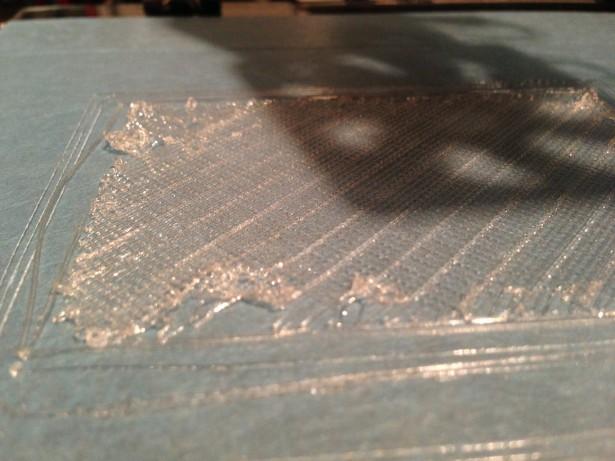
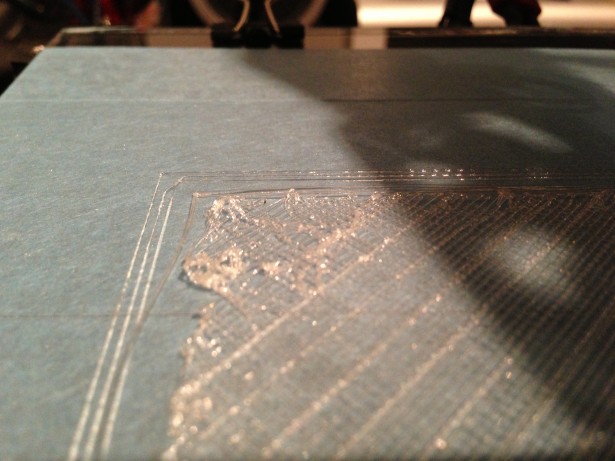
Hello all!I've had my M2 for a few weeks now, and done a few decent prints.Lately, however, I can't get it to work!I've got (fresh) blue painters tape on my heated platform, yet it seems that the filament do not stick.I am quite sure that it is simply a calibration error. Either I have too big distance from the nozzle to the bed, or too small distance.The last few prints I've tried to make, the filament sticks to the nozzle and is dragged around somewhat.I did an experiment with the 100micron setting that another member of this group posted, and it printed succesfully .. at times.Using that nice 100 micron print .fff file, I took a quick 30 sec vid, and that can be found right here: https://www.youtube.com/watch?v=15s2Df4fJLI
This is supposed to be a rectangle. Base point for a thing I tried to print.
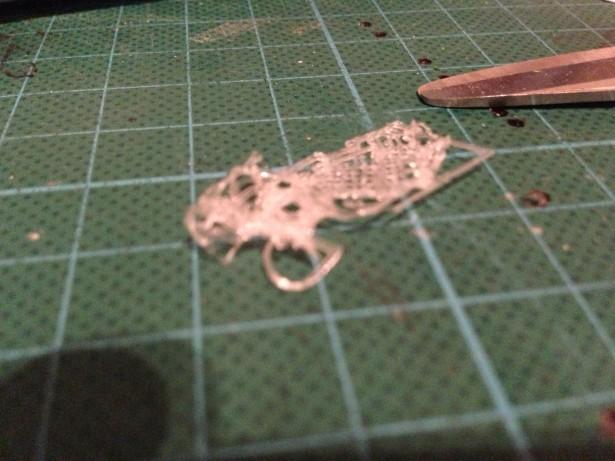
Another rectangle. Same model. Model is fine, by the way. I've printed it before.This is supposed to be ... well .. I'm not sure... I THINK it is supposed to be two smaller rectangles next to each other...
I've tried printing with the standard profiles that came with Creator, I've tried just about anything.The filament is pushed out at 190 Degrees Celsius, and the heated bed is running at 60 Degrees Celsius.The filament won't really stick, and I don't know if what I'm seeing is due to the Z-home being too close to the nozzle or too far from it.At this moment, it is really touch and go, as some things seems to print fine at first, and some not.Any suggestions is welcome, and oh... before anyone asks.. this is printed with the filament that came with my M2, so nothing funny going on there! I bought other PLA filament as well, but haven't been able to get that to print at all.. In fact, it is after that that I went back to my original one, and have had these issues..Thanks in advance for any suggestions. I want to print things, not banging my head against the desk ;)cheers,Micke Askernäs--
You received this message because you are subscribed to the Google Groups "MakerGear - Make Today, Change Tomorrow" group.
To unsubscribe from this group and stop receiving emails from it, send an email to makergear+...@googlegroups.com.
For more options, visit https://groups.google.com/groups/opt_out.

Jonathan Hirschman
May 22, 2013, 1:05:35 PM5/22/13
to make...@googlegroups.com
The other tape, that is more catered towards ABS I've found is a lot more difficult to attach, since it keeps on getting bubbles on the glass... never seen a tape that is so hard to put on smooth before =)
I think that you're referring to Kapton. It's a piece of cake to apply if you put it in a tray of soapy water, put it on the glass, and then squeegee the bubbles and water out from underneath. Then run the bed heater for a bit, and it "bakes" any remaining bubbles out.
Cheers,
jh

Tim
May 23, 2013, 9:08:30 AM5/23/13
to make...@googlegroups.com
Hello Micke,
I also started having problems with filament lifting off the bed after a few weeks of perfect printing. Here's what I found:
(1) Temperature of the bed and distance from the nozzle to the bed don't make a whole lot of difference, although I do try to stick to the recommended temperatures and the recommended nozzle-to-plate distance of the thickness of a piece of paper.
(2) Blue painter's tape still needs a good rub-down with alcohol. With the tape I have, some kind of manufacturing residue gives it a slick surface, but alcohol takes it right off.
(3) Hair spray gives the best surface for sticking, and is very easy to work with. I have had zero problems with surface adhesion since switching to hair spray.
(4) At least for slic3r, the default settings extrude too much material, leading to the tendency for the nozzle to start pushing the excess material around. The extruder multiplier value in slic3r should be around 0.85. If you are using Creator or another slicer, I don't have any experience with them.
Reply all
Reply to author
Forward
0 new messages