
Re: Replicator 2 Extruder skipping

Jetguy
sound you hear is called skipping steps. Basically, the motor has
magnetic poles that line up. In order to move, there there 2 phases or
2 sets of poles that line up offset to the rotor. You change coils to
move the rotor forward but if the shaft cannot turn, then you here a
click as the shaft will actually turn backwards to line up with the
previous set of poles. The "click" is the sound of the motor tryign to
move forward, not being able to,and actually spinning backwards a tiny
bit to line up with the previous "step", meanwhile slapping the
filament up and down.
In short, your nozzle is restricted for some reason and thus the
filament can't be pushed into the extruder.
Known causes:
Nozzle too close to platform on first layer
Nozzle obstructed due to burnt plastic in the nozzle too long (leaving
the head heated but not actively printing)
Filament diameter inconsistent causing more friction in a fixed pinch
drive wheel system (see MK8 upgrades on thingiverse)
Crap filament
Nozzle not at correct temperature
On Oct 31, 3:29 pm, Joey Nelson <j...@joescan.com> wrote:
> The bot was working for the last two days, but not seems to be a bit
> unhappy.
>
> This is with default medium settings, with rafts and supports selected.
>
> I don't remember hearing the clicking noise before.
>
> I'm thinking the filament pushing gears are slipping.
>
> http://youtu.be/O5QbU_-M_j0

Joey Nelson
Jetguy
nozzle when traversing from one place to the next can be problematic
for the exact same reasons. Being that you said it worked from an SD
card print but not from generated gcode from your software clearly
points at settings in the software. Makerware has a very limited
inforace for adjusting anything and thus you might be better served by
using Replicator-g.
>
> - Show quoted text -
Jetguy
>
> > - Show quoted text -- Hide quoted text -

Mark

Dan Newman
On 11 Nov 2012 , at 11:47 AM, Mark wrote:
> I've had a lot of issues with uneven flow from the extruder. I took some
> time Friday and reversed the drive gear to eliminate the random slippage I
> was gettting on the stepper motor shaft. Reversing the drive gear allows
> the set screw to engage the flat on the motor shaft (which is there for set
With the Mk8's in the Replicator 1, it's intentional that the flat is not
used. The issue is that the flat doesn't go far enough down the shaft: if
you use the flat, then the centerline of the trough in the pinch gear doesn't
correctly line up with the filament's feed path through the drive block nor
the extruder heater core inlet. People who have done what you then did then
end up with the extruder skipping….
I dealt with this by filing the flat further down the shaft. Rocketsled
had an even better approach. Below is his response in its entirety from
2 November 2012.
Dan
> Yeah. Hitting the centerline of the drive wheel with the filament requires
> the wheel be very close to the stepper motor. The grub screw can't hit the
> flat when that spacing is as specified by MBI.
> Mechanically, there's no reason you wouldn't want to hit the flat. The
> whole reason for the shaft having a flat is, after all, to ensure that
> whatever is attached to the shaft doesn't require an "infinitely tight"
> grub to lock it down to the shaft.
> All that's required to fix this is a few washers between the face of the
> stepper and the back side of the filament feed/guide block, which would
> move the motor back slightly, which would let the drive wheel move forward
> on the shaft slightly, which would allow the grub to hit the flat and
> actually do what it's supposed to do and allow the filament to align
> properly with the center of the drive wheel.
> The Rep1 is a great machine, don't get me wrong, but there are quite a few
> areas of the design that present opportunities for improvement. This is one
> of them. Using thread locker is another.
Mark
On Sunday, November 11, 2012 2:26:37 PM UTC-8, dnewman wrote:
With the Mk8's in the Replicator 1, it's intentional that the flat is not
used. The issue is that the flat doesn't go far enough down the shaft: if
you use the flat, then the centerline of the trough in the pinch gear doesn't
correctly line up with the filament's feed path through the drive block nor
the extruder heater core inlet. People who have done what you then did then
end up with the extruder skipping….
I dealt with this by filing the flat further down the shaft.
Rocketsled
had an even better approach. Below is his response in its entirety from
2 November 2012.
> All that's required to fix this is a few washers between the face of the
> stepper and the back side of the filament feed/guide block, which would
> move the motor back slightly, which would let the drive wheel move forward
> on the shaft slightly, which would allow the grub to hit the flat and
> actually do what it's supposed to do and allow the filament to align
> properly with the center of the drive wheel.

Guidozelf


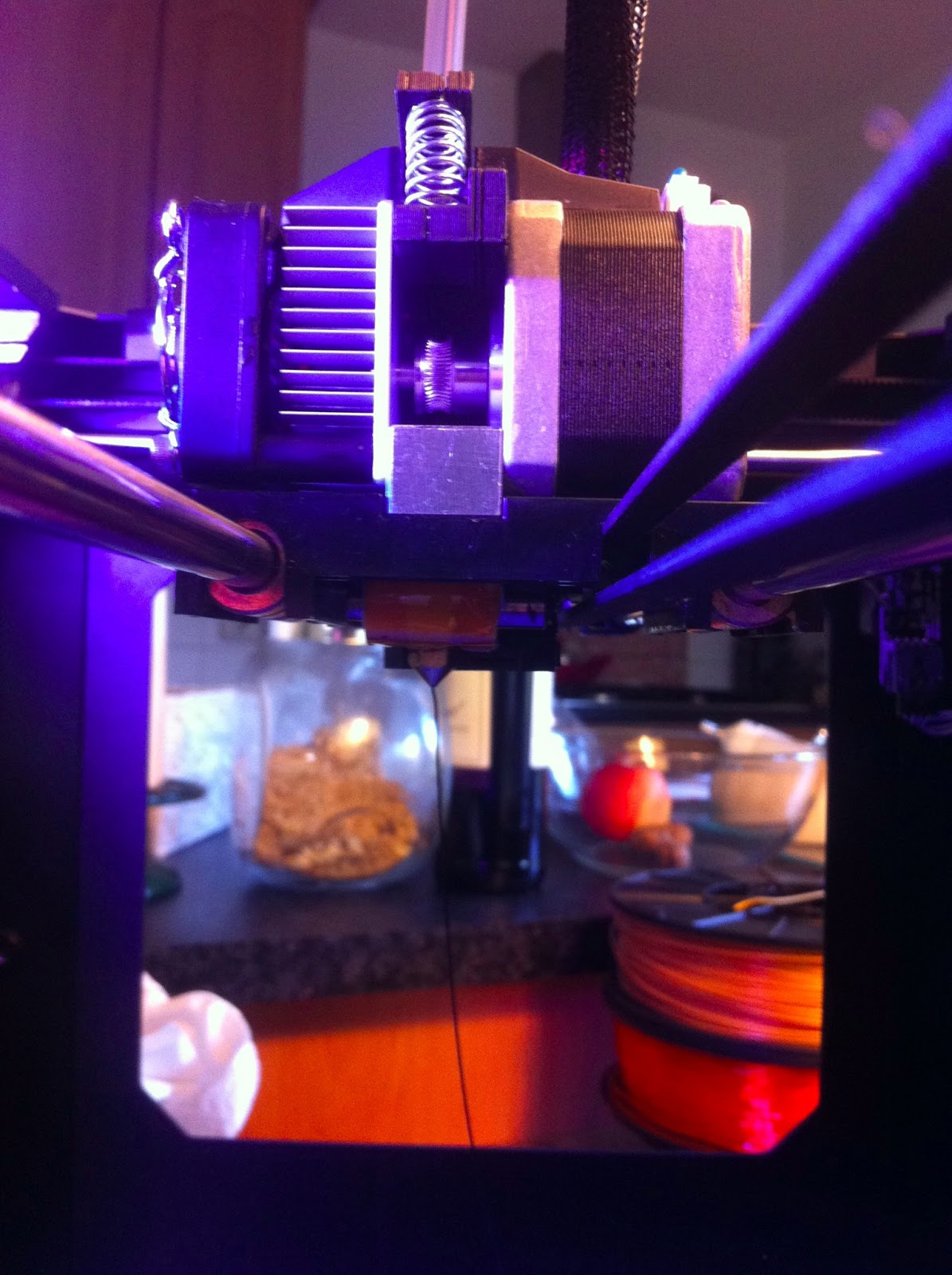
Op woensdag 31 oktober 2012 20:29:14 UTC+1 schreef Joey Nelson het volgende:
Joey Nelson

Hammerhead
I'll confirm Dan's comments. Had the same trouble with a slipping drive
gear also. It's beyond me why MBI wouldn't take the time to fix this
issue, but my solution was to use a Dremel and create a flat at the base
of the shaft. I've included a few photos (before/after) to show where the set screw
sits and how there's nothing to grab onto and what my motors look like now after the modification.


66tbird

Shawn
location, lock it down on the flat part. Or is there a reason not to do
this? (I noted the same issue on my Rep1 but never really had an issue
with slipping since I last check the grub screws... knock on wood.)
On 12-11-13 06:32 PM, Hammerhead wrote:
>
> I'll confirm Dan's comments. Had the same trouble with a slipping drive
> gear also. It's beyond me why MBI wouldn't take the time to fix this
> issue, but my solution was to use a Dremel and create a flat at the base
> of the shaft. I've included a few photos (before/after) to show where
> the set screw sits and how there's nothing to grab onto and what my
> motors look like now after the modification.
>
>
>
>
> On Sunday, November 11, 2012 5:26:37 PM UTC-5, dnewman wrote:
>
>
> With the Mk8's in the Replicator 1, it's intentional that the flat
> is not
> used. The issue is that the flat doesn't go far enough down the
> shaft: if
> you use the flat, then the centerline of the trough in the pinch
> gear doesn't
> correctly line up with the filament's feed path through the drive
> block nor
> the extruder heater core inlet. People who have done what you then
> did then
> I dealt with this by filing the flat further down the shaft.
> Rocketsled
> had an even better approach. Below is his response in its entirety
> from
> 2 November 2012.
>
> Dan
>
> You received this message because you are subscribed to the Google
> Groups "MakerBot Operators" group.
> To view this discussion on the web visit
> https://groups.google.com/d/msg/makerbot/-/vXeFKROw1bEJ.
> To post to this group, send email to make...@googlegroups.com.
> To unsubscribe from this group, send email to
> makerbot+u...@googlegroups.com.
> For more options, visit this group at
> http://groups.google.com/group/makerbot?hl=en.
Dan Newman
On 13 Nov 2012 , at 6:48 PM, Shawn wrote:
> Turn the gear around, line it up so the teeth are in the correct location, lock it down on the flat part. Or is there a reason not to do this? (I noted the same issue on my Rep1 but never really had an issue with slipping since I last check the grub screws... knock on wood.)
the trough of the pinch gear to no longer line up with the filament guide in the black extruder
block nor the inlet to the extruder's heater core. That because the flat doesn't extend down
far enough. You can extend the flat by grinding/filing or cause the black block to sit a little
farther away from the motor face with washers (Rocketsled's solution).
Dan
Shawn
screw is not on the bottom, but on the top. (assuming the motor shaft is
pointing up). Or in 3D terms, rotate 180 degrees on the X or Y axis,
not the Z axis.
Dan Newman
On 13 Nov 2012 , at 7:11 PM, Shawn wrote:
> When I say turn the gear around, I mean flip it over so that the grub screw is not on the bottom, but on the top. (assuming the motor shaft is pointing up). Or in 3D terms, rotate 180 degrees on the X or Y axis, not the Z axis.
So, drum roll please …… you can get a useful trough alignment when you do that? (Presumably the answer
is affirmative since presumably you wouldn't have said so otherwise.)
Thanks,
Dan
Mark
On Tuesday, November 13, 2012 7:30:54 PM UTC-8, dnewman wrote:
So, drum roll please …… you can get a useful trough alignment when you do that? (Presumably the answer
is affirmative since presumably you wouldn't have said so otherwise.)

Steve
On Monday, November 12, 2012 6:55:56 AM UTC-8, Guidozelf wrote:
Mark
On Tuesday, November 20, 2012 6:13:21 PM UTC-8, Steve wrote:
In order to make the Minimalistic Mk8 replacement from emmet (http://www.thingiverse.com/thing:28241 for the Replicator 2 do you just need to print the extruderR.stl file and then add the bearings and springs. When you actually have a Replicator 2 is it obvious how the parts go together? Mine has not arrived yet so I don't quite see how it fits in.
Mark
BTW, the hobby shop bearings were for an Align helicopter, part number HS1029T, which includes 4 of the 3x8x4mm bearings (693ZZ).

Infinityplusplus
Not that I want to push this design, just hate to see anyone cut the plastic on thier REP 2 that doesnt want to.

Mark McGovern
Mark

Andy Cohen
On Friday, February 1, 2013 12:10:49 PM UTC-8, Timesaint wrote:
Hi there, everyone - Rep2 owner here:I had a similar problem; my prints would stop extruding for a while and start again, or stop completely while making that sickening clicking sound. I adjusted my plunger, cleaned the motor and extruder, etc. - I could not get a print to last longer than 6 hrs.Two days ago, I decided to reduce the force needed to pull the filament into the extruder by this very complex step:I hung my filament directly above the machine.Problem solved; got a very clean 22hr print of the PLA big nip cube and many other short prints. Haven't seen the problem since.My reasoning: Mounting the spool to the back of the unit causes the filament to turn a full 180 degrees before getting into the extruder. In the guide tube, even though it is a fairly slick surface, this causes friction that the motor has to compensate for. Now that the filament bends no more than 30 degrees, it requires much less pull by the motor to draw the filament in.While I am planning on installing http://www.thingiverse.com/thing:42250 tonight, as my spring just arrived, I'm so much happier with my bot.Good luck!

Gary Crowell
--
You received this message because you are subscribed to the Google Groups "MakerBot Operators" group.
To unsubscribe from this group and stop receiving emails from it, send an email to makerbot+u...@googlegroups.com.
For more options, visit https://groups.google.com/groups/opt_out.
----------------------------------------------
Gary A. Crowell Sr., P.E., CID+


