
Funky wavieness with 6.0 firmware?

Zak Kus
So, i've done this print dozens, maybe even hundreds, of times. I upgraded to 6.0 recently (did some other prints that were successful), but when i printed out this guy it produced a weird wavy effect that i had never seen before. (See picture)
It was the same gcode i had used many times before (so no settings error). I thought it was maybe something funky with my filament (it is sorta old), however the pattern seems very regular and "intentional". All the peices have a little bit of wave, but its most noticeable on the dramatic slopes and curves.
Has anyone else seen this?


Jetty
1. The smaller vibration effect is Vibration of the HBP.
Printing near the back of the platform will make it better, or reduce
your overall speed
and acceleration too (if you're using it).
2. The larger effect is due to too little filament being extruded at
the start of the each move,
and too much at the end of the move.
Certain shapes make the above problems worse, due to the increased
vibration
and resonance.
1. will start to become visible on speeds > 30mm/s (accelerated or
non).

Tyler Pope
Jetty
making it worse.

Matthew Marlowe
> I believe the acceleration settings were changed to. They maybe
> making it worse.
>
perfect prints.
However, I've noticed/changed:
a) updated acceleration firmware settings - See attached pic with
those that I use.
b) limiting print speed to 60/60/60 with some other minor non-default
skeinforge changes
c) Noticed that somehow prints are more sensitive to how close the
build plate is to the extruder, whenever I'm slightly too close I'm
now seeing tiny little dots showing on the exterior of my prints. I
don't remember seeing the same effect before. Simple fix though and
makes levelling the build plate easy now - just keep printing out
small prints with each having a skirt. If one of the corners is too
close, the exterior wall of those prints will have the dots on the
surface. If the corner is too far, the skirt will not stick in a
straight line or not be perfectly flat. So, all I have to do is
monitor these items on each print and adjust each corner slightly
until I get perfectly level.
Matt
--
https://www.twitter.com/deploylinux

Moceri
I've tried several acceleration configurations as suggested from Tony Buser a while back, "Joe's MakerBot", PlanetaryGear, what was suggested by Matt in this thread, and my own.
What I have observed:
1) no matter the acceleration settings I used, the prints would start out fine for about half or a quarter of the print
2) after half/quarter of print, the X/Y seem to get very jittery and print quality suffers
3) I get the same artifacts as Zak
4) the issue is not isolated within the gcode, I've tried generating the same models in both MakerWare/Miracle Grue and RepG/skeinforge and get the same jittery result. However, the artifacts are less apparent in my skeinforge profile because I reduced my perimeter feed/flow rates to .33.
5) does not matter if print in in the front or back of the plate/position
A few notes:
1) I updated the firmware via MakerWare initially
2) I have been going back and forth between RepG and MakerWare changing the acceleration values
3) MakerWare has a few more options than RepG, the x/y jerk are separate
4) this may be an unrelated issue, but possibly connected, when I am connected to RepG I get this message in the console: "You are running an unverified MightyBoard, your machine is not a verified MakerBot Replicator", but I'm still able to operate the bot normally from control panel/preferences
5) no issue connecting in MakerWare
Attached are a few pics of my results. Would a video suffice instead?
On Friday, October 5, 2012 6:41:42 PM UTC-5, Zak Kus wrote:
Jetty
mind
having a go at printing them myself.
On Oct 7, 4:16 pm, Moceri <xmoce...@gmail.com> wrote:
> I'm having the same problem with 6.0 right now.
>
> I've tried several acceleration configurations as suggested from Tony Buser
> MakerBot"<http://joesmakerbot.blogspot.com/2012/07/acceleration-and-you.html>,
> PlanetaryGear<http://www.planetarygear.org/2012/09/makerbot-acceleration-settings.html>,
>
>
>
> Untitled-1.jpg
> 71KViewDownload
>
> Untitled-2.jpg
> 68KViewDownload
>
> Untitled-3.jpg
> 109KViewDownload
Moceri
Do you have a link to the items you printed on Thingiverse, wouldn't
mind
having a go at printing them myself.
Sure, I've attached a .stl that is not available on Thingiverse yet, ("untitled-1.jpg").
"untitled-2.jpg" is of my Sue the T-Rex
"Untitled-3.jpg" is the Companion Cube with a flat bottom (not sure what I scaled it to) and the Bucket of Octopi (from the MakerWare examples)
Would the altshell plugin for SF50 that was just released do any good (any difference than the previous altshell)? Just a thought.
Matthew Marlowe
I printed out the bucket of octopi along with other sea creature
designs last night on replicator running 6.0 - in preparation for a
kids pool party today - no problems at all with any of the prints.
The only time I see dots/exterior blemishes is when the extruder is
too close to the build plate.
Matt
> You received this message because you are subscribed to the Google Groups
> "MakerBot Operators" group.
> To view this discussion on the web visit
> https://groups.google.com/d/msg/makerbot/-/MJsMPOqnM0UJ.
>
> To post to this group, send email to make...@googlegroups.com.
> To unsubscribe from this group, send email to
> makerbot+u...@googlegroups.com.
> For more options, visit this group at
> http://groups.google.com/group/makerbot?hl=en.
--
https://www.twitter.com/deploylinux
Moceri
The only time I see dots/exterior blemishes is when the extruder is
too close to the build plate.
I'm definitely sure the plate is level. However the issue I'm having is unrelated to the build plate. The stepper motors for the X/Y axis seem to be very jittery/shaky while laying down the shells/perimeter.
Are you noticing this at all during your prints? I'm currently using your acceleration settings, and I'm still getting this effect.
I'm going to try repg39 and activate altshell for SF50 to see if it does anything for me. More later...
Tyler Pope
I also used Makerware to upgrade to 6.0. Could that be it?
--
You received this message because you are subscribed to the Google Groups "MakerBot Operators" group.
To view this discussion on the web visit https://groups.google.com/d/msg/makerbot/-/Jyv2BjCHmQ4J.
Moceri
I also used Makerware to upgrade to 6.0. Could that be it?
Matthew Marlowe
As far as makerware/replicatorg, I haven't touched makerware at all yet...especially as my desktop runs gentoo linux, and I haven't gotten around to writing a gentoo compatible wrapper around the ubuntu tailored package.
https://www.twitter.com/deploylinux
Tyler Pope
Tyler Pope
I'm going to have you download ReplicatorG 39, which just was released a few days ago.
http://code.google.com/p/replicatorg/downloads/list
Once that's installed, re-upload firmware 6.0 from ReplicatorG, regenerate your code, and let me know how the print comes out!
Best,
Alex
MakerBot Support
So far it looks like it fixed the problem on new gcode. I hope old gcode runs without issues. I don't want to regenerate it all again.
On Friday, October 5, 2012 6:41:42 PM UTC-5, Zak Kus wrote:
Tyler Pope
It worked on a part with straight walls but when I tried one with curved walls it failed again. I sent my part, gcode and a pic to Makerbot support last night. Hopefully they figure it out.
Hi Tyler,I tried this fix, but it didn't solve the problem with the jittery x/y-axis. Did it really work for you? Which operating system did you use?
--
You received this message because you are subscribed to the Google Groups "MakerBot Operators" group.
To view this discussion on the web visit https://groups.google.com/d/msg/makerbot/-/fCpEUBodjsQJ.

Jürgen Gründmayer

Chuck Joga

Chuck Joga
Jürgen Gründmayer

Justin Ribeiro


Chuck Joga
Summary: In some circumstances, FW 6.0 introduces the waviness issue that was not present in FW 5.5. In FW 6.0, waviness presents itself in different degrees whether acceleration is on or off. It is more detectable when acceleration is turned on and when printing at any speed. Turning acceleration off and printing at the default slow speed greatly reduces this waviness issue.
I ran some tests with FW 6.0 and FW 5.5 with different combinations of acceleration and feedrate. All gcode files were generated with Replicator G 37. All generated objects used defaults from the default tab to switch between default speed/temp and accelerated temp/speed. Filament diameter was set to 1.74mm and object infill was 3%.
My conclusion is that if you turn on acceleration in FW 6.0, the waviness reported here may be produced using both accelerated and normal speed defaults in Replicator G. Additionally, very slight waviness can be detected upon very close inspection when acceleration is turned off in FW 6.0 at 40mm/sec print speed. Using FW 5.5 with acceleration turned on and 40mm/sec print speed shows no detectable waviness. While FW 5.5 @ 40mm/sec produced no detectable waviness, there are issues with extruder start/stop that seem to have been improved in FW 6.0.
Recommendation if you experience this so called waviness: For best quality, use FW 5.5 @ 40mm/sec and infill of > 10%. For best print quality using FW 6.0, turn off acceleration and set print speed to 40mm/sec.
-Chuck
--------------------------------------------------------------------------------------------------------------------------------------------------------
Firmware 6.0 vs 5.5
- Acceleration: ON
- Feedrate: 80mm/sec
- Notes: Waviness in present with FW 6.0 on left. There is no waviness with FW 5.5 on right. Dimensional quality of FW 6.0 using acceleration is superior. Print with FW 5.5 shows distorted/contracted bands at bottom and top. There were noticeable gaps and dropped loops using FW 5.5. Extrusion starts were inaccurate with FW 5.5. "Air printing" was noticeable with FW 5.5 which left gaps and mangled support structures. Distortion in FW 5.5 print may be due to low infill of 3%.

--------------------------------------------------------------------------------------------------------------------------------------------------------
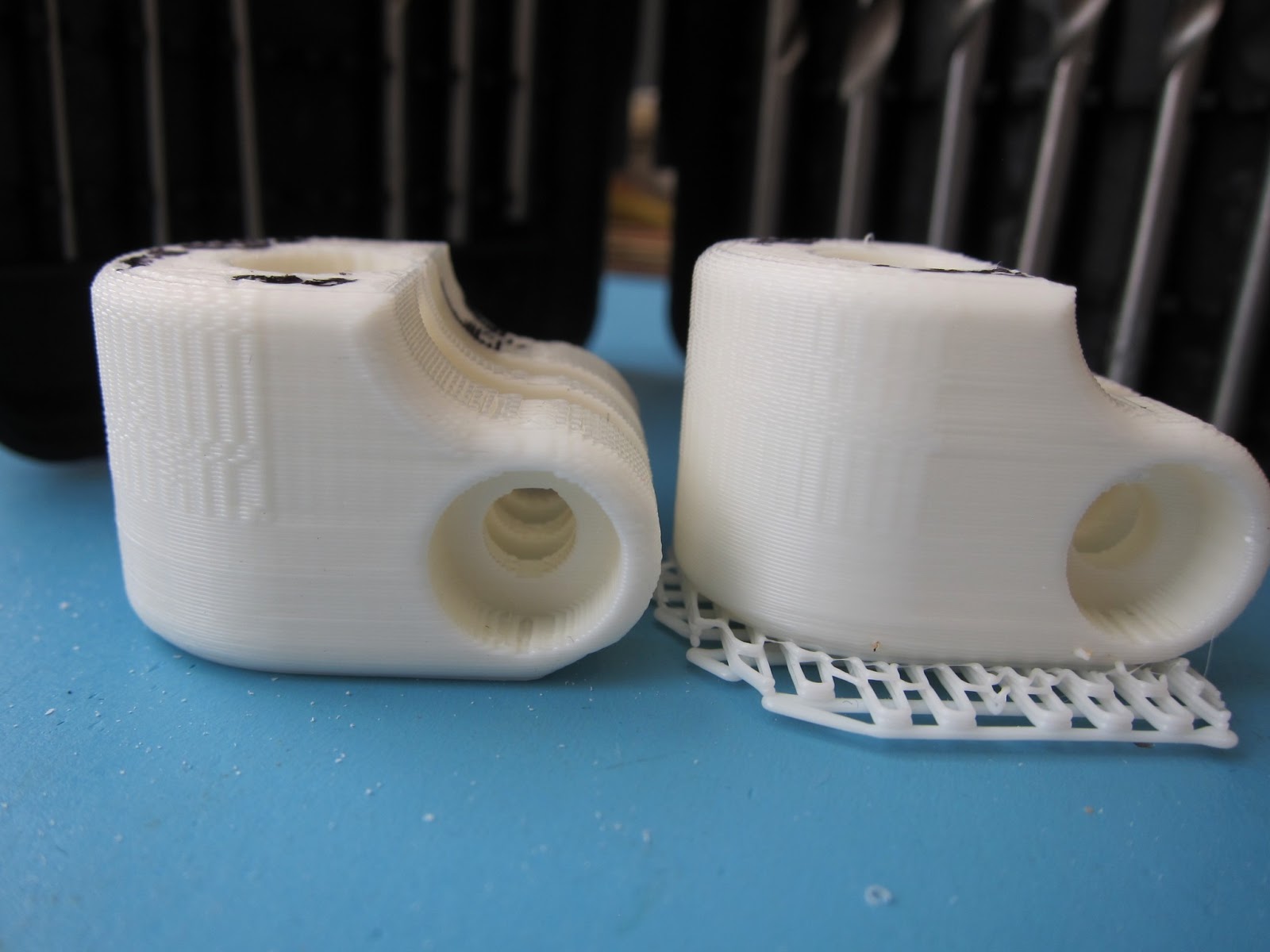
Firmware 6.0 Feedrate 80mm/sec vs. 40mm/sec
- Acceleration: ON
- Notes: Decreasing the print speed by 50% using FW 6.0 improved the waviness, but was still noticeable.
--------------------------------------------------------------------------------------------------------------------------------------------------------
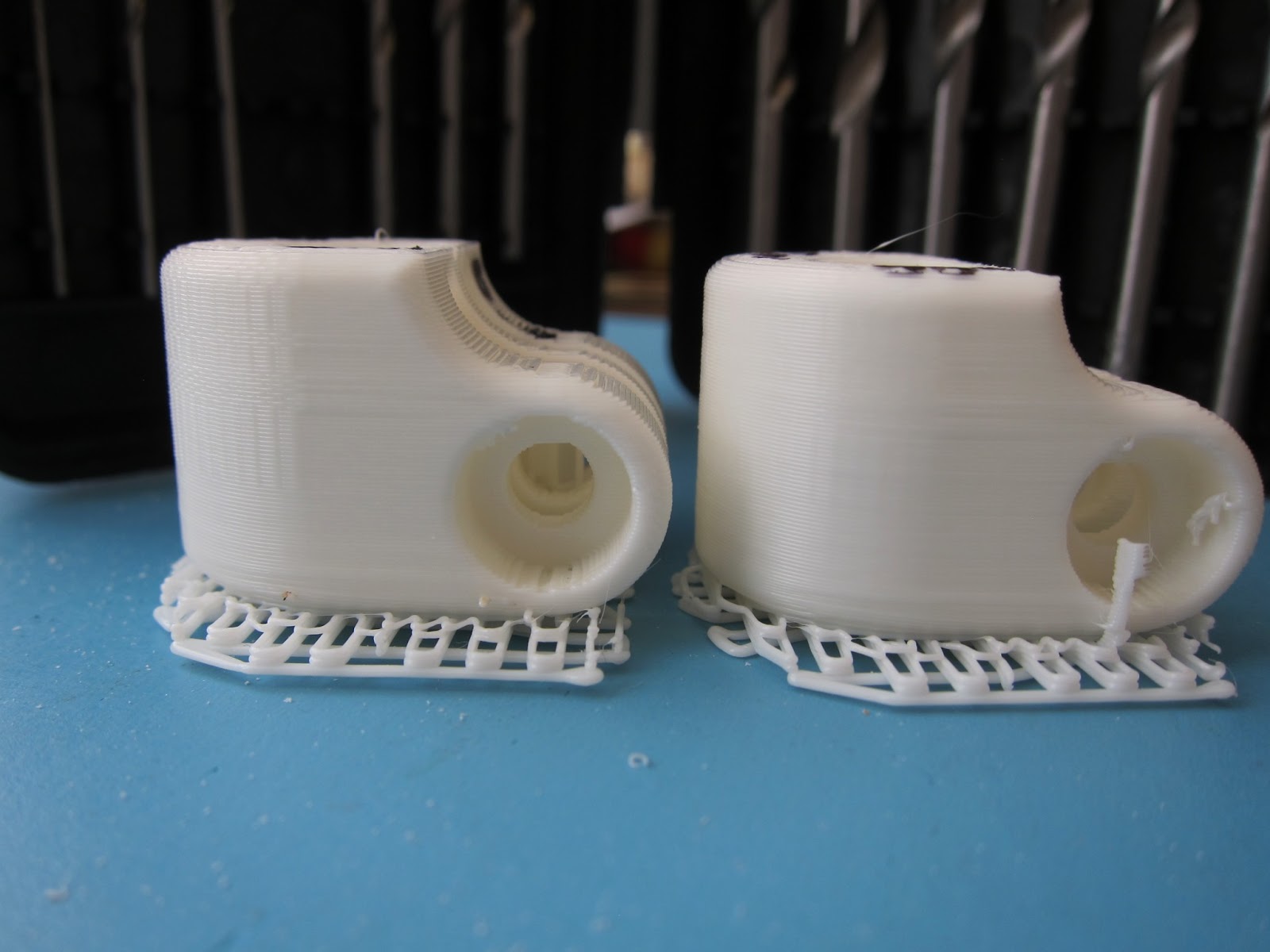
Firmware 6.0 Acceleration On vs. Off
- Feedrate: 40mm/sec
- Notes: Turning acceleration off in FW 6.0 further decreased waviness, but was noticeable only under close inspection.
--------------------------------------------------------------------------------------------------------------------------------------------------------
Firmware 5.5 Feedrate 80mm/sec vs. 40mm/sec
- Acceleration: ON
- Notes: Waviness at 80mm/sec on left was noticeable upon very close inspection. There was no waviness detected at 40mm/sec print speed on right. Comparing FW 5.5 80mm/sec print to FW 6.0 40mm/sec print showed slightly less waviness using FW 5.5. However FW 5.5 print quality was inferior to FW 6.0.

Zak Kus
Chuck Joga
Chuck Joga
Chuck Joga

Mark Cohen
Wow this is just like the old days when they were releasing software that was not QA tested. All they had to do was print something to see there was a problem.
--
You received this message because you are subscribed to the Google Groups "MakerBot Operators" group.
To view this discussion on the web visit https://groups.google.com/d/msg/makerbot/-/lRC8yRnHeHkJ.
Matthew Marlowe
> Wow this is just like the old days when they were releasing software that
> was not QA tested. All they had to do was print something to see there was a
> problem.
>
--
https://www.twitter.com/deploylinux
Chuck Joga

Finhead

RocketSled
Chuck Joga
Mark Cohen
Dual using right in black
Assuming you have a dualstrusion, which extruder are you using? I've been printing with 6.0 on the right extruder and the quality of my prints have improved from 5.5, and I haven't seen the wavy problem (and the objects I've been printing are fairly large, inches in size). Last night, I did a job (twice to be sure) with the left extruder and they're *awful*. Terrible wavyness. I'm using a different color ABS (white vs. black), but I ran a second print with reduced HBP and Extruder temps and filament diameter (down by 0.04mm) and there was no meaningful difference.Can't think of a reason why which extruder would matter to the FW, but a possibility none-the-less... so while I might just be wasting more plastic, I'm about to try a rerun on the right extruder, in black. If that looks good, I'll swap filaments and try one more time with white (though color mattering to the FW is even more outlandish possibility).
--
You received this message because you are subscribed to the Google Groups "MakerBot Operators" group.
To view this discussion on the web visit https://groups.google.com/d/msg/makerbot/-/gcpf7etHV8cJ.
Mark Cohen
Hey Everyone,This is Ben from MakerBot support.I just wanted to let you all know that we've figured out what's causing this waviness. We're testing a fix and we're going to be sending out very soon.Thank you to everyone who pointed this issue out - we really appreciate the heads up.-Ben
On Friday, October 5, 2012 7:41:42 PM UTC-4, Zak Kus wrote:So, i've done this print dozens, maybe even hundreds, of times. I upgraded to 6.0 recently (did some other prints that were successful), but when i printed out this guy it produced a weird wavy effect that i had never seen before. (See picture)
It was the same gcode i had used many times before (so no settings error). I thought it was maybe something funky with my filament (it is sorta old), however the pattern seems very regular and "intentional". All the peices have a little bit of wave, but its most noticeable on the dramatic slopes and curves.
Has anyone else seen this?
--
You received this message because you are subscribed to the Google Groups "MakerBot Operators" group.
To view this discussion on the web visit https://groups.google.com/d/msg/makerbot/-/qsiXqpIEwesJ.

Shawn
changes to work around? Or is this a solid software issue that needs
new f/w and/or software?
Telling me you found the problem is great. Telling me what the problem
was is even better. :)
Shawn
On 12-10-12 02:56 PM, Ben McCallum wrote:
> Hey Everyone,
>
> This is Ben from MakerBot support.
>
> I just wanted to let you all know that we've figured out what's causing
> this waviness. We're testing a fix and we're going to be sending out
> very soon.
>
> Thank you to everyone who pointed this issue out - we really appreciate
> the heads up.
>
> -Ben
>
>
>
> On Friday, October 5, 2012 7:41:42 PM UTC-4, Zak Kus wrote:
>
> So, i've done this print dozens, maybe even hundreds, of times. I
> upgraded to 6.0 recently (did some other prints that were
> successful), but when i printed out this guy it produced
> a weird wavy effect that i had never seen before. (See picture)
>
> It was the same gcode i had used many times before (so no settings
> error). I thought it was maybe something funky with my filament (it
> is sorta old), however the pattern seems very regular and
> "intentional". All the peices have a little bit of wave, but its
> most noticeable on the dramatic slopes and curves.
>
> Has anyone else seen this?
>

Andrew Plumb
"The future is already here. It's just not very evenly distributed" -- William Gibson
Me: http://clothbot.com/wiki/

Doogiekr
Finhead
Tyler Pope
Mark Cohen
obvious, how did the get through QA? Is there no QA anymore?
Jetty
Zak Kus
Tyler Pope
Zak Kus
RocketSled


DB
Chuck Joga
On Friday, October 12, 2012 2:56:44 PM UTC-6, Ben McCallum wrote:
Hey Everyone,This is Ben from MakerBot support.I just wanted to let you all know that we've figured out what's causing this waviness. We're testing a fix and we're going to be sending out very soon.Thank you to everyone who pointed this issue out - we really appreciate the heads up.-Ben
On Friday, October 5, 2012 7:41:42 PM UTC-4, Zak Kus wrote:
So, i've done this print dozens, maybe even hundreds, of times. I upgraded to 6.0 recently (did some other prints that were successful), but when i printed out this guy it produced a weird wavy effect that i had never seen before. (See picture)
It was the same gcode i had used many times before (so no settings error). I thought it was maybe something funky with my filament (it is sorta old), however the pattern seems very regular and "intentional". All the peices have a little bit of wave, but its most noticeable on the dramatic slopes and curves.
Has anyone else seen this?