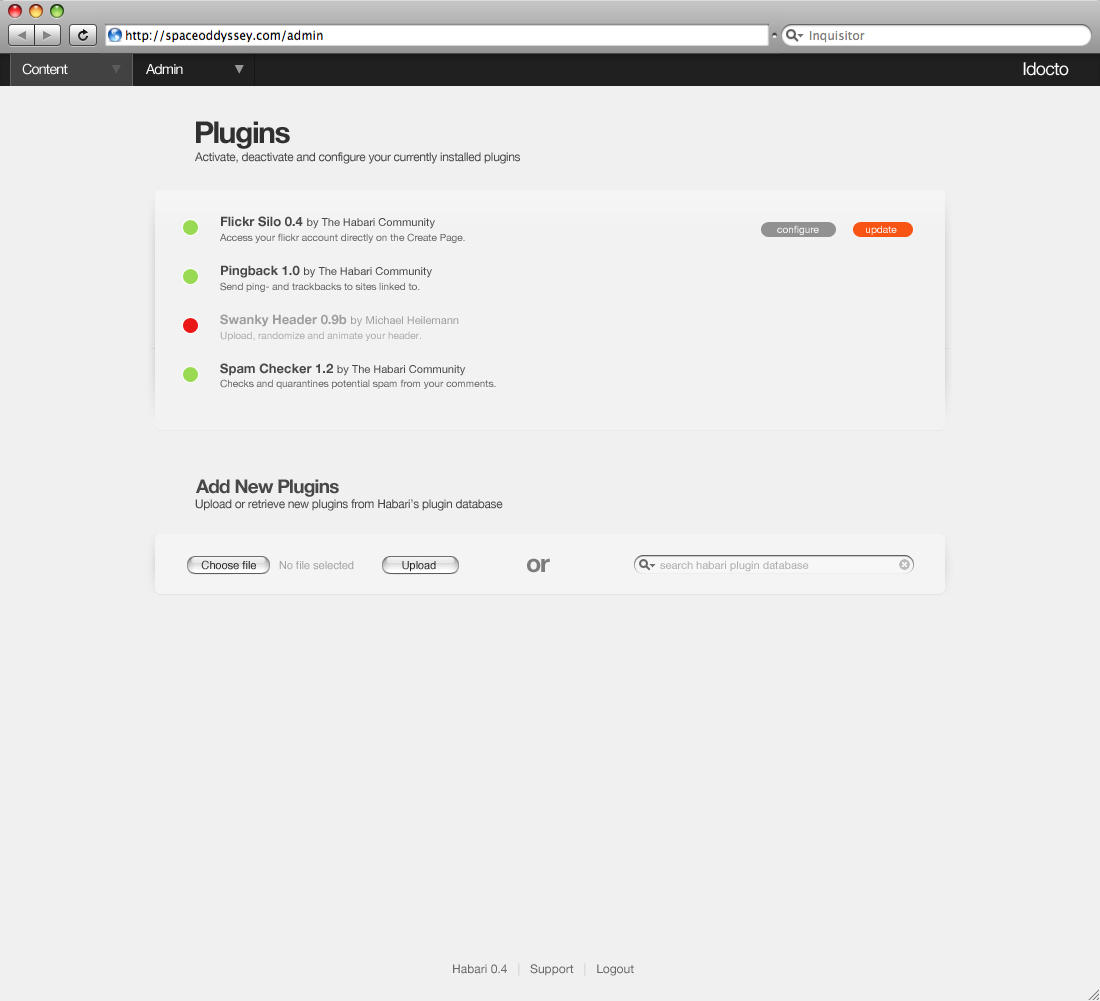
I've tried doing a mockup of how I see the plugins page working. I'm
not 100% on this, but since I've been going in circles in the last
hour, I figured it was time to just post it.
It should be self-explanatory. If it isn't, I didn't do my job
properly... damn. And in that case, you can go read the flickr notes
(http://www.flickr.com/photos/heilemann/2183367609/), which should
explain everything.
> I've tried doing a mockup of how I see the plugins page working. I'm > not 100% on this, but since I've been going in circles in the last > hour, I figured it was time to just post it.
> It should be self-explanatory. If it isn't, I didn't do my job > properly... damn. And in that case, you can go read the flickr notes > (http://www.flickr.com/photos/heilemann/2183367609/), which should > explain everything.
OK. I understand where this is going, and I'm partial to the way the
config options etc. are presented (eg. on one page that expands etc.),
BUT;
a) Where did the colors come from? Colors has not been discussed yet,
and given the track record of discussions on similar issues I don't
think we should stray much from the black/grey we use until now.
Colors is a completely new ballgame. ;-)
b) Where did the dropshadow come from? Thats not like anything else in
admin?
On Jan 10, 11:39 pm, "Michael Heilemann" <heilem...@gmail.com> wrote:
> Let me just attach the file here as well, for archival purposes.
> On Jan 10, 2008 11:26 PM, Michael Heilemann <heilem...@gmail.com> wrote:
> > I've tried doing a mockup of how I see the plugins page working. I'm
> > not 100% on this, but since I've been going in circles in the last
> > hour, I figured it was time to just post it.
> > It should be self-explanatory. If it isn't, I didn't do my job
> > properly... damn. And in that case, you can go read the flickr notes
> > (http://www.flickr.com/photos/heilemann/2183367609/), which should
> > explain everything.
> a) Where did the colors come from? Colors has not been discussed yet, > and given the track record of discussions on similar issues I don't > think we should stray much from the black/grey we use until now. > Colors is a completely new ballgame. ;-)
Colors haven't been needed so far, which to my knowledge, is the only reason they haven't been touched upon.
I'm still all in favor of keeping the admin largely monochrome, except when it comes to 'functional colors', which is what these are.
> b) Where did the dropshadow come from? Thats not like anything else in > admin?
As I see it, there is only one page currently 'fully' designed in the admin, namely the Create Page page. And because the Create Page consists mostly of form elements, it creates its own layout structure.
The Plugins page on the other hand is mostly text, which, if left without guides, just ends up floating in mid-air. I tried a variety of approaches to tying the content down, and ended up with what you see.
As I said, I'm not 100% on it yet. Especially because these new elements need to be able to carry themselves on other pages as well, which might not be the case.
> On Jan 10, 11:39 pm, "Michael Heilemann" <heilem...@gmail.com> wrote: > > Let me just attach the file here as well, for archival purposes.
> > On Jan 10, 2008 11:26 PM, Michael Heilemann <heilem...@gmail.com> wrote:
> > > I've tried doing a mockup of how I see the plugins page working. I'm > > > not 100% on this, but since I've been going in circles in the last > > > hour, I figured it was time to just post it.
> > > It should be self-explanatory. If it isn't, I didn't do my job > > > properly... damn. And in that case, you can go read the flickr notes > > > (http://www.flickr.com/photos/heilemann/2183367609/), which should > > > explain everything.
> b) Where did the dropshadow come from? Thats not like anything else in > > admin?
> As I see it, there is only one page currently 'fully' designed in the > admin, namely the Create Page page. And because the Create Page consists > mostly of form elements, it creates its own layout structure.
> The Plugins page on the other hand is mostly text, which, if left without > guides, just ends up floating in mid-air. I tried a variety of approaches to > tying the content down, and ended up with what you see.
> As I said, I'm not 100% on it yet. Especially because these new elements > need to be able to carry themselves on other pages as well, which might not > be the case.
FWIW, I really, really, *really* like this. The drop shadows are very subtle yet hold the elements together. Very tastefully done, I must say.
On 10 Jan 2008, at 22:26, Michael Heilemann wrote:
> I've tried doing a mockup of how I see the plugins page working. I'm > not 100% on this, but since I've been going in circles in the last > hour, I figured it was time to just post it.
> It should be self-explanatory. If it isn't, I didn't do my job > properly... damn. And in that case, you can go read the flickr notes > (http://www.flickr.com/photos/heilemann/2183367609/), which should > explain everything.
This is the first mockup of the plugin page that I actually like. First thing that jumps out at me is how low the contrast is between the background and any disabled plugin, and the second is the broken up drop-shadow, which should IMO come all the way down from the top menu to the bottom of the options (so only the footer menu is outside of it).
On Fri, Jan 11, 2008 at 08:11:46AM +0100, Michael Heilemann wrote: > a) Where did the colors come from? Colors has not been > discussed yet, and given the track record of discussions on > similar issues I don't think we should stray much from the > black/grey we use until now. Colors is a completely new > ballgame. ;-)
> Colors haven't been needed so far, which to my knowledge, is the only > reason they haven't been touched upon. > I'm still all in favor of keeping the admin largely monochrome, except > when it comes to 'functional colors', which is what these are.
I'm colour blind, and while I can differentiate the green and red here, I don't like colour-based UI elements like this. I don't look for it and the meaning isn't obvious to me.
There's some really good ideas here so I'll concentrate on these first: I like that you can choose files and add them from within the interface. I'm not sure how that would work to be honest but the only way I can think of is how Tiddlywiki for example deals with themes. They're downloaded directly from the theme author's link and are installed accordingly. i don't know if this is possible for us but that would be pretty damn cool function. I also like the placement of this additional functionality at the bottom of the page.
I do like the drop shadow idea, but I'm not so keen on it's implementation here. I know what you're doing however the slight effect kinda starts adding elements to the page that i don't see as necessary in this context, maybe use it as a separator between a sidebar?
The thing is, and it might be just me, I don't feel that the way this page is presented, it fits within the feel that has been established on the create page. I'm not very keen on the huge amount of wasted space in the middle between the title of the plugin (and description) and the actions to those plugins. Also I'm not very keen on how wide the bottom section is with the addition of the search function to the right of the plugin addition function.
I like the colour indicators (although not the colours chosen) to tell the different plugin states, however I do think we should have the drop down page filter integrated in there.
Final point, is how these design principals that are shown here get integrated into the rest of the pages (as you've mentioned). I was thinking about this yesterday and i think we should have an asset toolbox of elements that we should use in the admin panel to create that integration between the pages, and so that any additional pages we create or are created have a set of rules which they can adhere to?
On 11 Jan 2008, at 07:11, Michael Heilemann wrote:
> a) Where did the colors come from? Colors has not been discussed yet, > and given the track record of discussions on similar issues I don't > think we should stray much from the black/grey we use until now. > Colors is a completely new ballgame. ;-)
> Colors haven't been needed so far, which to my knowledge, is the > only reason they haven't been touched upon.
> I'm still all in favor of keeping the admin largely monochrome, > except when it comes to 'functional colors', which is what these are.
> b) Where did the dropshadow come from? Thats not like anything else in > admin?
> As I see it, there is only one page currently 'fully' designed in > the admin, namely the Create Page page. And because the Create Page > consists mostly of form elements, it creates its own layout structure.
> The Plugins page on the other hand is mostly text, which, if left > without guides, just ends up floating in mid-air. I tried a variety > of approaches to tying the content down, and ended up with what you > see.
> As I said, I'm not 100% on it yet. Especially because these new > elements need to be able to carry themselves on other pages as well, > which might not be the case.
> - Mike
> On Jan 10, 11:39 pm, "Michael Heilemann" < heilem...@gmail.com> wrote: > > Let me just attach the file here as well, for archival purposes.
> > On Jan 10, 2008 11:26 PM, Michael Heilemann < heilem...@gmail.com> > wrote:
> > > I've tried doing a mockup of how I see the plugins page working. > I'm > > > not 100% on this, but since I've been going in circles in the last > > > hour, I figured it was time to just post it.
> > > It should be self-explanatory. If it isn't, I didn't do my job > > > properly... damn. And in that case, you can go read the flickr > notes > > > (http://www.flickr.com/photos/heilemann/2183367609/), which should > > > explain everything.
> On Fri, Jan 11, 2008 at 08:11:46AM +0100, Michael Heilemann wrote: > > a) Where did the colors come from? Colors has not been > > discussed yet, and given the track record of discussions on > > similar issues I don't think we should stray much from the > > black/grey we use until now. Colors is a completely new > > ballgame. ;-)
> > Colors haven't been needed so far, which to my knowledge, is the only > > reason they haven't been touched upon. > > I'm still all in favor of keeping the admin largely monochrome, > except > > when it comes to 'functional colors', which is what these are.
> I'm colour blind, and while I can differentiate the green and red > here, I don't like colour-based UI elements like this. I don't look > for it and the meaning isn't obvious to me.
Well correct me if I'm wrong, but isn't green universal for 'go' and red 'no go'? I'm trying to figure out what it is that isn't obvious about the colors as such?
| | | On Fri, Jan 11, 2008 at 08:11:46AM +0100, Michael Heilemann wrote: | > a) Where did the colors come from? Colors has not been | > discussed yet, and given the track record of discussions on | > similar issues I don't think we should stray much from the | > black/grey we use until now. Colors is a completely new | > ballgame. ;-) | > | > Colors haven't been needed so far, which to my knowledge, is | the only | > reason they haven't been touched upon. | > I'm still all in favor of keeping the admin largely | monochrome, except | > when it comes to 'functional colors', which is what these are. | | I'm colour blind, and while I can differentiate the green and red | here, I don't like colour-based UI elements like this. I don't look | for it and the meaning isn't obvious to me. | | | Well correct me if I'm wrong, but isn't green universal for 'go' and red | 'no go'? I'm trying to figure out what it is that isn't obvious about | the colors as such? |
It is yes. However, red-green colour blindness affects about 10% of the male population [1]. Therefore using red and green to discern something on a UI that it placed in the same position is a bad idea.
Icons or separate indicators traffic light style are probably more appropriate.
> It is yes. However, red-green colour blindness affects about 10% of the > male population [1]. Therefore using red and green to discern something > on a UI that it placed in the same position is a bad idea.
That's very good to know. Hadn't thought of that to be honest.
Originally I had the 'button' on a slider where left was red and right was green. This might help, but then, maybe another solution is easier on everyone.
> I do like the drop shadow idea, but I'm not so keen on it's implementation > here. I know what you're doing however the slight effect kinda starts adding > elements to the page that i don't see as necessary in this context, maybe > use it as a separator between a sidebar?
Non-boxed/bordered elements have a tendency to 'float' if they aren't confined. That's why the edges are 'necessary' here. They create a frame, without confining the content in a box (which IMHO doesn't work visually).
The thing is, and it might be just me, I don't feel that the way this page
> is presented, it fits within the feel that has been established on the > create page. I'm not very keen on the huge amount of wasted space in the > middle between the title of the plugin (and description) and the actions to > those plugins. Also I'm not very keen on how wide the bottom section is with > the addition of the search function to the right of the plugin addition > function.
I don't consider it wasted space at all. It's whitespace. Breathing room.
There are two solutions to that 'problem'. Either redesign the individual elements to take up more space, or narrow down the page width. The first feels counterintuitive and the second counter to what I, in my internal monolog, have termed 'luxury through whitespace'.
I don't have the language to communicate properly what that means; the best I can do is to say that this 'breathes', and a more narrow design would breathe less.
Or that is to say, I haven't seen a suggestion that didn't.
> I like the colour indicators (although not the colours chosen) to tell the > different plugin states, however I do think we should have the drop down > page filter integrated in there.
Dropdown page filter?
> Final point, is how these design principals that are shown here get > integrated into the rest of the pages (as you've mentioned). I was thinking > about this yesterday and i think we should have an asset toolbox of elements > that we should use in the admin panel to create that integration between the > pages, and so that any additional pages we create or are created have a set > of rules which they can adhere to?
Yes. Althoughwe can't create that until we've iterated on more pages.
> On 11 Jan 2008, at 07:11, Michael Heilemann wrote:
> a) Where did the colors come from? Colors has not been discussed yet, > > and given the track record of discussions on similar issues I don't > > think we should stray much from the black/grey we use until now. > > Colors is a completely new ballgame. ;-)
> Colors haven't been needed so far, which to my knowledge, is the only > reason they haven't been touched upon.
> I'm still all in favor of keeping the admin largely monochrome, except > when it comes to 'functional colors', which is what these are.
> > b) Where did the dropshadow come from? Thats not like anything else in > > admin?
> As I see it, there is only one page currently 'fully' designed in the > admin, namely the Create Page page. And because the Create Page consists > mostly of form elements, it creates its own layout structure.
> The Plugins page on the other hand is mostly text, which, if left without > guides, just ends up floating in mid-air. I tried a variety of approaches to > tying the content down, and ended up with what you see.
> As I said, I'm not 100% on it yet. Especially because these new elements > need to be able to carry themselves on other pages as well, which might not > be the case.
> - Mike
> > On Jan 10, 11:39 pm, "Michael Heilemann" < heilem...@gmail.com> wrote: > > > Let me just attach the file here as well, for archival purposes.
> > > On Jan 10, 2008 11:26 PM, Michael Heilemann < heilem...@gmail.com> > > wrote:
> > > > I've tried doing a mockup of how I see the plugins page working. I'm > > > > not 100% on this, but since I've been going in circles in the last > > > > hour, I figured it was time to just post it.
> > > > It should be self-explanatory. If it isn't, I didn't do my job > > > > properly... damn. And in that case, you can go read the flickr notes
On Jan 12, 2008, at 04:30, Khaled Abou Alfa wrote:
> I like that you can choose files and add them from within the > interface. I'm not sure how that would work to be honest but the > only way I can think of is how Tiddlywiki for example deals with > themes. They're downloaded directly from the theme author's link > and are installed accordingly. i don't know if this is possible for > us but that would be pretty damn cool function. I also like the > placement of this additional functionality at the bottom of the page.
Having the ability for one server to HTTP GET a file from another server and do something magical with it is potentially very dangerous. I'm sure that we're all aware of that, but it's worth stating explicitly, and being sure that every line of code that implements this functionality is scrutinized for possible ways to exploit it maliciously. Yes, obviously, it would be very cool if we could do this, but we need to make sure we don't say, well, the user is responsible for making sure they don't do something stupid with it. We need to take all possible steps to ensure that it can be used to install themes and plugins, but not random malicious code.
-- A poet more than thirty years old is simply an overgrown child. H. L. Mencken
> Having the ability for one server to HTTP GET a file from another server > and do something magical with it is potentially very dangerous. I'm sure > that we're all aware of that, but it's worth stating explicitly, and being > sure that
On Sat, Jan 12, 2008 at 12:26:11PM +0100, Michael Heilemann wrote: > On Jan 12, 2008 10:04 AM, Michael C. Harris <michael.twof...@gmail.com> wrote: > > I'm colour blind, and while I can differentiate the green and red > > here, I don't like colour-based UI elements like this. I don't > > look for it and the meaning isn't obvious to me.
> Well correct me if I'm wrong, but isn't green universal for 'go' > and red 'no go'? I'm trying to figure out what it is that isn't > obvious about the colors as such?
I'm not talking about what's universally accepted, I'm talking about how I personally interact with a UI (and with colour in general). A UI should be as intuitive as possible (leaving aside recent arguments elsewhere regarding the meaning of intuitive). You're making the assumption that green == active through go is intuitive, and to me it isn't.
I mention my colour blindness because that's likely the reason I don't relate to colour-based UI elements in the way that you expect. Of course I worked it out, and I'd be fine with it now, but because of the extra cognitive effort that I have to make with colour-based UI elements, my initial reaction was negative.
IMHO, representing Data by color is not a good practice at least in terms of accessibility. Which is why I think it would be better to be represented in another way. I personally am with the labeling that Khalid suggested in his plugins page mockup.
On Jan 13, 2008 12:13 AM, Michael C. Harris <michael.twof...@gmail.com> wrote:
> On Sat, Jan 12, 2008 at 12:26:11PM +0100, Michael Heilemann wrote: > > On Jan 12, 2008 10:04 AM, Michael C. Harris <michael.twof...@gmail.com> > wrote: > > > I'm colour blind, and while I can differentiate the green and red > > > here, I don't like colour-based UI elements like this. I don't > > > look for it and the meaning isn't obvious to me.
> > Well correct me if I'm wrong, but isn't green universal for 'go' > > and red 'no go'? I'm trying to figure out what it is that isn't > > obvious about the colors as such?
> I'm not talking about what's universally accepted, I'm talking about > how I personally interact with a UI (and with colour in general). A UI > should be as intuitive as possible (leaving aside recent arguments > elsewhere regarding the meaning of intuitive). You're making the > assumption that green == active through go is intuitive, and to me it > isn't.
> I mention my colour blindness because that's likely the reason I don't > relate to colour-based UI elements in the way that you expect. Of > course I worked it out, and I'd be fine with it now, but because of > the extra cognitive effort that I have to make with colour-based UI > elements, my initial reaction was negative.