Message from discussion
CPU Profiler does not display calls
Date: Fri, 2 Nov 2012 13:32:11 -0700 (PDT)
From: jay...@gmail.com
To: google-chrome-developer-tools@googlegroups.com
Cc: scott.came...@sap.com
Message-Id: <f9ebe445-92d7-4014-b2c6-60b35a7615c9@googlegroups.com>
In-Reply-To: <CANpOREXpFO6LbPzwrb2hn7E_V8FTczubUHj1_e9ANb4_OUh_rg@mail.gmail.com>
References: <3b7cd5e6-c41c-4409-9c8b-6a436d4d5d10@googlegroups.com>
<CANpOREXpFO6LbPzwrb2hn7E_V8FTczubUHj1_e9ANb4_OUh_rg@mail.gmail.com>
Subject: Re: [Chrome DevTools] CPU Profiler does not display calls
MIME-Version: 1.0
Content-Type: multipart/mixed;
boundary="----=_Part_1860_7569914.1351888331452"
------=_Part_1860_7569914.1351888331452
Content-Type: multipart/alternative;
boundary="----=_Part_1861_32993919.1351888331457"
------=_Part_1861_32993919.1351888331457
Content-Type: text/plain; charset=UTF-8
Content-Transfer-Encoding: 7bit
Thanks for posting a bug on this. I am seeing the exact same problem in
Chrome Version 22.0.1229.94 m on Windows 7 64-bit, but Canary works great.
On Wednesday, October 3, 2012 5:12:31 AM UTC-5, Yury Semikhatsky wrote:
>
>
>
> On Wed, Oct 3, 2012 at 12:02 AM, <scott....@sap.com <javascript:>> wrote:
>
>> Hi,
>>
>> I'm trying to get the CPU Profiler tool in Chrome to work and I'm seeing
>> some odd behaviour. This was working for me earlier today. I was able to
>> get a cpu captured and navigate around the various call stacks no problem.
>> Then it stopped working when I did something more DOM-intensive and now
>> even my simple case doesn't work any more.
>>
>> Basically, what happens is after the profiler stops it displays a list of
>> functions in the "bottom up" view. When I click on the arrow next to any
>> of the functions, the first click does nothing and then the second click
>> does expand the selection but it just shows empty lines nested under the
>> function. Sometimes there are "self" and "total" numbers next to the empty
>> lines and sometimes not.
>>
>> Same thing when I switch to "top down" view. First click on a function
>> expand arrow does nothing and then the next click expands to nothing. As I
>> switch back and forth between "top down" and "bottom up" I get a different
>> view. Sometimes even the top-level functions are missing. It is very
>> flaky.
>>
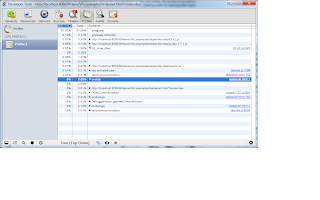
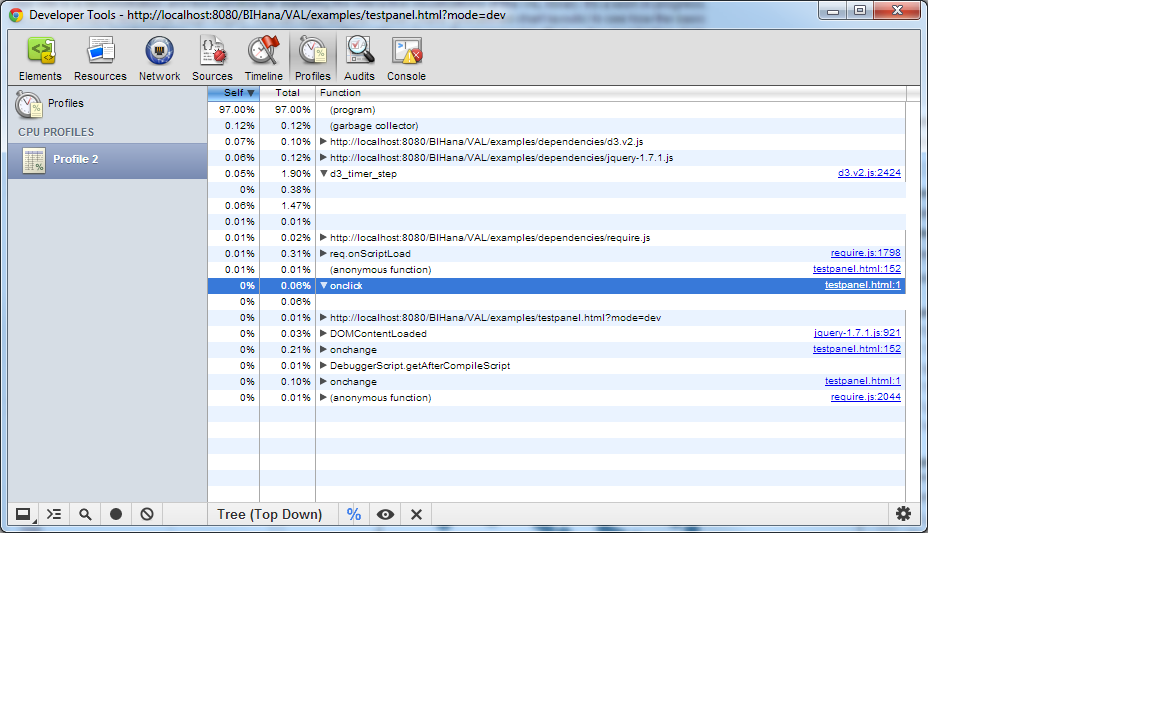
>> Here's a screen shot showing the missing lines. You can see the
>> d3_timer_step and the onclick functions expanded with empty lines under
>> them:
>>
>>
>> <https://lh6.googleusercontent.com/-2_KRa-WiRe0/UGtH9_vrW8I/AAAAAAAAAAM/_9L2fhC8Gys/s1600/screen.png>
>> As I said, for the first couple of simple runs this worked fine. But now
>> I can't get back to that place anymore, even in the simplest cases. I've
>> tried shutting the browser down completely and even creating a second
>> profile with no extensions or anything but nothing works.
>>
>> Is this something I'm doing wrong? Is there any way get around this? Or
>> should I file a bug?
>>
>> You are doing all right. I filed a bug on this:
> https://bugs.webkit.org/show_bug.cgi?id=98250
> I cannot reproduce the problem on tip-of-tree build, so as a work around I
> would recommend using canary build of Chrome(you can download it here
> https://tools.google.com/dlpage/chromesxs) which can be installed in
> parallel with the stable version you have.
>
> Yury
>
>
>> BTW, I'm using Version 22.0.1229.79 m on Windows 7 64-bit.
>>
>> Cheers,
>> scott
>>
>
>
------=_Part_1861_32993919.1351888331457
Content-Type: text/html; charset=utf-8
Content-Transfer-Encoding: 7bit
Thanks for posting a bug on this. I am seeing the exact same problem in Chrome <span style="color: rgb(48, 57, 66); font-family: 'Segoe UI', Tahoma, sans-serif; font-size: 12px; ">Version 22.0.1229.94 m on Windows 7 64-bit, but Canary works great.</span><div><br>On Wednesday, October 3, 2012 5:12:31 AM UTC-5, Yury Semikhatsky wrote:<blockquote class="gmail_quote" style="margin: 0;margin-left: 0.8ex;border-left: 1px #ccc solid;padding-left: 1ex;"><br><br><div class="gmail_quote">On Wed, Oct 3, 2012 at 12:02 AM, <span dir="ltr"><<a href="javascript:" target="_blank" gdf-obfuscated-mailto="0x2wE-I6wE0J">scott....@sap.com</a>></span> wrote:<br><blockquote class="gmail_quote" style="margin:0 0 0 .8ex;border-left:1px #ccc solid;padding-left:1ex">
Hi,<div><br></div><div>I'm trying to get the CPU Profiler tool in Chrome to work and I'm seeing some odd behaviour. This was working for me earlier today. I was able to get a cpu captured and navigate around the various call stacks no problem. Then it stopped working when I did something more DOM-intensive and now even my simple case doesn't work any more.</div>
<div><br></div><div>Basically, what happens is after the profiler stops it displays a list of functions in the "bottom up" view. When I click on the arrow next to any of the functions, the first click does nothing and then the second click does expand the selection but it just shows empty lines nested under the function. Sometimes there are "self" and "total" numbers next to the empty lines and sometimes not.</div>
<div><br></div><div>Same thing when I switch to "top down" view. First click on a function expand arrow does nothing and then the next click expands to nothing. As I switch back and forth between "top down" and "bottom up" I get a different view. Sometimes even the top-level functions are missing. It is very flaky. </div>
<div><br></div><div>Here's a screen shot showing the missing lines. You can see the d3_timer_step and the onclick functions expanded with empty lines under them:</div><div><br></div><div><a href="https://lh6.googleusercontent.com/-2_KRa-WiRe0/UGtH9_vrW8I/AAAAAAAAAAM/_9L2fhC8Gys/s1600/screen.png" style="margin-right:1em;margin-left:1em;line-height:17.999998092651367px;text-align:center" target="_blank"><img border="0" width="320" height="200" origsrc="https://lh6.googleusercontent.com/-2_KRa-WiRe0/UGtH9_vrW8I/AAAAAAAAAAM/_9L2fhC8Gys/s320/screen.png"></a></div>
<div>As I said, for the first couple of simple runs this worked fine. But now I can't get back to that place anymore, even in the simplest cases. I've tried shutting the browser down completely and even creating a second profile with no extensions or anything but nothing works.</div>
<div><br></div><div>Is this something I'm doing wrong? Is there any way get around this? Or should I file a bug?</div><div><br></div></blockquote><div>You are doing all right. I filed a bug on this: <a href="https://bugs.webkit.org/show_bug.cgi?id=98250" target="_blank">https://bugs.webkit.org/<wbr>show_bug.cgi?id=98250</a></div>
<div>I cannot reproduce the problem on tip-of-tree build, so as a work around I would recommend using canary build of Chrome(you can download it here <a href="https://tools.google.com/dlpage/chromesxs" target="_blank">https://tools.google.com/<wbr>dlpage/chromesxs</a>) which can be installed in parallel with the stable version you have.</div>
<div><br></div><div>Yury</div><div> </div><blockquote class="gmail_quote" style="margin:0 0 0 .8ex;border-left:1px #ccc solid;padding-left:1ex"><div></div><div>BTW, I'm using <span style="color:rgb(48,57,66);font-family:'Segoe UI',Tahoma,sans-serif;font-size:12px">Version 22.0.1229.79 m on Windows 7 64-bit.</span></div>
<div><br></div><div>Cheers,</div><div>scott</div></blockquote></div><br>
</blockquote></div>
------=_Part_1861_32993919.1351888331457--
------=_Part_1860_7569914.1351888331452--