
Feature Request - Compare Styles of two elements
86 views
Skip to first unread message

Robert O'Keefe
May 30, 2012, 12:44:25 PM5/30/12
to fir...@googlegroups.com
I would like to request the ability to select two elements on a page and then compare the styles of those two elements side by side to see the differences between the computed styles for the two elements.

Jan Honza Odvarko
May 31, 2012, 3:11:36 AM5/31/12
to Firebug
I like the suggestion.
I think the hard part will be mostly the UI in this case.
Any ideas how UI/UX should look like?
Honza
I think the hard part will be mostly the UI in this case.
Any ideas how UI/UX should look like?
Honza

Sebastian Zartner
May 31, 2012, 6:59:06 AM5/31/12
to fir...@googlegroups.com
Robert O'Keefe
May 31, 2012, 3:29:13 PM5/31/12
to fir...@googlegroups.com
Sebastian - I looked at Friendly Bug. That does not appear to do what I am trying to do. Unless I missed something I don't see any way to compare the styles on two elements. I found how to see what properties have been modified on an element, but I have not found how to compare two elements. Do you know if any more work is being done on issue 4705? It doesn't appear that way since the issue is almost a year old.
Jan - The way I would envision this working from a UI/UX perspective would be using one of the two following options:
Option 1 - Add a different arrow selector for comparing would be available. That arrow would allow you to select two elements and then show the side by side style comparison.
Option 2 - Right click on an element and select Compare from the menu. Then the user would click on another element and the style comparison results would display.
Jan - The way I would envision this working from a UI/UX perspective would be using one of the two following options:
Option 1 - Add a different arrow selector for comparing would be available. That arrow would allow you to select two elements and then show the side by side style comparison.
Option 2 - Right click on an element and select Compare from the menu. Then the user would click on another element and the style comparison results would display.
Sebastian Zartner
May 31, 2012, 6:18:33 PM5/31/12
to fir...@googlegroups.com, Harutyun Amirjanyan
Sebastian - I looked at Friendly Bug. That does not appear to do what I am trying to do. Unless I missed something I don't see any way to compare the styles on two elements. I found how to see what properties have been modified on an element, but I have not found how to compare two elements.
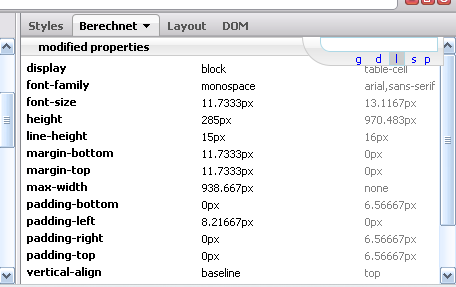
It offers a way. You first have to inspect one element. Then inside the Computed
side panel you have to click the "l" (small L) at the upper-right
corner of the widget Friendly Bug adds. And finally inspect a second
element.
Then there will be two columns shown containing the differing styles of both elements.
See this screenshot:
Then there will be two columns shown containing the differing styles of both elements.
See this screenshot:
If you can't find it how to do that, Harutyun (the author of the extension) will probably be able to explain it better than me.
Do you know if any more work is being done on issue 4705? It doesn't appear that way since the issue is almost a year old.
Two things to say here:
- We didn't get any more feedback on this. See my last comment.
- Note that the Firebug team is very small and mainly consists of volunteer developers (like me). So it is up to the contributors if they want to implement a feature. But of course you're always welcome to contribute a patch for this.
Jan - The way I would envision this working from a UI/UX perspective would be using one of the two following options:
Option 1 - Add a different arrow selector for comparing would be available. That arrow would allow you to select two elements and then show the side by side style comparison.
I assume people would just get confused about the two different Inspectors. So I don't like that idea very much.
Option 2 - Right click on an element and select Compare from the menu. Then the user would click on another element and the style comparison results would display.
This solution sounds much better from the UI and the workflow.
Anyway, I believe what Friendly Bug offers is already sufficient.
Sebastian
Anyway, I believe what Friendly Bug offers is already sufficient.
Sebastian
Reply all
Reply to author
Forward
0 new messages