
Re: Firebug not showing CSS files
791 views
Skip to first unread message

Sebastian Zartner
Sep 24, 2012, 5:32:13 PM9/24/12
to fir...@googlegroups.com
When you see the script name as source of the CSS, then it means that the rule is defined inside of it inside a <style> tag. So it's an internal stylesheet and not an external CSS file. The number behind it (in this case 17) means that it's the nth internal stylesheet (i.e. the nth <style> tag) inside the page.
Sebastian
On Monday, September 24, 2012 4:05:54 PM UTC+2, Julie wrote:
Sebastian
On Monday, September 24, 2012 4:05:54 PM UTC+2, Julie wrote:
I have a problem with firebug not showing which css files are being used. I have attached a screen shot and circled in red where I would normally expect to find the name of the css file being used and now it is just showing the URL link to the page that I am inspecting.
Is there a setting that need to be changed to get this back

Julie
Sep 27, 2012, 1:53:34 AM9/27/12
to fir...@googlegroups.com
Sorry I am not sure I understand your answer.
Until this week when using Firebug I would always see then name of the external style sheet that contained the rules relating to the element that I was inspecting.
Now I am only seeing a URL so if I want to change the css rules it is very dificult as I don't know which style sheet they are in??
What is an internal style sheet?
I am using Drupal which utilises Themes which are placed in the file system and contain css files, which I am able to edit if I know which one is being used.
So I still not sure how to work this out.
Julie
Until this week when using Firebug I would always see then name of the external style sheet that contained the rules relating to the element that I was inspecting.
Now I am only seeing a URL so if I want to change the css rules it is very dificult as I don't know which style sheet they are in??
What is an internal style sheet?
I am using Drupal which utilises Themes which are placed in the file system and contain css files, which I am able to edit if I know which one is being used.
So I still not sure how to work this out.
Julie
Sebastian Zartner
Sep 27, 2012, 3:49:06 AM9/27/12
to fir...@googlegroups.com
Until this week when using Firebug I would always see then name of the external style sheet that contained the rules relating to the element that I was inspecting.
Firebug didn't update this week, so it's probably a change in your website or another extension, which is causing this.
What is an internal style sheet?
I am using Drupal which utilises Themes which are placed in the file system and contain css files, which I am able to edit if I know which one is being used.
So I still not sure how to work this out.
Sebastian
Julie
Sep 28, 2012, 3:21:43 AM9/28/12
to fir...@googlegroups.com


Julie
Sebastian Zartner
Sep 28, 2012, 7:48:37 AM9/28/12
to fir...@googlegroups.com
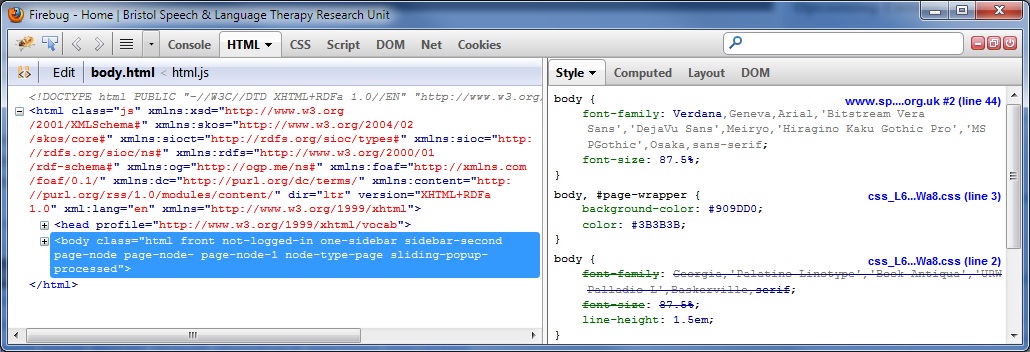
This first screen shot shows Firebug as it was working for me, I got this screen shot from https://getfirebug.com/css, you see it show the css file global.css. This second screen shot shows what I am seeing now (FB-not-working.png) I can only see the URL of the site and not the specific css file. The URL for this site is http://www.speech-therapy.org.uk/. I am just pressing F12 to get Firebug up and then you can see the rest from the screenshot. Thank you for looking into this for me.
My steps:
Opened Firebug at http://www.speech-therapy.org.uk/
Switched to the HTML panel and there to the Style side panel
The result is shown below.
Do you have different steps?
If not, I assume your problem is caused by another extension or a specific setting. In this case you should follow the steps on our "first aid" page to find the culprit.
Sebastian
Julie
Sep 28, 2012, 11:21:14 PM9/28/12
to fir...@googlegroups.com
Hi
I use the same steps as you. Where do I find the First Aid page.
Thanks
Julie
I use the same steps as you. Where do I find the First Aid page.
Thanks
Julie
Julie
Oct 2, 2012, 3:30:18 PM10/2/12
to fir...@googlegroups.com
I am still unable to see the css files that I need to edit. Firebug is showing all my css as embded when previously is showed the file names that contained the css. I am not sure how to resolve this???
Sebastian Zartner
Oct 3, 2012, 5:16:21 AM10/3/12
to fir...@googlegroups.com
Hi Julie,
sorry for not writing earlier. The first aid page is here:
https://getfirebug.com/wiki/index.php/I_found_a_Firebug_Bug!
Just forgot to link to it earlier.
Sebastian
sorry for not writing earlier. The first aid page is here:
https://getfirebug.com/wiki/index.php/I_found_a_Firebug_Bug!
Just forgot to link to it earlier.
Sebastian
Sebastian Zartner
Oct 13, 2012, 11:45:50 AM10/13/12
to fir...@googlegroups.com
Hi again Julie,
in another thread a guy had the same problem as you and I guess he's also using Drupal. He said in the settings is an option called "Allow Composite Files", which you have to turn off.
Hope that helps.
Sebastian
in another thread a guy had the same problem as you and I guess he's also using Drupal. He said in the settings is an option called "Allow Composite Files", which you have to turn off.
Hope that helps.
Sebastian
Reply all
Reply to author
Forward
0 new messages