
Re: Problem: firebug does not show corresponding stylesheet with row number
1,079 views
Skip to first unread message

Sebastian Zartner
Oct 10, 2012, 4:40:03 PM10/10/12
to fir...@googlegroups.com
There was already another report like this last month. Unfortunately I was not able to reproduce the problem.
Can you give a reproducible test case?
Sebastian
Can you give a reproducible test case?
Sebastian
Sebastian Zartner
Oct 12, 2012, 4:23:22 AM10/12/12
to fir...@googlegroups.com
It does this for every site I visit.
Really? What do you see when you visit https://www.getfirebug.com/ and inspect the slogan "The most popular and powerful web development tool"?
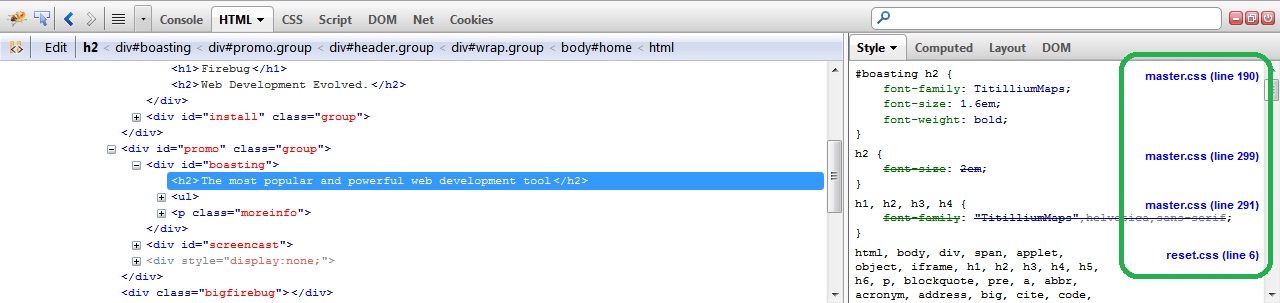
If it's not looking like so for you, please create a new Firefox profile and just install Firebug there. Does that fix the problem?
Sebastian
Sebastian

David Wolters
Oct 12, 2012, 9:18:25 AM10/12/12
to fir...@googlegroups.com
HEY! Smack me up side the head. Every site that I visited before posting was one of mine (because I knew they worked before) and every one of them I had recently turned on "Allow Composite Files" in the CMS settings. So Firebug was accurately showing the filename of the composite file being generated by the CMS.
Turned off "Allow Composite Files" and Firebug shows the individual filenames.
Simple error on my part now that I figured it out but man, was that frustrating!
Hope this helps anyone else who may have the same issue. Keep Composite Files out of the equation until your site is completed.
David
Sebastian Zartner
Oct 13, 2012, 11:40:09 AM10/13/12
to fir...@googlegroups.com
I had recently turned on "Allow Composite Files" in the CMS settings. So Firebug was accurately showing the filename of the composite file being generated by the CMS.
Thanks for the info, David! Clemens, do you use the same CMS with the same option enabled?
Hope this helps anyone else who may have the same issue.
David Wolters
Nov 16, 2012, 9:32:15 AM11/16/12
to fir...@googlegroups.com
By the way, the CMS that I'm using is DotNetNuke (DNN) and the setting "Allow Composite Files" creates one single CSS file from the multitude of CSS files associated with the particular DNN site. This enables a more efficient loading of pages but shouldn't be enabled until after your design phase is completed.

Clemens Heilmann
Nov 29, 2012, 8:04:52 AM11/29/12
to fir...@googlegroups.com
Hello Sebastian,
sorry that I come back to the post only now. I still have the same problem. The external stylesheet (in my case styles.css) with corresponding line number is not shown in the firebug window. I don't think it is the same problem as David's because on my macbook air firebug has the problem with showing the style sheet with row number wheras my firebug on my desktop mac pro is showing the stylesheet with corresponding row number correctly. Do you have any idea what to do?
Thank you
Clemens
sorry that I come back to the post only now. I still have the same problem. The external stylesheet (in my case styles.css) with corresponding line number is not shown in the firebug window. I don't think it is the same problem as David's because on my macbook air firebug has the problem with showing the style sheet with row number wheras my firebug on my desktop mac pro is showing the stylesheet with corresponding row number correctly. Do you have any idea what to do?
Thank you
Clemens
Sebastian Zartner
Nov 29, 2012, 9:20:18 AM11/29/12
to fir...@googlegroups.com
Hi Clemens,
you didn't answer my previous questions yet. So do you use a CMS like DotNetNuke? Did you check the responses inside the Net panel?
Also, do you have a public URL, so I can reproduce what you see?
Sebastian
you didn't answer my previous questions yet. So do you use a CMS like DotNetNuke? Did you check the responses inside the Net panel?
Also, do you have a public URL, so I can reproduce what you see?
Sebastian
Clemens Heilmann
Nov 29, 2012, 10:11:18 AM11/29/12
to fir...@googlegroups.com
Hi Sebastian,
- I am currently developing a magento based shop; I don't use DotNetNuke
- I did open the Net panel of firebug but I have no idea what to look for
- Url of our test site is as follows: http://magento.p148901.webspaceconfig.de/
I did deinstall firefox with all extensions and profiles and reinstalled firefox 17 plus firebug and 1Password. Still no stylesheet reference with firebug.
Hope you can help somehow.
Thanx
Clemens
- I am currently developing a magento based shop; I don't use DotNetNuke
- I did open the Net panel of firebug but I have no idea what to look for
- Url of our test site is as follows: http://magento.p148901.webspaceconfig.de/
I did deinstall firefox with all extensions and profiles and reinstalled firefox 17 plus firebug and 1Password. Still no stylesheet reference with firebug.
Hope you can help somehow.
Thanx
Clemens
Sebastian Zartner
Nov 29, 2012, 6:41:31 PM11/29/12
to fir...@googlegroups.com
Hi Clemens,
- You normally don't have to completely reinstall Firefox to fix a problem. Simply creating a new profile often already does it.
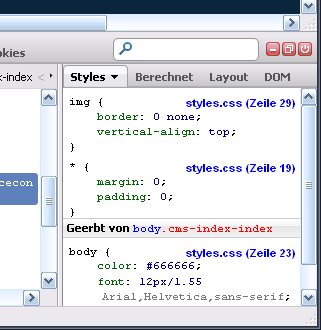
- From your screenshot it looks like the CSS gets merged into the HTML (via <style> tags). I explained this in more detail in the other thread I mentioned earlier, though accessing your page I can't see that. There's probably an option within Magento controlling this like for DotNetNuke, but I don't have any experience with that. Below is what I see when inspecting the main image inside your page.
- Do you see this also at other pages than your shop? E.g. on getfirebug.com?
- You have several ways to check where the CSS is actually coming from:
- Right-click into the page and choose View Page Source (Seitenquelltext anzeigen in German). In the window that opens search for one of the styles you see inside the Style side panel. (According to your screenshot e.g. vertical-align.)
- Switch to the Net panel, reload the page and set the CSS filter. If the CSS isn't merged into the HTML, there should be 15 requests (see the screenshot below).
If you can't see them, switch the filter back to All and search for one of the styles. - Inside the HTML panel search for style and you'll probably find several <style> tags inside your HTML containing all the styles.
Sebastian

Clemens Heilmann
Nov 30, 2012, 3:55:19 AM11/30/12
to fir...@googlegroups.com
Thank you Sebastian,
I will check your advice on my macbook air.
Currently, I am working on my mac pro with same firefox 17 and same firebug 1.10.6. When I load here the page I provided to you the stylessheet with row numbers is correctly shown (see attached screenshot). I would take that as a hint it has something to do with the firebug settings...
Again thank you for your engagement.
Ciao
Clemens

Clemens Heilmann
Nov 30, 2012, 5:30:02 PM11/30/12
to fir...@googlegroups.com
Hello Sebastian,
the problem is solved.
The problems with my macbook air not showing the stylesheet with the corresponding row number are caused by my umts provider vodafone or my wlan router Huawei E5. I just started firebug on my macbook using my wlan at home (network provider kabeldeutschland) and everything is fine: the correct stylesheet with corresponding row number is shown.
I will now look how to setup the vodafone connection to overcome the problem when I am not at home. I already read in another forum that vodafone somehow seems to compress the data somehow.
Thank you
Clemens
Sebastian Zartner
Dec 2, 2012, 10:36:20 AM12/2/12
to fir...@googlegroups.com
Hello Clemens,
thanks for the feedback and your investigations. Now that you say that your UMTS connection is responsible for that I remember I already heard something similar some years ago.
I'll add this to our FAQ.
Sebastian
thanks for the feedback and your investigations. Now that you say that your UMTS connection is responsible for that I remember I already heard something similar some years ago.
I'll add this to our FAQ.
Sebastian
Sebastian Zartner
Dec 3, 2012, 3:17:55 AM12/3/12
to fir...@googlegroups.com

Toby Pestridge
Nov 11, 2013, 11:13:26 AM11/11/13
to fir...@googlegroups.com
How did you fix this? I'm having the same problem and it's driving me nuts!
Sebastian Zartner
Nov 23, 2013, 6:35:59 PM11/23/13
to fir...@googlegroups.com
Sorry for the late reply. As Clemens wrote before he simply solved his problem by using a landline connection instead of the UMTS. If you just have UMTS available, you should contact your provider asking him if there's the possibility to avoid the data to be compressed.
If you don't use a UMTS connection but you're working with a CMS, check in its options whether there is a preference for compressing CSS output.
Sebastian
If you don't use a UMTS connection but you're working with a CMS, check in its options whether there is a preference for compressing CSS output.
Sebastian
Reply all
Reply to author
Forward
0 new messages