Thanks for participating in the audio stress test this morning at 9am. Here's a summary of the results.
Caveat: Each server is different -- virtual vs dedicated, # of cores, hyperthreadig, and memory -- so take this test as a data point. Your mileage will vary.
Server: Core2Duo E8400 Dual Core running 4G (dedicated server). This server has Hyperthreading, so it reports 8 cores.
Software: FreeSWITCH 1.0.6 red5 0.91 Internal build of BigBlueButton 0.8 using 16khz wide-band speex (encode quality of 6).
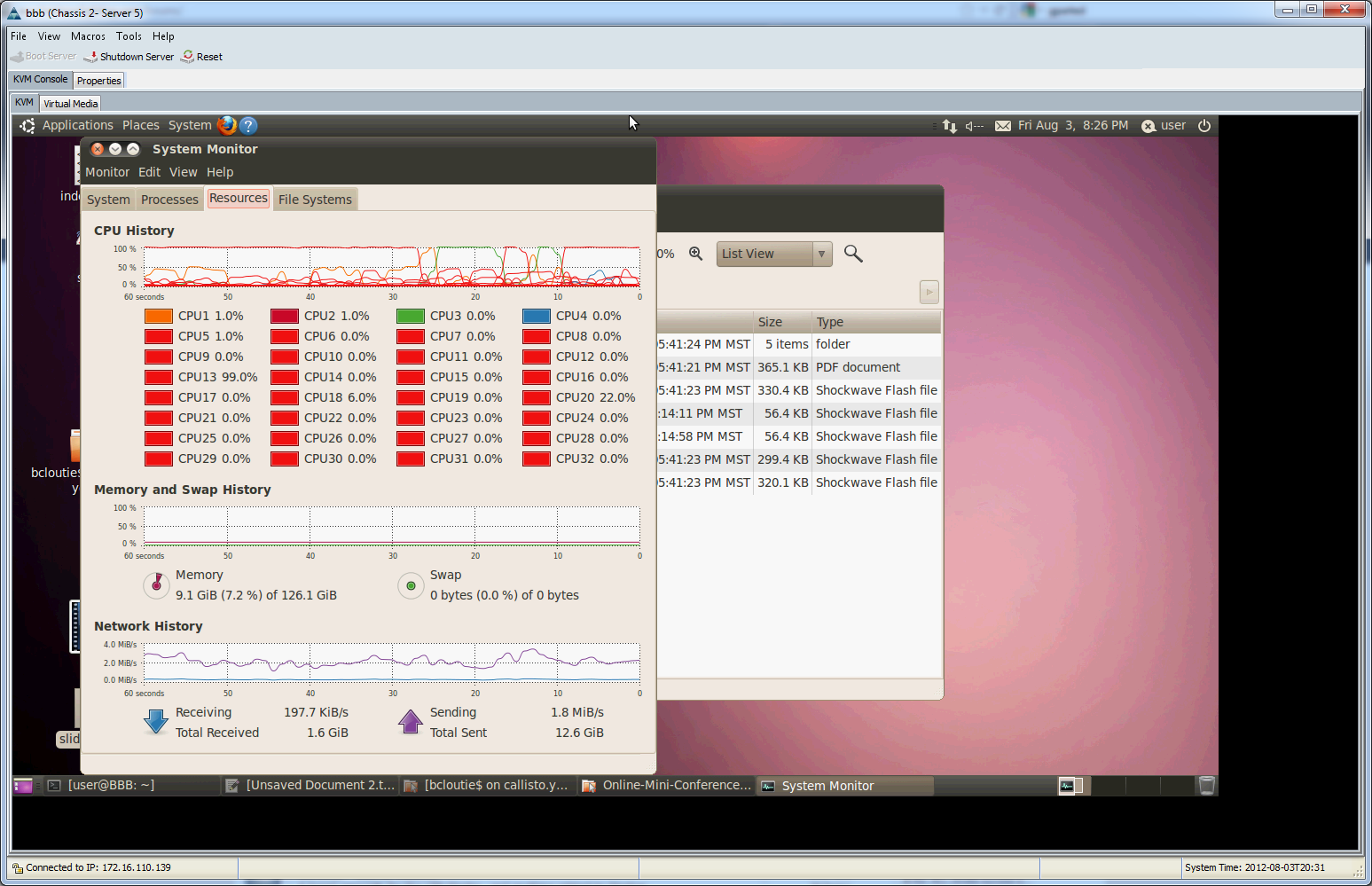
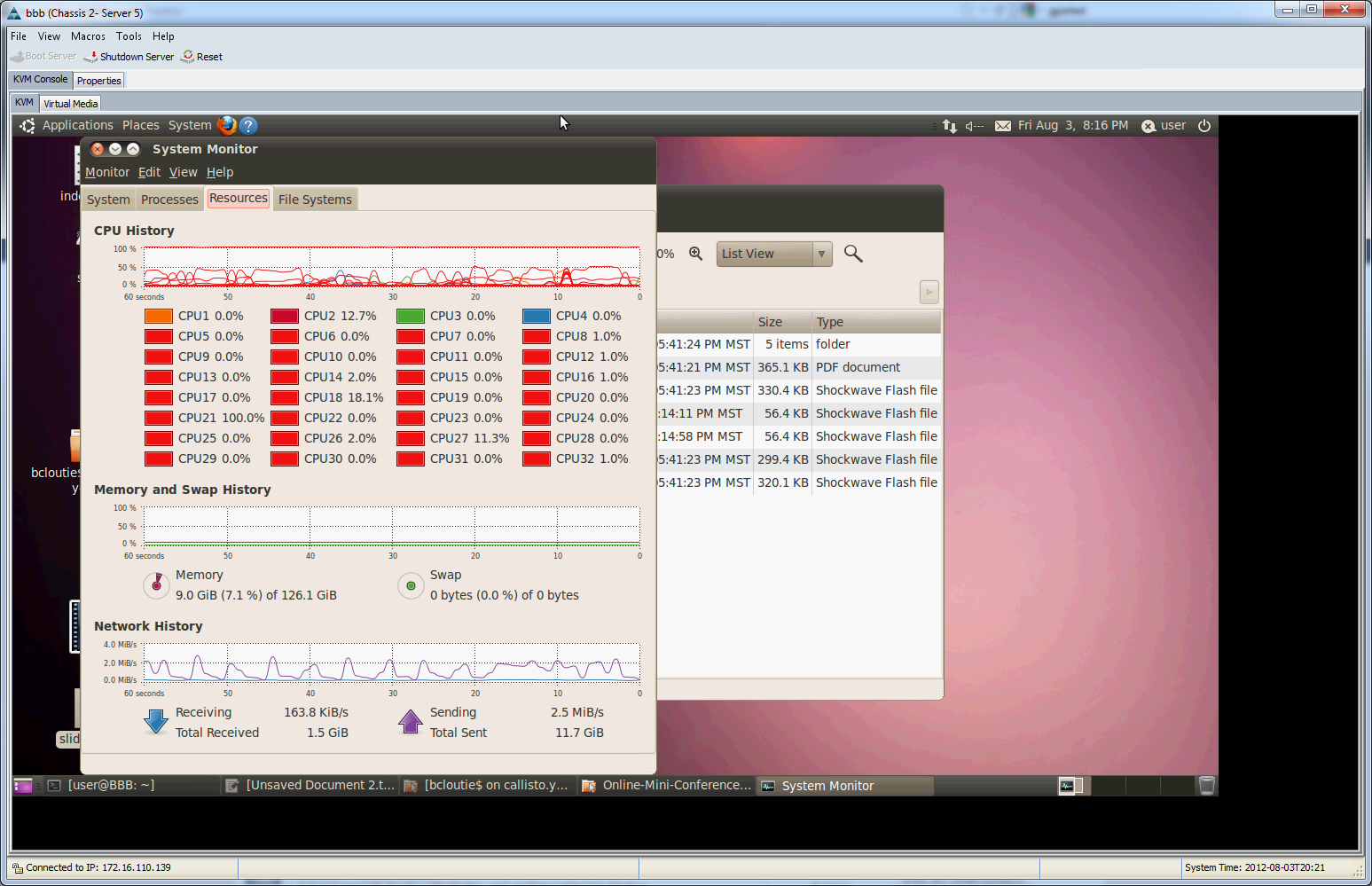
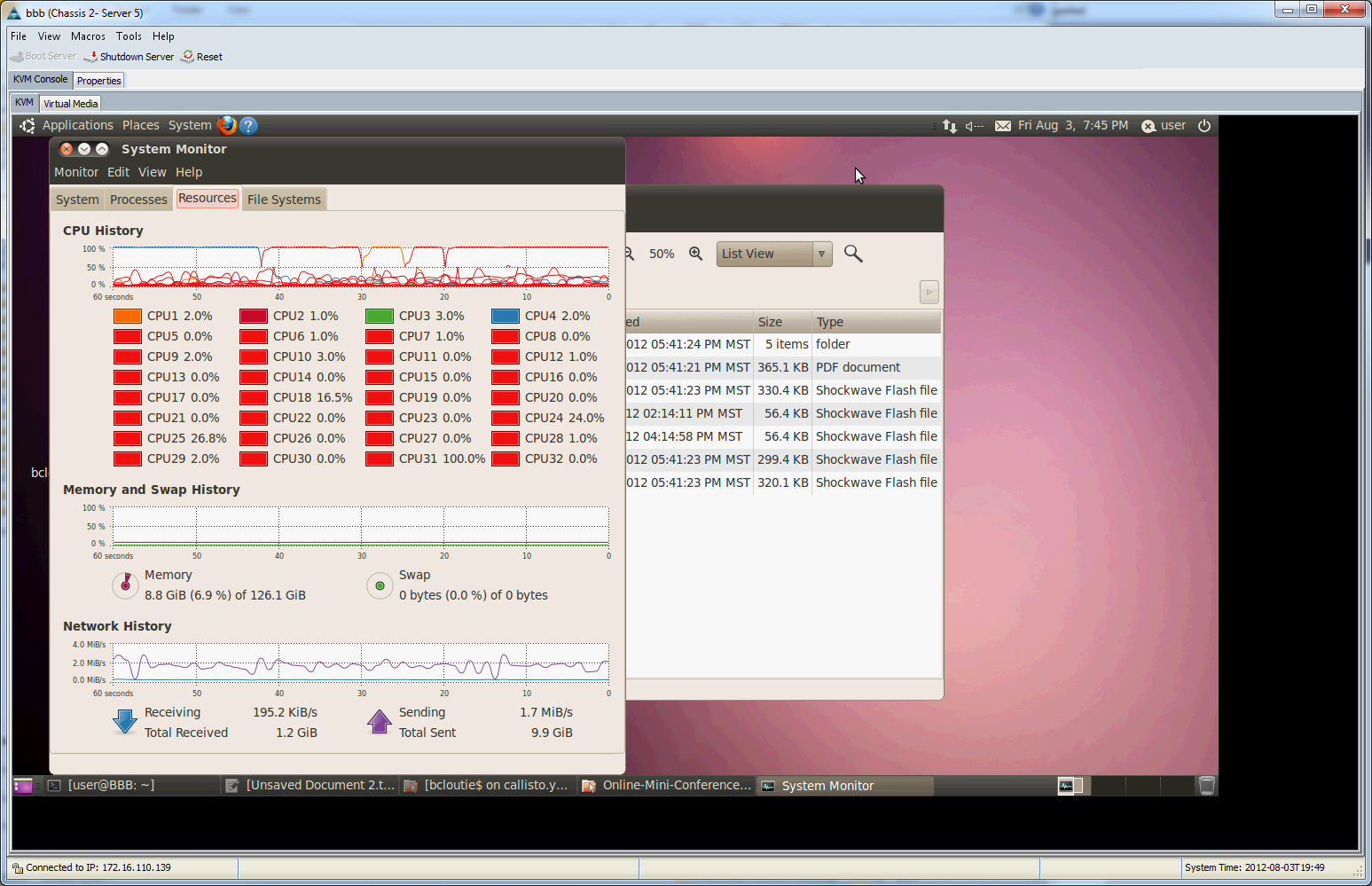
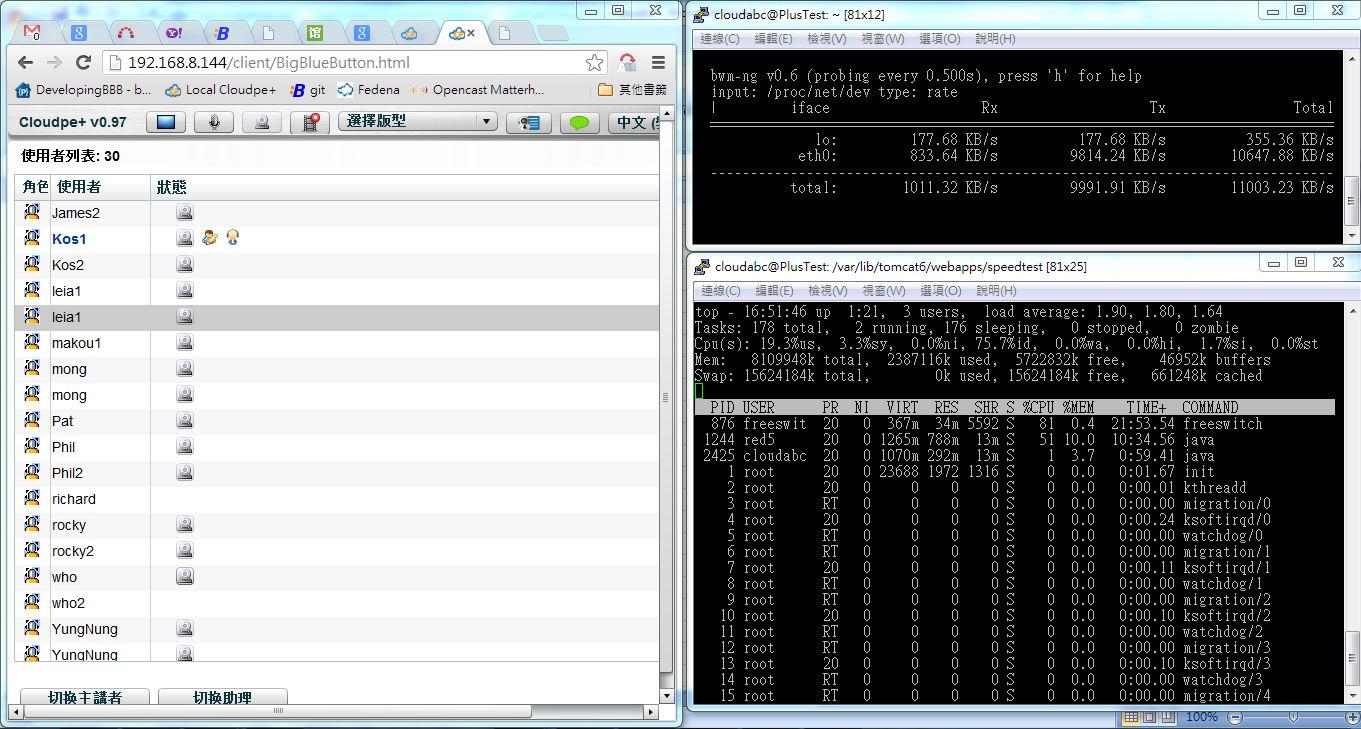
Heres a breakdown of the sequence of test. Note: We actually started the testing at 9am EST, but the time on the graph is skewed, so I'll summarize the results based on the graph (see attached image).
7:48 -- We had 20 users in voice with ~30% CPU 7:57 -- We had 40 users in voice with ~45% CPU 8:05 -- We had 60 users in voice with ~70% CPU 8:08 -- We had 80 users in voice with ~90% CPU <-- Audio stared to degrade
We roughly had about 30 real users running BigBlueButton, spread all over the world, so to get to 60 and 90 BigBlueButton sessions, we asked everyone to open additional browser tabs. To the BigBlueButton server, each browser tab is a distinct user.
At 80 users the overall CPU (average of all 8 cores) was at 90% CPU. At this point, FreeSWITCH starts to have challenges decoding/encoding speex, and the audio started to degrade. We dropped the number of users back to 60 (by closing some browser tabs), and the audio returned to normal. We then asked everyone to open a webcam .
8:09 -- We had 80 users in voice with 20 webcams with ~70% CPU
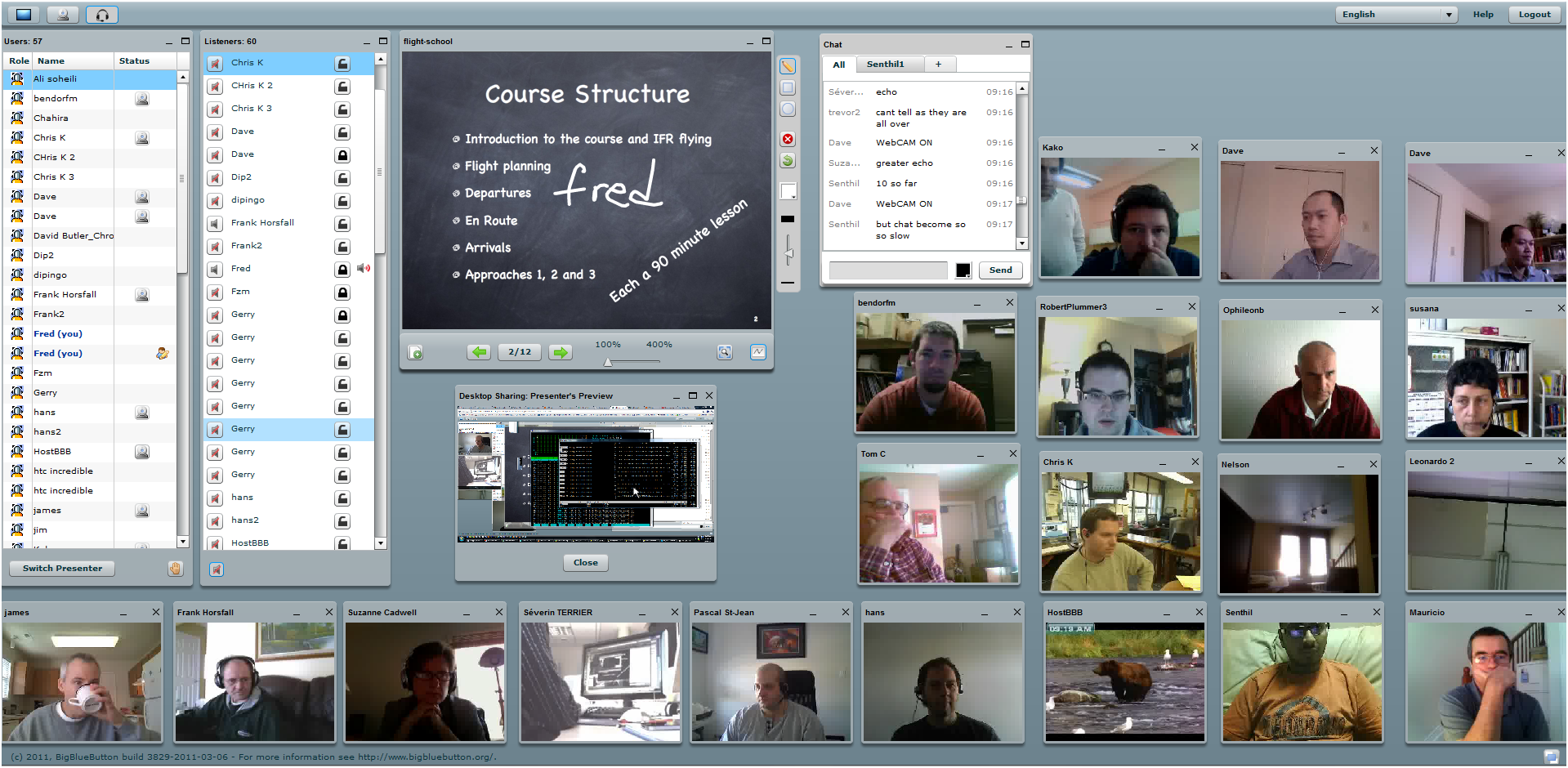
At this point, we had 60 users with 20 simultaneous webcams (see attached screen shot), audio remained good. This makes sense because there isn't much additional CPU processing required for the video packets: they are just broadcasted out to users. We then started desktop sharing, which triggered a crash of red5. We've opened an issue for this at
We're definitely going to look into why desktop sharing caused red5 to crash with 60 users.
In summary: the purpose of this stress test was to test the audio, and remote users reported the audio was good for 60 simultaneous users, and it remained good when we started up 20 webcams.
In observing the bandwidth with small number of users, we estimate each audio connection requires roughly 60 Kbits/sec to transmit to the server, and 60 Kbits/sec to receive. So, here's how the bandwidth scales for audio.
The first colum is # of users, the second is Kbits/sec bandwidth, the third colum is Mbits/sec. So, for 60 users the server had roughly 3.6 Mbits/sec transmission and 3.6 Mbits/sec receiving.
Thanks again to everyone who participated. Here's some locations for the users:
Chahira - 09:13 : Bonn, Germany Chris K - 09:13 : Dearborn, Michigan Dave - 09:13 : Ottawa, Canada David Butler_Chrome 2 - 09:13 : Switzerland Dip - 09:13 : Near Boston Fred - 09:13 : Ottawa, Ontario, Canada Gerry - 09:13 : Ottawa HostBBB - 09:13 : northern maine Kako - 09:13 : La Serena, Chile Leonardo 2 - 09:13 : Brazil, Porto Alegre Nelson - 09:13 : Toronto, Canada Ophileonb - 09:13 : Netherlands that is Pascal St-Jean - 09:13 : Ottawa, Ontario Ravi - 09:13 : Abuja , Nigeria RobertPlummer - 09:13 : Midwest - USA Shylesh - 09:13 : Hong Kong Suzanne Cadwell - 09:13 : durham, nc, usa Séverin TERRIER - 09:13 : Toulouse, France Tom C - 09:13 : Waskom Texas hans - 09:13 : Netherlands james - 09:13 : Winston-Salem NC kimberly - 09:13 : Ottawa ranjeev - 09:13 : Nice, France susana2 - 09:13 : Ottawa trevor - 09:13 : Ireland
> Thanks for participating in the audio stress test this morning at 9am.
> Here's a summary of the results.
> Caveat: Each server is different -- virtual vs dedicated, # of cores,
> hyperthreadig, and memory -- so take this test as a data point. Your
> mileage will vary.
> Server:
> Core2Duo E8400 Dual Core running 4G (dedicated server). This server
> has Hyperthreading, so it reports 8 cores.
> Software:
> FreeSWITCH 1.0.6
> red5 0.91
> Internal build of BigBlueButton 0.8 using 16khz wide-band speex
> (encode quality of 6).
> Heres a breakdown of the sequence of test. Note: We actually started
> the testing at 9am EST, but the time on the graph is skewed, so I'll
> summarize the results based on the graph (see attached image).
> 7:48 -- We had 20 users in voice with ~30% CPU
> 7:57 -- We had 40 users in voice with ~45% CPU
> 8:05 -- We had 60 users in voice with ~70% CPU
> 8:08 -- We had 80 users in voice with ~90% CPU <-- Audio stared to degrade
> We roughly had about 30 real users running BigBlueButton, spread all
> over the world, so to get to 60 and 90 BigBlueButton sessions, we
> asked everyone to open additional browser tabs. To the BigBlueButton
> server, each browser tab is a distinct user.
> At 80 users the overall CPU (average of all 8 cores) was at 90% CPU.
> At this point, FreeSWITCH starts to have challenges decoding/encoding
> speex, and the audio started to degrade. We dropped the number of
> users back to 60 (by closing some browser tabs), and the audio
> returned to normal. We then asked everyone to open a webcam .
> 8:09 -- We had 80 users in voice with 20 webcams with ~70% CPU
> At this point, we had 60 users with 20 simultaneous webcams (see
> attached screen shot), audio remained good. This makes sense because
> there isn't much additional CPU processing required for the video
> packets: they are just broadcasted out to users. We then started
> desktop sharing, which triggered a crash of red5. We've opened an
> issue for this at
> We're definitely going to look into why desktop sharing caused red5 to
> crash with 60 users.
> In summary: the purpose of this stress test was to test the audio, and
> remote users reported the audio was good for 60 simultaneous users,
> and it remained good when we started up 20 webcams.
> In observing the bandwidth with small number of users, we estimate
> each audio connection requires roughly 60 Kbits/sec to transmit to the
> server, and 60 Kbits/sec to receive. So, here's how the bandwidth
> scales for audio.
> The first colum is # of users, the second is Kbits/sec bandwidth, the
> third colum is Mbits/sec. So, for 60 users the server had roughly 3.6
> Mbits/sec transmission and 3.6 Mbits/sec receiving.
> Thanks again to everyone who participated. Here's some locations for the users:
> Chahira - 09:13 : Bonn, Germany
> Chris K - 09:13 : Dearborn, Michigan
> Dave - 09:13 : Ottawa, Canada
> David Butler_Chrome 2 - 09:13 : Switzerland
> Dip - 09:13 : Near Boston
> Fred - 09:13 : Ottawa, Ontario, Canada
> Gerry - 09:13 : Ottawa
> HostBBB - 09:13 : northern maine
> Kako - 09:13 : La Serena, Chile
> Leonardo 2 - 09:13 : Brazil, Porto Alegre
> Nelson - 09:13 : Toronto, Canada
> Ophileonb - 09:13 : Netherlands that is
> Pascal St-Jean - 09:13 : Ottawa, Ontario
> Ravi - 09:13 : Abuja , Nigeria
> RobertPlummer - 09:13 : Midwest - USA
> Shylesh - 09:13 : Hong Kong
> Suzanne Cadwell - 09:13 : durham, nc, usa
> Séverin TERRIER - 09:13 : Toulouse, France
> Tom C - 09:13 : Waskom Texas
> hans - 09:13 : Netherlands
> james - 09:13 : Winston-Salem NC
> kimberly - 09:13 : Ottawa
> ranjeev - 09:13 : Nice, France
> susana2 - 09:13 : Ottawa
> trevor - 09:13 : Ireland
On Thu, Mar 24, 2011 at 6:28 PM, Andrew E <awens...@gmail.com> wrote: > Awesome. Thank you for posting the results. Looks like a great > test. I wish I had been able to participate.
> Did any users note a delay in audio, and if so how much?
> Also, I'm confused about the server's CPU. Is it a dual-socket server > (meaning it has two E8400's)? If not, I'm not sure how you had 8 > logical cores.
> Thanks,
> Andrew
> On Mar 24, 3:14 pm, Fred Dixon <ffdi...@gmail.com> wrote: >> Hi Everyone,
>> Thanks for participating in the audio stress test this morning at 9am. >> Here's a summary of the results.
>> Caveat: Each server is different -- virtual vs dedicated, # of cores, >> hyperthreadig, and memory -- so take this test as a data point. Your >> mileage will vary.
>> Server: >> Core2Duo E8400 Dual Core running 4G (dedicated server). This server >> has Hyperthreading, so it reports 8 cores.
>> Software: >> FreeSWITCH 1.0.6 >> red5 0.91 >> Internal build of BigBlueButton 0.8 using 16khz wide-band speex >> (encode quality of 6).
>> Heres a breakdown of the sequence of test. Note: We actually started >> the testing at 9am EST, but the time on the graph is skewed, so I'll >> summarize the results based on the graph (see attached image).
>> 7:48 -- We had 20 users in voice with ~30% CPU >> 7:57 -- We had 40 users in voice with ~45% CPU >> 8:05 -- We had 60 users in voice with ~70% CPU >> 8:08 -- We had 80 users in voice with ~90% CPU <-- Audio stared to degrade
>> We roughly had about 30 real users running BigBlueButton, spread all >> over the world, so to get to 60 and 90 BigBlueButton sessions, we >> asked everyone to open additional browser tabs. To the BigBlueButton >> server, each browser tab is a distinct user.
>> At 80 users the overall CPU (average of all 8 cores) was at 90% CPU. >> At this point, FreeSWITCH starts to have challenges decoding/encoding >> speex, and the audio started to degrade. We dropped the number of >> users back to 60 (by closing some browser tabs), and the audio >> returned to normal. We then asked everyone to open a webcam .
>> 8:09 -- We had 80 users in voice with 20 webcams with ~70% CPU
>> At this point, we had 60 users with 20 simultaneous webcams (see >> attached screen shot), audio remained good. This makes sense because >> there isn't much additional CPU processing required for the video >> packets: they are just broadcasted out to users. We then started >> desktop sharing, which triggered a crash of red5. We've opened an >> issue for this at
>> We're definitely going to look into why desktop sharing caused red5 to >> crash with 60 users.
>> In summary: the purpose of this stress test was to test the audio, and >> remote users reported the audio was good for 60 simultaneous users, >> and it remained good when we started up 20 webcams.
>> In observing the bandwidth with small number of users, we estimate >> each audio connection requires roughly 60 Kbits/sec to transmit to the >> server, and 60 Kbits/sec to receive. So, here's how the bandwidth >> scales for audio.
>> The first colum is # of users, the second is Kbits/sec bandwidth, the >> third colum is Mbits/sec. So, for 60 users the server had roughly 3.6 >> Mbits/sec transmission and 3.6 Mbits/sec receiving.
>> Thanks again to everyone who participated. Here's some locations for the users:
>> Chahira - 09:13 : Bonn, Germany >> Chris K - 09:13 : Dearborn, Michigan >> Dave - 09:13 : Ottawa, Canada >> David Butler_Chrome 2 - 09:13 : Switzerland >> Dip - 09:13 : Near Boston >> Fred - 09:13 : Ottawa, Ontario, Canada >> Gerry - 09:13 : Ottawa >> HostBBB - 09:13 : northern maine >> Kako - 09:13 : La Serena, Chile >> Leonardo 2 - 09:13 : Brazil, Porto Alegre >> Nelson - 09:13 : Toronto, Canada >> Ophileonb - 09:13 : Netherlands that is >> Pascal St-Jean - 09:13 : Ottawa, Ontario >> Ravi - 09:13 : Abuja , Nigeria >> RobertPlummer - 09:13 : Midwest - USA >> Shylesh - 09:13 : Hong Kong >> Suzanne Cadwell - 09:13 : durham, nc, usa >> Séverin TERRIER - 09:13 : Toulouse, France >> Tom C - 09:13 : Waskom Texas >> hans - 09:13 : Netherlands >> james - 09:13 : Winston-Salem NC >> kimberly - 09:13 : Ottawa >> ranjeev - 09:13 : Nice, France >> susana2 - 09:13 : Ottawa >> trevor - 09:13 : Ireland
>> Regards,... Fred
>> stress_test.PNG >> 69KViewDownload
>> many_users2.PNG >> 1520KViewDownload
> -- > You received this message because you are subscribed to the Google Groups "BigBlueButton-dev" group. > To post to this group, send email to bigbluebutton-dev@googlegroups.com. > To unsubscribe from this group, send email to bigbluebutton-dev+unsubscribe@googlegroups.com. > For more options, visit this group at http://groups.google.com/group/bigbluebutton-dev?hl=en.
> On Thu, Mar 24, 2011 at 6:28 PM, Andrew E <awens...@gmail.com> wrote:
> > Awesome. Thank you for posting the results. Looks like a great
> > test. I wish I had been able to participate.
> > Did any users note a delay in audio, and if so how much?
> > Also, I'm confused about the server's CPU. Is it a dual-socket server
> > (meaning it has two E8400's)? If not, I'm not sure how you had 8
> > logical cores.
> > Thanks,
> > Andrew
> > On Mar 24, 3:14 pm, Fred Dixon <ffdi...@gmail.com> wrote:
> >> Hi Everyone,
> >> Thanks for participating in the audio stress test this morning at 9am.
> >> Here's a summary of the results.
> >> Caveat: Each server is different -- virtual vs dedicated, # of cores,
> >> hyperthreadig, and memory -- so take this test as a data point. Your
> >> mileage will vary.
> >> Server:
> >> Core2Duo E8400 Dual Core running 4G (dedicated server). This server
> >> has Hyperthreading, so it reports 8 cores.
> >> Software:
> >> FreeSWITCH 1.0.6
> >> red5 0.91
> >> Internal build of BigBlueButton 0.8 using 16khz wide-band speex
> >> (encode quality of 6).
> >> Heres a breakdown of the sequence of test. Note: We actually started
> >> the testing at 9am EST, but the time on the graph is skewed, so I'll
> >> summarize the results based on the graph (see attached image).
> >> 7:48 -- We had 20 users in voice with ~30% CPU
> >> 7:57 -- We had 40 users in voice with ~45% CPU
> >> 8:05 -- We had 60 users in voice with ~70% CPU
> >> 8:08 -- We had 80 users in voice with ~90% CPU <-- Audio stared to degrade
> >> We roughly had about 30 real users running BigBlueButton, spread all
> >> over the world, so to get to 60 and 90 BigBlueButton sessions, we
> >> asked everyone to open additional browser tabs. To the BigBlueButton
> >> server, each browser tab is a distinct user.
> >> At 80 users the overall CPU (average of all 8 cores) was at 90% CPU.
> >> At this point, FreeSWITCH starts to have challenges decoding/encoding
> >> speex, and the audio started to degrade. We dropped the number of
> >> users back to 60 (by closing some browser tabs), and the audio
> >> returned to normal. We then asked everyone to open a webcam .
> >> 8:09 -- We had 80 users in voice with 20 webcams with ~70% CPU
> >> At this point, we had 60 users with 20 simultaneous webcams (see
> >> attached screen shot), audio remained good. This makes sense because
> >> there isn't much additional CPU processing required for the video
> >> packets: they are just broadcasted out to users. We then started
> >> desktop sharing, which triggered a crash of red5. We've opened an
> >> issue for this at
> >> We're definitely going to look into why desktop sharing caused red5 to
> >> crash with 60 users.
> >> In summary: the purpose of this stress test was to test the audio, and
> >> remote users reported the audio was good for 60 simultaneous users,
> >> and it remained good when we started up 20 webcams.
> >> In observing the bandwidth with small number of users, we estimate
> >> each audio connection requires roughly 60 Kbits/sec to transmit to the
> >> server, and 60 Kbits/sec to receive. So, here's how the bandwidth
> >> scales for audio.
> >> The first colum is # of users, the second is Kbits/sec bandwidth, the
> >> third colum is Mbits/sec. So, for 60 users the server had roughly 3.6
> >> Mbits/sec transmission and 3.6 Mbits/sec receiving.
> >> Thanks again to everyone who participated. Here's some locations for the users:
> >> Chahira - 09:13 : Bonn, Germany
> >> Chris K - 09:13 : Dearborn, Michigan
> >> Dave - 09:13 : Ottawa, Canada
> >> David Butler_Chrome 2 - 09:13 : Switzerland
> >> Dip - 09:13 : Near Boston
> >> Fred - 09:13 : Ottawa, Ontario, Canada
> >> Gerry - 09:13 : Ottawa
> >> HostBBB - 09:13 : northern maine
> >> Kako - 09:13 : La Serena, Chile
> >> Leonardo 2 - 09:13 : Brazil, Porto Alegre
> >> Nelson - 09:13 : Toronto, Canada
> >> Ophileonb - 09:13 : Netherlands that is
> >> Pascal St-Jean - 09:13 : Ottawa, Ontario
> >> Ravi - 09:13 : Abuja , Nigeria
> >> RobertPlummer - 09:13 : Midwest - USA
> >> Shylesh - 09:13 : Hong Kong
> >> Suzanne Cadwell - 09:13 : durham, nc, usa
> >> Séverin TERRIER - 09:13 : Toulouse, France
> >> Tom C - 09:13 : Waskom Texas
> >> hans - 09:13 : Netherlands
> >> james - 09:13 : Winston-Salem NC
> >> kimberly - 09:13 : Ottawa
> >> ranjeev - 09:13 : Nice, France
> >> susana2 - 09:13 : Ottawa
> >> trevor - 09:13 : Ireland
> >> Regards,... Fred
> >> stress_test.PNG
> >> 69KViewDownload
> >> many_users2.PNG
> >> 1520KViewDownload
> > --
> > You received this message because you are subscribed to the Google Groups "BigBlueButton-dev" group.
> > To post to this group, send email to bigbluebutton-dev@googlegroups.com.
> > To unsubscribe from this group, send email to bigbluebutton-dev+unsubscribe@googlegroups.com.
> > For more options, visit this group athttp://groups.google.com/group/bigbluebutton-dev?hl=en.
Does this mean that we cannot use BigBlueButton for a large
university / school with thousands of students and multiple rooms? Is
there any workaround to use it in such a scenario?
Thank you.
On Mar 25, 7:28 am, Andrew E <awens...@gmail.com> wrote:
> > On Thu, Mar 24, 2011 at 6:28 PM, Andrew E <awens...@gmail.com> wrote:
> > > Awesome. Thank you for posting the results. Looks like a great
> > > test. I wish I had been able to participate.
> > > Did any users note a delay in audio, and if so how much?
> > > Also, I'm confused about the server's CPU. Is it a dual-socket server
> > > (meaning it has two E8400's)? If not, I'm not sure how you had 8
> > > logical cores.
> > > Thanks,
> > > Andrew
> > > On Mar 24, 3:14 pm, Fred Dixon <ffdi...@gmail.com> wrote:
> > >> Hi Everyone,
> > >> Thanks for participating in the audio stress test this morning at 9am.
> > >> Here's a summary of the results.
> > >> Caveat: Each server is different -- virtual vs dedicated, # of cores,
> > >> hyperthreadig, and memory -- so take this test as a data point. Your
> > >> mileage will vary.
> > >> Server:
> > >> Core2Duo E8400 Dual Core running 4G (dedicated server). This server
> > >> has Hyperthreading, so it reports 8 cores.
> > >> Heres a breakdown of the sequence of test. Note: We actually started
> > >> the testing at 9am EST, but the time on the graph is skewed, so I'll
> > >> summarize the results based on the graph (see attached image).
> > >> 7:48 -- We had 20 users in voice with ~30% CPU
> > >> 7:57 -- We had 40 users in voice with ~45% CPU
> > >> 8:05 -- We had 60 users in voice with ~70% CPU
> > >> 8:08 -- We had 80 users in voice with ~90% CPU <-- Audio stared to degrade
> > >> We roughly had about 30 real users running BigBlueButton, spread all
> > >> over the world, so to get to 60 and 90 BigBlueButton sessions, we
> > >> asked everyone to open additional browser tabs. To the BigBlueButton
> > >> server, each browser tab is a distinct user.
> > >> At 80 users the overall CPU (average of all 8 cores) was at 90% CPU.
> > >> At this point, FreeSWITCH starts to have challenges decoding/encoding
> > >> speex, and the audio started to degrade. We dropped the number of
> > >> users back to 60 (by closing some browser tabs), and the audio
> > >> returned to normal. We then asked everyone to open a webcam .
> > >> 8:09 -- We had 80 users in voice with 20 webcams with ~70% CPU
> > >> At this point, we had 60 users with 20 simultaneous webcams (see
> > >> attached screen shot), audio remained good. This makes sense because
> > >> there isn't much additional CPU processing required for the video
> > >> packets: they are just broadcasted out to users. We then started
> > >> desktop sharing, which triggered a crash of red5. We've opened an
> > >> issue for this at
> > >> We're definitely going to look into why desktop sharing caused red5 to
> > >> crash with 60 users.
> > >> In summary: the purpose of this stress test was to test the audio, and
> > >> remote users reported the audio was good for 60 simultaneous users,
> > >> and it remained good when we started up 20 webcams.
> > >> In observing the bandwidth with small number of users, we estimate
> > >> each audio connection requires roughly 60 Kbits/sec to transmit to the
> > >> server, and 60 Kbits/sec to receive. So, here's how the bandwidth
> > >> scales for audio.
> > >> The first colum is # of users, the second is Kbits/sec bandwidth, the
> > >> third colum is Mbits/sec. So, for 60 users the server had roughly 3.6
> > >> Mbits/sec transmission and 3.6 Mbits/sec receiving.
> > >> Thanks again to everyone who participated. Here's some locations for the users:
> > >> Chahira - 09:13 : Bonn, Germany
> > >> Chris K - 09:13 : Dearborn, Michigan
> > >> Dave - 09:13 : Ottawa, Canada
> > >> David Butler_Chrome 2 - 09:13 : Switzerland
> > >> Dip - 09:13 : Near Boston
> > >> Fred - 09:13 : Ottawa, Ontario, Canada
> > >> Gerry - 09:13 : Ottawa
> > >> HostBBB - 09:13 : northern maine
> > >> Kako - 09:13 : La Serena, Chile
> > >> Leonardo 2 - 09:13 : Brazil, Porto Alegre
> > >> Nelson - 09:13 : Toronto, Canada
> > >> Ophileonb - 09:13 : Netherlands that is
> > >> Pascal St-Jean - 09:13 : Ottawa, Ontario
> > >> Ravi - 09:13 : Abuja , Nigeria
> > >> RobertPlummer - 09:13 : Midwest - USA
> > >> Shylesh - 09:13 : Hong Kong
> > >> Suzanne Cadwell - 09:13 : durham, nc, usa
> > >> Séverin TERRIER - 09:13 : Toulouse, France
> > >> Tom C - 09:13 : Waskom Texas
> > >> hans - 09:13 : Netherlands
> > >> james - 09:13 : Winston-Salem NC
> > >> kimberly - 09:13 : Ottawa
> > >> ranjeev - 09:13 : Nice, France
> > >> susana2 - 09:13 : Ottawa
> > >> trevor - 09:13 : Ireland
> > >> Regards,... Fred
> > >> stress_test.PNG
> > >> 69KViewDownload
> > >> many_users2.PNG
> > >> 1520KViewDownload
> > > --
> > > You received this message because you are subscribed to the Google Groups "BigBlueButton-dev" group.
> > > To post to this group, send email to bigbluebutton-dev@googlegroups.com.
> > > To unsubscribe from this group, send email to bigbluebutton-dev+unsubscribe@googlegroups.com.
> > > For more options, visit this group athttp://groups.google.com/group/bigbluebutton-dev?hl=en.
i think that if you really intend to use BBB for a big university,
with lot of simultaneous users, and make it a key service, you can
then buy a dedicated server for that.
You can already find (at least) some with 2 CPU with 4 (or 6) core
each, and lot of RAM (16 to 144 Gb or more).
After that, if think that programs (red5...) will have to be tweaked
to make benefit of that.
Hope this helps.
I would be interested to know if someone uses such server, and how
many users it can handle...
Séverin
On 25 mar, 04:16, Josh <uniquegod...@gmail.com> wrote:
> Does this mean that we cannot use BigBlueButton for a large
> university / school with thousands of students and multiple rooms? Is
> there any workaround to use it in such a scenario?
> Thank you.
> On Mar 25, 7:28 am, Andrew E <awens...@gmail.com> wrote:
> > Oh ok. I must have found the wrong link then, the CPU spec page I
> > found said it only had two cores. Thanks.
> > I'm very interested in what the users have to say about the delay.
> > Keep up the great work!
> > Andrew
> > On Mar 24, 8:51 pm, Fred Dixon <ffdi...@gmail.com> wrote:
> > > > Did any users note a delay in audio, and if so how much?
> > > I'll let some of the other users post their response.
> > > > Also, I'm confused about the server's CPU.
> > > 1 CPU, 4 cores with hyper-threading, so the OS reports 8 cores. See
> > > On Thu, Mar 24, 2011 at 6:28 PM, Andrew E <awens...@gmail.com> wrote:
> > > > Awesome. Thank you for posting the results. Looks like a great
> > > > test. I wish I had been able to participate.
> > > > Did any users note a delay in audio, and if so how much?
> > > > Also, I'm confused about the server's CPU. Is it a dual-socket server
> > > > (meaning it has two E8400's)? If not, I'm not sure how you had 8
> > > > logical cores.
> > > > Thanks,
> > > > Andrew
> > > > On Mar 24, 3:14 pm, Fred Dixon <ffdi...@gmail.com> wrote:
> > > >> Hi Everyone,
> > > >> Thanks for participating in the audio stress test this morning at 9am.
> > > >> Here's a summary of the results.
> > > >> Caveat: Each server is different -- virtual vs dedicated, # of cores,
> > > >> hyperthreadig, and memory -- so take this test as a data point. Your
> > > >> mileage will vary.
> > > >> Server:
> > > >> Core2Duo E8400 Dual Core running 4G (dedicated server). This server
> > > >> has Hyperthreading, so it reports 8 cores.
> > > >> Heres a breakdown of the sequence of test. Note: We actually started
> > > >> the testing at 9am EST, but the time on the graph is skewed, so I'll
> > > >> summarize the results based on the graph (see attached image).
> > > >> 7:48 -- We had 20 users in voice with ~30% CPU
> > > >> 7:57 -- We had 40 users in voice with ~45% CPU
> > > >> 8:05 -- We had 60 users in voice with ~70% CPU
> > > >> 8:08 -- We had 80 users in voice with ~90% CPU <-- Audio stared to degrade
> > > >> We roughly had about 30 real users running BigBlueButton, spread all
> > > >> over the world, so to get to 60 and 90 BigBlueButton sessions, we
> > > >> asked everyone to open additional browser tabs. To the BigBlueButton
> > > >> server, each browser tab is a distinct user.
> > > >> At 80 users the overall CPU (average of all 8 cores) was at 90% CPU.
> > > >> At this point, FreeSWITCH starts to have challenges decoding/encoding
> > > >> speex, and the audio started to degrade. We dropped the number of
> > > >> users back to 60 (by closing some browser tabs), and the audio
> > > >> returned to normal. We then asked everyone to open a webcam .
> > > >> 8:09 -- We had 80 users in voice with 20 webcams with ~70% CPU
> > > >> At this point, we had 60 users with 20 simultaneous webcams (see
> > > >> attached screen shot), audio remained good. This makes sense because
> > > >> there isn't much additional CPU processing required for the video
> > > >> packets: they are just broadcasted out to users. We then started
> > > >> desktop sharing, which triggered a crash of red5. We've opened an
> > > >> issue for this at
> > > >> We're definitely going to look into why desktop sharing caused red5 to
> > > >> crash with 60 users.
> > > >> In summary: the purpose of this stress test was to test the audio, and
> > > >> remote users reported the audio was good for 60 simultaneous users,
> > > >> and it remained good when we started up 20 webcams.
> > > >> In observing the bandwidth with small number of users, we estimate
> > > >> each audio connection requires roughly 60 Kbits/sec to transmit to the
> > > >> server, and 60 Kbits/sec to receive. So, here's how the bandwidth
> > > >> scales for audio.
> > > >> The first colum is # of users, the second is Kbits/sec bandwidth, the
> > > >> third colum is Mbits/sec. So, for 60 users the server had roughly 3.6
> > > >> Mbits/sec transmission and 3.6 Mbits/sec receiving.
> > > >> Thanks again to everyone who participated. Here's some locations for the users:
I was thinking about your question early this morning ... the server was reporting 8 cores, but the specs for E8400 are dual core. Turns out you were right!
After double-checking, I realized my mistake. The server we used for the voice testing yesterday was running a Xenon 3450 quad core running 2.66 Ghz. It has hyper-threading, and thus the OS reports 8 cores.
On Thu, Mar 24, 2011 at 10:28 PM, Andrew E <awens...@gmail.com> wrote: > Oh ok. I must have found the wrong link then, the CPU spec page I > found said it only had two cores. Thanks.
> I'm very interested in what the users have to say about the delay.
> Keep up the great work!
> Andrew
> On Mar 24, 8:51 pm, Fred Dixon <ffdi...@gmail.com> wrote: >> > Did any users note a delay in audio, and if so how much?
>> I'll let some of the other users post their response.
>> > Also, I'm confused about the server's CPU.
>> 1 CPU, 4 cores with hyper-threading, so the OS reports 8 cores. See
>> On Thu, Mar 24, 2011 at 6:28 PM, Andrew E <awens...@gmail.com> wrote: >> > Awesome. Thank you for posting the results. Looks like a great >> > test. I wish I had been able to participate.
>> > Did any users note a delay in audio, and if so how much?
>> > Also, I'm confused about the server's CPU. Is it a dual-socket server >> > (meaning it has two E8400's)? If not, I'm not sure how you had 8 >> > logical cores.
>> > Thanks,
>> > Andrew
>> > On Mar 24, 3:14 pm, Fred Dixon <ffdi...@gmail.com> wrote: >> >> Hi Everyone,
>> >> Thanks for participating in the audio stress test this morning at 9am. >> >> Here's a summary of the results.
>> >> Caveat: Each server is different -- virtual vs dedicated, # of cores, >> >> hyperthreadig, and memory -- so take this test as a data point. Your >> >> mileage will vary.
>> >> Server: >> >> Core2Duo E8400 Dual Core running 4G (dedicated server). This server >> >> has Hyperthreading, so it reports 8 cores.
>> >> Software: >> >> FreeSWITCH 1.0.6 >> >> red5 0.91 >> >> Internal build of BigBlueButton 0.8 using 16khz wide-band speex >> >> (encode quality of 6).
>> >> Heres a breakdown of the sequence of test. Note: We actually started >> >> the testing at 9am EST, but the time on the graph is skewed, so I'll >> >> summarize the results based on the graph (see attached image).
>> >> 7:48 -- We had 20 users in voice with ~30% CPU >> >> 7:57 -- We had 40 users in voice with ~45% CPU >> >> 8:05 -- We had 60 users in voice with ~70% CPU >> >> 8:08 -- We had 80 users in voice with ~90% CPU <-- Audio stared to degrade
>> >> We roughly had about 30 real users running BigBlueButton, spread all >> >> over the world, so to get to 60 and 90 BigBlueButton sessions, we >> >> asked everyone to open additional browser tabs. To the BigBlueButton >> >> server, each browser tab is a distinct user.
>> >> At 80 users the overall CPU (average of all 8 cores) was at 90% CPU. >> >> At this point, FreeSWITCH starts to have challenges decoding/encoding >> >> speex, and the audio started to degrade. We dropped the number of >> >> users back to 60 (by closing some browser tabs), and the audio >> >> returned to normal. We then asked everyone to open a webcam .
>> >> 8:09 -- We had 80 users in voice with 20 webcams with ~70% CPU
>> >> At this point, we had 60 users with 20 simultaneous webcams (see >> >> attached screen shot), audio remained good. This makes sense because >> >> there isn't much additional CPU processing required for the video >> >> packets: they are just broadcasted out to users. We then started >> >> desktop sharing, which triggered a crash of red5. We've opened an >> >> issue for this at
>> >> We're definitely going to look into why desktop sharing caused red5 to >> >> crash with 60 users.
>> >> In summary: the purpose of this stress test was to test the audio, and >> >> remote users reported the audio was good for 60 simultaneous users, >> >> and it remained good when we started up 20 webcams.
>> >> In observing the bandwidth with small number of users, we estimate >> >> each audio connection requires roughly 60 Kbits/sec to transmit to the >> >> server, and 60 Kbits/sec to receive. So, here's how the bandwidth >> >> scales for audio.
>> >> The first colum is # of users, the second is Kbits/sec bandwidth, the >> >> third colum is Mbits/sec. So, for 60 users the server had roughly 3.6 >> >> Mbits/sec transmission and 3.6 Mbits/sec receiving.
>> >> Thanks again to everyone who participated. Here's some locations for the users:
>> >> Chahira - 09:13 : Bonn, Germany >> >> Chris K - 09:13 : Dearborn, Michigan >> >> Dave - 09:13 : Ottawa, Canada >> >> David Butler_Chrome 2 - 09:13 : Switzerland >> >> Dip - 09:13 : Near Boston >> >> Fred - 09:13 : Ottawa, Ontario, Canada >> >> Gerry - 09:13 : Ottawa >> >> HostBBB - 09:13 : northern maine >> >> Kako - 09:13 : La Serena, Chile >> >> Leonardo 2 - 09:13 : Brazil, Porto Alegre >> >> Nelson - 09:13 : Toronto, Canada >> >> Ophileonb - 09:13 : Netherlands that is >> >> Pascal St-Jean - 09:13 : Ottawa, Ontario >> >> Ravi - 09:13 : Abuja , Nigeria >> >> RobertPlummer - 09:13 : Midwest - USA >> >> Shylesh - 09:13 : Hong Kong >> >> Suzanne Cadwell - 09:13 : durham, nc, usa >> >> Séverin TERRIER - 09:13 : Toulouse, France >> >> Tom C - 09:13 : Waskom Texas >> >> hans - 09:13 : Netherlands >> >> james - 09:13 : Winston-Salem NC >> >> kimberly - 09:13 : Ottawa >> >> ranjeev - 09:13 : Nice, France >> >> susana2 - 09:13 : Ottawa >> >> trevor - 09:13 : Ireland
>> >> Regards,... Fred
>> >> stress_test.PNG >> >> 69KViewDownload
>> >> many_users2.PNG >> >> 1520KViewDownload
>> > -- >> > You received this message because you are subscribed to the Google Groups "BigBlueButton-dev" group. >> > To post to this group, send email to bigbluebutton-dev@googlegroups.com. >> > To unsubscribe from this group, send email to bigbluebutton-dev+unsubscribe@googlegroups.com. >> > For more options, visit this group athttp://groups.google.com/group/bigbluebutton-dev?hl=en.
> -- > You received this message because you are subscribed to the Google Groups "BigBlueButton-dev" group. > To post to this group, send email to bigbluebutton-dev@googlegroups.com. > To unsubscribe from this group, send email to bigbluebutton-dev+unsubscribe@googlegroups.com. > For more options, visit this group at http://groups.google.com/group/bigbluebutton-dev?hl=en.
Putting on my Blindside Networks hat for a moment, we have developed a commercial load balancing server for BigBlueButton that we are currently using to scale BigBlueButton in the way you described.
If a university or college want to use BigBlueButton for thousand of students, they should be achieving a significant cost savings over commercial solutions. (Just like Moodle and Sakai help them reduce their costs over commercial LMS systems)
For a university or college to use BigBlueButton for thousands of students, they need three components (I'm simplifying here, but these are the core):
1) BigBlueButton must have the features they need (such as record and playback) and it must be solid, really solid 2) Load balancing 3) Commercial support
Yourself Josh, and everyone else who uses BigBlueButton, are counting on us to deliver (1). Along with other very talented open source developers, we've been working hard on BigBlueButton for over three years to achieve that goal. We're not going to let you down.
(2) and (3) are funding our efforts to achieve (1).
I want to emphasize the BigBlueButton ecosystem is not just Blindside Networks. Today, if you need commercial support and hosting, you can contact any one of the companies listed at http://bigbluebutton.org/support.
Others may develop open source solutions for load balancing. And that's OK as well (just don't ask us to help you do it :-). The developers working on BigBlueButton -- whether from Blindside Networks or other companies -- are all entrepreneurs. We are working hard to create a complete solution for real-time distance education, and if we can achieve that, everyone wins.
On Thu, Mar 24, 2011 at 11:16 PM, Josh <uniquegod...@gmail.com> wrote: > Does this mean that we cannot use BigBlueButton for a large > university / school with thousands of students and multiple rooms? Is > there any workaround to use it in such a scenario?
> Thank you.
> On Mar 25, 7:28 am, Andrew E <awens...@gmail.com> wrote: >> Oh ok. I must have found the wrong link then, the CPU spec page I >> found said it only had two cores. Thanks.
>> I'm very interested in what the users have to say about the delay.
>> Keep up the great work!
>> Andrew
>> On Mar 24, 8:51 pm, Fred Dixon <ffdi...@gmail.com> wrote:
>> > > Did any users note a delay in audio, and if so how much?
>> > I'll let some of the other users post their response.
>> > > Also, I'm confused about the server's CPU.
>> > 1 CPU, 4 cores with hyper-threading, so the OS reports 8 cores. See
>> > On Thu, Mar 24, 2011 at 6:28 PM, Andrew E <awens...@gmail.com> wrote: >> > > Awesome. Thank you for posting the results. Looks like a great >> > > test. I wish I had been able to participate.
>> > > Did any users note a delay in audio, and if so how much?
>> > > Also, I'm confused about the server's CPU. Is it a dual-socket server >> > > (meaning it has two E8400's)? If not, I'm not sure how you had 8 >> > > logical cores.
>> > > Thanks,
>> > > Andrew
>> > > On Mar 24, 3:14 pm, Fred Dixon <ffdi...@gmail.com> wrote: >> > >> Hi Everyone,
>> > >> Thanks for participating in the audio stress test this morning at 9am. >> > >> Here's a summary of the results.
>> > >> Caveat: Each server is different -- virtual vs dedicated, # of cores, >> > >> hyperthreadig, and memory -- so take this test as a data point. Your >> > >> mileage will vary.
>> > >> Server: >> > >> Core2Duo E8400 Dual Core running 4G (dedicated server). This server >> > >> has Hyperthreading, so it reports 8 cores.
>> > >> Heres a breakdown of the sequence of test. Note: We actually started >> > >> the testing at 9am EST, but the time on the graph is skewed, so I'll >> > >> summarize the results based on the graph (see attached image).
>> > >> 7:48 -- We had 20 users in voice with ~30% CPU >> > >> 7:57 -- We had 40 users in voice with ~45% CPU >> > >> 8:05 -- We had 60 users in voice with ~70% CPU >> > >> 8:08 -- We had 80 users in voice with ~90% CPU <-- Audio stared to degrade
>> > >> We roughly had about 30 real users running BigBlueButton, spread all >> > >> over the world, so to get to 60 and 90 BigBlueButton sessions, we >> > >> asked everyone to open additional browser tabs. To the BigBlueButton >> > >> server, each browser tab is a distinct user.
>> > >> At 80 users the overall CPU (average of all 8 cores) was at 90% CPU. >> > >> At this point, FreeSWITCH starts to have challenges decoding/encoding >> > >> speex, and the audio started to degrade. We dropped the number of >> > >> users back to 60 (by closing some browser tabs), and the audio >> > >> returned to normal. We then asked everyone to open a webcam .
>> > >> 8:09 -- We had 80 users in voice with 20 webcams with ~70% CPU
>> > >> At this point, we had 60 users with 20 simultaneous webcams (see >> > >> attached screen shot), audio remained good. This makes sense because >> > >> there isn't much additional CPU processing required for the video >> > >> packets: they are just broadcasted out to users. We then started >> > >> desktop sharing, which triggered a crash of red5. We've opened an >> > >> issue for this at
>> > >> We're definitely going to look into why desktop sharing caused red5 to >> > >> crash with 60 users.
>> > >> In summary: the purpose of this stress test was to test the audio, and >> > >> remote users reported the audio was good for 60 simultaneous users, >> > >> and it remained good when we started up 20 webcams.
>> > >> In observing the bandwidth with small number of users, we estimate >> > >> each audio connection requires roughly 60 Kbits/sec to transmit to the >> > >> server, and 60 Kbits/sec to receive. So, here's how the bandwidth >> > >> scales for audio.
>> > >> The first colum is # of users, the second is Kbits/sec bandwidth, the >> > >> third colum is Mbits/sec. So, for 60 users the server had roughly 3.6 >> > >> Mbits/sec transmission and 3.6 Mbits/sec receiving.
>> > >> Thanks again to everyone who participated. Here's some locations for the users:
>> > >> Chahira - 09:13 : Bonn, Germany >> > >> Chris K - 09:13 : Dearborn, Michigan >> > >> Dave - 09:13 : Ottawa, Canada >> > >> David Butler_Chrome 2 - 09:13 : Switzerland >> > >> Dip - 09:13 : Near Boston >> > >> Fred - 09:13 : Ottawa, Ontario, Canada >> > >> Gerry - 09:13 : Ottawa >> > >> HostBBB - 09:13 : northern maine >> > >> Kako - 09:13 : La Serena, Chile >> > >> Leonardo 2 - 09:13 : Brazil, Porto Alegre >> > >> Nelson - 09:13 : Toronto, Canada >> > >> Ophileonb - 09:13 : Netherlands that is >> > >> Pascal St-Jean - 09:13 : Ottawa, Ontario >> > >> Ravi - 09:13 : Abuja , Nigeria >> > >> RobertPlummer - 09:13 : Midwest - USA >> > >> Shylesh - 09:13 : Hong Kong >> > >> Suzanne Cadwell - 09:13 : durham, nc, usa >> > >> Séverin TERRIER - 09:13 : Toulouse, France >> > >> Tom C - 09:13 : Waskom Texas >> > >> hans - 09:13 : Netherlands >> > >> james - 09:13 : Winston-Salem NC >> > >> kimberly - 09:13 : Ottawa >> > >> ranjeev - 09:13 : Nice, France >> > >> susana2 - 09:13 : Ottawa >> > >> trevor - 09:13 : Ireland
>> > >> Regards,... Fred
>> > >> stress_test.PNG >> > >> 69KViewDownload
>> > >> many_users2.PNG >> > >> 1520KViewDownload
>> > > -- >> > > You received this message because you are subscribed to the Google Groups "BigBlueButton-dev" group. >> > > To post to this group, send email to bigbluebutton-dev@googlegroups.com. >> > > To unsubscribe from this group, send email to bigbluebutton-dev+unsubscribe@googlegroups.com. >> > > For more options, visit this group athttp://groups.google.com/group/bigbluebutton-dev?hl=en.
> -- > You received this message because you are subscribed to the Google Groups "BigBlueButton-dev" group. > To post to this group, send email to bigbluebutton-dev@googlegroups.com. > To unsubscribe from this group, send email to bigbluebutton-dev+unsubscribe@googlegroups.com. > For more options, visit this group at http://groups.google.com/group/bigbluebutton-dev?hl=en.
> Putting on my Blindside Networks hat for a moment, we have developed a
> commercial load balancing server for BigBlueButton that we are
> currently using to scale BigBlueButton in the way you described.
> If a university or college want to use BigBlueButton for thousand of
> students, they should be achieving a significant cost savings over
> commercial solutions. (Just like Moodle and Sakai help them reduce
> their costs over commercial LMS systems)
> For a university or college to use BigBlueButton for thousands of
> students, they need three components (I'm simplifying here, but these
> are the core):
> 1) BigBlueButton must have the features they need (such as record and
> playback) and it must be solid, really solid
> 2) Load balancing
> 3) Commercial support
> Yourself Josh, and everyone else who uses BigBlueButton, are counting
> on us to deliver (1). Along with other very talented open source
> developers, we've been working hard on BigBlueButton for over three
> years to achieve that goal. We're not going to let you down.
> (2) and (3) are funding our efforts to achieve (1).
> I want to emphasize the BigBlueButton ecosystem is not just Blindside
> Networks. Today, if you need commercial support and hosting, you can
> contact any one of the companies listed athttp://bigbluebutton.org/support.
> Others may develop open source solutions for load balancing. And
> that's OK as well (just don't ask us to help you do it :-). The
> developers working on BigBlueButton -- whether from Blindside Networks
> or other companies -- are all entrepreneurs. We are working hard to
> create a complete solution for real-time distance education, and if we
> can achieve that, everyone wins.
> Regards,... Fred
> On Thu, Mar 24, 2011 at 11:16 PM, Josh <uniquegod...@gmail.com> wrote:
> > Does this mean that we cannot use BigBlueButton for a large
> > university / school with thousands of students and multiple rooms? Is
> > there any workaround to use it in such a scenario?
> > Thank you.
> > On Mar 25, 7:28 am, Andrew E <awens...@gmail.com> wrote:
> >> Oh ok. I must have found the wrong link then, the CPU spec page I
> >> found said it only had two cores. Thanks.
> >> I'm very interested in what the users have to say about the delay.
> >> Keep up the great work!
> >> Andrew
> >> On Mar 24, 8:51 pm, Fred Dixon <ffdi...@gmail.com> wrote:
> >> > > Did any users note a delay in audio, and if so how much?
> >> > I'll let some of the other users post their response.
> >> > > Also, I'm confused about the server's CPU.
> >> > 1 CPU, 4 cores with hyper-threading, so the OS reports 8 cores. See
> >> > On Thu, Mar 24, 2011 at 6:28 PM, Andrew E <awens...@gmail.com> wrote:
> >> > > Awesome. Thank you for posting the results. Looks like a great
> >> > > test. I wish I had been able to participate.
> >> > > Did any users note a delay in audio, and if so how much?
> >> > > Also, I'm confused about the server's CPU. Is it a dual-socket server
> >> > > (meaning it has two E8400's)? If not, I'm not sure how you had 8
> >> > > logical cores.
> >> > > Thanks,
> >> > > Andrew
> >> > > On Mar 24, 3:14 pm, Fred Dixon <ffdi...@gmail.com> wrote:
> >> > >> Hi Everyone,
> >> > >> Thanks for participating in the audio stress test this morning at 9am.
> >> > >> Here's a summary of the results.
> >> > >> Caveat: Each server is different -- virtual vs dedicated, # of cores,
> >> > >> hyperthreadig, and memory -- so take this test as a data point. Your
> >> > >> mileage will vary.
> >> > >> Server:
> >> > >> Core2Duo E8400 Dual Core running 4G (dedicated server). This server
> >> > >> has Hyperthreading, so it reports 8 cores.
> >> > >> Heres a breakdown of the sequence of test. Note: We actually started
> >> > >> the testing at 9am EST, but the time on the graph is skewed, so I'll
> >> > >> summarize the results based on the graph (see attached image).
> >> > >> 7:48 -- We had 20 users in voice with ~30% CPU
> >> > >> 7:57 -- We had 40 users in voice with ~45% CPU
> >> > >> 8:05 -- We had 60 users in voice with ~70% CPU
> >> > >> 8:08 -- We had 80 users in voice with ~90% CPU <-- Audio stared to degrade
> >> > >> We roughly had about 30 real users running BigBlueButton, spread all
> >> > >> over the world, so to get to 60 and 90 BigBlueButton sessions, we
> >> > >> asked everyone to open additional browser tabs. To the BigBlueButton
> >> > >> server, each browser tab is a distinct user.
> >> > >> At 80 users the overall CPU (average of all 8 cores) was at 90% CPU.
> >> > >> At this point, FreeSWITCH starts to have challenges decoding/encoding
> >> > >> speex, and the audio started to degrade. We dropped the number of
> >> > >> users back to 60 (by closing some browser tabs), and the audio
> >> > >> returned to normal. We then asked everyone to open a webcam .
> >> > >> 8:09 -- We had 80 users in voice with 20 webcams with ~70% CPU
> >> > >> At this point, we had 60 users with 20 simultaneous webcams (see
> >> > >> attached screen shot), audio remained good. This makes sense because
> >> > >> there isn't much additional CPU processing required for the video
> >> > >> packets: they are just broadcasted out to users. We then started
> >> > >> desktop sharing, which triggered a crash of red5. We've opened an
> >> > >> issue for this at
> >> > >> We're definitely going to look into why desktop sharing caused red5 to
> >> > >> crash with 60 users.
> >> > >> In summary: the purpose of this stress test was to test the audio, and
> >> > >> remote users reported the audio was good for 60 simultaneous users,
> >> > >> and it remained good when we started up 20 webcams.
> >> > >> In observing the bandwidth with small number of users, we estimate
> >> > >> each audio connection requires roughly 60 Kbits/sec to transmit to the
> >> > >> server, and 60 Kbits/sec to receive. So, here's how the bandwidth
> >> > >> scales for audio.
> >> > >> The first colum is # of users, the second is Kbits/sec bandwidth, the
> >> > >> third colum is Mbits/sec. So, for 60 users the server had roughly 3.6
> >> > >> Mbits/sec transmission and 3.6 Mbits/sec receiving.
> >> > >> Thanks again to everyone who participated. Here's some locations for the users:
> >> > > --
> >> > > You received this message because you are subscribed to the Google Groups "BigBlueButton-dev" group.
> >> > > To post to this group, send email to bigbluebutton-dev@googlegroups.com.
> >> > > To unsubscribe from this group, send email to bigbluebutton-dev+unsubscribe@googlegroups.com.
> >> > > For more options, visit this group
> On Mar 25, 6:42 am, Fred Dixon <ffdi...@gmail.com> wrote:
> > Josh,
> > There is a solution.
> > Putting on my Blindside Networks hat for a moment, we have developed a
> > commercial load balancing server for BigBlueButton that we are
> > currently using to scale BigBlueButton in the way you described.
> > If a university or college want to use BigBlueButton for thousand of
> > students, they should be achieving a significant cost savings over
> > commercial solutions. (Just like Moodle and Sakai help them reduce
> > their costs over commercial LMS systems)
> > For a university or college to use BigBlueButton for thousands of
> > students, they need three components (I'm simplifying here, but these
> > are the core):
> > 1) BigBlueButton must have the features they need (such as record and
> > playback) and it must be solid, really solid
> > 2) Load balancing
> > 3) Commercial support
> > Yourself Josh, and everyone else who uses BigBlueButton, are counting
> > on us to deliver (1). Along with other very talented open source
> > developers, we've been working hard on BigBlueButton for over three
> > years to achieve that goal. We're not going to let you down.
> > (2) and (3) are funding our efforts to achieve (1).
> > I want to emphasize the BigBlueButton ecosystem is not just Blindside
> > Networks. Today, if you need commercial support and hosting, you can
> > contact any one of the companies listed athttp://bigbluebutton.org/support.
> > Others may develop open source solutions for load balancing. And
> > that's OK as well (just don't ask us to help you do it :-). The
> > developers working on BigBlueButton -- whether from Blindside Networks
> > or other companies -- are all entrepreneurs. We are working hard to
> > create a complete solution for real-time distance education, and if we
> > can achieve that, everyone wins.
> > Regards,... Fred
> > On Thu, Mar 24, 2011 at 11:16 PM, Josh <uniquegod...@gmail.com> wrote:
> > > Does this mean that we cannot use BigBlueButton for a large
> > > university / school with thousands of students and multiple rooms? Is
> > > there any workaround to use it in such a scenario?
> > > Thank you.
> > > On Mar 25, 7:28 am, Andrew E <awens...@gmail.com> wrote:
> > >> Oh ok. I must have found the wrong link then, the CPU spec page I
> > >> found said it only had two cores. Thanks.
> > >> I'm very interested in what the users have to say about the delay.
> > >> Keep up the great work!
> > >> Andrew
> > >> On Mar 24, 8:51 pm, Fred Dixon <ffdi...@gmail.com> wrote:
> > >> > > Did any users note a delay in audio, and if so how much?
> > >> > I'll let some of the other users post their response.
> > >> > > Also, I'm confused about the server's CPU.
> > >> > 1 CPU, 4 cores with hyper-threading, so the OS reports 8 cores. See
> > >> > On Thu, Mar 24, 2011 at 6:28 PM, Andrew E <awens...@gmail.com> wrote:
> > >> > > Awesome. Thank you for posting the results. Looks like a great
> > >> > > test. I wish I had been able to participate.
> > >> > > Did any users note a delay in audio, and if so how much?
> > >> > > Also, I'm confused about the server's CPU. Is it a dual-socket server
> > >> > > (meaning it has two E8400's)? If not, I'm not sure how you had 8
> > >> > > logical cores.
> > >> > > Thanks,
> > >> > > Andrew
> > >> > > On Mar 24, 3:14 pm, Fred Dixon <ffdi...@gmail.com> wrote:
> > >> > >> Hi Everyone,
> > >> > >> Thanks for participating in the audio stress test this morning at 9am.
> > >> > >> Here's a summary of the results.
> > >> > >> Caveat: Each server is different -- virtual vs dedicated, # of cores,
> > >> > >> hyperthreadig, and memory -- so take this test as a data point. Your
> > >> > >> mileage will vary.
> > >> > >> Server:
> > >> > >> Core2Duo E8400 Dual Core running 4G (dedicated server). This server
> > >> > >> has Hyperthreading, so it reports 8 cores.
> > >> > >> Heres a breakdown of the sequence of test. Note: We actually started
> > >> > >> the testing at 9am EST, but the time on the graph is skewed, so I'll
> > >> > >> summarize the results based on the graph (see attached image).
> > >> > >> 7:48 -- We had 20 users in voice with ~30% CPU
> > >> > >> 7:57 -- We had 40 users in voice with ~45% CPU
> > >> > >> 8:05 -- We had 60 users in voice with ~70% CPU
> > >> > >> 8:08 -- We had 80 users in voice with ~90% CPU <-- Audio stared to degrade
> > >> > >> We roughly had about 30 real users running BigBlueButton, spread all
> > >> > >> over the world, so to get to 60 and 90 BigBlueButton sessions, we
> > >> > >> asked everyone to open additional browser tabs. To the BigBlueButton
> > >> > >> server, each browser tab is a distinct user.
> > >> > >> At 80 users the overall CPU (average of all 8 cores) was at 90% CPU.
> > >> > >> At this point, FreeSWITCH starts to have challenges decoding/encoding
> > >> > >> speex, and the audio started to degrade. We dropped the number of
> > >> > >> users back to 60 (by closing some browser tabs), and the audio
> > >> > >> returned to normal. We then asked everyone to open a webcam .
> > >> > >> 8:09 -- We had 80 users in voice with 20 webcams with ~70% CPU
> > >> > >> At this point, we had 60 users with 20 simultaneous webcams (see
> > >> > >> attached screen shot), audio remained good. This makes sense because
> > >> > >> there isn't much additional CPU processing required for the video
> > >> > >> packets: they are just broadcasted out to users. We then started
> > >> > >> desktop sharing, which triggered a crash of red5. We've opened an
> > >> > >> issue for this at
> > >> > >> We're definitely going to look into why desktop sharing caused red5 to
> > >> > >> crash with 60 users.
> > >> > >> In summary: the purpose of this stress test was to test the audio, and
> > >> > >> remote users reported the audio was good for 60 simultaneous users,
> > >> > >> and it remained good when we started up 20 webcams.
> > >> > >> In observing the bandwidth with small number of users, we estimate
> > >> > >> each audio connection requires roughly 60 Kbits/sec to transmit to the
> > >> > >> server, and 60 Kbits/sec to receive. So, here's how the bandwidth
> > >> > >> scales for audio.
> > >> > >> The first colum is # of users, the second is Kbits/sec bandwidth, the
> > >> > >> third colum is Mbits/sec. So, for 60 users the server had roughly 3.6
> > >> > >> Mbits/sec transmission and 3.6 Mbits/sec receiving.
> > >> > >> Thanks again to everyone who participated. Here's some locations for the users:
did you monitor the CPU usage using 'top' or did you check every core using 'mpstat -P ALL' from the 'sysstat' package (debian) ?
I haven't played around with the latest BBB but not every tool is fully multithreaded which means it will just use 1 core, perhaps 2 cores at most. In that case you can have 4 cores, 6 cores or 3700 cores ; the application will only run on 1 core and when that one is at 100% the application has reached its limits.
Besides that the E8400 is a desktop-CPU and a decent Xeon with some more cache will probably work better than that CPU so for servers the scenario might look a bit better.
IF one of the modules/apps is core-bound then you could install multiple VM/VPS (virtual machine) on that dedicated server (as much as you have cores) and then you'd increase the productive power by 2, 4 or even 12 (if you have 2 CPU's with each 6 cores).
Decoupling modules and spreading them over multiple servers might (read will) influence greatly as well ; the internal webserver can easily handle 1000's of users, it's just the audio-mixing that eats time.
If you want to identify the real bottleneck you have to breakdown the cpu-usage per process. Is it Red5 doing transcoding stuff (is the Red5Phone module still in use ? sorry for asking, didnt read anything here for , cough , half a year) ? So is the java process eating any cpu ? Or is it purely freeswitch ?
There is a lot of information how to tune freeswitch.
My 2 cents, Walter
(I'm going to investigate 'back' into BBB because of the upcoming Flash 10.3 with the echo cancelling feature which suddenly makes Flash again interesting to use as an audio-interface).
> On Thu, Mar 24, 2011 at 6:28 PM, Andrew E <awens...@gmail.com> wrote: > > Awesome. Thank you for posting the results. Looks like a great > > test. I wish I had been able to participate.
> > Did any users note a delay in audio, and if so how much?
> > Also, I'm confused about the server's CPU. Is it a dual-socket server > > (meaning it has two E8400's)? If not, I'm not sure how you had 8 > > logical cores.
> > Thanks,
> > Andrew
> > On Mar 24, 3:14 pm, Fred Dixon <ffdi...@gmail.com> wrote: > >> Hi Everyone,
> >> Thanks for participating in the audio stress test this morning at 9am. > >> Here's a summary of the results.
> >> Caveat: Each server is different -- virtual vs dedicated, # of cores, > >> hyperthreadig, and memory -- so take this test as a data point. Your > >> mileage will vary.
> >> Server: > >> Core2Duo E8400 Dual Core running 4G (dedicated server). This server > >> has Hyperthreading, so it reports 8 cores.
> >> Software: > >> FreeSWITCH 1.0.6 > >> red5 0.91 > >> Internal build of BigBlueButton 0.8 using 16khz wide-band speex > >> (encode quality of 6).
> >> Heres a breakdown of the sequence of test. Note: We actually started > >> the testing at 9am EST, but the time on the graph is skewed, so I'll > >> summarize the results based on the graph (see attached image).
> >> 7:48 -- We had 20 users in voice with ~30% CPU > >> 7:57 -- We had 40 users in voice with ~45% CPU > >> 8:05 -- We had 60 users in voice with ~70% CPU > >> 8:08 -- We had 80 users in voice with ~90% CPU <-- Audio stared to > degrade
> >> We roughly had about 30 real users running BigBlueButton, spread all > >> over the world, so to get to 60 and 90 BigBlueButton sessions, we > >> asked everyone to open additional browser tabs. To the BigBlueButton > >> server, each browser tab is a distinct user.
> >> At 80 users the overall CPU (average of all 8 cores) was at 90% CPU. > >> At this point, FreeSWITCH starts to have challenges decoding/encoding > >> speex, and the audio started to degrade. We dropped the number of > >> users back to 60 (by closing some browser tabs), and the audio > >> returned to normal. We then asked everyone to open a webcam .
> >> 8:09 -- We had 80 users in voice with 20 webcams with ~70% CPU
> >> At this point, we had 60 users with 20 simultaneous webcams (see > >> attached screen shot), audio remained good. This makes sense because > >> there isn't much additional CPU processing required for the video > >> packets: they are just broadcasted out to users. We then started > >> desktop sharing, which triggered a crash of red5. We've opened an > >> issue for this at
> >> We're definitely going to look into why desktop sharing caused red5 to > >> crash with 60 users.
> >> In summary: the purpose of this stress test was to test the audio, and > >> remote users reported the audio was good for 60 simultaneous users, > >> and it remained good when we started up 20 webcams.
> >> In observing the bandwidth with small number of users, we estimate > >> each audio connection requires roughly 60 Kbits/sec to transmit to the > >> server, and 60 Kbits/sec to receive. So, here's how the bandwidth > >> scales for audio.
> >> The first colum is # of users, the second is Kbits/sec bandwidth, the > >> third colum is Mbits/sec. So, for 60 users the server had roughly 3.6 > >> Mbits/sec transmission and 3.6 Mbits/sec receiving.
> >> Thanks again to everyone who participated. Here's some locations for > the users:
> >> Chahira - 09:13 : Bonn, Germany > >> Chris K - 09:13 : Dearborn, Michigan > >> Dave - 09:13 : Ottawa, Canada > >> David Butler_Chrome 2 - 09:13 : Switzerland > >> Dip - 09:13 : Near Boston > >> Fred - 09:13 : Ottawa, Ontario, Canada > >> Gerry - 09:13 : Ottawa > >> HostBBB - 09:13 : northern maine > >> Kako - 09:13 : La Serena, Chile > >> Leonardo 2 - 09:13 : Brazil, Porto Alegre > >> Nelson - 09:13 : Toronto, Canada > >> Ophileonb - 09:13 : Netherlands that is > >> Pascal St-Jean - 09:13 : Ottawa, Ontario > >> Ravi - 09:13 : Abuja , Nigeria > >> RobertPlummer - 09:13 : Midwest - USA > >> Shylesh - 09:13 : Hong Kong > >> Suzanne Cadwell - 09:13 : durham, nc, usa > >> Séverin TERRIER - 09:13 : Toulouse, France > >> Tom C - 09:13 : Waskom Texas > >> hans - 09:13 : Netherlands > >> james - 09:13 : Winston-Salem NC > >> kimberly - 09:13 : Ottawa > >> ranjeev - 09:13 : Nice, France > >> susana2 - 09:13 : Ottawa > >> trevor - 09:13 : Ireland
> >> Regards,... Fred
> >> stress_test.PNG > >> 69KViewDownload
> >> many_users2.PNG > >> 1520KViewDownload
> > -- > > You received this message because you are subscribed to the Google Groups > "BigBlueButton-dev" group. > > To post to this group, send email to bigbluebutton-dev@googlegroups.com. > > To unsubscribe from this group, send email to > bigbluebutton-dev+unsubscribe@googlegroups.com. > > For more options, visit this group at > http://groups.google.com/group/bigbluebutton-dev?hl=en.
> -- > You received this message because you are subscribed to the Google Groups > "BigBlueButton-dev" group. > To post to this group, send email to bigbluebutton-dev@googlegroups.com. > To unsubscribe from this group, send email to > bigbluebutton-dev+unsubscribe@googlegroups.com. > For more options, visit this group at > http://groups.google.com/group/bigbluebutton-dev?hl=en.
I think, the overhead problem is in design.
Right now, the streams are custom generated for each user for their
voice cancellation.
And even costly server have huge problem with only a handfull of
users.
Why not create, on conference creation (server side) separate global
sip stream that would be used for users that only listen.
By default joining the conference would be in listening mode (muted).
When un-muted, the existing logic would kick in, and vice-versa.
Just until you are not speaking, you dont have your own stream, you
use global sip stream.
Than CPU and memmory problem is out ;)
What Do You think, should not be hard to implement at all?
Sly
On 24 Mar, 22:14, Fred Dixon <ffdi...@gmail.com> wrote:
> Thanks for participating in the audio stress test this morning at 9am.
> Here's a summary of the results.
> Caveat: Each server is different -- virtual vs dedicated, # of cores,
> hyperthreadig, and memory -- so take this test as a data point. Your
> mileage will vary.
> Server:
> Core2Duo E8400 Dual Core running 4G (dedicated server). This server
> has Hyperthreading, so it reports 8 cores.
> Software:
> FreeSWITCH 1.0.6
> red5 0.91
> Internal build of BigBlueButton 0.8 using 16khz wide-band speex
> (encode quality of 6).
> Heres a breakdown of the sequence of test. Note: We actually started
> the testing at 9am EST, but the time on the graph is skewed, so I'll
> summarize the results based on the graph (see attached image).
> 7:48 -- We had 20 users in voice with ~30% CPU
> 7:57 -- We had 40 users in voice with ~45% CPU
> 8:05 -- We had 60 users in voice with ~70% CPU
> 8:08 -- We had 80 users in voice with ~90% CPU <-- Audio stared to degrade
> We roughly had about 30 real users running BigBlueButton, spread all
> over the world, so to get to 60 and 90 BigBlueButton sessions, we
> asked everyone to open additional browser tabs. To the BigBlueButton
> server, each browser tab is a distinct user.
> At 80 users the overall CPU (average of all 8 cores) was at 90% CPU.
> At this point, FreeSWITCH starts to have challenges decoding/encoding
> speex, and the audio started to degrade. We dropped the number of
> users back to 60 (by closing some browser tabs), and the audio
> returned to normal. We then asked everyone to open a webcam .
> 8:09 -- We had 80 users in voice with 20 webcams with ~70% CPU
> At this point, we had 60 users with 20 simultaneous webcams (see
> attached screen shot), audio remained good. This makes sense because
> there isn't much additional CPU processing required for the video
> packets: they are just broadcasted out to users. We then started
> desktop sharing, which triggered a crash of red5. We've opened an
> issue for this at
> We're definitely going to look into why desktop sharing caused red5 to
> crash with 60 users.
> In summary: the purpose of this stress test was to test the audio, and
> remote users reported the audio was good for 60 simultaneous users,
> and it remained good when we started up 20 webcams.
> In observing the bandwidth with small number of users, we estimate
> each audio connection requires roughly 60 Kbits/sec to transmit to the
> server, and 60 Kbits/sec to receive. So, here's how the bandwidth
> scales for audio.
> The first colum is # of users, the second is Kbits/sec bandwidth, the
> third colum is Mbits/sec. So, for 60 users the server had roughly 3.6
> Mbits/sec transmission and 3.6 Mbits/sec receiving.
> Thanks again to everyone who participated. Here's some locations for the users:
> Chahira - 09:13 : Bonn, Germany
> Chris K - 09:13 : Dearborn, Michigan
> Dave - 09:13 : Ottawa, Canada
> David Butler_Chrome 2 - 09:13 : Switzerland
> Dip - 09:13 : Near Boston
> Fred - 09:13 : Ottawa, Ontario, Canada
> Gerry - 09:13 : Ottawa
> HostBBB - 09:13 : northern maine
> Kako - 09:13 : La Serena, Chile
> Leonardo 2 - 09:13 : Brazil, Porto Alegre
> Nelson - 09:13 : Toronto, Canada
> Ophileonb - 09:13 : Netherlands that is
> Pascal St-Jean - 09:13 : Ottawa, Ontario
> Ravi - 09:13 : Abuja , Nigeria
> RobertPlummer - 09:13 : Midwest - USA
> Shylesh - 09:13 : Hong Kong
> Suzanne Cadwell - 09:13 : durham, nc, usa
> Séverin TERRIER - 09:13 : Toulouse, France
> Tom C - 09:13 : Waskom Texas
> hans - 09:13 : Netherlands
> james - 09:13 : Winston-Salem NC
> kimberly - 09:13 : Ottawa
> ranjeev - 09:13 : Nice, France
> susana2 - 09:13 : Ottawa
> trevor - 09:13 : Ireland
On Mon, Apr 4, 2011 at 4:41 AM, Sly <3dmultimedi...@gmail.com> wrote: > Hi,
> I think, the overhead problem is in design. > Right now, the streams are custom generated for each user for their > voice cancellation. > And even costly server have huge problem with only a handfull of > users.
> Why not create, on conference creation (server side) separate global > sip stream that would be used for users that only listen. > By default joining the conference would be in listening mode (muted). > When un-muted, the existing logic would kick in, and vice-versa. > Just until you are not speaking, you dont have your own stream, you > use global sip stream.
> Than CPU and memmory problem is out ;) > What Do You think, should not be hard to implement at all?
> Sly
> On 24 Mar, 22:14, Fred Dixon <ffdi...@gmail.com> wrote: >> Hi Everyone,
>> Thanks for participating in the audio stress test this morning at 9am. >> Here's a summary of the results.
>> Caveat: Each server is different -- virtual vs dedicated, # of cores, >> hyperthreadig, and memory -- so take this test as a data point. Your >> mileage will vary.
>> Server: >> Core2Duo E8400 Dual Core running 4G (dedicated server). This server >> has Hyperthreading, so it reports 8 cores.
>> Software: >> FreeSWITCH 1.0.6 >> red5 0.91 >> Internal build of BigBlueButton 0.8 using 16khz wide-band speex >> (encode quality of 6).
>> Heres a breakdown of the sequence of test. Note: We actually started >> the testing at 9am EST, but the time on the graph is skewed, so I'll >> summarize the results based on the graph (see attached image).
>> 7:48 -- We had 20 users in voice with ~30% CPU >> 7:57 -- We had 40 users in voice with ~45% CPU >> 8:05 -- We had 60 users in voice with ~70% CPU >> 8:08 -- We had 80 users in voice with ~90% CPU <-- Audio stared to degrade
>> We roughly had about 30 real users running BigBlueButton, spread all >> over the world, so to get to 60 and 90 BigBlueButton sessions, we >> asked everyone to open additional browser tabs. To the BigBlueButton >> server, each browser tab is a distinct user.
>> At 80 users the overall CPU (average of all 8 cores) was at 90% CPU. >> At this point, FreeSWITCH starts to have challenges decoding/encoding >> speex, and the audio started to degrade. We dropped the number of >> users back to 60 (by closing some browser tabs), and the audio >> returned to normal. We then asked everyone to open a webcam .
>> 8:09 -- We had 80 users in voice with 20 webcams with ~70% CPU
>> At this point, we had 60 users with 20 simultaneous webcams (see >> attached screen shot), audio remained good. This makes sense because >> there isn't much additional CPU processing required for the video >> packets: they are just broadcasted out to users. We then started >> desktop sharing, which triggered a crash of red5. We've opened an >> issue for this at
>> We're definitely going to look into why desktop sharing caused red5 to >> crash with 60 users.
>> In summary: the purpose of this stress test was to test the audio, and >> remote users reported the audio was good for 60 simultaneous users, >> and it remained good when we started up 20 webcams.
>> In observing the bandwidth with small number of users, we estimate >> each audio connection requires roughly 60 Kbits/sec to transmit to the >> server, and 60 Kbits/sec to receive. So, here's how the bandwidth >> scales for audio.
>> The first colum is # of users, the second is Kbits/sec bandwidth, the >> third colum is Mbits/sec. So, for 60 users the server had roughly 3.6 >> Mbits/sec transmission and 3.6 Mbits/sec receiving.
>> Thanks again to everyone who participated. Here's some locations for the users:
>> Chahira - 09:13 : Bonn, Germany >> Chris K - 09:13 : Dearborn, Michigan >> Dave - 09:13 : Ottawa, Canada >> David Butler_Chrome 2 - 09:13 : Switzerland >> Dip - 09:13 : Near Boston >> Fred - 09:13 : Ottawa, Ontario, Canada >> Gerry - 09:13 : Ottawa >> HostBBB - 09:13 : northern maine >> Kako - 09:13 : La Serena, Chile >> Leonardo 2 - 09:13 : Brazil, Porto Alegre >> Nelson - 09:13 : Toronto, Canada >> Ophileonb - 09:13 : Netherlands that is >> Pascal St-Jean - 09:13 : Ottawa, Ontario >> Ravi - 09:13 : Abuja , Nigeria >> RobertPlummer - 09:13 : Midwest - USA >> Shylesh - 09:13 : Hong Kong >> Suzanne Cadwell - 09:13 : durham, nc, usa >> Séverin TERRIER - 09:13 : Toulouse, France >> Tom C - 09:13 : Waskom Texas >> hans - 09:13 : Netherlands >> james - 09:13 : Winston-Salem NC >> kimberly - 09:13 : Ottawa >> ranjeev - 09:13 : Nice, France >> susana2 - 09:13 : Ottawa >> trevor - 09:13 : Ireland
>> Regards,... Fred
>> stress_test.PNG >> 69KZobaczPobierz
>> many_users2.PNG >> 1520KZobaczPobierz
> -- > You received this message because you are subscribed to the Google Groups "BigBlueButton-dev" group. > To post to this group, send email to bigbluebutton-dev@googlegroups.com. > To unsubscribe from this group, send email to bigbluebutton-dev+unsubscribe@googlegroups.com. > For more options, visit this group at http://groups.google.com/group/bigbluebutton-dev?hl=en.
It is very interesting the information that you share about the stress testing, can you detail more about the badwith conditions of the test? I have a similar computing infratucture with 8 cores and 16 GB RAM, and i think that 35 users will be perfect, but i want to figure out how much bandwith and network conditions do i require. Im planning to use BBB to help a health institution's psychologist to collaborate and share their experience and knowledge between them.
On Thursday, March 24, 2011 2:14:59 PM UTC-6, Fred Dixon wrote:
> Hi Everyone,
> Thanks for participating in the audio stress test this morning at 9am.
> Here's a summary of the results.
> Caveat: Each server is different -- virtual vs dedicated, # of cores,
> hyperthreadig, and memory -- so take this test as a data point. Your
> mileage will vary.
> Server:
> Core2Duo E8400 Dual Core running 4G (dedicated server). This server
> has Hyperthreading, so it reports 8 cores.
> Software:
> FreeSWITCH 1.0.6
> red5 0.91
> Internal build of BigBlueButton 0.8 using 16khz wide-band speex
> (encode quality of 6).
> Heres a breakdown of the sequence of test. Note: We actually started
> the testing at 9am EST, but the time on the graph is skewed, so I'll
> summarize the results based on the graph (see attached image).
> 7:48 -- We had 20 users in voice with ~30% CPU
> 7:57 -- We had 40 users in voice with ~45% CPU
> 8:05 -- We had 60 users in voice with ~70% CPU
> 8:08 -- We had 80 users in voice with ~90% CPU <-- Audio stared to degrade
> We roughly had about 30 real users running BigBlueButton, spread all
> over the world, so to get to 60 and 90 BigBlueButton sessions, we
> asked everyone to open additional browser tabs. To the BigBlueButton
> server, each browser tab is a distinct user.
> At 80 users the overall CPU (average of all 8 cores) was at 90% CPU.
> At this point, FreeSWITCH starts to have challenges decoding/encoding
> speex, and the audio started to degrade. We dropped the number of
> users back to 60 (by closing some browser tabs), and the audio
> returned to normal. We then asked everyone to open a webcam .
> 8:09 -- We had 80 users in voice with 20 webcams with ~70% CPU
> At this point, we had 60 users with 20 simultaneous webcams (see
> attached screen shot), audio remained good. This makes sense because
> there isn't much additional CPU processing required for the video
> packets: they are just broadcasted out to users. We then started
> desktop sharing, which triggered a crash of red5. We've opened an
> issue for this at
> We're definitely going to look into why desktop sharing caused red5 to
> crash with 60 users.
> In summary: the purpose of this stress test was to test the audio, and
> remote users reported the audio was good for 60 simultaneous users,
> and it remained good when we started up 20 webcams.
> In observing the bandwidth with small number of users, we estimate
> each audio connection requires roughly 60 Kbits/sec to transmit to the
> server, and 60 Kbits/sec to receive. So, here's how the bandwidth
> scales for audio.
> The first colum is # of users, the second is Kbits/sec bandwidth, the
> third colum is Mbits/sec. So, for 60 users the server had roughly 3.6
> Mbits/sec transmission and 3.6 Mbits/sec receiving.
> Thanks again to everyone who participated. Here's some locations for the > users:
> Chahira - 09:13 : Bonn, Germany
> Chris K - 09:13 : Dearborn, Michigan
> Dave - 09:13 : Ottawa, Canada
> David Butler_Chrome 2 - 09:13 : Switzerland
> Dip - 09:13 : Near Boston
> Fred - 09:13 : Ottawa, Ontario, Canada
> Gerry - 09:13 : Ottawa
> HostBBB - 09:13 : northern maine
> Kako - 09:13 : La Serena, Chile
> Leonardo 2 - 09:13 : Brazil, Porto Alegre
> Nelson - 09:13 : Toronto, Canada
> Ophileonb - 09:13 : Netherlands that is
> Pascal St-Jean - 09:13 : Ottawa, Ontario
> Ravi - 09:13 : Abuja , Nigeria
> RobertPlummer - 09:13 : Midwest - USA
> Shylesh - 09:13 : Hong Kong
> Suzanne Cadwell - 09:13 : durham, nc, usa
> Séverin TERRIER - 09:13 : Toulouse, France
> Tom C - 09:13 : Waskom Texas
> hans - 09:13 : Netherlands
> james - 09:13 : Winston-Salem NC
> kimberly - 09:13 : Ottawa
> ranjeev - 09:13 : Nice, France
> susana2 - 09:13 : Ottawa
> trevor - 09:13 : Ireland
You can also test yourself. Try running a tool such as bmon on the server,
then join with one or two users with webcams. You can see how the webcam
bandwidth usage is adaptive -- in increases and decreases with movement.
By doing one or two users with desktop sharing, webcams, and audio, you can
easily get some real-world numbers for your server. The above FAQ entry
will also give you guidance on the bandwidth usage as well.
> It is very interesting the information that you share about the stress
> testing, can you detail more about the badwith conditions of the test? I
> have a similar computing infratucture with 8 cores and 16 GB RAM, and i
> think that 35 users will be perfect, but i want to figure out how much
> bandwith and network conditions do i require. Im planning to use BBB to
> help a health institution's psychologist to collaborate and share their
> experience and knowledge between them.
> all the best!
> On Thursday, March 24, 2011 2:14:59 PM UTC-6, Fred Dixon wrote:
>> Hi Everyone,
>> Thanks for participating in the audio stress test this morning at 9am.
>> Here's a summary of the results.
>> Caveat: Each server is different -- virtual vs dedicated, # of cores,
>> hyperthreadig, and memory -- so take this test as a data point. Your
>> mileage will vary.
>> Server:
>> Core2Duo E8400 Dual Core running 4G (dedicated server). This server
>> has Hyperthreading, so it reports 8 cores.
>> Software:
>> FreeSWITCH 1.0.6
>> red5 0.91
>> Internal build of BigBlueButton 0.8 using 16khz wide-band speex
>> (encode quality of 6).
>> Heres a breakdown of the sequence of test. Note: We actually started
>> the testing at 9am EST, but the time on the graph is skewed, so I'll
>> summarize the results based on the graph (see attached image).
>> 7:48 -- We had 20 users in voice with ~30% CPU
>> 7:57 -- We had 40 users in voice with ~45% CPU
>> 8:05 -- We had 60 users in voice with ~70% CPU
>> 8:08 -- We had 80 users in voice with ~90% CPU <-- Audio stared to
>> degrade
>> We roughly had about 30 real users running BigBlueButton, spread all
>> over the world, so to get to 60 and 90 BigBlueButton sessions, we
>> asked everyone to open additional browser tabs. To the BigBlueButton
>> server, each browser tab is a distinct user.
>> At 80 users the overall CPU (average of all 8 cores) was at 90% CPU.
>> At this point, FreeSWITCH starts to have challenges decoding/encoding
>> speex, and the audio started to degrade. We dropped the number of
>> users back to 60 (by closing some browser tabs), and the audio
>> returned to normal. We then asked everyone to open a webcam .
>> 8:09 -- We had 80 users in voice with 20 webcams with ~70% CPU
>> At this point, we had 60 users with 20 simultaneous webcams (see
>> attached screen shot), audio remained good. This makes sense because
>> there isn't much additional CPU processing required for the video
>> packets: they are just broadcasted out to users. We then started
>> desktop sharing, which triggered a crash of red5. We've opened an
>> issue for this at
>> We're definitely going to look into why desktop sharing caused red5 to
>> crash with 60 users.
>> In summary: the purpose of this stress test was to test the audio, and
>> remote users reported the audio was good for 60 simultaneous users,
>> and it remained good when we started up 20 webcams.
>> In observing the bandwidth with small number of users, we estimate
>> each audio connection requires roughly 60 Kbits/sec to transmit to the
>> server, and 60 Kbits/sec to receive. So, here's how the bandwidth
>> scales for audio.
>> The first colum is # of users, the second is Kbits/sec bandwidth, the
>> third colum is Mbits/sec. So, for 60 users the server had roughly 3.6
>> Mbits/sec transmission and 3.6 Mbits/sec receiving.
>> Thanks again to everyone who participated. Here's some locations for the
>> users:
>> Chahira - 09:13 : Bonn, Germany
>> Chris K - 09:13 : Dearborn, Michigan
>> Dave - 09:13 : Ottawa, Canada
>> David Butler_Chrome 2 - 09:13 : Switzerland
>> Dip - 09:13 : Near Boston
>> Fred - 09:13 : Ottawa, Ontario, Canada
>> Gerry - 09:13 : Ottawa
>> HostBBB - 09:13 : northern maine
>> Kako - 09:13 : La Serena, Chile
>> Leonardo 2 - 09:13 : Brazil, Porto Alegre
>> Nelson - 09:13 : Toronto, Canada
>> Ophileonb - 09:13 : Netherlands that is
>> Pascal St-Jean - 09:13 : Ottawa, Ontario
>> Ravi - 09:13 : Abuja , Nigeria
>> RobertPlummer - 09:13 : Midwest - USA
>> Shylesh - 09:13 : Hong Kong
>> Suzanne Cadwell - 09:13 : durham, nc, usa
>> Séverin TERRIER - 09:13 : Toulouse, France
>> Tom C - 09:13 : Waskom Texas
>> hans - 09:13 : Netherlands
>> james - 09:13 : Winston-Salem NC
>> kimberly - 09:13 : Ottawa
>> ranjeev - 09:13 : Nice, France
>> susana2 - 09:13 : Ottawa
>> trevor - 09:13 : Ireland
> To post to this group, send email to bigbluebutton-dev@googlegroups.com.
> To unsubscribe from this group, send email to
> bigbluebutton-dev+unsubscribe@googlegroups.com.
> For more options, visit this group at
> http://groups.google.com/group/bigbluebutton-dev?hl=en.
here are some stats from my real server running real user loads 37 users = ~1.5-2MiB/s upload to clients 170-224KiB/s download from clients
35 users = ~3.5MiB/s with changing slides only one or two webcams active at a time, and no desktop sharing also you can ignore the cpu load as the server was reprosesing all its recorded vids while the meeting was running btw iv gotten to 48 real users with 6 webcams and it runs, but i dident log the system usage :(
Thank you very much for sharing this info, we runned testing and we confirmed that our server works just fine for our needs, the only restriction is bandwith and this issue will be on the money field, the solution works great!
We have 4 MB sync on Central site (where the server is) and on remote sites we have 515k and we are using Satelital link, if we run the app without desktop sharing the solution works ok, but desktop sharing runs slow and users see it with approx 30 secs delay.
On Saturday, August 4, 2012 3:10:47 PM UTC-5, gigo wrote:
> here are some stats from my real server running real user loads > 37 users = ~1.5-2MiB/s upload to clients 170-224KiB/s download from > clients
> 35 users = ~3.5MiB/s with changing slides
> only one or two webcams active at a time, and no desktop sharing
> also you can ignore the cpu load as the server was reprosesing all > its recorded vids while the meeting was running
> btw iv gotten to 48 real users with 6 webcams and it runs, but i dident > log the system usage :(
Thank you for the info, you are right, the server works without a problem as you said, we performed testing and analized network traffic with wireshark and now we have a good idea about the bandwith requirements.
> You can also test yourself. Try running a tool such as bmon on the > server, then join with one or two users with webcams. You can see how the > webcam bandwidth usage is adaptive -- in increases and decreases with > movement.
> By doing one or two users with desktop sharing, webcams, and audio, you > can easily get some real-world numbers for your server. The above FAQ > entry will also give you guidance on the bandwidth usage as well.
> On Thu, Aug 2, 2012 at 7:08 PM, César Javier García López <
> ce...@root.com.mx <javascript:>> wrote:
>> Hi Fred!
>> It is very interesting the information that you share about the stress >> testing, can you detail more about the badwith conditions of the test? I >> have a similar computing infratucture with 8 cores and 16 GB RAM, and i >> think that 35 users will be perfect, but i want to figure out how much >> bandwith and network conditions do i require. Im planning to use BBB to >> help a health institution's psychologist to collaborate and share their >> experience and knowledge between them.
>> all the best!
>> On Thursday, March 24, 2011 2:14:59 PM UTC-6, Fred Dixon wrote:
>>> Hi Everyone,
>>> Thanks for participating in the audio stress test this morning at 9am.
>>> Here's a summary of the results.
>>> Caveat: Each server is different -- virtual vs dedicated, # of cores,
>>> hyperthreadig, and memory -- so take this test as a data point. Your
>>> mileage will vary.
>>> Server:
>>> Core2Duo E8400 Dual Core running 4G (dedicated server). This server
>>> has Hyperthreading, so it reports 8 cores.
>>> Software:
>>> FreeSWITCH 1.0.6
>>> red5 0.91
>>> Internal build of BigBlueButton 0.8 using 16khz wide-band speex
>>> (encode quality of 6).
>>> Heres a breakdown of the sequence of test. Note: We actually started
>>> the testing at 9am EST, but the time on the graph is skewed, so I'll
>>> summarize the results based on the graph (see attached image).
>>> 7:48 -- We had 20 users in voice with ~30% CPU
>>> 7:57 -- We had 40 users in voice with ~45% CPU
>>> 8:05 -- We had 60 users in voice with ~70% CPU
>>> 8:08 -- We had 80 users in voice with ~90% CPU <-- Audio stared to >>> degrade
>>> We roughly had about 30 real users running BigBlueButton, spread all
>>> over the world, so to get to 60 and 90 BigBlueButton sessions, we
>>> asked everyone to open additional browser tabs. To the BigBlueButton
>>> server, each browser tab is a distinct user.
>>> At 80 users the overall CPU (average of all 8 cores) was at 90% CPU.
>>> At this point, FreeSWITCH starts to have challenges decoding/encoding
>>> speex, and the audio started to degrade. We dropped the number of
>>> users back to 60 (by closing some browser tabs), and the audio
>>> returned to normal. We then asked everyone to open a webcam .
>>> 8:09 -- We had 80 users in voice with 20 webcams with ~70% CPU
>>> At this point, we had 60 users with 20 simultaneous webcams (see
>>> attached screen shot), audio remained good. This makes sense because
>>> there isn't much additional CPU processing required for the video
>>> packets: they are just broadcasted out to users. We then started
>>> desktop sharing, which triggered a crash of red5. We've opened an
>>> issue for this at
>>> We're definitely going to look into why desktop sharing caused red5 to
>>> crash with 60 users.
>>> In summary: the purpose of this stress test was to test the audio, and
>>> remote users reported the audio was good for 60 simultaneous users,
>>> and it remained good when we started up 20 webcams.
>>> In observing the bandwidth with small number of users, we estimate
>>> each audio connection requires roughly 60 Kbits/sec to transmit to the
>>> server, and 60 Kbits/sec to receive. So, here's how the bandwidth
>>> scales for audio.
>>> The first colum is # of users, the second is Kbits/sec bandwidth, the
>>> third colum is Mbits/sec. So, for 60 users the server had roughly 3.6
>>> Mbits/sec transmission and 3.6 Mbits/sec receiving.
>>> Thanks again to everyone who participated. Here's some locations for >>> the users:
>>> Chahira - 09:13 : Bonn, Germany
>>> Chris K - 09:13 : Dearborn, Michigan
>>> Dave - 09:13 : Ottawa, Canada
>>> David Butler_Chrome 2 - 09:13 : Switzerland
>>> Dip - 09:13 : Near Boston
>>> Fred - 09:13 : Ottawa, Ontario, Canada
>>> Gerry - 09:13 : Ottawa
>>> HostBBB - 09:13 : northern maine
>>> Kako - 09:13 : La Serena, Chile
>>> Leonardo 2 - 09:13 : Brazil, Porto Alegre
>>> Nelson - 09:13 : Toronto, Canada
>>> Ophileonb - 09:13 : Netherlands that is
>>> Pascal St-Jean - 09:13 : Ottawa, Ontario
>>> Ravi - 09:13 : Abuja , Nigeria
>>> RobertPlummer - 09:13 : Midwest - USA
>>> Shylesh - 09:13 : Hong Kong
>>> Suzanne Cadwell - 09:13 : durham, nc, usa
>>> Séverin TERRIER - 09:13 : Toulouse, France
>>> Tom C - 09:13 : Waskom Texas
>>> hans - 09:13 : Netherlands
>>> james - 09:13 : Winston-Salem NC
>>> kimberly - 09:13 : Ottawa
>>> ranjeev - 09:13 : Nice, France
>>> susana2 - 09:13 : Ottawa
>>> trevor - 09:13 : Ireland
>> To post to this group, send email to bigblueb...@googlegroups.com<javascript:>
>> .
>> To unsubscribe from this group, send email to >> bigbluebutton-...@googlegroups.com <javascript:>.
>> For more options, visit this group at >> http://groups.google.com/group/bigbluebutton-dev?hl=en.
We tested with 24-25 people with videos on BBB .81 , Red5 1.0.rc2 When we get to about 25 people the videos freeze (the audio keeps running ok), but the CPU isn't maxed out. Could you look at the CPU info and suggest what might be the problem.
BigBlueButton 0.81 to still in development, so you should have better
results once we reach beta. When running with 25 simultaneous webcams is
putting 625 streams through red5, which is pretty good.
Not sure why yours is failing. If you want to help, can you do the
following:
1. Run
sudo bbb-conf --clean
2. Test with 25 webcams again (hopefully it fails)
On Mon, Jan 14, 2013 at 9:20 PM, Patrick <patr...@cloudigit.com> wrote:
> Hi!
> We tested with 24-25 people with videos on BBB .81 , Red5 1.0.rc2
> When we get to about 25 people the videos freeze (the audio keeps running
> ok), but the CPU isn't maxed out. Could you look at the CPU info and
> suggest what might be the problem.
> To post to this group, send email to bigbluebutton-dev@googlegroups.com.
> To unsubscribe from this group, send email to
> bigbluebutton-dev+unsubscribe@googlegroups.com.
> For more options, visit this group at
> http://groups.google.com/group/bigbluebutton-dev?hl=en.
bbb-conf --watch will show the number of connections being made as
users are added. To scale to very large meeting sizes you will need
to optimize the OS, Tomcat to handle larger number of open files,
etc....
ulimit is your friend here, and there are some changes that can be
made so red5 and tomcat have more resources to handle this increased
load.
Usually when you run into issues you will see the too many files
open, socket error issues in logs.
regards,
Stephen
hostbbb.com
On Jan 14, 10:00 pm, Fred Dixon <ffdi...@gmail.com> wrote:
> BigBlueButton 0.81 to still in development, so you should have better
> results once we reach beta. When running with 25 simultaneous webcams is
> putting 625 streams through red5, which is pretty good.
> Not sure why yours is failing. If you want to help, can you do the
> following:
> 1. Run
> sudo bbb-conf --clean
> 2. Test with 25 webcams again (hopefully it fails)
> On Mon, Jan 14, 2013 at 9:20 PM, Patrick <patr...@cloudigit.com> wrote:
> > Hi!
> > We tested with 24-25 people with videos on BBB .81 , Red5 1.0.rc2
> > When we get to about 25 people the videos freeze (the audio keeps running
> > ok), but the CPU isn't maxed out. Could you look at the CPU info and
> > suggest what might be the problem.
> > To post to this group, send email to bigbluebutton-dev@googlegroups.com.
> > To unsubscribe from this group, send email to
> > bigbluebutton-dev+unsubscribe@googlegroups.com.
> > For more options, visit this group at
> >http://groups.google.com/group/bigbluebutton-dev?hl=en.
On Tuesday, January 15, 2013 5:00:58 AM UTC+2, Fred Dixon wrote:
> Hi Patrick,
> BigBlueButton 0.81 to still in development, so you should have better > results once we reach beta. When running with 25 simultaneous webcams is > putting 625 streams through red5, which is pretty good.
> Not sure why yours is failing. If you want to help, can you do the > following:
> 1. Run
> sudo bbb-conf --clean
> 2. Test with 25 webcams again (hopefully it fails)
> On Mon, Jan 14, 2013 at 9:20 PM, Patrick <pat...@cloudigit.com<javascript:> > > wrote:
>> Hi!
>> We tested with 24-25 people with videos on BBB .81 , Red5 1.0.rc2 >> When we get to about 25 people the videos freeze (the audio keeps running >> ok), but the CPU isn't maxed out. Could you look at the CPU info and >> suggest what might be the problem.
>> To post to this group, send email to bigblueb...@googlegroups.com<javascript:> >> . >> To unsubscribe from this group, send email to >> bigbluebutton-...@googlegroups.com <javascript:>. >> For more options, visit this group at >> http://groups.google.com/group/bigbluebutton-dev?hl=en.
On Tue, Jan 15, 2013 at 2:43 PM, ofer kruzel <okru...@gmail.com> wrote:
> Hi Fred,
> Can you share info on which process is taking the larger portion of the
> resources?
> FreeSwitch / Red5 or both?
> is it CPU or RAM?
> Thanks,
> Ofer
> On Tuesday, January 15, 2013 5:00:58 AM UTC+2, Fred Dixon wrote:
>> Hi Patrick,
>> BigBlueButton 0.81 to still in development, so you should have better
>> results once we reach beta. When running with 25 simultaneous webcams is
>> putting 625 streams through red5, which is pretty good.
>> Not sure why yours is failing. If you want to help, can you do the
>> following:
>> 1. Run
>> sudo bbb-conf --clean
>> 2. Test with 25 webcams again (hopefully it fails)
>> On Mon, Jan 14, 2013 at 9:20 PM, Patrick <pat...@cloudigit.com> wrote:
>>> Hi!
>>> We tested with 24-25 people with videos on BBB .81 , Red5 1.0.rc2
>>> When we get to about 25 people the videos freeze (the audio keeps
>>> running ok), but the CPU isn't maxed out. Could you look at the CPU info
>>> and suggest what might be the problem.
>>> To post to this group, send email to bigblueb...@**googlegroups.com.
>>> To unsubscribe from this group, send email to bigbluebutton-...@**
>>> googlegroups.com.
> To post to this group, send email to bigbluebutton-dev@googlegroups.com.
> To unsubscribe from this group, send email to
> bigbluebutton-dev+unsubscribe@googlegroups.com.
> For more options, visit this group at
> http://groups.google.com/group/bigbluebutton-dev?hl=en.
sorry if this a basic question, but, why do you need to mix audio streams?
couldn't we just stream the audio streams to all users as separate streams thru a server and render them in parallel on the client? similar to the way you do the video thru red5, but for audio, I guess it require another type of server to do that. as far as I know red5/wowza/FMS can't do without video in the stream.
> On Tue, Jan 15, 2013 at 2:43 PM, ofer kruzel <okr...@gmail.com<javascript:> > > wrote:
>> Hi Fred, >> Can you share info on which process is taking the larger portion of the >> resources? >> FreeSwitch / Red5 or both? >> is it CPU or RAM?
>> Thanks, >> Ofer
>> On Tuesday, January 15, 2013 5:00:58 AM UTC+2, Fred Dixon wrote:
>>> Hi Patrick,
>>> BigBlueButton 0.81 to still in development, so you should have better >>> results once we reach beta. When running with 25 simultaneous webcams is >>> putting 625 streams through red5, which is pretty good.
>>> Not sure why yours is failing. If you want to help, can you do the >>> following:
>>> 1. Run
>>> sudo bbb-conf --clean
>>> 2. Test with 25 webcams again (hopefully it fails)
>>> On Mon, Jan 14, 2013 at 9:20 PM, Patrick <pat...@cloudigit.com> wrote:
>>>> Hi!
>>>> We tested with 24-25 people with videos on BBB .81 , Red5 1.0.rc2 >>>> When we get to about 25 people the videos freeze (the audio keeps >>>> running ok), but the CPU isn't maxed out. Could you look at the CPU info >>>> and suggest what might be the problem.
>>>> To post to this group, send email to bigblueb...@**googlegroups.com. >>>> To unsubscribe from this group, send email to bigbluebutton-...@** >>>> googlegroups.com.
>> To post to this group, send email to bigblueb...@googlegroups.com<javascript:> >> . >> To unsubscribe from this group, send email to >> bigbluebutton-...@googlegroups.com <javascript:>. >> For more options, visit this group at >> http://groups.google.com/group/bigbluebutton-dev?hl=en.
Consider a session where you have ten people collaborating. By mixing the
audio on the server, each user has two streams for their audio: sending and
receiving. There is a total of twenty (20) streams. For each user, the
two audio streams pass through red5 and are forwarded to FreeSWITCH, which
mixes the audio together in the voice conference.
If you didn't have any voice conference bridge, each user would need to
have a stream of audio from each other user. That would require 10 x 10 or
100 streams of data, either going through the BigBlueButton server.
By having an audio conference in place, we significantly reduce the
bandwidth requirements.
On Tue, Jan 15, 2013 at 3:30 PM, ofer kruzel <okru...@gmail.com> wrote:
> I understand.
> sorry if this a basic question, but,
> why do you need to mix audio streams?
> couldn't we just stream the audio streams to all users as separate streams
> thru a server and render them in parallel on the client?
> similar to the way you do the video thru red5, but for audio, I guess it
> require another type of server to do that. as far as I know red5/wowza/FMS
> can't do without video in the stream.
> Thanks,
> Ofer
> On Tuesday, January 15, 2013 10:01:06 PM UTC+2, Fred Dixon wrote:
>> Hi Ofer,
>> In almost all cases, the component that uses the most CPU is FreeSWITCH
>> (real-time mixing of audio). See
>> On Tue, Jan 15, 2013 at 2:43 PM, ofer kruzel <okr...@gmail.com> wrote:
>>> Hi Fred,
>>> Can you share info on which process is taking the larger portion of the
>>> resources?
>>> FreeSwitch / Red5 or both?
>>> is it CPU or RAM?
>>> Thanks,
>>> Ofer
>>> On Tuesday, January 15, 2013 5:00:58 AM UTC+2, Fred Dixon wrote:
>>>> Hi Patrick,
>>>> BigBlueButton 0.81 to still in development, so you should have better
>>>> results once we reach beta. When running with 25 simultaneous webcams is
>>>> putting 625 streams through red5, which is pretty good.
>>>> Not sure why yours is failing. If you want to help, can you do the
>>>> following:
>>>> 1. Run
>>>> sudo bbb-conf --clean
>>>> 2. Test with 25 webcams again (hopefully it fails)
>>>> On Mon, Jan 14, 2013 at 9:20 PM, Patrick <pat...@cloudigit.com> wrote:
>>>>> Hi!
>>>>> We tested with 24-25 people with videos on BBB .81 , Red5 1.0.rc2
>>>>> When we get to about 25 people the videos freeze (the audio keeps
>>>>> running ok), but the CPU isn't maxed out. Could you look at the CPU info
>>>>> and suggest what might be the problem.
>>>>> To post to this group, send email to bigblueb...@**googlegroups.com.
>>>>> To unsubscribe from this group, send email to bigbluebutton-...@**
>>>>> googlegroups**.com.
>>> To post to this group, send email to bigblueb...@**googlegroups.com.
>>> To unsubscribe from this group, send email to bigbluebutton-...@**
>>> googlegroups.com.
>>> For more options, visit this group at http://groups.google.com/** >>> group/bigbluebutton-dev?hl=en<http://groups.google.com/group/bigbluebutton-dev?hl=en>
>>> .
> To post to this group, send email to bigbluebutton-dev@googlegroups.com.
> To unsubscribe from this group, send email to
> bigbluebutton-dev+unsubscribe@googlegroups.com.
> For more options, visit this group at
> http://groups.google.com/group/bigbluebutton-dev?hl=en.