
[Inside AdSense] Fontastic new options for your ad units
0 views
Skip to first unread message

Inside AdSense Team
Feb 19, 2009, 7:08:11 PM2/19/09
to inside-...@googlegroups.com
You've been asking for more control over the appearance of the ads on your sites, so we're happy to let you know that you can now change the font face of the text in ad units on pages in Latin-character languages. You can choose between Arial, Times, and Verdana font faces. Please note that while font options will appear in every account, they'll currently only be applied to ad units on pages primarily in Latin-based characters.
There are a few ways to customize the font face of your ad units. If you'd like to quickly change the font settings for every ad unit generated from your account, visit the 'Ad Display Preference' section of your Account Settings page to select a new account-wide font face. This will affect all units you've created in the past, regardless of whether you used the Manage Ads feature. By default, your ads are currently set to 'Standard AdSense font family', which we've found has performed well across browsers and displays.
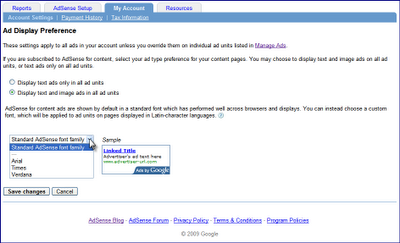
However, you can also select custom font faces for specific ad units that you've created with the Manage Ads feature. When creating new ad units, you'll be prompted to select between the default 'Standard AdSense font family', your new account-wide font face (if you've selected one), or another font face. You can also change the appearance of existing ad units, by visiting the Manage Ads page of your account and updating your font choices for specific ad units. Once you've changed the font face of an ad unit away from the default, those selections will be maintained even if you change your account-wide settings later.

Just as with color and placement optimizations, we encourage you to test these new font options to find the best combination for your sites. For instance, you can try matching the font face of your ads to that of your sites. Enjoy the new font faces, and feel free to leave feedback in our comments field below.
Posted by Arlene Lee - Inside AdSense Team
--
Posted By Inside AdSense Team to Inside AdSense at 2/19/2009 04:06:00 PM
There are a few ways to customize the font face of your ad units. If you'd like to quickly change the font settings for every ad unit generated from your account, visit the 'Ad Display Preference' section of your Account Settings page to select a new account-wide font face. This will affect all units you've created in the past, regardless of whether you used the Manage Ads feature. By default, your ads are currently set to 'Standard AdSense font family', which we've found has performed well across browsers and displays.

However, you can also select custom font faces for specific ad units that you've created with the Manage Ads feature. When creating new ad units, you'll be prompted to select between the default 'Standard AdSense font family', your new account-wide font face (if you've selected one), or another font face. You can also change the appearance of existing ad units, by visiting the Manage Ads page of your account and updating your font choices for specific ad units. Once you've changed the font face of an ad unit away from the default, those selections will be maintained even if you change your account-wide settings later.

Just as with color and placement optimizations, we encourage you to test these new font options to find the best combination for your sites. For instance, you can try matching the font face of your ads to that of your sites. Enjoy the new font faces, and feel free to leave feedback in our comments field below.
Posted by Arlene Lee - Inside AdSense Team
--
Posted By Inside AdSense Team to Inside AdSense at 2/19/2009 04:06:00 PM
Reply all
Reply to author
Forward
0 new messages