
"Model Too Poly" when 323 KB?
172 views
Skip to first unread message

Max Kraft
Jun 8, 2013, 4:23:39 AM6/8/13
to 3d...@googlegroups.com

Max Kraft
Jun 8, 2013, 5:21:28 AM6/8/13
to 3d...@googlegroups.com
Hello... uploaded another model at Keflavik Airport and again have the same problem! Is there any way to fix that?
Geo Splet
Jun 8, 2013, 7:02:24 AM6/8/13
to 3d...@googlegroups.com
I had similar problem in the past.
I've opened new document/scene and imported mode.
After that upload process went smooth.
I've opened new document/scene and imported mode.
After that upload process went smooth.
Randy
Jun 9, 2013, 2:20:37 AM6/9/13
to 3d...@googlegroups.com
If you provide a link to your model, we can take a look at it. Screen shot doesn't really help.
Max Kraft
Jun 9, 2013, 6:54:01 AM6/9/13
to 3D Modeling for Google Earth & Maps on behalf of Randy
On Sun, Jun 9, 2013 at 10:20 AM, Randy via 3D Modeling for Google Earth & Maps <3dwh+noreply-APn2wQejwSj-fDE1uYi...@googlegroups.com> wrote:
If you provide a link to your model, we can take a look at it. Screen shot doesn't really help.
--
--
You received this message because you are subscribed to the "3D Modeling for Google Earth & Maps" group.
You received this message because you are subscribed to the "3D Modeling for Google Earth & Maps" group. To participate in this discussion or adjust your membership options, visit the forum:
- via the 3D Warehouse site: http://sketchup.google.com/3dwarehouse/forum
- via Google Groups: https://groups.google.com/forum/#!forum/3dwh
---
You received this message because you are subscribed to a topic in the Google Groups "3D Modeling for Google Earth & Maps" group.
To unsubscribe from this topic, visit https://groups.google.com/d/topic/3dwh/OSyeFZNBj0Y/unsubscribe?hl=en-US.
To unsubscribe from this group and all its topics, send an email to 3dwh+uns...@googlegroups.com.
For more options, visit https://groups.google.com/groups/opt_out.
Yours Faithfully,
Max Kraft.
Isaiah 9:6:
For to us a child is born, to us a son is given, and the government will be on his shoulders. And he will be called Wonderful Counselor, Mighty God, Everlasting Father, Prince of Peace.
Isaiah 40:28:
Do you not know? Have you not heard? The Lord is the everlasting God, the Creator of the ends of the earth. He will not grow tired or weary, and his understanding no one can fathom.
Max Kraft
Jun 9, 2013, 3:13:31 PM6/9/13
to 3d...@googlegroups.com
Hello Geo Splet. I have done as you've told me and I have the same trouble.
The re-uploaded model is here:
Randy
Jun 10, 2013, 7:40:34 AM6/10/13
to 3d...@googlegroups.com
Max,
An important thing to remember is that while you'e making changes to fix problems, you don't create new problems in the process.
- When you started a new file, did you remember to set Sketchup to use the Google Earth Template?
- When you started the new file, you forgot to delete the person component from the center.
- You are not allowed to use ANY of the materials that ship with Sketchup.
- Turn off the shadows and lines
- I know the ramps/jetways are off the ground, but shouldn't there be something holding them up?
- There is z-fighting on the bottom.
- The terrain images should be on the two terrain layers. That might be where the problem is. Delete the terrain, clear the location, then geo-locate it again and texture the tops.
- The file doesn't have a file name.
- The windows in the texture are half cut off by the roof.
Hope this helps
Max Kraft
Jun 10, 2013, 2:49:56 PM6/10/13
to 3D Modeling for Google Earth & Maps on behalf of Randy
the bottom is not seen.
the textures are found from the internet.
what's a GE template?
person going to be deleted.
the jetways are without sticks to it's easier to adopt the model to terrain.
file name doesn't really matter.
anything else, gonna work on it.
--
--
You received this message because you are subscribed to the "3D Modeling for Google Earth & Maps" group.
You received this message because you are subscribed to the "3D Modeling for Google Earth & Maps" group. To participate in this discussion or adjust your membership options, visit the forum:
- via the 3D Warehouse site: http://sketchup.google.com/3dwarehouse/forum
- via Google Groups: https://groups.google.com/forum/#!forum/3dwh
---
You received this message because you are subscribed to a topic in the Google Groups "3D Modeling for Google Earth & Maps" group.
To unsubscribe from this topic, visit https://groups.google.com/d/topic/3dwh/OSyeFZNBj0Y/unsubscribe?hl=en-US.
To unsubscribe from this group and all its topics, send an email to 3dwh+uns...@googlegroups.com.
For more options, visit https://groups.google.com/groups/opt_out.
Google Craig
Jun 10, 2013, 4:07:57 PM6/10/13
to 3d...@googlegroups.com
Hi Max, one of the most important aspects of 3D Modeling for Google Earth (or games) is to have the cleanest geometry possible, and the model should be a "skin" or "balloon" with no internal geometry at all.
On Monday, June 10, 2013 12:49:56 PM UTC-6, Max Kraft wrote:
When I look at your model, I see walls, such as the jet ways, that extend through the building's walls, instead of intersecting with the faces...essentially they're passing through instead of being attached.
All inner geometry should be removed, remove all duplicate planes (Z-fighting) and really clean up the model's vertices (where lines attach to points).
Also, the inner textures should be the default texture instead of the mirror of the exterior texture. By having textures on the inside, you double the rendering for any given wall.
I would just go through and thoroughly clean up the model.
- Craig
On Monday, June 10, 2013 12:49:56 PM UTC-6, Max Kraft wrote:
the bottom is not seen.the textures are found from the internet.what's a GE template?person going to be deleted.the jetways are without sticks to it's easier to adopt the model to terrain.file name doesn't really matter.anything else, gonna work on it.
Google Craig
Jun 10, 2013, 4:11:25 PM6/10/13
to 3d...@googlegroups.com
Also, please remove the religious portions of your posts. This is a forum dedicated to 3D Building modeling for Maps and Google Earth, and we do not wish to have religious content promoted.
Thank you,
- Craig
Randy
Jun 10, 2013, 9:15:38 PM6/10/13
to 3d...@googlegroups.com
- I realize the bottom of the model is not seen. That is even more reason why you should delete it, especially if you have a high poly problem. z-fighting is bad, even if it's hidden.
- When you delete the person component in the center, be sure to purge the materials too.
- In Sketchup, under "Window > Preferences > Templates" select the Google Earth template, then start a new file, geo-locate it, then bring in the building from the old file.
- Your model should reflect real world buildings, and in the real world buildings don't hover off the ground without something supporting it. Also, your model SHOULD be slightly planted into the terrain. The vertical supports do not affect the adaptability to the terrain since they should be planted, not missing.
- Name your file. It's just good standard practice.
Hope this helps.
Max Kraft
Jun 11, 2013, 3:45:51 AM6/11/13
to 3d...@googlegroups.com
Yes, ok. Going to work on it in about 20-30 minutes and I'll tell if it helps.
About religious, it's just my e-mail signature. It comes up, going to delete it from the posts.
Max Kraft
Jun 11, 2013, 3:47:10 AM6/11/13
to 3d...@googlegroups.com
Thanx Craig for help too.
Randy
Jun 11, 2013, 11:27:56 PM6/11/13
to 3d...@googlegroups.com
You posted an .mp4 file. Mistake?
Max Kraft
Jun 12, 2013, 4:46:08 AM6/12/13
to 3d...@googlegroups.com
No. I posted the video of how I upload those terminals.
You know how I got it to work? I eliminated all the textures except the roof. Don't know what happened with this system.
Google Craig
Jun 12, 2013, 4:53:29 PM6/12/13
to 3d...@googlegroups.com
The mp4 failed for me.
What I'd like to see is:
All inner geometry should be removed, remove all duplicate planes (Z-fighting) and really clean up the model's vertices (where lines attach to points). There should be no walls that extend through another wall. Each instance should end when it intersects a wall, and the interior geometry should be removed.
Also, the inner textures should be the default texture instead of the mirror of the exterior texture. By having textures on the inside, you double the rendering for any given wall.
When that's all done, please share the link to the model and I'll take a look.
Thanks,
- Craig
Max Kraft
Jun 12, 2013, 5:34:33 PM6/12/13
to 3d...@googlegroups.com
I just got the second problem with a different model where I have all of the above things:
Google Craig
Jun 12, 2013, 5:47:49 PM6/12/13
to 3d...@googlegroups.com
This model also has exactly what I said needs to be fixed with the first model.
You should:
- intersect all faces
- deleted all internal geometry
- replace interior textures with default back face color (blue) - you have different textures on the inside than you do on the outside of your model...remove all of the interior textures
- I'd explode all groups and purge model
- remove any parallel surfaces (internal faces just add to the processing)
- remove person component
It could be textures, it could be geometry. You'll need to clean up both.
Google Craig
Jun 12, 2013, 5:54:51 PM6/12/13
to 3d...@googlegroups.com
You've also added a texture to back side of the Terrain Layer, so you have to delete the terrain layer and the Google Earth Snapshot layer.
You really have to look at your entire model and clean it up. The evidence is all there. :)
Google Craig
Jun 12, 2013, 5:56:03 PM6/12/13
to 3d...@googlegroups.com
Obviously you've also unlocked the Google Earth Imagery layer and applied a material texture to the entire back side of it and then locked it again.
Unlock it, delete it. Purge the model.
Max Kraft
Jun 13, 2013, 5:10:31 AM6/13/13
to 3d...@googlegroups.com
My re-newed Bismarck airport is now uploading. I deleted the woman, changed the colors to defaults on the insides, re-established the Google Earth Image, deleted all inner geometry, and finally, exploded everything.
Max Kraft
Jun 13, 2013, 10:42:41 AM6/13/13
to 3d...@googlegroups.com
but it still is the same.
Randy
Jun 13, 2013, 12:28:18 PM6/13/13
to 3d...@googlegroups.com
I thought this one was much better (out of the starting gate) than the last one. There are three things I think that could cause problems
- Turn off the shadows before uploading
- The tiled wall texture does not line up as well as it could with the building and makes it a little unrealistic.
- The two overhangs in the front, the back sections of their roofs have broken faces. If you turn on Hidden Geometry you'll see this. Turn off before uploading.
Tip: While building your model, if you adjust the drawing precision from 1/16" to 1/2", you'll have an easier time with drawing and snapping.
Randy
Jun 13, 2013, 12:41:59 PM6/13/13
to 3d...@googlegroups.com
Looking back at the first model posted here, it doesn't look to me like any changes have been done to it at all.
Max Kraft
Jun 13, 2013, 2:13:36 PM6/13/13
to 3D Modeling for Google Earth & Maps on behalf of Randy
edited it as you told. still a timeout error.
On Thu, Jun 13, 2013 at 8:41 PM, Randy via 3D Modeling for Google Earth & Maps <3dwh+noreply-APn2wQejwSj-fDE1uYi...@googlegroups.com> wrote:
Looking back at the first model posted here, it doesn't look to me like any changes have been done to it at all.
--
--
You received this message because you are subscribed to the "3D Modeling for Google Earth & Maps" group.
You received this message because you are subscribed to the "3D Modeling for Google Earth & Maps" group. To participate in this discussion or adjust your membership options, visit the forum:
- via the 3D Warehouse site: http://sketchup.google.com/3dwarehouse/forum
- via Google Groups: https://groups.google.com/forum/#!forum/3dwh
---
You received this message because you are subscribed to a topic in the Google Groups "3D Modeling for Google Earth & Maps" group.
To unsubscribe from this topic, visit https://groups.google.com/d/topic/3dwh/OSyeFZNBj0Y/unsubscribe?hl=en-US.
To unsubscribe from this group and all its topics, send an email to 3dwh+uns...@googlegroups.com.
For more options, visit https://groups.google.com/groups/opt_out.
Google Craig
Jun 13, 2013, 3:02:23 PM6/13/13
to 3d...@googlegroups.com
Hi Max, I just tried a test and mistakenly uploaded the model with the same ID, making me a contributor.
On Thursday, June 13, 2013 12:13:36 PM UTC-6, Max Kraft wrote:
I think you should delete that 3D Warehouse model, and upload it again fresh. Sorry for the inconvenience. I was trying to see if systematically removing the textures would help.
I'll upload another version without the model ID to test, but you should delete the current version and re-upload.
We'll figure this out.
- Craig
On Thursday, June 13, 2013 12:13:36 PM UTC-6, Max Kraft wrote:
edited it as you told. still a timeout error.
Max Kraft
Jun 14, 2013, 4:10:16 AM6/14/13
to 3d...@googlegroups.com
I guess I still know what to do... I am going to download the model, claim credit, and re-upload. It helps with that kind of mistakes. Ok, I'll see.
Max Kraft
Jun 14, 2013, 4:57:19 AM6/14/13
to 3D Modeling for Google Earth & Maps on behalf of Max Kraft
Well, it is still is the same. I don't know what to do now. I have a typical idea of removing textures with colors.
On Fri, Jun 14, 2013 at 12:10 PM, Max Kraft via 3D Modeling for Google Earth & Maps <3dwh+noreply-APn2wQcALNUAES_53Np...@googlegroups.com> wrote:
I guess I still know what to do... I am going to download the model, claim credit, and re-upload. It helps with that kind of mistakes. Ok, I'll see.
--
--
You received this message because you are subscribed to the "3D Modeling for Google Earth & Maps" group.
You received this message because you are subscribed to the "3D Modeling for Google Earth & Maps" group. To participate in this discussion or adjust your membership options, visit the forum:
- via the 3D Warehouse site: http://sketchup.google.com/3dwarehouse/forum
- via Google Groups: https://groups.google.com/forum/#!forum/3dwh
---
You received this message because you are subscribed to a topic in the Google Groups "3D Modeling for Google Earth & Maps" group.
To unsubscribe from this topic, visit https://groups.google.com/d/topic/3dwh/OSyeFZNBj0Y/unsubscribe.
To unsubscribe from this group and all its topics, send an email to 3dwh+uns...@googlegroups.com.
For more options, visit https://groups.google.com/groups/opt_out.
Google Craig
Jun 14, 2013, 2:05:53 PM6/14/13
to 3d...@googlegroups.com
Hi Max,
On Friday, June 14, 2013 2:57:19 AM UTC-6, Max Kraft wrote:
I was looking at your model again, and found multiple back side textures that still have material textures, along with interior geometry and extremely closely positioned lines (this may be your culprit). You really need to take a microscope to your model to clean it up.
Best,
- Craig
On Friday, June 14, 2013 2:57:19 AM UTC-6, Max Kraft wrote:
Well, it is still is the same. I don't know what to do now. I have a typical idea of removing textures with colors.
Max Kraft
Jun 15, 2013, 9:35:12 AM6/15/13
to 3d...@googlegroups.com
ok ill see
Max Kraft
Jun 16, 2013, 1:07:38 AM6/16/13
to 3d...@googlegroups.com
Hi again Craig. I corrected the model again and reduced the size to 1 megabyte by purging the extra colors by hand, adding a few simple details, adding the caps I forgot earlier, simplifying a few things, and deleting extra terrain. Still a timeout error. When uploaded, the shadows were off.
Max Kraft
Jun 16, 2013, 1:10:13 AM6/16/13
to 3D Modeling for Google Earth & Maps on behalf of Max Kraft
The model I'm talking about:
On Sun, Jun 16, 2013 at 9:07 AM, Max Kraft via 3D Modeling for Google Earth & Maps <3dwh+noreply-APn2wQcALNUAES_53Np...@googlegroups.com> wrote:
Hi again Craig. I corrected the model again and reduced the size to 1 megabyte by purging the extra colors by hand, adding a few simple details, adding the caps I forgot earlier, simplifying a few things, and deleting extra terrain. Still a timeout error. When uploaded, the shadows were off.
--
--
You received this message because you are subscribed to the "3D Modeling for Google Earth & Maps" group.
You received this message because you are subscribed to the "3D Modeling for Google Earth & Maps" group. To participate in this discussion or adjust your membership options, visit the forum:
- via the 3D Warehouse site: http://sketchup.google.com/3dwarehouse/forum
- via Google Groups: https://groups.google.com/forum/#!forum/3dwh
---
You received this message because you are subscribed to a topic in the Google Groups "3D Modeling for Google Earth & Maps" group.
To unsubscribe from this topic, visit https://groups.google.com/d/topic/3dwh/OSyeFZNBj0Y/unsubscribe.
To unsubscribe from this group and all its topics, send an email to 3dwh+uns...@googlegroups.com.
For more options, visit https://groups.google.com/groups/opt_out.
Randy
Jun 16, 2013, 10:40:11 AM6/16/13
to 3d...@googlegroups.com
Hi,
Remember my comment about "An important thing to remember is that while you'e making changes to fix problems, you don't create new problems in the process".? Well, you've deleted the terrain.
Max Kraft
Jun 16, 2013, 12:48:56 PM6/16/13
to 3D Modeling for Google Earth & Maps on behalf of Randy
yes but it still is an acceptable GE model.
On Sun, Jun 16, 2013 at 6:40 PM, Randy via 3D Modeling for Google Earth & Maps <3dwh+noreply-APn2wQejwSj-fDE1uYi...@googlegroups.com> wrote:
Hi,Remember my comment about "An important thing to remember is that while you'e making changes to fix problems, you don't create new problems in the process".? Well, you've deleted the terrain.
--
--
You received this message because you are subscribed to the "3D Modeling for Google Earth & Maps" group.
You received this message because you are subscribed to the "3D Modeling for Google Earth & Maps" group. To participate in this discussion or adjust your membership options, visit the forum:
- via the 3D Warehouse site: http://sketchup.google.com/3dwarehouse/forum
- via Google Groups: https://groups.google.com/forum/#!forum/3dwh
---
You received this message because you are subscribed to a topic in the Google Groups "3D Modeling for Google Earth & Maps" group.
To unsubscribe from this topic, visit https://groups.google.com/d/topic/3dwh/OSyeFZNBj0Y/unsubscribe.
To unsubscribe from this group and all its topics, send an email to 3dwh+uns...@googlegroups.com.
For more options, visit https://groups.google.com/groups/opt_out.
Kico Lopez Suarez
Jun 16, 2013, 10:30:12 PM6/16/13
to 3d...@googlegroups.com
I had a look at your model and I think the problem may be in that part of the entry overhangs. You have intersected the columns with the cover and sketchup has self-generated some potentially problematic edges (you need check "hidden geometry" in the view menu to see it).


Usually intersecting elements is good for keeping clean and light our model, but sometimes the effect is just the opposite and generate unnecesary faces.
 Moreover, boarding areas are overworked, you should keep it simple and do not add irrelevant information. Of the 800 faces on your model, 600 are used for small details, such as bellows, door, window. Geo models have to be light, that should be your main premise to model them.
Finally, you have some inverted faces. It is important to re orient properly and place the textures, because outside of sketchup these are invisible.
regards
Kico Lopez
El sábado, 8 de junio de 2013 10:23:39 UTC+2, Max Kraft escribió:Hello Craig! I have had a funny glitch which quite annoys me. I have re-uploaded the model 3 times and low-polized it as much as possible. It says that it took too long [LOL] to adjust my model for GE, or whatever it says there. I have added a screenshot to help the problem.
Randy
Jun 16, 2013, 11:24:46 PM6/16/13
to 3d...@googlegroups.com
I must ditto Kico's comment. I made a similar comment on June 13 about the hidden geometry and the two sections of the roof overhangs.
I wouldn't presume to say that it's acceptable with missing terrain objects, after all, it hasn't been accepted yet because the upload hasn't been successful. Once you do get this uploaded, don't be surprised if it fails acceptance.
...I'm just saying.
Max Kraft
Jun 17, 2013, 4:30:32 AM6/17/13
to 3D Modeling for Google Earth & Maps on behalf of Randy
Copy that. I'm gonna simplify this things and re-work the hangings.
--
--
You received this message because you are subscribed to the "3D Modeling for Google Earth & Maps" group.
You received this message because you are subscribed to the "3D Modeling for Google Earth & Maps" group. To participate in this discussion or adjust your membership options, visit the forum:
- via the 3D Warehouse site: http://sketchup.google.com/3dwarehouse/forum
- via Google Groups: https://groups.google.com/forum/#!forum/3dwh
---
You received this message because you are subscribed to a topic in the Google Groups "3D Modeling for Google Earth & Maps" group.
To unsubscribe from this topic, visit https://groups.google.com/d/topic/3dwh/OSyeFZNBj0Y/unsubscribe.
To unsubscribe from this group and all its topics, send an email to 3dwh+uns...@googlegroups.com.
For more options, visit https://groups.google.com/groups/opt_out.
Max Kraft
Jun 17, 2013, 4:32:39 AM6/17/13
to 3d...@googlegroups.com
i see what are you talking about.
Max Kraft
Jun 17, 2013, 6:07:27 AM6/17/13
to 3D Modeling for Google Earth & Maps on behalf of Max Kraft
I simplified the following model but it still is a timeout error.
On Mon, Jun 17, 2013 at 12:32 PM, Max Kraft via 3D Modeling for Google Earth & Maps <3dwh+noreply-APn2wQcALNUAES_53Np...@googlegroups.com> wrote:
i see what are you talking about.
--
--
You received this message because you are subscribed to the "3D Modeling for Google Earth & Maps" group.
You received this message because you are subscribed to the "3D Modeling for Google Earth & Maps" group. To participate in this discussion or adjust your membership options, visit the forum:
- via the 3D Warehouse site: http://sketchup.google.com/3dwarehouse/forum
- via Google Groups: https://groups.google.com/forum/#!forum/3dwh
---
You received this message because you are subscribed to a topic in the Google Groups "3D Modeling for Google Earth & Maps" group.
To unsubscribe from this topic, visit https://groups.google.com/d/topic/3dwh/OSyeFZNBj0Y/unsubscribe.
To unsubscribe from this group and all its topics, send an email to 3dwh+uns...@googlegroups.com.
For more options, visit https://groups.google.com/groups/opt_out.
Google Craig
Jun 17, 2013, 11:36:00 AM6/17/13
to 3d...@googlegroups.com
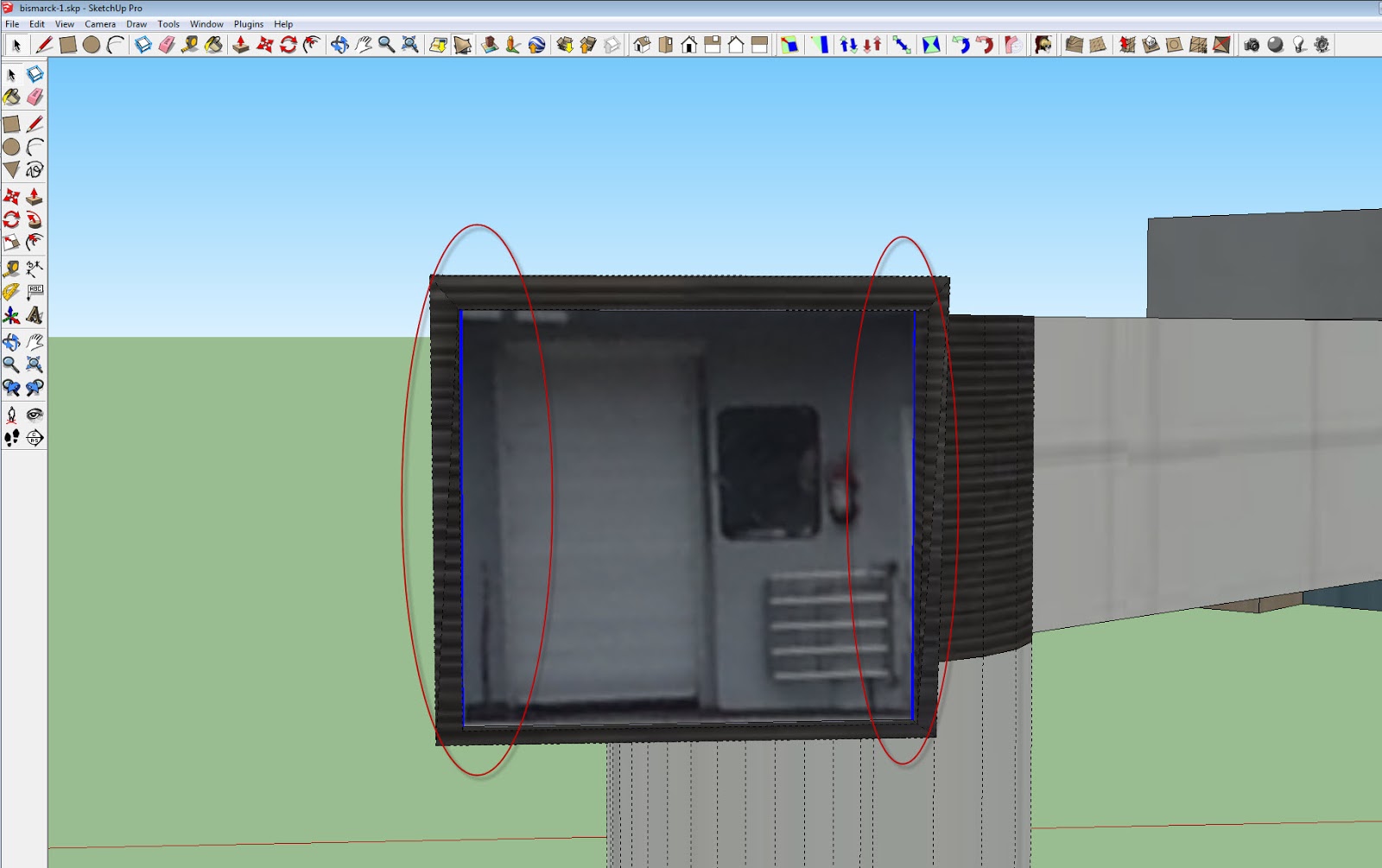
Max, I'm at the limit of time I can spend on this, so here's my last bit of advice.
On Monday, June 17, 2013 4:07:27 AM UTC-6, Max Kraft wrote:
1. Clean up the model. I've again found lines/edges and vertices that are too small and will cause processing errors. See the screenshots to illustrate the bad geometry. You need to CLEAN this model up. There shouldn't be any broken faces for the planes on your model. Turn on hidden geometry and edges, and if you see ANY planes that are broken by lines, replace them with good geometry.
2. After all of this, your model will need to have pictures of the facade of the building, not processed material textures. This model is barely passing the acceptance criteria because there aren't photo textures on the main facades of the structure.
3. Remove ALL backside textures. There are still faces that are textured with material textures. Also, make sure all Front side faces are facing OUT, and backside faces facing IN.
4. Purge the layers. You've removed the geometry, now remove the layers.
You've been given a lot of expert advice, and have yet to fully implement that advice. I see that you're now cursing in the the description field, which is not warranted, especially since you have yet to fully implement the advice you've been given.
Please, follow all of this advice, and clean your model. The main reason for a processing failure is geometry that is TOO small, edges that are too close, and broken faces that cause geometry that is too small.
Good luck,
- Craig



- - -
On Monday, June 17, 2013 4:07:27 AM UTC-6, Max Kraft wrote:
I simplified the following model but it still is a timeout error.
Richard Pedicini
Jun 17, 2013, 5:26:52 PM6/17/13
to 3d...@googlegroups.com
My real work deals with airplanes and airports, so I like terminal models.
The problem may be the fingers.
In the Sketchup application, under "View", turn on "Hidden Geometry", the again under "View", "Edge Styles", "Edges".
Look at the underside of the middle finger; the floor has all sorts of lines. The diagonal one slanting from the corner, too.
Also, the round columns at the finger joint are far rounder than they need to be; less complex curves would serve as well.
Suggestion: get one finger simplified way down, then copy it for the other two. If you took the finger from the earlier model, that may explain why the problem is following you.
Cheers,
Richard
On Monday, June 17, 2013 7:07:27 AM UTC-3, Max Kraft wrote:
The problem may be the fingers.
In the Sketchup application, under "View", turn on "Hidden Geometry", the again under "View", "Edge Styles", "Edges".
Look at the underside of the middle finger; the floor has all sorts of lines. The diagonal one slanting from the corner, too.
Also, the round columns at the finger joint are far rounder than they need to be; less complex curves would serve as well.
Suggestion: get one finger simplified way down, then copy it for the other two. If you took the finger from the earlier model, that may explain why the problem is following you.
Cheers,
Richard
On Monday, June 17, 2013 7:07:27 AM UTC-3, Max Kraft wrote:
I simplified the following model but it still is a timeout error.
Randy
Jun 17, 2013, 9:42:50 PM6/17/13
to 3d...@googlegroups.com
You missed some spots. See images:


This will also be my last review/post of this model.
Hope this helps.
Max Kraft
Jun 18, 2013, 3:14:25 AM6/18/13
to 3D Modeling for Google Earth & Maps on behalf of Randy
yes, im gonna correct those mishaps. Thank you very much.
--
--
You received this message because you are subscribed to the "3D Modeling for Google Earth & Maps" group.
You received this message because you are subscribed to the "3D Modeling for Google Earth & Maps" group. To participate in this discussion or adjust your membership options, visit the forum:
- via the 3D Warehouse site: http://sketchup.google.com/3dwarehouse/forum
- via Google Groups: https://groups.google.com/forum/#!forum/3dwh
---
You received this message because you are subscribed to a topic in the Google Groups "3D Modeling for Google Earth & Maps" group.
To unsubscribe from this topic, visit https://groups.google.com/d/topic/3dwh/OSyeFZNBj0Y/unsubscribe.
To unsubscribe from this group and all its topics, send an email to 3dwh+uns...@googlegroups.com.
For more options, visit https://groups.google.com/groups/opt_out.
Reply all
Reply to author
Forward
0 new messages